

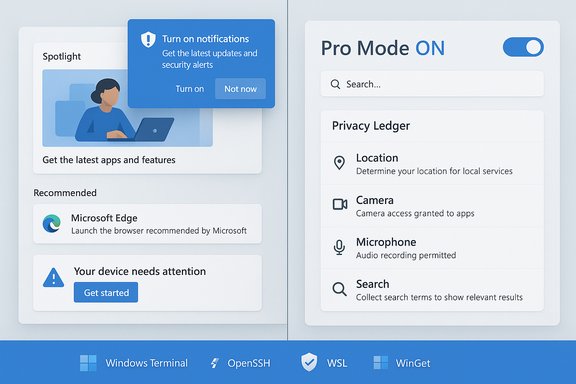
Dave Plummer — the retired Microsoft engineer best known for authoring the original Windows Task Manager — has published a blunt, short video and accompanying commentary arguing that modern Windows “sucks” for a sizeable and influential subset of users, and he’s offering a compact, practical repair plan built around a first‑class “Professional” or “Pro” mode that restores control, reduces noise, and makes developer tooling and privacy transparency defaults for those who want them.
Background / Overview
Windows has always been a platform of trade‑offs: broad hardware compatibility, a huge driver ecosystem, and decades of feature additions versus the simplicity and predictability that seasoned operators prize. Plummer’s critique is not at the kernel level — he explicitly praises Windows’ core for its performance and robustness — but at the layers most users touch every day: the shell, setup flows, defaults, and the steady tide of product suggestions, cloud fallbacks, and telemetry nudges that interrupt workflows and erode trust. Who is making these claims? Dave Plummer is a long‑time member of the Windows engineering community and is widely credited with Task Manager, ZIP‑folders support, and the Space Cadet Pinball NT port — a background that gives his diagnosis a practitioner’s weight rather than the usual outsider critique. Independent profiles and product histories corroborate his involvement in multiple system components across the 1990s and 2000s. Why this matters now: the conversation arrives as enterprises and consumers are still processing Windows 10’s end of mainstream support and Microsoft’s push to move more experiences into cloud‑connected, service‑centred flows. That context sharpens the stakes for users who value local control and minimal friction.What Plummer Actually Proposes
Plummer’s argument is concise and pragmatic: offer a discoverable, durable profile — call it Professional Mode, Expert Mode, or Hardcore Mode — that flips Windows’ operational personality from “safe and chatty” to “deterministic and terse.” The main elements he lays out include:- Disable promotional content, Start menu suggestions, and unsolicited product nudges by default for users who opt into Pro Mode.
- Make local search default to local results; avoid web/Bing fallbacks unless explicitly requested.
- Consolidate advanced settings into one authoritative control center that shows provenance (user choice vs. policy), affected subsystems, and any telemetry/network consequences.
- Treat developer and advanced tooling as first‑class: ship OpenSSH, Windows Terminal, WinGet, tar, curl, and WSL as standard and put them on the PATH for Pro installs.
- Offer radical telemetry transparency in the form of a human‑readable “privacy ledger” that logs outbound telemetry packets and explains in plain English why each item would be sent.
- Respect local account choices at setup: do not steer or coerce users toward a Microsoft Account during initial setup.
- Make update behavior predictable and rollback‑friendly: no surprise reboots, no opaque forced reconfigurations, and safe one‑click rollback when an update causes issues.
- Consider offering Pro Mode as a discoverable option during setup — possibly as a paid SKU — so Microsoft can continue consumer‑focused experiments for newcomers while giving power users the deterministic environment they need.
What Windows Already Offers — and Where Plummer’s Idea Fits
Before assessing feasibility, it helps to inventory existing Windows controls so we can see which pieces would need new engineering work and which are mainly defaults and discoverability changes.- S Mode / Windows SE / other locked configurations. Windows already ships configurations that constrain app sources for security and simplicity (S Mode) and historically experimented with focused SKUs for education (SE). Those features show Microsoft can ship alternate personalities of the OS, but they’re not the same as a power‑user mode because they trade capability for lock‑down rather than honoring expertise.
- Developer Mode. Windows exposes a Developer Mode that enables sideloading, debugging, and additional deployment features. Plummer’s Pro Mode would not replace Developer Mode but should make much of that tooling available without extra opt‑ins for eligible users. Microsoft documentation already shows Developer Mode can enable SSH services and developer features — pieces that Pro Mode would surface by default.
- Telemetry and Diagnostic Data Viewer. Microsoft publicly documents diagnostic categories and ships a Diagnostic Data Viewer for transparency. Plummer’s “privacy ledger” idea would need better usability and stronger guarantees about persistence through updates and policy changes; conceptually it builds on existing telemetry controls but raises the bar for clarity and auditability.
- Group Policy / MDM. Enterprises have granular control via Group Policy and MDM. Plummer’s point is different: individual power users (and small IT teams) should get the same predictability and discoverability without diving into Group Policy or the Registry. That’s primarily a UX and defaults problem, not a policy engine gap.
Why This Would Matter — The Benefits for Users and IT
Plummer’s proposals, if implemented well, would produce several measurable and qualitative benefits.- Reduced friction for power workflows. Experienced users frequently waste minutes — and occasionally hours — fighting nudges, reconfigurations, or blocked local searches. A deterministic Pro Mode reduces these interruptions and restores flow.
- Clearer privacy posture. A human‑readable privacy ledger that records outbound telemetry intent would shift conversations about surveillance toward accountability instead of opaque trust. That could also help compliance officers quickly validate what data leaves devices.
- Better developer experience out of the box. Making Windows Terminal, OpenSSH, WSL, and WinGet immediate defaults shrinks the time-to‑productivity for developers and testers, making Windows a more attractive primary workstation.
- Fewer support incidents. If update behavior becomes safer (predictable schedule, reliable rollback), organizations and home users alike would see fewer outage tickets and less lost work.
- Platform stickiness among influencers. Power users are often the people who answer technical questions for families, friends, and the broader community. Respecting their time and expectations prevents erosion of advocacy to alternative platforms like Linux or macOS. Multiple industry writeups emphasize that loss of goodwill among these groups is strategically important for Microsoft.
Costs, Incentives, and Why Microsoft Might Hesitate
If the technical work is modest in scope, why isn’t Pro Mode already a thing? There are at least three business and organizational reasons Microsoft might resist or delay a full Pro Mode:- Engagement and monetization incentives. Many UI nudges — recommended apps, Microsoft 365 calls‑to‑action, Edge/Bing promotions — are driven by engagement metrics, ecosystem activation goals, or business incentives. Turning those off by default for a user cohort is a product decision with revenue and funnel implications.
- Engineering productization costs. While each requested change is small, bundling them into a consistent, auditable, and supported Pro Mode requires product design, UX work, telemetry instrumentation, QA matrices, documentation, and support training. Doing this well — and ensuring enterprise policy compatibility — is nontrivial across countless SKU, region, OEM, and update permutations.
- Support and security trade‑offs. If Pro Mode exposes more “sharp edges” (sideloading defaults, less supervised telemetry), Microsoft must ensure that support and security risks are contained. Enterprises will still want predictable MDM policies; home users may accidentally disable telemetry needed to triage security incidents. These are solvable, but they impose operational costs.
Risks, Trade‑offs and Regulatory Considerations
Every advantage comes with second‑order effects. A well‑run Pro Mode would lower friction for power users, but it could increase complexity for other stakeholders.- Fragmentation risk. If Pro becomes a paid or separate channel, Microsoft could fragment the user base with two conflicting expectations: the mainstream “helpful” mode and the hardened Pro mode. That might complicate support, third‑party vendor testing, and OEM configurations.
- Telemetry blind spots. A privacy ledger and stronger user muting are laudable, but if critical diagnostic telemetry is disabled by Pro users, incidents might be harder to diagnose at scale (for Microsoft and third‑party app vendors). The ledger must therefore carefully distinguish between elective and required telemetry and provide safety nets for security‑critical data.
- Regulatory fairness. Offering a “privacy friendly” Pro Mode only as a paid add‑on would invite scrutiny. Regulators and consumer advocates are sensitive to pay‑for‑privacy models that effectively monetize default data flows. In some jurisdictions, regulators may insist on parity or require prominent opt‑outs at install time. The Windows 10 end‑of‑support saga — and the discussions around account requirements for Extended Security Updates — illustrate how policy and regional rules force product changes.
- Enterprise compatibility and policy drift. Enterprises use Group Policy and MDM to enforce compliance. Pro Mode must interoperate with, and not undermine, enterprise control surfaces. That requires clear precedence rules (does a Group Policy override a Pro Mode toggle? Does Pro Mode persist after a domain join?, which are solvable but essential to avoid dangerous support surprises.
How Microsoft Could Implement Pro Mode — A Practical Roadmap
Plummer’s proposals are small and tractable. Below is a potential phased roadmap that balances engineering effort, user safety, and business concerns.- Ship Pro Mode as an optional profile during OOBE (out‑of‑box experience) and as a stable toggle in Settings.
- Start by flipping defaults only (no promotional content, local‑first search, developer tools on PATH) while keeping telemetry policies explicit and documented.
- Provide a privacy ledger preview: surface a readable outbound‑traffic log with categories and “why” explanations; allow durable muting per category but flag security‑required telemetry as non‑muteable with explicit rationale.
- Integrate Pro Mode semantics into existing policy/MDM stacks so admins can govern Pro Mode devices centrally.
- Pilot Pro Mode with Insiders and enterprise customers; gather metrics on support incidents, telemetry quality for diagnostics, and user satisfaction before broad rollout.
- If Microsoft contemplates monetization, ensure regulatory fairness: make privacy features available to those who opt out of paid tiers via explicit install‑time consent and prominent notices.
Community Reaction and the Strategic Signal
The reaction across enthusiast communities and trade press has been broadly favorable to Plummer’s framing: people don’t disagree with the diagnosis that Windows has become “chatty” or “salesy,” and many see an Expert/Pro Mode as a straightforward, trust‑restoring fix if done respectfully. Community threads and forum summaries echo the same point: the fix is mostly about defaults and transparency, and doing it well would be a meaningful gesture to a vocal user base.Strategically, adopting a Pro Mode would send a signal that Microsoft values long‑term platform trust over short‑term engagement nudges. That signal matters because power users are influential: they recommend products, instruct novices, author tutorials, and shape sentiment in the broader internet discourse.
Quick, Actionable Steps Users Can Take Today
While Microsoft considers whether to adopt anything like Plummer’s proposal, many of his desired outcomes can be approximated with existing tools:- Turn off Start menu suggestions and promoted content in Settings > Personalization > Start.
- Use the Diagnostic Data Viewer to inspect what telemetry your device sends and set diagnostic options under Privacy & security > Diagnostics & feedback.
- Make Windows Terminal the default console host and add commonly used developer tools (OpenSSH, WinGet) to PATH; enable Developer Mode if you need sideloading or SSH server features.
- For sharper control, apply Group Policy tweaks or MDM settings (Pro/Enterprise) to disable specific “Microsoft consumer experiences” and recommended content.
- Control update timing with Active Hours and Pause Updates, recognizing long pauses increase risk.
Verdict — Practical Prescription, Low Technical Debt, Political Work
Plummer’s prescription is valuable because it’s practical: the technical changes map largely to defaults, settings, and UX improvements, not to fundamental platform rewrites. That means the engineering cost is modest compared with the organizational cost of re‑prioritizing design, marketing, and telemetry incentives across a massive product portfolio.A well‑implemented Professional Mode would restore predictability and respect to a class of users who still matter to Windows’ health. It would also reduce friction for developers and administrators who spend their lives inside the OS. The remaining obstacles are political and economic: Microsoft must be willing to trade some engagement‑driven metrics for increased trust, or find a fair, clearly signposted commercial model that doesn’t read as monetized privacy.
For a product that still powers the majority of the world’s desktops, that’s a strategic choice with long‑term consequences. Plummer’s voice matters because he helped build the platform; his proposed blueprint is doable, and it’s precisely the kind of small, principle‑driven change that could restore goodwill and reduce the daily friction that makes otherwise competent users occasionally say, quite sharply, that Windows “sucks.”
Conclusion
The debate Plummer has reignited is not primarily about features but about respect: whether an operating system honours an operator’s explicit choices, gives them understandable controls over their data, and recognizes that experienced users deserve a low‑noise, deterministic environment. Microsoft already has most of the plumbing to deliver that experience; what remains is a product decision. Implemented thoughtfully, Professional Mode could be the simplest way to give power users back their day — and to make Windows feel less like a storefront and more like the tool many of them still depend on.
Source: extremetech.com Retired Microsoft Engineer Says Windows 'Sucks,' Calls for 'Professional Mode'
