

Last month’s forced farewell to Windows 10 and a blunt, public critique from a former Microsoft engineer have exposed a widening gulf between the operating system Microsoft builds for “everyone” and what experienced users actually want to do with their PCs. The company’s marketing — including a controversial “up to 2.3× faster” performance claim for Windows 11 — and its end‑of‑life choices for Windows 10 have left millions of people feeling boxed in: pushed toward hardware upgrades, nudged into a Microsoft Account, and subjected to more upsell and telemetry than many consider acceptable. In response, veteran engineer Dave Plummer has proposed a radical, pragmatic answer: a built‑in “Pro Mode” that flips the OS from chatty concierge to a deterministic, no‑nonsense workhorse for power users. His proposal crystallizes common complaints and also highlights steps Microsoft has already taken — and where it still needs to change.
Microsoft’s ten‑year support promise for Windows 10 officially ended in mid‑October 2025, forcing a choice that many felt arrived too suddenly: upgrade to Windows 11, buy into the Extended Security Updates (ESU) plan, or continue running an unsupported OS. The company’s promotional messaging — from security advantages to performance boosts — has not soothed the friction. Microsoft’s headline claim that “Windows 11 PCs are up to 2.3× faster than Windows 10 PCs” raised eyebrows because the measurement compares different hardware generations, not the same machine running both OS versions, which makes the figure less meaningful for the typical user deciding whether to upgrade. At the same time, Microsoft’s extended support program has new enrollment conditions: consumer ESU options have required a Microsoft Account link or enabling Windows Backup; in the European Economic Area that requirement was later relaxed after regulatory pressure, but globally the roll‑out left many users feeling forced into cloud tie‑ins and account logins to maintain basic security updates. These policy decisions amplified perceptions that Windows is becoming a monetized and centrally controlled experience rather than an owned platform. Into that environment comes Dave Plummer — the engineer behind Windows Task Manager and other long‑standing Windows components — arguing bluntly that the problem isn’t the kernel or device drivers, but the surface level experience: the nudges, the upsells, the hidden settings, and the constant second‑guessing of an informed operator. His fix: give power users an explicit, robust alternative to the default “safe and chatty” mode that most consumers see.
Power users and IT administrators can reduce friction today by enabling developer tooling, tightening telemetry, and making update policies explicit, but the deeper structural changes Plummer wants — single authoritative settings, a readable outbound telemetry ledger, predictable and rollbackable updates, and an ad‑free paid tier — require Microsoft to rewrite parts of the product’s social contract. If Microsoft adopts a true Pro Mode, it would answer a long‑standing complaint in one pragmatic move: not by dumbing down the OS for the majority, but by respecting expertise when it’s declared. Until then, the debate over who Windows is for will keep shaping how millions of people use — or avoid — the platform.
Source: Windows Central Ex‑Microsoft engineer: Windows needs a Pro Mode
 Background
Microsoft’s ten‑year support promise for Windows 10 officially ended in mid‑October 2025, forcing a choice that many felt arrived too suddenly: upgrade to Windows 11, buy into the Extended Security Updates (ESU) plan, or continue running an unsupported OS. The company’s promotional messaging — from security advantages to performance boosts — has not soothed the friction. Microsoft’s headline claim that “Windows 11 PCs are up to 2.3× faster than Windows 10 PCs” raised eyebrows because the measurement compares different hardware generations, not the same machine running both OS versions, which makes the figure less meaningful for the typical user deciding whether to upgrade. At the same time, Microsoft’s extended support program has new enrollment conditions: consumer ESU options have required a Microsoft Account link or enabling Windows Backup; in the European Economic Area that requirement was later relaxed after regulatory pressure, but globally the roll‑out left many users feeling forced into cloud tie‑ins and account logins to maintain basic security updates. These policy decisions amplified perceptions that Windows is becoming a monetized and centrally controlled experience rather than an owned platform. Into that environment comes Dave Plummer — the engineer behind Windows Task Manager and other long‑standing Windows components — arguing bluntly that the problem isn’t the kernel or device drivers, but the surface level experience: the nudges, the upsells, the hidden settings, and the constant second‑guessing of an informed operator. His fix: give power users an explicit, robust alternative to the default “safe and chatty” mode that most consumers see. Why power users are frustrated
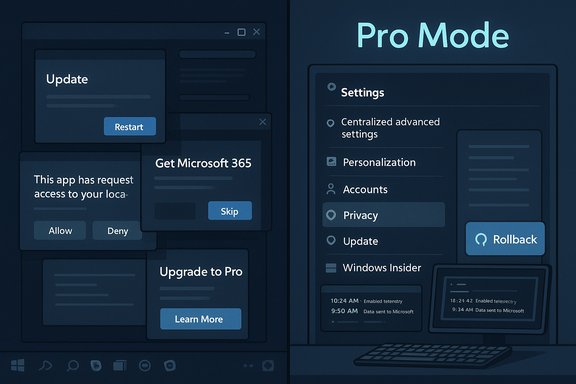
Short, practical reasons explain why the power‑user backlash has traction. These are not philosophical gripes about design theory; they are productivity chokes that compound over time.- Defaults that fight the user. Edge and other built‑in apps frequently reassert themselves or are difficult to fully remove. Users report default handlers reverting and installers or updates overwriting manual choices, interrupting workflows and creating distrust.
- Ubiquitous upsell and advertising. At nearly every turn Windows presents suggestions, app ads, and “finish setting up your PC” nudges that often boil down to product pitches — turning the desktop into a storefront.
- Telemetry and opaque data flows. Even though Windows offers tools to view diagnostic telemetry, the defaults and marketing‑style “tailored experiences” make many users uneasy; the volume and purpose of collected data are often unclear. Microsoft does provide a Diagnostic Data Viewer — but it’s not the same as a compact, always‑on ledger that explains outbound data in human terms.
- Forced account and cloud coupling. Requiring a Microsoft Account or backup to keep receiving free ESU benefits (until regulatory exceptions) feels like a coercive lever to push users into Microsoft’s cloud. For people who value local control, that’s unacceptable.
- Interruptive updates. Surprise reboots or updates that change behavior during crucial work sessions produce legitimate workplace risks. Predictability and rollback capabilities are major pain points.
What Plummer’s “Pro Mode” would actually do
Plummer’s proposal is a concentrated list of interface, policy, and tooling changes that together aim to eliminate friction for advanced users. The idea is not aesthetic only; it’s a shift in the OS’s social contract with its operator.Core elements of Pro Mode
- Single authoritative settings hub. Consolidate advanced configuration into a single, discoverable place so users don’t have to scavenge for deep options across disparate panels.
- No unsolicited suggestions. Disable app suggestions, product upsells, and proactive web results in local search unless the operator explicitly opts in.
- Deterministic updates and rollback. Schedule updates with choreography that never interrupts working sessions, provide plain‑language patch notes, and make rolling back a single‑click operation.
- Privacy ledger. Ship a persistent, readable “privacy ledger” that logs outbound telemetry with timestamps, destinations, and reasons — not just raw JSON dumps. The idea is radical transparency, not zero telemetry.
- Developer and admin tools available by default. Make Windows Terminal the default, keep WinGet and other CLI tools on the PATH, and ensure SSH, tar, and other Unix‑style tools are installed and discoverable without extra hoops.
- Ad‑free option. Make the pro experience optionally paid; paying customers get an OS free of in‑product marketing and upsell. Plummer frames this as a fair exchange: pay a fee and your machine stops trying to sell you other Microsoft properties.
Which of Plummer’s requests are already in progress (and where they fall short)
Plummer is not inventing features from whole cloth; several of his recommendations are partially implemented by Microsoft — but implementation gaps matter.- Windows Terminal as default. Microsoft did make Windows Terminal the default command line experience in Windows 11 (since the 22H2 cycle), which aligns with Plummer’s call to “respect the console.” That change makes tabs, profiles, and better default behavior standard for many users. However, practical gaps remain: some apps still spawn legacy consoles, and Terminal settings can be confusing for users migrating from decades of cmd.exe habits.
- WinGet availability. Windows Package Manager (winget) is delivered via App Installer and is included in modern Windows builds, but it is not always immediately usable out of the box on all images — particularly in tightly controlled enterprise images, server SKUs, or freshly imaged systems that have not completed store registration. Winget’s presence is close to Plummer’s ideal, but the UX for first‑run activation and PATH placement can still trip people up.
- Telemetry visibility. Microsoft already provides a Diagnostic Data Viewer and privacy controls that let users toggle optional telemetry and inspect some outgoing data. This is a substantial step toward transparency, but the feature is buried, not always enabled, and the output remains technical JSON rather than a human‑friendly “who, what, why” ledger Plummer envisions. That difference matters: a tool exists, but it’s not designed for continuous, everyday oversight.
The practical and technical feasibility of a Pro Mode
Plummer’s ideas are technically feasible but require changes across product, engineering, and policy layers. Turning them into shipped features would involve:- A settings and UX rewrite. Consolidating advanced options into a single authority requires cross‑team alignment between System UI, Settings, and security teams to ensure no regressions for managed enterprise devices.
- Policy and telemetry reclassification. A clear taxonomy of “essential” vs “diagnostic” telemetry must be created and enforced. Nonessential data should be toggleable at a granular level with immediate effect, plus a local log. That’s a product decision as much as a code one.
- Update orchestration and rollback mechanics. Better rollback requires more robust snapshotting or delta mechanisms that don’t bloat user storage or break Windows Update pipelines; enterprise users already use solutions like imaging and SCCM, but consumer scenarios will need lightweight, reliable rollback UIs.
- Commercial model changes. Offering an ad‑free paid tier (or letting Windows Pro users opt out) would require a commercial decision that balances revenue loss from in‑OS marketing against subscription uptake.
Risks, both technical and strategic
A Pro Mode that hands more power to users reduces friction, but it introduces new risks and tradeoffs.- Security vs. autonomy. Giving power users the ability to disable safeguards could increase exposure if defaults are misused. Microsoft will need to balance permissiveness with fail‑safes and robust warnings for risky choices.
- Support complexity. A system with many operator‑driven configurations increases variability in support outcomes. Microsoft’s Support and ecosystem partners will face more complexity in diagnosing problems across widely differing Pro Mode states.
- Commercial friction. Removing targeted product placements and upsells reduces a revenue stream; Microsoft must choose whether the goodwill and loyalty gains offset the lost monetization.
- Fragmentation. If Pro Mode diverges too much, apps and services might behave differently when they detect the mode, and developers may need to handle different runtime assumptions.
Policy and market implications
Plummer’s pitch also intersects with larger public debates: forced cloud tie‑ins, sustainability, and hardware obsolescence. Estimates circulating in the press — often quoted as “around 400 million devices” that can’t move to Windows 11 — are widely cited but imprecise; they reflect aggregated market data and device‑eligibility calculations rather than an auditable Microsoft census. Independent outlets and advocacy groups have used those figures to pressure Microsoft on ESU and upgrade pathways. Regardless of the exact count, the scale is large enough that policy and consumer‑protection scrutiny is inevitable. Microsoft’s partial concessions in the EEA (free ESU enrollment without backup conditions) show regulators can influence outcomes. Readers should treat large device‑count figures as estimates with variance; the core point stands: a multi‑hundred‑million user transition was both technically and politically consequential.What users and admins can do right now
While Microsoft decides whether to adopt “Pro Mode” at scale, power users and IT teams can adopt practical measures to reduce friction and regain agency.- Use Windows Terminal and make it the default console if it hasn’t been set already — the Terminal team has made it the default experience in Windows 11, and using it yields immediate productivity benefits.
- Verify winget availability and install App Installer from the Microsoft Store if needed; expect that some images or enterprise policies may need adjustments to expose the tool and add it to PATH.
- Enable the Diagnostic Data Viewer and periodically review the exported logs; if the output is too technical, use it strategically to identify which components are communicating off‑device and when. Turning on diagnostic data viewing will begin storing a local copy and permit exports.
- Lock down telemetry and tailored experiences via Settings > Privacy & security > Diagnostics & feedback, and review the “Tailored experiences” and optional data toggles. For enterprise fleets, define clear group policies that match organizational risk appetite.
- For people stuck on ineligible Windows 10 hardware, explore sustainable options: ESU (if affordable), hardware refresh planning, or switching to lightweight alternatives such as ChromeOS Flex or mainstream Linux distributions; refurbishing and reuse initiatives can mitigate e‑waste concerns while preserving functionality.
Conclusion
Dave Plummer’s “Pro Mode” is less an engineering wishlist than a formal statement: Windows should be able to be both welcoming to new users and unapologetically useful for professionals. Many of the components he asks for exist in seed form — Terminal as default, winget inclusion, diagnostic tools — but the broader design and product incentives still favor discoverability and monetization over explicit user sovereignty. The technical work to build an opt‑in, deterministic experience is decidedly doable; the real question is whether Microsoft will choose to trade a steady stream of in‑OS promotions for a clearer contract with the operators who keep Windows trusted in mission‑critical environments.Power users and IT administrators can reduce friction today by enabling developer tooling, tightening telemetry, and making update policies explicit, but the deeper structural changes Plummer wants — single authoritative settings, a readable outbound telemetry ledger, predictable and rollbackable updates, and an ad‑free paid tier — require Microsoft to rewrite parts of the product’s social contract. If Microsoft adopts a true Pro Mode, it would answer a long‑standing complaint in one pragmatic move: not by dumbing down the OS for the majority, but by respecting expertise when it’s declared. Until then, the debate over who Windows is for will keep shaping how millions of people use — or avoid — the platform.
Source: Windows Central Ex‑Microsoft engineer: Windows needs a Pro Mode
