

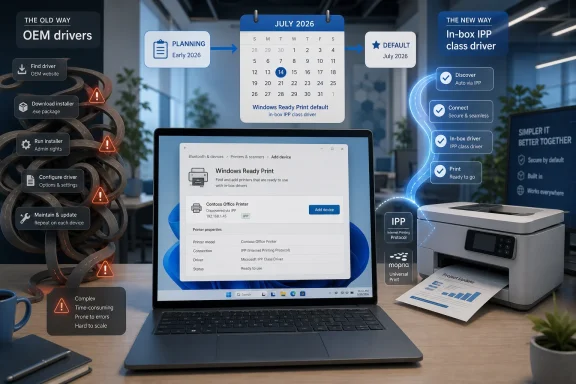
Microsoft is rebranding its Modern Print Platform as Windows Ready Print in June 2026, with new eligible printer installations set to prefer the built-in Windows IPP printing path by default starting in July 2026. The name change is not the important part. The important part is that Microsoft is turning a long-running technical migration into an explicit Windows promise: printing should work without the old driver hunt, the old vendor installer, and the old admin dread. That promise is attractive, but anyone who has supported real office printers knows the last mile is where printing schemes go to die.
“Windows Ready Print” sounds like a certification sticker, and that is probably the point. “Modern Print Platform” described an architecture. “Windows Ready Print” describes an expectation: plug in, discover, print, and move on.
This is Microsoft trying to reframe a backend transition as a front-end user benefit. The company has been pushing Windows toward standards-based printing for years, leaning on IPP, Mopria-compatible devices, eSCL scanning, Universal Print, and the inbox Microsoft IPP class driver. The rebrand turns that pile of plumbing into a brand that can appear in Settings, policy documentation, partner materials, and eventually the mental model of IT teams.
The timing matters. Microsoft’s broader plan to wind down reliance on third-party V3 and V4 printer drivers has already caused confusion, especially among users who interpreted driver deprecation as imminent printer death. Windows Ready Print is a softer wrapper around the same strategic direction: fewer vendor drivers in the operating system, more common protocol behavior, and a cleaner line between basic printing and vendor-specific extras.
It is not a ban on legacy printers. It is not a sudden execution date for every office LaserJet, Ricoh, Canon, Epson, Xerox, Brother, or Zebra device sitting in a corner. But it is a default change, and defaults are how Microsoft moves the Windows ecosystem when mandates would start a riot.
For home users, that bargain usually showed up as annoyance. A printer worked fine on one PC, failed on another, demanded a driver package from a website, or installed a background service nobody asked for. For IT departments, the same problem scaled into driver staging, print server hardening, queue deployment, version drift, user privilege headaches, and the fear that a routine driver update could break accounting, labels, badges, prescriptions, shipping documents, or invoices.
Security gave Microsoft the decisive argument. PrintNightmare was not the only reason to modernize printing, but it made the problem impossible to ignore. A print subsystem that requires privileged, third-party code to make ordinary office hardware function is exactly the sort of legacy dependency modern platform vendors are trying to squeeze out.
Windows Ready Print is best understood as part of that cleanup campaign. Microsoft wants the operating system to talk to printers through standard protocols and built-in class drivers rather than through a constantly refreshed pile of OEM packages. That does not eliminate all risk, but it narrows where the risk lives.
The trade-off is obvious. Generic, standards-based printing is easier to secure and maintain. Vendor-specific drivers are often where the weird but business-critical features live.
That matters because Microsoft is not asking printer makers to accept a Windows-only fantasy. IPP, Mopria, and related standards already sit behind a great deal of modern printing, including cross-platform print behavior that users now expect from phones, tablets, Chromebooks, Macs, and managed Windows devices. The Windows move is less about inventing the future than about making Windows stop being the exception that still defaults to legacy baggage.
The inbox Microsoft IPP class driver is the mechanism. Instead of matching a printer to a vendor-provided package, Windows can discover and configure a compatible printer using common capabilities exposed through the protocol. In theory, that means fewer downloads, fewer architecture mismatches, fewer surprise installers, and fewer administrator decisions.
The phrase “in theory” is doing work here. Printing is not only about sending a page to a device. It is also about finishing options, stapling, hole punching, secure release, departmental accounting, PIN codes, color policies, tray mapping, duplex defaults, scan workflows, label stock, and obscure settings that are invisible until the day they become essential.
That is why the Windows Ready Print shift is not only a Microsoft story. It is also a printer vendor story. If OEMs want the modern model to feel complete, they need to expose capabilities properly through standards and provide clean support apps where the base protocol does not cover the entire experience.
This is not the same as ripping out every existing print queue. Installed printers should not suddenly vanish because Microsoft changed branding. Environments that still need traditional OEM drivers will retain ways to use them, including through driver selection controls in Settings and through Group Policy.
But default behavior has consequences. A help desk script that once assumed “download the manufacturer driver” will increasingly begin with “try Windows Ready Print.” A procurement checklist that once asked whether a device had a Windows driver will increasingly ask whether it behaves correctly with IPP and modern Windows printing. A vendor that ships a powerful multifunction printer but provides a poor standards-based experience will look increasingly out of step.
This is how Windows transitions often work. Microsoft rarely flips the entire enterprise estate overnight. It changes defaults, rewrites guidance, adjusts driver ranking, narrows update channels, and waits for hardware and software vendors to notice that the old path is now the exception.
For administrators, July 2026 should be treated as a planning date rather than a panic date. The machines most likely to hurt are not the ordinary office printers that already speak modern protocols. The machines to audit are the specialized devices, the ancient workhorses, the print-server-dependent workflows, and the business processes where “printing” really means “printing with one exact driver setting that nobody has documented since 2014.”
Windows Ready Print must coexist with legacy compatibility because the installed base is messy. Enterprises do not replace fleets simply because a cleaner model exists. Schools, clinics, warehouses, government offices, libraries, law firms, and manufacturing floors often keep printers for years after consumer hardware would have been recycled.
That coexistence is the strength of Microsoft’s approach. Users and administrators can move to the modern path where it works and fall back to OEM drivers where it does not. Group Policy gives managed environments a way to standardize the decision rather than leaving users to discover the difference at the worst possible time.
It is also the weakness. A transition that keeps the old path alive can stall if the new path feels merely adequate. IT departments are pragmatic; if the IPP queue prints but loses a finishing option that the old driver handled, the old driver wins. If a Windows Ready Print install is simpler but causes help desk tickets about tray selection, the old driver wins. If the vendor support app is clumsy, the old driver wins.
Microsoft’s challenge is not to prove that Windows can print without OEM drivers. It can. The challenge is to prove that modern printing is good enough for the workflows that made OEM drivers sticky in the first place.
Protected Print is Microsoft’s more security-forward version of the same philosophy: remove third-party print drivers from the equation and constrain printing to the modern Windows print stack. For security teams, that is the cleanest version of the argument. For compatibility teams, it is where the anxiety begins.
The existence of Protected Print shows that Microsoft’s long game is not just easier setup. It is a smaller, more controlled print surface. Microsoft wants printing to behave more like the rest of the modern Windows platform, where inbox components, signed code, sandboxing, standards, and policy control matter more than whatever utility a hardware vendor shipped years ago.
That is a reasonable goal. The print subsystem has historically enjoyed too much privilege for too little scrutiny. Every unnecessary driver package is another component that must be trusted, serviced, and explained during an incident review.
But the Windows ecosystem is not iOS. Microsoft cannot simply declare a clean break and tell the world to buy new printers. Windows’ value proposition has always included a stubborn willingness to work with old, weird, and business-critical equipment. Windows Ready Print is therefore a balancing act: modernize the default without breaking the social contract that made Windows the default in the first place.
That is a healthier division of labor. The operating system should not need a heavyweight vendor package to perform ordinary printing. The vendor should not need to wedge itself deep into Windows merely to expose basic device capabilities. If a printer is genuinely modern, Windows should discover it and print to it with minimal drama.
The hard part is the middle layer. Many printer vendors have historically used drivers not only to support hardware but to differentiate it. Advanced finishing, secure print release, cost accounting, managed print integration, and device-specific workflows often live in software that was never designed for a driverless world.
Microsoft’s preferred answer is to move those experiences into cleaner support apps and standards-based extensions. That is sensible, but it depends on vendor execution. A polished support app can make Windows Ready Print feel like progress. A neglected one can make the modern stack feel like a downgrade wearing a new badge.
This is where business buyers should apply pressure. The question for a printer vendor in 2026 is not simply “Do you have a Windows driver?” It is “Does your device work well with Windows Ready Print, and can you demonstrate the features our users actually need without a legacy driver dependency?”
A standards-first experience reduces the number of things a user must understand. If Windows can find the printer, install it, and print without a vendor installer, that is a better outcome for almost everyone. It also reduces the opportunity for users to download the wrong package, install unnecessary utilities, or accept bundled services they do not need.
The consumer printer market has its own dysfunctions, of course. Ink subscriptions, firmware restrictions, hostile cartridge policies, and unreliable Wi-Fi setups will not be cured by IPP. Windows Ready Print does not make a bad printer good.
But it can remove Windows from the list of suspects. If setup becomes boring, Microsoft has done its job. In the home market, boring is victory.
The right response is inventory. IT teams should identify which printers are already using modern IPP-friendly paths, which queues still depend on V3 or V4 drivers, and which business processes rely on vendor-specific options. The point is not to block Windows Ready Print. The point is to know where it will succeed before it arrives by default.
Pilot testing matters more than policy purity. A printer that works for basic Word documents may fail the real test when accounting needs duplex color invoices from tray three, legal needs precise envelope handling, or a warehouse needs thermal labels that scan reliably. The only useful compatibility test is the one that resembles the workflow users actually perform.
Group Policy will be the pressure release valve for many organizations. Microsoft’s more flexible driver selection model should let administrators decide whether Windows Ready Print or traditional OEM drivers are appropriate for specific environments. That is exactly how the transition should work: modern by default, exception-based where the business case is real.
The danger is organizational complacency. Printing is often ignored until it breaks, and then it becomes an emergency. Windows Ready Print gives admins a reason to drag print infrastructure back into the light before the next default change does it for them.
Windows Ready Print is partly a trust repair exercise. The name tells users what they should expect instead of what Microsoft is removing. It shifts attention from “third-party driver deprecation” to “ready-to-use printing.”
That is good messaging, but it can backfire if the product experience is uneven. A user who chooses Windows Ready Print and loses access to a needed setting will not care that the security model is cleaner. An admin who must explain why a feature disappeared will not be comforted by a brand name.
The trust test will be transparency. Microsoft needs to make it obvious when Windows is using the IPP class driver, when an OEM driver is available, what trade-offs exist, and how administrators can control the behavior. Hidden automation is convenient only when it works. When it fails, users need a clear path back.
Microsoft’s best move is to avoid pretending this is a magic simplification. It should say plainly that the modern path is preferred, safer, and easier, while legacy drivers remain available for scenarios that still require them. That message respects the reality of printing instead of trying to market around it.
Traditional Windows print management often revolved around centralized queues, driver deployment, and print servers that existed partly because clients could not be trusted to manage printer complexity cleanly. If clients can discover and use standards-based printers with inbox support, some of that infrastructure begins to look less inevitable.
Universal Print extends the same logic into the cloud. Microsoft would clearly prefer organizations to think about printing as a managed service rather than a tangle of local servers, vendor drivers, and manual queue mapping. Windows Ready Print fits that cloud-management future because it makes the endpoint side less dependent on local driver baggage.
That does not mean print servers disappear overnight. Large organizations still need access control, auditing, secure release, routing, redundancy, and integration with existing managed print platforms. In many environments, print servers are not just driver depots; they are policy enforcement points.
But the center of gravity is moving. The less Windows needs a vendor driver to print, the easier it becomes to modernize the rest of the print pipeline. That will not excite anyone outside IT, but it matters to the people responsible for keeping print infrastructure patched, documented, and boring.
Consistency, however, often comes with flattening. The generic path is rarely the richest path. It is the path most likely to work everywhere, not the path most likely to expose every feature in the most elegant way.
That is the central tension of the transition. Microsoft is optimizing for the median print job: find printer, print document, avoid driver mess. Many users live entirely inside that median. Others live in the edges, and the edges are where Windows compatibility has historically mattered most.
The answer is not to preserve the old model forever. The old model created real costs. But the modern model must be judged by more than first-page success. It must handle scanning, finishing, authentication, color management, accessibility, policy, and fleet-scale deployment without sending admins back to vendor driver packages by reflex.
If Windows Ready Print becomes the reliable baseline and vendor support apps become the clean extension layer, Microsoft wins. If Windows Ready Print becomes the basic mode and “install the real driver” remains the first troubleshooting step, the rebrand will look cosmetic.
That changes the maintenance conversation. In the old world, a flaky Windows printing experience could often be addressed with a different driver package. In the Windows Ready Print world, the printer’s own standards implementation becomes more important. Firmware quality, IPP behavior, Mopria certification, and vendor support cadence matter more than they used to.
This is especially important for organizations with long hardware lifecycles. A printer may be physically fine but strategically obsolete if its modern protocol support is weak. Conversely, a device that supports IPP cleanly may survive the transition with little drama even if it is not new.
Procurement teams should adjust accordingly. The cheapest compatible printer is not necessarily the cheapest printer to support. A device that behaves properly with Windows Ready Print may save time in deployment, help desk calls, security reviews, and future Windows upgrades.
That is the practical heart of Microsoft’s move. The company is not merely changing how Windows installs printers. It is changing which printer qualities matter.
A modern Windows fleet now needs printer validation the same way it needs application validation. If an organization tests Windows feature updates against VPN clients, endpoint security agents, Office add-ins, and line-of-business apps, it should test them against printing workflows too. The fact that printing is boring does not make it low impact.
This is particularly true for regulated and operationally sensitive environments. Healthcare, logistics, education, government, manufacturing, finance, and legal services all contain printing workflows that cannot be reduced to “does a test page come out?” A missed tray, failed label format, unavailable secure-release option, or broken scan path can become a real business incident.
The July 2026 default is therefore a forcing function. It gives IT teams a calendar reason to ask vendors better questions and document which devices are safe for modern printing. The organizations that do this early will experience Windows Ready Print as a simplification. The ones that wait may experience it as another mysterious Windows change that arrived through an update and made users angry.
Microsoft’s job is to keep the escape hatch visible. IT’s job is to stop relying on the escape hatch as an undocumented strategy.
Here is the practical shape of the transition:
Microsoft’s rebrand is easy to dismiss because printing has trained everyone to be cynical. Yet Windows Ready Print is more than a label slapped on the Modern Print Platform; it is the user-facing banner for a serious attempt to make Windows printing less fragile, less privileged, and less dependent on third-party code. The next year will show whether Microsoft and printer makers can make the standards-first path rich enough for real offices, not just clean enough for demos, and whether IT departments can use the July 2026 default as a planning milestone rather than another reason to curse the printer room.
 Microsoft Gives Driverless Printing a Consumer-Friendly Name
“Windows Ready Print” sounds like a certification sticker, and that is probably the point. “Modern Print Platform” described an architecture. “Windows Ready Print” describes an expectation: plug in, discover, print, and move on.This is Microsoft trying to reframe a backend transition as a front-end user benefit. The company has been pushing Windows toward standards-based printing for years, leaning on IPP, Mopria-compatible devices, eSCL scanning, Universal Print, and the inbox Microsoft IPP class driver. The rebrand turns that pile of plumbing into a brand that can appear in Settings, policy documentation, partner materials, and eventually the mental model of IT teams.
The timing matters. Microsoft’s broader plan to wind down reliance on third-party V3 and V4 printer drivers has already caused confusion, especially among users who interpreted driver deprecation as imminent printer death. Windows Ready Print is a softer wrapper around the same strategic direction: fewer vendor drivers in the operating system, more common protocol behavior, and a cleaner line between basic printing and vendor-specific extras.
It is not a ban on legacy printers. It is not a sudden execution date for every office LaserJet, Ricoh, Canon, Epson, Xerox, Brother, or Zebra device sitting in a corner. But it is a default change, and defaults are how Microsoft moves the Windows ecosystem when mandates would start a riot.
The Old Windows Print Model Became a Security Liability
The traditional Windows printing stack has always been a strange bargain. Users got broad hardware compatibility and advanced device-specific controls, but they paid for it with brittle drivers, vendor utilities, sprawling print servers, and decades of attack surface.For home users, that bargain usually showed up as annoyance. A printer worked fine on one PC, failed on another, demanded a driver package from a website, or installed a background service nobody asked for. For IT departments, the same problem scaled into driver staging, print server hardening, queue deployment, version drift, user privilege headaches, and the fear that a routine driver update could break accounting, labels, badges, prescriptions, shipping documents, or invoices.
Security gave Microsoft the decisive argument. PrintNightmare was not the only reason to modernize printing, but it made the problem impossible to ignore. A print subsystem that requires privileged, third-party code to make ordinary office hardware function is exactly the sort of legacy dependency modern platform vendors are trying to squeeze out.
Windows Ready Print is best understood as part of that cleanup campaign. Microsoft wants the operating system to talk to printers through standard protocols and built-in class drivers rather than through a constantly refreshed pile of OEM packages. That does not eliminate all risk, but it narrows where the risk lives.
The trade-off is obvious. Generic, standards-based printing is easier to secure and maintain. Vendor-specific drivers are often where the weird but business-critical features live.
IPP Is the Escape Hatch Microsoft Should Have Used Years Ago
At the center of Windows Ready Print is IPP, the Internet Printing Protocol. That name sounds old because it is old, but its age is part of the appeal. IPP is not a moonshot; it is a mature standards path already used across modern print ecosystems.That matters because Microsoft is not asking printer makers to accept a Windows-only fantasy. IPP, Mopria, and related standards already sit behind a great deal of modern printing, including cross-platform print behavior that users now expect from phones, tablets, Chromebooks, Macs, and managed Windows devices. The Windows move is less about inventing the future than about making Windows stop being the exception that still defaults to legacy baggage.
The inbox Microsoft IPP class driver is the mechanism. Instead of matching a printer to a vendor-provided package, Windows can discover and configure a compatible printer using common capabilities exposed through the protocol. In theory, that means fewer downloads, fewer architecture mismatches, fewer surprise installers, and fewer administrator decisions.
The phrase “in theory” is doing work here. Printing is not only about sending a page to a device. It is also about finishing options, stapling, hole punching, secure release, departmental accounting, PIN codes, color policies, tray mapping, duplex defaults, scan workflows, label stock, and obscure settings that are invisible until the day they become essential.
That is why the Windows Ready Print shift is not only a Microsoft story. It is also a printer vendor story. If OEMs want the modern model to feel complete, they need to expose capabilities properly through standards and provide clean support apps where the base protocol does not cover the entire experience.
July 2026 Turns a Preference Into a Platform Signal
The key date is July 2026, when new printer installations on eligible Windows devices are expected to default to Windows Ready Print where supported. That means the inbox IPP path becomes the first choice rather than the fallback.This is not the same as ripping out every existing print queue. Installed printers should not suddenly vanish because Microsoft changed branding. Environments that still need traditional OEM drivers will retain ways to use them, including through driver selection controls in Settings and through Group Policy.
But default behavior has consequences. A help desk script that once assumed “download the manufacturer driver” will increasingly begin with “try Windows Ready Print.” A procurement checklist that once asked whether a device had a Windows driver will increasingly ask whether it behaves correctly with IPP and modern Windows printing. A vendor that ships a powerful multifunction printer but provides a poor standards-based experience will look increasingly out of step.
This is how Windows transitions often work. Microsoft rarely flips the entire enterprise estate overnight. It changes defaults, rewrites guidance, adjusts driver ranking, narrows update channels, and waits for hardware and software vendors to notice that the old path is now the exception.
For administrators, July 2026 should be treated as a planning date rather than a panic date. The machines most likely to hurt are not the ordinary office printers that already speak modern protocols. The machines to audit are the specialized devices, the ancient workhorses, the print-server-dependent workflows, and the business processes where “printing” really means “printing with one exact driver setting that nobody has documented since 2014.”
Compatibility Is Microsoft’s Safety Valve and Its Weakness
Microsoft is emphasizing gradual migration for a reason. The company knows printing is one of the few areas where a technically superior platform story can be defeated by a single missing checkbox in a driver dialog.Windows Ready Print must coexist with legacy compatibility because the installed base is messy. Enterprises do not replace fleets simply because a cleaner model exists. Schools, clinics, warehouses, government offices, libraries, law firms, and manufacturing floors often keep printers for years after consumer hardware would have been recycled.
That coexistence is the strength of Microsoft’s approach. Users and administrators can move to the modern path where it works and fall back to OEM drivers where it does not. Group Policy gives managed environments a way to standardize the decision rather than leaving users to discover the difference at the worst possible time.
It is also the weakness. A transition that keeps the old path alive can stall if the new path feels merely adequate. IT departments are pragmatic; if the IPP queue prints but loses a finishing option that the old driver handled, the old driver wins. If a Windows Ready Print install is simpler but causes help desk tickets about tray selection, the old driver wins. If the vendor support app is clumsy, the old driver wins.
Microsoft’s challenge is not to prove that Windows can print without OEM drivers. It can. The challenge is to prove that modern printing is good enough for the workflows that made OEM drivers sticky in the first place.
Windows Protected Print Shows the Destination More Clearly Than the Rebrand
Windows Ready Print is the friendly name. Windows Protected Print Mode is the sharper signal.Protected Print is Microsoft’s more security-forward version of the same philosophy: remove third-party print drivers from the equation and constrain printing to the modern Windows print stack. For security teams, that is the cleanest version of the argument. For compatibility teams, it is where the anxiety begins.
The existence of Protected Print shows that Microsoft’s long game is not just easier setup. It is a smaller, more controlled print surface. Microsoft wants printing to behave more like the rest of the modern Windows platform, where inbox components, signed code, sandboxing, standards, and policy control matter more than whatever utility a hardware vendor shipped years ago.
That is a reasonable goal. The print subsystem has historically enjoyed too much privilege for too little scrutiny. Every unnecessary driver package is another component that must be trusted, serviced, and explained during an incident review.
But the Windows ecosystem is not iOS. Microsoft cannot simply declare a clean break and tell the world to buy new printers. Windows’ value proposition has always included a stubborn willingness to work with old, weird, and business-critical equipment. Windows Ready Print is therefore a balancing act: modernize the default without breaking the social contract that made Windows the default in the first place.
Printer Makers Are Being Pushed Out of the Kernel-Era Comfort Zone
The rebrand also sends a message to printer manufacturers. The old model let vendors treat drivers as the center of the product experience. The new model pushes them toward standards compliance, firmware quality, and companion apps for advanced features.That is a healthier division of labor. The operating system should not need a heavyweight vendor package to perform ordinary printing. The vendor should not need to wedge itself deep into Windows merely to expose basic device capabilities. If a printer is genuinely modern, Windows should discover it and print to it with minimal drama.
The hard part is the middle layer. Many printer vendors have historically used drivers not only to support hardware but to differentiate it. Advanced finishing, secure print release, cost accounting, managed print integration, and device-specific workflows often live in software that was never designed for a driverless world.
Microsoft’s preferred answer is to move those experiences into cleaner support apps and standards-based extensions. That is sensible, but it depends on vendor execution. A polished support app can make Windows Ready Print feel like progress. A neglected one can make the modern stack feel like a downgrade wearing a new badge.
This is where business buyers should apply pressure. The question for a printer vendor in 2026 is not simply “Do you have a Windows driver?” It is “Does your device work well with Windows Ready Print, and can you demonstrate the features our users actually need without a legacy driver dependency?”
Home Users Get the Best Version of the Deal
For consumers, Windows Ready Print is likely to be an uncomplicated win. Most home printing failures are not exotic finishing problems; they are discovery, setup, driver, and maintenance problems.A standards-first experience reduces the number of things a user must understand. If Windows can find the printer, install it, and print without a vendor installer, that is a better outcome for almost everyone. It also reduces the opportunity for users to download the wrong package, install unnecessary utilities, or accept bundled services they do not need.
The consumer printer market has its own dysfunctions, of course. Ink subscriptions, firmware restrictions, hostile cartridge policies, and unreliable Wi-Fi setups will not be cured by IPP. Windows Ready Print does not make a bad printer good.
But it can remove Windows from the list of suspects. If setup becomes boring, Microsoft has done its job. In the home market, boring is victory.
Enterprise IT Will Treat the New Default as a Change-Control Event
In managed environments, no one should treat July 2026 as a casual UX improvement. A default driver-selection change is still a change, and printing remains one of the least glamorous ways to disrupt a business day.The right response is inventory. IT teams should identify which printers are already using modern IPP-friendly paths, which queues still depend on V3 or V4 drivers, and which business processes rely on vendor-specific options. The point is not to block Windows Ready Print. The point is to know where it will succeed before it arrives by default.
Pilot testing matters more than policy purity. A printer that works for basic Word documents may fail the real test when accounting needs duplex color invoices from tray three, legal needs precise envelope handling, or a warehouse needs thermal labels that scan reliably. The only useful compatibility test is the one that resembles the workflow users actually perform.
Group Policy will be the pressure release valve for many organizations. Microsoft’s more flexible driver selection model should let administrators decide whether Windows Ready Print or traditional OEM drivers are appropriate for specific environments. That is exactly how the transition should work: modern by default, exception-based where the business case is real.
The danger is organizational complacency. Printing is often ignored until it breaks, and then it becomes an emergency. Windows Ready Print gives admins a reason to drag print infrastructure back into the light before the next default change does it for them.
The Rebrand Is Also a Trust Repair Job
Microsoft has a communication problem around Windows printing because too many users heard “legacy drivers are going away” as “your printer is about to be bricked.” That fear was exaggerated, but it was not irrational. Printer compatibility is one of those areas where users have been trained by experience to expect pain.Windows Ready Print is partly a trust repair exercise. The name tells users what they should expect instead of what Microsoft is removing. It shifts attention from “third-party driver deprecation” to “ready-to-use printing.”
That is good messaging, but it can backfire if the product experience is uneven. A user who chooses Windows Ready Print and loses access to a needed setting will not care that the security model is cleaner. An admin who must explain why a feature disappeared will not be comforted by a brand name.
The trust test will be transparency. Microsoft needs to make it obvious when Windows is using the IPP class driver, when an OEM driver is available, what trade-offs exist, and how administrators can control the behavior. Hidden automation is convenient only when it works. When it fails, users need a clear path back.
Microsoft’s best move is to avoid pretending this is a magic simplification. It should say plainly that the modern path is preferred, safer, and easier, while legacy drivers remain available for scenarios that still require them. That message respects the reality of printing instead of trying to market around it.
The Print Server Era Is Being Quietly Rewritten
The Windows Ready Print story is not only about client PCs. It also changes the long-term logic of print servers and managed print architecture.Traditional Windows print management often revolved around centralized queues, driver deployment, and print servers that existed partly because clients could not be trusted to manage printer complexity cleanly. If clients can discover and use standards-based printers with inbox support, some of that infrastructure begins to look less inevitable.
Universal Print extends the same logic into the cloud. Microsoft would clearly prefer organizations to think about printing as a managed service rather than a tangle of local servers, vendor drivers, and manual queue mapping. Windows Ready Print fits that cloud-management future because it makes the endpoint side less dependent on local driver baggage.
That does not mean print servers disappear overnight. Large organizations still need access control, auditing, secure release, routing, redundancy, and integration with existing managed print platforms. In many environments, print servers are not just driver depots; they are policy enforcement points.
But the center of gravity is moving. The less Windows needs a vendor driver to print, the easier it becomes to modernize the rest of the print pipeline. That will not excite anyone outside IT, but it matters to the people responsible for keeping print infrastructure patched, documented, and boring.
Standards Reduce Chaos, but They Also Flatten Experience
The strongest case for Windows Ready Print is consistency. A printer discovered through standards, managed through Windows, and driven by an inbox class driver is easier to support than a bespoke vendor installation path.Consistency, however, often comes with flattening. The generic path is rarely the richest path. It is the path most likely to work everywhere, not the path most likely to expose every feature in the most elegant way.
That is the central tension of the transition. Microsoft is optimizing for the median print job: find printer, print document, avoid driver mess. Many users live entirely inside that median. Others live in the edges, and the edges are where Windows compatibility has historically mattered most.
The answer is not to preserve the old model forever. The old model created real costs. But the modern model must be judged by more than first-page success. It must handle scanning, finishing, authentication, color management, accessibility, policy, and fleet-scale deployment without sending admins back to vendor driver packages by reflex.
If Windows Ready Print becomes the reliable baseline and vendor support apps become the clean extension layer, Microsoft wins. If Windows Ready Print becomes the basic mode and “install the real driver” remains the first troubleshooting step, the rebrand will look cosmetic.
The Most Important Printer Upgrade May Be Firmware, Not Hardware
One underappreciated part of this shift is firmware. A standards-based print model depends heavily on what the printer advertises and how well it implements the protocol.That changes the maintenance conversation. In the old world, a flaky Windows printing experience could often be addressed with a different driver package. In the Windows Ready Print world, the printer’s own standards implementation becomes more important. Firmware quality, IPP behavior, Mopria certification, and vendor support cadence matter more than they used to.
This is especially important for organizations with long hardware lifecycles. A printer may be physically fine but strategically obsolete if its modern protocol support is weak. Conversely, a device that supports IPP cleanly may survive the transition with little drama even if it is not new.
Procurement teams should adjust accordingly. The cheapest compatible printer is not necessarily the cheapest printer to support. A device that behaves properly with Windows Ready Print may save time in deployment, help desk calls, security reviews, and future Windows upgrades.
That is the practical heart of Microsoft’s move. The company is not merely changing how Windows installs printers. It is changing which printer qualities matter.
The July Default Makes Printing a Procurement Test
Windows Ready Print should push organizations to stop treating printing as an afterthought. That is a cultural shift as much as a technical one.A modern Windows fleet now needs printer validation the same way it needs application validation. If an organization tests Windows feature updates against VPN clients, endpoint security agents, Office add-ins, and line-of-business apps, it should test them against printing workflows too. The fact that printing is boring does not make it low impact.
This is particularly true for regulated and operationally sensitive environments. Healthcare, logistics, education, government, manufacturing, finance, and legal services all contain printing workflows that cannot be reduced to “does a test page come out?” A missed tray, failed label format, unavailable secure-release option, or broken scan path can become a real business incident.
The July 2026 default is therefore a forcing function. It gives IT teams a calendar reason to ask vendors better questions and document which devices are safe for modern printing. The organizations that do this early will experience Windows Ready Print as a simplification. The ones that wait may experience it as another mysterious Windows change that arrived through an update and made users angry.
Microsoft’s job is to keep the escape hatch visible. IT’s job is to stop relying on the escape hatch as an undocumented strategy.
The Calendar Now Belongs in Every Print Migration Plan
The concrete lesson is that Microsoft’s print modernization is no longer an abstract roadmap. Windows Ready Print gives it a brand, July 2026 gives it a default-change moment, and the driver-servicing plan gives it a long tail.Here is the practical shape of the transition:
- New eligible printer installations will increasingly favor the Windows Ready Print path rather than traditional OEM drivers.
- Existing printers and legacy drivers are not supposed to stop working merely because the modern platform has a new name.
- Administrators should test real workflows, not just basic printing, before allowing a standards-based queue to replace a vendor-specific one.
- Printer procurement should prioritize strong IPP, Mopria, scanning, firmware, and support-app behavior instead of treating a downloadable Windows driver as proof of compatibility.
- Group Policy and driver selection controls will matter because the right answer may differ between ordinary office printing and specialized line-of-business devices.
- Security teams should view the move as part of a broader reduction in third-party driver exposure, not as a cosmetic Settings change.
Microsoft’s rebrand is easy to dismiss because printing has trained everyone to be cynical. Yet Windows Ready Print is more than a label slapped on the Modern Print Platform; it is the user-facing banner for a serious attempt to make Windows printing less fragile, less privileged, and less dependent on third-party code. The next year will show whether Microsoft and printer makers can make the standards-first path rich enough for real offices, not just clean enough for demos, and whether IT departments can use the July 2026 default as a planning milestone rather than another reason to curse the printer room.
References
- Primary source: Petri IT Knowledgebase
Published: Thu, 11 Jun 2026 16:22:23 GMT

Microsoft Rebrands Modern Print Platform as Windows Ready Print
Microsoft is rebranding its Modern Print Platform as Windows Ready Print, reinforcing its commitment to a simpler, more modern printing experience. The goal petri.com
- Official source: support.microsoft.com

Modern Print Platform and Windows Protected Print Mode | Microsoft Learn
Describes the modern print platform and Windows protected print mode.support.microsoft.com - Official source: learn.microsoft.com
Modern Print Platform and Windows Protected Print Mode | Microsoft Learn
Describes the modern print platform and Windows protected print mode.learn.microsoft.com - Related coverage: techspot.com

Windows Ready Print is Microsoft's biggest overhaul of Windows printing in years | TechSpot
Microsoft recently introduced Windows Ready Print, a new printing model designed to "evolve" the company's previous Modern Print Platform. The core idea behind the model is to...www.techspot.com - Related coverage: windowscentral.com

Windows 11 ends legacy printer drivers in 2026 | Windows Central
Microsoft has issued a correction stating that legacy printer drivers are not being killed off.www.windowscentral.com - Related coverage: tomshardware.com

Microsoft purges Windows 11 printer drivers, putting millions of devices on borrowed time — legacy printers face extinction as Microsoft stops distributing V3 and V4 drivers | Tom's Hardware
Microsoft cuts off new third-party print driver releases via Windows Update.www.tomshardware.com
- Related coverage: osnews.com
- Related coverage: frandroid.com

Windows Ready Print : fin des pilotes d'imprimante en 2026 — Frandroid
Microsoft rebaptise sa plateforme d'impression « Windows Ready Print » et veut en finir avec les pilotes d'imprimante installés à la main. Le basculement pwww.frandroid.com - Related coverage: techradar.com

'If your printer works today, it will continue to work' - Microsoft says it isn't killing off your old printer for good after all | TechRadar
Legacy printer drivers are still being supportedwww.techradar.com - Related coverage: myq-solution.com
Windows Protected Print (WPP) Mode and the end of third-party printer drivers | MyQ
Microsoft is moving Windows printing toward a new model built around the IPP class driver, Mopria compatibility, and Print Support Apps. The change…www.myq-solution.com - Related coverage: delmarvadocumentsolutions.com

