

Microsoft’s AI experiments have shifted a debated privacy trade-off from theory to practice: features like Windows Recall — designed to give Windows 11 a searchable “photographic memory” of your screen — have prompted privacy experts, independent developers, and regulators to ask whether the new OS actually widens the desktop threat surface in ways Windows 10 did not.
Windows 11’s roadmap in 2024–2026 moved aggressively toward an agentic vision: Copilot integrated across the shell, Copilot+ hardware for on-device acceleration, and new features that index and act on local content. This is the origin story for the current debate: Microsoft’s Recall (and associated agent primitives) promise productivity gains — but they also introduce new categories of risk that existing endpoint defenses were not designed to manage.
At the same time, Windows 10 reached its official end-of-support milestone on October 14, 2025, and Microsoft offers an Extended Security Updates (ESU) bridge that runs through October 13, 2026 for eligible devices. That timeline has become central to the "stay with Windows 10" advice circulating in recent coverage.
Trust must be rebuilt through:
For enterprises, treat agentic features as a governance and security decision, not a convenience feature. Demand signed agents, attested connectors, auditable logs, and integration with existing security stacks before approval.
Short-term mitigations — staying on Windows 10 under ESU or disabling Recall on Windows 11 — are reasonable for users who prioritize privacy, but each option has costs and deadlines: ESU ends October 13, 2026, and unsupported OSes become attack targets over time. The durable solution lies in rigorous, auditable engineering plus trust-building measures: clearer defaults, robust admin controls, and third-party verification. Until those conditions are widely met, cautious users and administrators are justified in treating Recall and other agentic features as privileges to be earned, not entitlements to be assumed.
Source: Inbox.lv Trust Eroded: Windows 11 Deemed More Dangerous than Windows 10 Due to AI
 Background / Overview
Windows 11’s roadmap in 2024–2026 moved aggressively toward an agentic vision: Copilot integrated across the shell, Copilot+ hardware for on-device acceleration, and new features that index and act on local content. This is the origin story for the current debate: Microsoft’s Recall (and associated agent primitives) promise productivity gains — but they also introduce new categories of risk that existing endpoint defenses were not designed to manage. At the same time, Windows 10 reached its official end-of-support milestone on October 14, 2025, and Microsoft offers an Extended Security Updates (ESU) bridge that runs through October 13, 2026 for eligible devices. That timeline has become central to the "stay with Windows 10" advice circulating in recent coverage.
What is Recall — and why it matters
The feature in plain language
Recall captures frequent snapshots of what appears on your screen, extracts text via OCR, and builds a local, searchable index so you can later query “where did I see that slide” or “find the chat where we discussed X.” Microsoft positions Recall as a local, on-device capability designed to speed search and retrieval across apps and windows.Key technical claims Microsoft and reviewers verify
- Recall runs on Copilot+ PCs and requires a relatively powerful on-device NPU and system spec set. Windows Central documents Copilot+ hardware requirements (NPU with 40+ TOPS, 16 GB RAM, 256 GB storage, specific CPU/core counts) for Recall to be enabled.
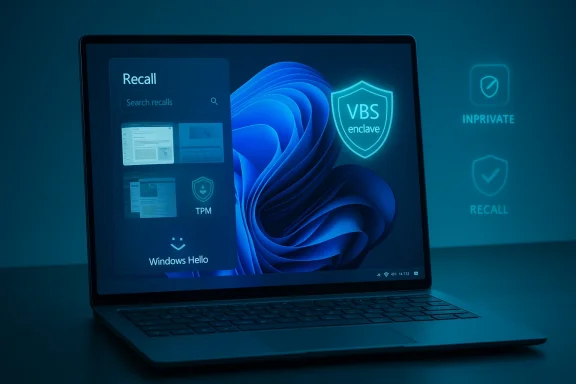
- Microsoft says snapshots are processed and stored locally, protected by encryption inside a virtualization-based security (VBS) enclave, and gated by Windows Hello authentication for access.
- Recall’s local store and retention behavior are configurable: users can pause the feature, delete snapshots (last hour to a month or all), and exclude specific apps or sites; Edge’s InPrivate is excluded automatically according to the published FAQs.
Where the trust erosion started
Historical missteps and design choices
Recall’s early previews and implementation had two missteps that amplified concerns: initially, test builds exposed an unencrypted index artifact in some cases, and Microsoft’s initial rollout plan included heavy Copilot surface area across the OS. Those events created optics of rushed rollout without robust privacy signaling. Microsoft paused and reshaped the rollout, adding stronger encryption, Windows Hello gating, and staging via Insiders and Copilot+ machines, but the initial damage to trust persisted.Why this feels different from Windows 10
Windows 10, by contrast, lacked pervasive agentic features that continuously indexed on-screen content. That simpler threat model made Windows 10 feel — for many privacy-minded users — like a lower immediate privacy surface. As several privacy/rights groups and journalists have argued, an OS that can “remember everything you saw” introduces a qualitatively different set of concerns for regulated data and sensitive workflows.Independent reactions: developers, journalists, and vendors
- Major privacy-focused apps and browsers signalled concrete pushback: Signal, Brave, and AdGuard implemented or announced protections to prevent Recall from capturing their windows, and Brave disabled Recall by default for users. This ecosystem-level reaction shows that several high-trust vendors do not consider Microsoft’s mitigations sufficient yet.
- Journalistic coverage amplified expert warnings: outlets like PCWorld reported data-protection experts urging users to avoid Windows 11 if they “care about their data,” with recommendations to remain on Windows 10 while ESU remains available or migrate to Linux after ESU ends. That framing has driven headlines and social-media amplification.
- Security analysts and enterprise-focused outlets noted novel attack surfaces: Microsoft itself has named cross-prompt injection (XPIA) and “agent hallucination” as operational concerns when models are allowed to act, not only advise. Community analysts expanded this into scenarios where content is weaponized to manipulate an agent, creating new exfiltration paths.
What the technical critics are actually worried about
1) Local indexing as an attractive target
Even when encrypted and gated, an on-device index of screen content concentrates sensitive material — passwords, banking details, and private conversations — in a single searchable surface. Threat models include:- Local attackers who obtain physical access and exploit misconfigured autologin or weak disk encryption.
- Malware that gains privilege escalation and targets the index or extraction logic.
- Administrator or backup processes that inadvertently expose the index if TPM/Hello/BitLocker are misused.
2) Feature permanence and manageability
Critics point out two operational realities that matter to administrators: whether a feature can truly be removed, and whether disablement is durable across updates. While Microsoft added an uninstall path and policy controls, some observers remain concerned about patches, update behaviors, and whether Recall components can be reliably excised across varied OEM images and managed fleets. Community tooling has attempted deeper removals, but those approaches carry support and update risks.3) Agentic automation expands the attack surface
Recall is only one axis; the larger agentic model (Agent Workspace, agent accounts, Copilot Actions, Model Context Protocol) lets AI processes read content and — when enabled — perform multi-step actions. When agents can act on behalf of a user, content can be weaponized via prompt-injection techniques that were previously irrelevant to desktop security paradigms. Microsoft publicly documents these hazards and has added mitigations, yet designers admit the threat model has changed.What Microsoft and reviewers say about the mitigations
- Microsoft reengineered Recall to run in a VBS enclave, encrypt snapshot storage with TPM-backed keys, and tie access to Windows Hello. The company also limits Recall to Copilot+ devices and made the feature opt-in with visible UI indicators. These are concrete architectural changes intended to reduce attack surface and increase user control.
- Review coverage and vendor FAQs confirm the controls: UI indicators, per-app/site exclusions, deletion windows, and the ability to pause or uninstall Recall in supported configurations. Reviewers emphasize that the feature requires conscious opt-in and physical presence checks for access.
- But reviewers also flag caveats: Recall can consume tens of gigabytes of storage (Microsoft indicates the feature may reserve up to ~50 GB, with active storage around 25 GB in some tests), and it depends on correct use of BitLocker or device encryption to secure snapshots beyond the enclave’s protections. That dependency chain matters operationally.
Practical guidance for users and administrators
The debate is not binary — it’s a trade-off between short-term privacy surface and long-term update security. Here’s a practical playbook.If you prioritize immediate data privacy:
- Delay upgrading to Windows 11 on Copilot+ devices until your threat model is satisfied. Staying on Windows 10 under ESU is a defensible short-term strategy for privacy-conscious users, but it has a deadline: ESU coverage extends through October 13, 2026 for eligible devices. Plan a migration before that date.
- If you already have a Windows 11 Copilot+ device and do not want Recall, use the OS controls to disable or remove Recall. On managed devices, apply Intune/Group Policy measures or the PowerShell removal command Microsoft documents. PCWorld and Windows Central document practical registry and PowerShell options.
If you must run Windows 11 with Recall enabled:
- Enforce full-disk encryption (BitLocker) and ensure Windows Hello is required for sign-in.
- Limit Recall to a small pilot group while you validate administrative controls, DLP integration, and logging.
- Require signed agents and connectors, enable tamper-resistant telemetry and SIEM ingestion for agent logs, and test rollback and data-removal procedures.
For enterprises:
- Treat agentic features as a governance decision, not a default. Require pilot programs with explicit KPIs on usability, privacy, and incident response.
- Demand fine-grained admin controls, DLP and EDR compatibility, auditable logs, and a clear revocation mechanism for agents. The risk calculus differs significantly between high-trust regulated environments and consumer productivity use cases.
Assessing the “stay on Windows 10” claim
Many headline stories simplified the advice to “avoid Windows 11, stay with Windows 10.” That guidance is defensible only as a short-term privacy mitigation for select users and organizations. It does not remove long-term security obligations.- Fact check: Windows 10’s mainstream and security updates for the general consumer edition ended on October 14, 2025, and Microsoft’s ESU program extends critical security updates for eligible devices through October 13, 2026. Relying on Windows 10 indefinitely without ESU is not safe.
- Practical reality: After ESU ends, staying on Windows 10 will place devices at greater risk from unpatched vulnerabilities; some third-party apps and services may drop support or degrade over time. Thus, “stay on Windows 10 forever” is neither realistic nor responsible for many users. The correct strategy is: a short-term privacy posture combined with a migration plan to a supported, secure OS before ESU expiry.
Strengths, limitations and the balanced verdict
Strengths of Microsoft’s approach
- The company recognized early concerns and redesigned Recall with stronger technical controls such as VBS enclaves, TPM-backed keys, Windows Hello gating, and an opt-in UI model. These are meaningful engineering mitigations that align with best practices for local data protection.
- Copilot+ hardware gating reduces exposure by limiting the feature to newer, more secure platforms that have hardware-backed isolation and modern NPUs capable of on-device processing. That design choice reduces the installed base immediately exposed to Recall.
Major limitations and persistent risks
- Concentration risk: centralizing searchable snapshots, even encrypted, raises high-value targeting incentives for attackers. Operational misconfiguration or recovery procedures could create exposure windows.
- Ecosystem distrust: major independent vendors have added blocks or refused to rely on Microsoft’s mitigations, citing incomplete options for developer control and inconsistent admin visibility. When high-trust apps opt out by design, it signals unresolved concerns for many users.
- Update and manageability concerns: the real-world durability of uninstall/disable paths across OEM images and update cycles is an open question for large fleets. Community removal scripts exist but are not recommended as enterprise practices.
SEO-friendly synthesis: what users searching for "Windows 11 Recall privacy", "Windows 10 end of support", or "avoid Windows 11" need to know now
- Windows Recall is a locally-running, on-device screenshot-indexing feature with visible UI indicators, Windows Hello gating, and VBS-backed storage; Microsoft says snapshots remain local and encrypted. Technical reviewers confirm these mitigations but also note dependencies on BitLocker and correct device configuration.
- Independent developers (Signal, Brave, AdGuard) and privacy-focused vendors have implemented blocks or defaults to avoid Recall capturing sensitive windows, indicating ecosystem-level mistrust that matters for users who rely on those apps.
- Windows 10 reached end-of-support for mainstream updates on October 14, 2025; Extended Security Updates are available through October 13, 2026 for eligible machines. Staying on Windows 10 is a temporary privacy hedge at best and requires a migration plan before ESU ends.
Final analysis: risk, responsibility, and the road ahead
Windows 11’s agentic features represent a watershed: they can materially increase productivity, but they also change the desktop threat model by turning content into a command surface. Microsoft’s engineering responses — VBS enclaves, TPM/Hello gating, opt-in design, and device-gating — are technically substantive and reduce several classes of risk. Yet technical mitigations alone will not fully restore trust.Trust must be rebuilt through:
- Transparent governance: independent audits, reproducible deletion semantics, and third-party verification of encryption and access models.
- Enterprise-grade controls: per-app, per-user policies, DLP integration, and auditable logs that let administrators make deployment decisions with measurable risk.
- Conservative staging: pilot cohorts, documented rollback plans, and measurable KPIs before broad enablement.
For enterprises, treat agentic features as a governance and security decision, not a convenience feature. Demand signed agents, attested connectors, auditable logs, and integration with existing security stacks before approval.
Conclusion
The current conversation about Windows 11, Recall, and trust is not a binary choice between “AI good” and “AI bad.” It is a nuanced technical and governance debate: Microsoft delivered promising, technically creative features that aim to make users more productive, but the company also introduced new, concentrated risks that require stronger controls, clearer communication, and independent validation.Short-term mitigations — staying on Windows 10 under ESU or disabling Recall on Windows 11 — are reasonable for users who prioritize privacy, but each option has costs and deadlines: ESU ends October 13, 2026, and unsupported OSes become attack targets over time. The durable solution lies in rigorous, auditable engineering plus trust-building measures: clearer defaults, robust admin controls, and third-party verification. Until those conditions are widely met, cautious users and administrators are justified in treating Recall and other agentic features as privileges to be earned, not entitlements to be assumed.
Source: Inbox.lv Trust Eroded: Windows 11 Deemed More Dangerous than Windows 10 Due to AI
