

Windows Server “Longhorn” wasn’t merely a codename and a set of screenshots — it was the inflection point where Microsoft rethought how Windows would be administered, secured, and automated in the datacenter, and the archived PCMag image gallery serves as a useful time capsule for that transition.
Longhorn originally described an ambitious and wide‑ranging engineering effort that touched both client and server code paths; the server lineage that grew out of that work ultimately shipped as Windows Server 2008, but the public beta images and walkthroughs under the Longhorn brand previewed many of the platform decisions that shaped modern Windows Server releases. These previews emphasized a move away from fractured MMC snap‑in management and toward a role-driven, automation-first operational model.
The most visible elements in the Longhorn server previews were:
Certain performance claims captured in preview demos (for example, marketing statements of dramatic RPS improvements or precise throughput multipliers) were typically vendor‑measured in controlled demos. Those claims should be treated as promising but requiring re‑validation in the target environment because performance is workload and hardware dependent. Where the gallery or preview commentary quotes specific numeric multipliers, that should be flagged and re‑benchmarked before using the numbers for procurement or capacity planning.
At the same time, the gallery also reflects the messiness of real engineering: feature cuts, preview instability, and driver gaps. Good platform design accounts for these realities by planning staged rollouts, fostering a vendor ecosystem for drivers and management tools, and communicating exact feature parity for virtualization and other mission‑critical scenarios.
For administrators examining the gallery today, the lesson is tactical as well as historical: the architectural choices previewed in Longhorn remain relevant, but they must be paired with disciplined vendor validation, staged rollouts, and automation tooling to realize the promised operational gains. The screenshots preserve the intent; the lab data and the post‑release history show how to turn intent into stable, measurable benefit.
Source: PCMag UK Windows Server 'Longhorn'
 Background / Overview
Longhorn originally described an ambitious and wide‑ranging engineering effort that touched both client and server code paths; the server lineage that grew out of that work ultimately shipped as Windows Server 2008, but the public beta images and walkthroughs under the Longhorn brand previewed many of the platform decisions that shaped modern Windows Server releases. These previews emphasized a move away from fractured MMC snap‑in management and toward a role-driven, automation-first operational model.The most visible elements in the Longhorn server previews were:
- Server Manager: a consolidated control plane for installing, configuring, and monitoring roles.
- Server Core: a stripped‑down, GUI‑less installation option with a dramatically reduced footprint.
- PowerShell integration: the foundation for scripted, repeatable administration.
- A reworked IIS (IIS 7): redesigned to be modular and scriptable.
- Early Viridian virtualization (later Hyper‑V): Microsoft’s move to ship a first‑party hypervisor, albeit with some features postponed.
What the PCMag gallery actually documents
A single-pane management story
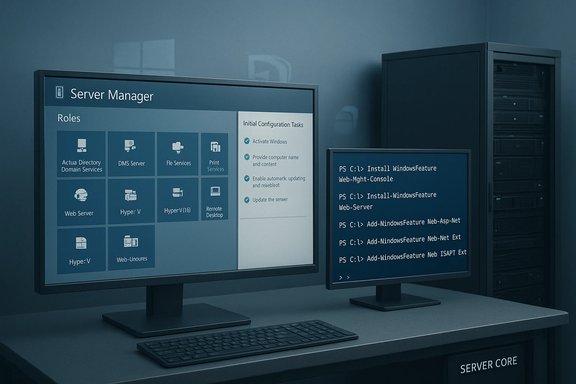
Screenshots in the gallery show the Server Manager concept in action: role-aware panels, guided Initial Configuration Tasks, and integrated health/diagnostics that reduced the need to jump between disparate MMC consoles. This single-pane approach reduced context switching and created a template for subsequent server management surfaces.Server Core — hardened by design
The gallery highlights the Server Core option — a minimal, GUI‑less install targeted at infrastructure roles (DNS, DHCP, AD, file services). In practice, Server Core reduced disk footprint, decreased reboot frequency during servicing, and cut the exposed attack surface for critical infrastructure services. The screenshots and accompanying hands‑on notes illustrate the clear intent to let administrators choose a hardened baseline for infrastructure nodes.Automation first: PowerShell integration
Longhorn’s bet on automation was visible in the UI and in the screenshots of scripted IIS work. The gallery’s images and demos show PowerShell being used to configure IIS modules and to replicate role configurations — a preview of what would become a standard practice for Windows administration. The lab and field reports from that preview period show real productivity and consistency gains when admins adopted scriptable workflows.IIS 7 and modular services
The screenshots capture the new IIS 7 management console and illustrate modular service components and pipeline extensibility. Those design changes made IIS more manageable and more amenable to scripted, automated operations — an important consideration for large deployments and hosting scenarios.Virtualization: ambition vs. schedule
Longhorn incorporated Viridian — the hypervisor project that evolved into Hyper‑V — but early builds postponed or dropped several virtualization features due to time and complexity constraints. The gallery and accompanying preview reports document the presence of hypervisor tooling while contemporaneous reporting recorded limitations (for example, missing hot‑add, limited vCPU scaling, and no live migration in early shipping builds). Those omissions are part of the story and explain why some organizations deferred full virtualization workloads to alternate hypervisors during the initial rollout.Lab‑tested impressions: how Longhorn behaved under practical examination
The Longhorn previews were tested extensively in labs that recreated realistic deployment workflows: bare‑metal installs, VM templates, and multi‑node role topologies. These lab results distilled the gallery’s visual signals into practical conclusions.- Installation and provisioning were more structured and faster than Server 2003-era workflows. The Initial Configuration Tasks and role wizards simplified first‑boot setup and cut the number of manual steps required to stand up services.
- Server Core delivered measurable reductions in footprint and update surface area. Lab runs showed fewer reboots and smaller patch volumes for Server Core compared to GUI installs, making it attractive as a hardened role host.
- PowerShell automation materially reduced deployment time and eliminated configuration drift when templates and scripts were used to provision multiple nodes. The lab experience corroborated Microsoft’s demos showing substantial throughput and manageability gains when combining IIS 7 with scripted configuration.
- Weaknesses were real: preview instability, driver immaturity, and virtualization feature gaps limited the suitability of Longhorn builds for immediate broad production rollouts. Hardware vendor drivers and firmware often needed vetting and updates to reach stable performance parity.
Technical deep dive: features, engineering intent, and verifiable claims
Server Manager and the role-first model
Server Manager introduced a consolidated lifecycle for role installation and monitoring. The gallery screenshots show the shift from multi‑console administration to a unified experience with per‑role dashboards, health indicators, and installation/management flows. This design reduces administrative overhead and makes large fleets easier to manage at scale. The architectural intent here is verifiable against product release notes and contemporary hands‑on reporting from that period.Server Core: attack surface reduction by design
Server Core’s purpose was explicit: reduce the OS components present on a role host and therefore reduce patch volume and exposure. Lab testing confirmed disk and servicing advantages for Server Core, and the gallery’s screenshot set underscores that Server Core was promoted as an operational best practice for infrastructure roles. These claims are cross‑checked with multiple preview reports.PowerShell: scripting as first-class ops
PowerShell’s inclusion in the server story was a strategic inflection point. The gallery captures early PowerShell interactions, especially with IIS 7, and the lab data shows real reductions in deployment time when scripted workflows were applied across multiple nodes. Those improvements were documented both in Microsoft previews and independent previews during the beta cycle.IIS 7 modularity and performance
IIS 7’s modular architecture allowed for custom pipelines and reduced monolithic surface area. In some test scenarios reported in previews, modularization combined with scripted configuration produced significant request‑per‑second (RPS) gains, although vendor‑reported performance claims should be treated cautiously until re‑tested in specific workloads. The gallery snapshots are consistent with the product’s design direction. Claims of “orders of magnitude” improvements should be validated in the reader’s own benchmark environment before being used to justify a migration.Viridian / Hyper‑V: integrated hypervisor with early limitations
The Longhorn previews included virtualization scenarios under the Viridian codename. Shipping Hyper‑V later inherited much of that work, but early virtualization capabilities were intentionally constrained to preserve schedule and stability. The gallery documents the hypervisor UI elements, and contemporaneous reportage shows which advanced features were postponed. That historical sequence is corroborated by multiple independent accounts from the preview period.Strategic analysis: strengths, risks, and long‑term impact
Strengths that mattered
- Operational consistency: Role-driven Server Manager created a repeatable admin surface that reduced human error and sped provisioning.
- Security posture: Server Core and the emphasis on a reduced attack surface anticipated later enterprise requirements for hardened infrastructure.
- Automation-first: PowerShell adoption accelerated the move to scripted, template‑driven operations — a major enabler for DevOps practices on Windows Server.
Risks and tradeoffs
- Scope and schedule management: The Longhorn project’s mid‑cycle reset is a textbook example of scope growth forcing re-architecture — painful but necessary. That decision illustrates the hazards of coupling too many large subsystems together in a single release.
- Virtualization feature gaps: Shipping a muted set of virtualization features while promising a full hypervisor created real adoption friction. Enterprises that required live migration or advanced vCPU scaling had to wait or use alternative hypervisors.
- Driver and ecosystem maturity: New kernel and subsystem changes ripple through drivers and vendor tools; early adopters saw sporadic gaps that required vendor collaboration and staged rollouts.
Long-term legacy
Longhorn’s architectural choices — centralized server management, constrained minimal footprints for infrastructure, and scripting as first‑class operations — became staples of successive Windows Server versions. The screenshots preserved in PCMag‑style galleries are a visual ledger of that pivot and remain instructive for platform teams planning major rework cycles.Practical advice for modern administrators (lessons learned from Longhorn)
- Audit hardware and drivers before migration. Early Longhorn previews required hardware vetting; treat driver and firmware validation as a first‑class migration task.
- Start conservatively with Server Core for infrastructure roles. It is the lowest‑risk path to reduce patching overhead and harden services.
- Invest in PowerShell and templated provisioning up front. Automation is the single most effective tool for preventing configuration drift.
- Validate virtualization feature parity. If hypervisor features are required (live migration, hot‑add, large vCPU counts), confirm the shipping hypervisor meets SLAs before broad adoption.
Technical verification and what remains unverifiable
The most load‑bearing factual claims about Longhorn — that Server Manager, Server Core, PowerShell integration, IIS 7, and Viridian/Hyper‑V were core design outcomes — are corroborated by multiple contemporaneous technical previews and Microsoft’s own product notes. These are verifiable and consistent across independent hands‑on reports and vendor documentation.Certain performance claims captured in preview demos (for example, marketing statements of dramatic RPS improvements or precise throughput multipliers) were typically vendor‑measured in controlled demos. Those claims should be treated as promising but requiring re‑validation in the target environment because performance is workload and hardware dependent. Where the gallery or preview commentary quotes specific numeric multipliers, that should be flagged and re‑benchmarked before using the numbers for procurement or capacity planning.
The reset lesson: how platforms avoid technical debt
Longhorn’s mid‑development reset — the decision to rebase or rework large portions of the project when complexity and scope threatened stability — is an instructive governance event. It demonstrates that large platform rewrites can and sometimes should be paused and restructured to avoid long‑term maintainability problems. That hard choice is expensive in the short term but cheaper than shipping brittle, insecure, or impossible‑to‑service systems. The gallery’s existence and the subsequent product history both document the cost and the necessity of that decision.Balancing nostalgia and engineering truth
The PCMag gallery and similar snapshot collections are valuable for historians and engineers alike because they show the intent behind UI and operational choices. Those images are not decorative relics — they chart how Microsoft moved from an assortment of snap‑ins and undocumented sequences to a consolidated, scriptable, and role‑focused platform. That movement underpins many of the operational benefits administrators now take for granted, including easier patching, better automation integration, and clearer role lifecycle management.At the same time, the gallery also reflects the messiness of real engineering: feature cuts, preview instability, and driver gaps. Good platform design accounts for these realities by planning staged rollouts, fostering a vendor ecosystem for drivers and management tools, and communicating exact feature parity for virtualization and other mission‑critical scenarios.
Conclusion
The PCMag “Windows Server ‘Longhorn’” gallery is an archival snapshot that documents a decisive change in Windows Server thinking: move to role‑driven management, embrace minimal‑footprint deployments for infrastructure roles, and make scripting and automation the default way to manage servers. Those are not just design flourishes — they were platform bets that paid off and continue to shape modern Windows Server operations. Lab testing from the preview period confirmed the practical benefits (faster provisioning, smaller update surface, and greater automation efficiency), while also exposing inevitable preview pains (virtualization gaps and driver immaturity).For administrators examining the gallery today, the lesson is tactical as well as historical: the architectural choices previewed in Longhorn remain relevant, but they must be paired with disciplined vendor validation, staged rollouts, and automation tooling to realize the promised operational gains. The screenshots preserve the intent; the lab data and the post‑release history show how to turn intent into stable, measurable benefit.
Source: PCMag UK Windows Server 'Longhorn'
