

Microsoft has a point here, and that’s exactly why the conversation around “Windows broke my PC” is more complicated than the headline suggests. The latest round of complaints aimed at Windows 11 and Windows 10 follows a familiar pattern: a reboot happens after Patch Tuesday, a machine fails, and the update gets blamed even when the root cause may have been sitting dormant for weeks. At the same time, Microsoft’s record is not spotless, so the company is speaking from a position of both technical insight and a history of real update regressions.
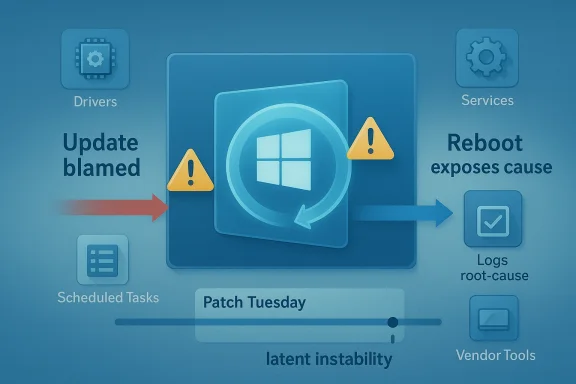
For enterprise IT teams, the distinction matters a lot more than it does on social media. A Windows update is often the final event in a long chain of software installs, driver changes, registry edits, and policy tweaks, and the restart is what forces the system to reconcile all of it at once. That means the reboot can expose hidden misconfigurations that were always present, only not yet visible.
This is the gist of the argument associated with Raymond Chen and other Microsoft support voices: users see the failure after the update, but the reboot is frequently the trigger rather than the cause. Microsoft’s broader servicing model has also been moving toward fewer disruptive restarts where possible, which is why rebootless approaches like Hotpatch have become such a talking point. The idea is attractive because it reduces the chance that a latent problem is revealed at the exact moment the system is being asked to restart cleanly.
Still, the company’s messaging lands in a complicated place. Microsoft has shipped genuine update problems in recent months, including an out-of-band fix for the March 2026 Windows 11 preview update after some devices hit installation errors. So while it is fair to say that users and admins sometimes misdiagnose the cause of a crash, it is equally fair to say that Windows Update has earned enough blame over the years to make skepticism understandable.
A second Samsung-related issue followed closely behind, this time involving inaccessible C: drives on some Windows 11 systems. In that case, too, the source of the problem pointed away from Microsoft’s update stack and toward Samsung’s own software or firmware ecosystem. These incidents gave Microsoft a timely opening to argue that the operating system often gets blamed for failures that originate elsewhere.
The argument is not new. Windows support teams have long seen patterns where monthly updates appear to be the culprit simply because they are the last major event before a reboot. A machine may run for days or weeks after a change, but once it restarts, the fragile configuration collapses. To the user, the timing makes the update look guilty by association.
That framing has real value for support organizations. It encourages better incident tracking, more disciplined rollback testing, and a closer look at the changes made before patch day. It also pushes enterprises to treat reboot readiness as a first-class operational problem rather than as an afterthought.
The problem, of course, is that the average user does not have a change log that neatly explains what happened. Home systems are full of driver updaters, performance tools, vendor utilities, tweak packages, and “fixes” suggested by random online advice. When the machine breaks after a reboot, the user sees causation; Microsoft sees correlation.
That is why Microsoft support personnel often describe post-Patch Tuesday breakage as a symptom of earlier changes rather than a direct result of the update itself. A driver installed two weeks ago may not fail until a restart. A registry permission change made by a third-party utility may sit unnoticed until Windows tries to reinitialize a service. A policy pushed through management tooling may be harmless until the next boot forces validation.
This also explains why enterprise support often sees trouble after scheduled maintenance windows. IT teams reboot en masse after installing updates, and suddenly dozens of endpoints surface problems that had been quietly accumulating. The patch did not create the fault so much as it put the machine into a state where the fault could no longer hide.
That distinction matters because Windows is the platform, not the only moving part. Storage utilities, SSD firmware tools, and vendor management apps often have deep hooks into system behavior. When those hooks break, the operating system can look guilty even when it is merely the environment where the fault became visible.
Microsoft’s argument here is subtle but important: if you load enough third-party layers onto a PC, the first visible failure after reboot may not be the layer that actually broke. That is why support engineers tend to ask about recent driver installs, tuning utilities, and vendor packages before they blame Windows Update.
That said, Microsoft’s own history ensures that the public will never take this argument on faith. The company has shipped real bad updates, real regressions, and real servicing failures, and those incidents are not erased just because some faults are misattributed. The trust gap is part of the story now.
In enterprises, the problem becomes even more pronounced because patching is itself a ritual of controlled risk. Changes are deliberately bundled and applied together, which means the update window becomes a container for every unrelated issue that surfaces during it. The update did not necessarily cause the failure, but it supplied the moment of discovery.
Microsoft has repeatedly positioned Hotpatch as a way to keep systems current while minimizing disruption. Its own materials describe the technology as delivering cumulative security updates without requiring a reboot in supported scenarios. In plain English: fewer restarts, fewer interruptions, and fewer chances for a boot-time surprise.
For Microsoft, it also strengthens the argument that reboots are not the update itself. If you can safely patch without restarting in some scenarios, the operating system can keep moving while hidden issues remain hidden until a different trigger reveals them. That makes the diagnostic model clearer, even if it does not make the politics easier.
Consumers live in a much messier environment. They install manufacturer utilities, overclocking tools, browser add-ons, gaming services, and “cleaners” without the same controls that enterprises use. That means the chance of a hidden problem surfacing after a reboot is arguably even higher on home PCs.
That is why Microsoft’s explanation should not be read as a defense of all broken PCs. It is more of a diagnostic warning: do not assume the last thing you touched is the thing that broke. In enterprise environments, that’s a disciplined engineering statement; at home, it is often a frustrating truth.
That matters because it keeps the criticism honest. Yes, many post-update problems are actually caused by pre-existing instability. But yes, Microsoft also ships updates that break, stall, or fail on their own merits. Both truths can coexist, and any serious analysis has to hold them together.
Microsoft knows this, which is why its support language increasingly tries to separate update content from restart behavior. The goal is not to deny fault, but to narrow the diagnosis. In practice, though, users hear a familiar institutional refrain: “It wasn’t us, it was something else.”
That means checking what changed before the reboot, reviewing driver and software deployments, and comparing affected systems against unaffected ones. If the same failure appears only after a specific cumulative update, that is useful evidence. If the issue also affects machines that never took the update, the case against Windows grows weaker.
The coming months will likely keep testing that balance. Every new Patch Tuesday, every OEM driver update, and every enterprise reboot cycle will create fresh opportunities for blame, whether deserved or not. The companies that win the trust battle will be the ones that can prove causation quickly and fix problems without turning every incident into a philosophical debate.
Source: Neowin Microsoft explains why it's blaming users for some buggy, broken, faulty Windows 11/10 PCs
 Overview
For enterprise IT teams, the distinction matters a lot more than it does on social media. A Windows update is often the final event in a long chain of software installs, driver changes, registry edits, and policy tweaks, and the restart is what forces the system to reconcile all of it at once. That means the reboot can expose hidden misconfigurations that were always present, only not yet visible.This is the gist of the argument associated with Raymond Chen and other Microsoft support voices: users see the failure after the update, but the reboot is frequently the trigger rather than the cause. Microsoft’s broader servicing model has also been moving toward fewer disruptive restarts where possible, which is why rebootless approaches like Hotpatch have become such a talking point. The idea is attractive because it reduces the chance that a latent problem is revealed at the exact moment the system is being asked to restart cleanly.
Still, the company’s messaging lands in a complicated place. Microsoft has shipped genuine update problems in recent months, including an out-of-band fix for the March 2026 Windows 11 preview update after some devices hit installation errors. So while it is fair to say that users and admins sometimes misdiagnose the cause of a crash, it is equally fair to say that Windows Update has earned enough blame over the years to make skepticism understandable.
Background
The current discussion was sparked by a broader debate about whether recent Windows failures are really Windows failures at all. Neowin highlighted a case involving Samsung Magician malfunctioning on modern Windows 11 systems, with users reporting launch issues, UI bugs, and performance problems. That matters because it is a reminder that not every broken experience on a Windows PC traces back to a Microsoft patch.A second Samsung-related issue followed closely behind, this time involving inaccessible C: drives on some Windows 11 systems. In that case, too, the source of the problem pointed away from Microsoft’s update stack and toward Samsung’s own software or firmware ecosystem. These incidents gave Microsoft a timely opening to argue that the operating system often gets blamed for failures that originate elsewhere.
The argument is not new. Windows support teams have long seen patterns where monthly updates appear to be the culprit simply because they are the last major event before a reboot. A machine may run for days or weeks after a change, but once it restarts, the fragile configuration collapses. To the user, the timing makes the update look guilty by association.
That framing has real value for support organizations. It encourages better incident tracking, more disciplined rollback testing, and a closer look at the changes made before patch day. It also pushes enterprises to treat reboot readiness as a first-class operational problem rather than as an afterthought.
The problem, of course, is that the average user does not have a change log that neatly explains what happened. Home systems are full of driver updaters, performance tools, vendor utilities, tweak packages, and “fixes” suggested by random online advice. When the machine breaks after a reboot, the user sees causation; Microsoft sees correlation.
Why Reboots Expose Hidden Problems
A Windows reboot is not a passive event. It is a checkpoint where services restart, scheduled tasks run, delayed file operations complete, and every misconfigured dependency has to line up again. If something was broken in the background, reboot time is often when it stops being theoretical.That is why Microsoft support personnel often describe post-Patch Tuesday breakage as a symptom of earlier changes rather than a direct result of the update itself. A driver installed two weeks ago may not fail until a restart. A registry permission change made by a third-party utility may sit unnoticed until Windows tries to reinitialize a service. A policy pushed through management tooling may be harmless until the next boot forces validation.
Latent instability is the real antagonist
The key concept is latent instability. Systems do not usually go from healthy to dead because of one simple event. They accumulate small fractures, and the reboot is the stress test that reveals them. That is why Microsoft engineers keep returning to this theme: it explains a class of incidents that would otherwise be misread as patch regressions.This also explains why enterprise support often sees trouble after scheduled maintenance windows. IT teams reboot en masse after installing updates, and suddenly dozens of endpoints surface problems that had been quietly accumulating. The patch did not create the fault so much as it put the machine into a state where the fault could no longer hide.
- Reboots force delayed changes to finalize.
- Services restart under fresh dependency checks.
- Broken permissions become visible immediately.
- Vendor utilities can misfire only after boot.
- “Fixes” from dubious online advice can destabilize core settings.
The Samsung Example as a Case Study
The Samsung Magician issue makes the timing problem easier to understand because it shows how quickly a third-party app can become the prime suspect. If the app fails to launch or behaves strangely on Windows 11, users naturally wonder whether Microsoft changed something. In this case, the likely explanation sits closer to Samsung’s stack than to the Windows servicing pipeline.That distinction matters because Windows is the platform, not the only moving part. Storage utilities, SSD firmware tools, and vendor management apps often have deep hooks into system behavior. When those hooks break, the operating system can look guilty even when it is merely the environment where the fault became visible.
Vendor software can look like an OS bug
This is especially true for storage and security tools, where software frequently touches low-level components. A misbehaving utility can affect launch behavior, disk visibility, service startup, and performance telemetry. If the issue appears after a restart, users often connect the dots in the wrong direction.Microsoft’s argument here is subtle but important: if you load enough third-party layers onto a PC, the first visible failure after reboot may not be the layer that actually broke. That is why support engineers tend to ask about recent driver installs, tuning utilities, and vendor packages before they blame Windows Update.
- Storage tools can interfere with disk-related services.
- OEM utilities can destabilize performance monitoring.
- Security software can block or alter device behavior.
- Firmware management apps may assume privileged access.
- Reboots reveal dependency failures that were already there.
Patch Tuesday and the Blame Cycle
Patch Tuesday is where this entire debate becomes emotionally charged. Enterprises schedule maintenance, users expect change, and when something fails afterward, the patch is the obvious suspect. Microsoft knows this pattern well, which is why it keeps trying to reframe the reboot as a diagnostic event rather than the crime scene itself.That said, Microsoft’s own history ensures that the public will never take this argument on faith. The company has shipped real bad updates, real regressions, and real servicing failures, and those incidents are not erased just because some faults are misattributed. The trust gap is part of the story now.
Why the timing feels so convincing
Humans are wired to connect the nearest event with the visible outcome. If a laptop works on Monday, takes a cumulative update on Tuesday, and fails on Wednesday after restart, the update is the thing people remember. That is not irrational; it is just incomplete.In enterprises, the problem becomes even more pronounced because patching is itself a ritual of controlled risk. Changes are deliberately bundled and applied together, which means the update window becomes a container for every unrelated issue that surfaces during it. The update did not necessarily cause the failure, but it supplied the moment of discovery.
- Post-update reboot is often the first full system reset in weeks.
- Delayed failures become visible all at once.
- Administrators naturally focus on the most recent change.
- Incident correlation is easier than root-cause analysis.
- Repair windows can magnify the appearance of a widespread bug.
Hotpatching and the Search for Fewer Restarts
This is where Hotpatch enters the conversation. Microsoft’s rebootless servicing approach is designed to apply certain updates without forcing a full restart, reducing downtime and limiting the number of moments when latent faults can surface. For enterprise environments, that is a genuinely attractive proposition.Microsoft has repeatedly positioned Hotpatch as a way to keep systems current while minimizing disruption. Its own materials describe the technology as delivering cumulative security updates without requiring a reboot in supported scenarios. In plain English: fewer restarts, fewer interruptions, and fewer chances for a boot-time surprise.
Why rebootless updates matter
Hotpatch does not solve every update problem, and it is not a magic shield against bad drivers or broken software. But it does reduce one of the biggest sources of operational pain: the mandatory reboot. For enterprise IT, that means less downtime and a smaller blast radius when something unrelated is already unstable.For Microsoft, it also strengthens the argument that reboots are not the update itself. If you can safely patch without restarting in some scenarios, the operating system can keep moving while hidden issues remain hidden until a different trigger reveals them. That makes the diagnostic model clearer, even if it does not make the politics easier.
- Fewer reboots mean fewer service interruptions.
- Rebootless servicing lowers the chance of timing-related blame.
- Hotpatch can improve compliance in managed environments.
- It is most valuable where uptime matters.
- It does not eliminate third-party software risk.
Enterprise vs Consumer Impact
Microsoft’s comments land most strongly in the enterprise world because that is where the update/reboot cycle is most disciplined and most visible. IT departments keep logs, push policies, deploy drivers, and manage fleets of devices. When something fails after an update, they have at least some chance of tracing the changes back through time.Consumers live in a much messier environment. They install manufacturer utilities, overclocking tools, browser add-ons, gaming services, and “cleaners” without the same controls that enterprises use. That means the chance of a hidden problem surfacing after a reboot is arguably even higher on home PCs.
Different systems, different failure paths
On managed devices, a bad change may come from a software deployment, a group policy edit, or a driver pushed through enterprise tooling. On home systems, it might be a random app installer, a registry tweak recommended in a forum, or an OEM utility shipped with the machine. The end result can look similar even when the causes are wildly different.That is why Microsoft’s explanation should not be read as a defense of all broken PCs. It is more of a diagnostic warning: do not assume the last thing you touched is the thing that broke. In enterprise environments, that’s a disciplined engineering statement; at home, it is often a frustrating truth.
- Enterprises need change control and rollback discipline.
- Consumers need caution around “optimization” tools.
- Managed fleets can document pre-reboot changes.
- Home systems often cannot reconstruct the sequence.
- Both groups can misread reboot-triggered failures.
Microsoft’s Own Update Problems Still Matter
The company’s argument would be more persuasive if Windows Update itself had a spotless recent record, but that is not the world we live in. Microsoft’s March 2026 out-of-band update, KB5086672, explicitly exists to fix an installation issue that affected some devices attempting to install the March 26 preview release. Microsoft’s own support page says the update is a cumulative out-of-band fix that addresses the error some devices encountered during setup.That matters because it keeps the criticism honest. Yes, many post-update problems are actually caused by pre-existing instability. But yes, Microsoft also ships updates that break, stall, or fail on their own merits. Both truths can coexist, and any serious analysis has to hold them together.
The company’s credibility problem is earned, not imagined
Users are not imagining the occasional Windows Update failure. They remember updates that broke install flows, created odd incompatibilities, or required emergency fixes. That memory shapes how they interpret the next problem, especially when the issue appears immediately after a restart.Microsoft knows this, which is why its support language increasingly tries to separate update content from restart behavior. The goal is not to deny fault, but to narrow the diagnosis. In practice, though, users hear a familiar institutional refrain: “It wasn’t us, it was something else.”
- Some update failures are genuine Microsoft problems.
- Some failures are third-party or configuration related.
- The reboot often determines which problem becomes visible.
- Out-of-band fixes are evidence of real servicing gaps.
- User skepticism remains rational because of past incidents.
How IT Teams Should Interpret These Claims
The smartest way to read Microsoft’s position is as an operational reminder rather than as an absolution. IT teams should not reflexively pin every crash on Patch Tuesday, but neither should they dismiss update issues out of hand. The right response is structured investigation.That means checking what changed before the reboot, reviewing driver and software deployments, and comparing affected systems against unaffected ones. If the same failure appears only after a specific cumulative update, that is useful evidence. If the issue also affects machines that never took the update, the case against Windows grows weaker.
A practical investigation sequence
A disciplined troubleshooting flow can help separate timing from causation. The point is to answer a simple question: was the update the trigger, or was it merely the first moment the problem could no longer stay hidden?- Identify the exact update and reboot time.
- Review driver, policy, and software changes from the prior weeks.
- Check whether non-updated systems show the same symptom.
- Compare affected and unaffected hardware models.
- Test rollback or alternate boot paths if available.
- Capture logs before making further changes.
- Track change windows carefully.
- Preserve system logs before remediation.
- Separate correlation from causation.
- Test with clean baselines where possible.
- Document OEM utilities and firmware updates.
Strengths and Opportunities
Microsoft’s message has real merit because it reflects how Windows systems actually fail in the field. It also creates an opportunity to improve support hygiene, update tooling, and customer education around reboot-triggered issues.- Better diagnostics can reduce false blame on Windows Update.
- Hotpatch-style servicing can reduce reboot-related disruption.
- Stronger change management helps enterprises isolate real causes.
- Improved OEM accountability could shift blame toward the right vendor.
- User education can make consumers more cautious with tweak tools.
- Telemetry-driven support can spot patterns faster across fleets.
- More granular rollback options would help when failures do stem from updates.
Risks and Concerns
The risk for Microsoft is that the explanation can sound like a deflection, especially to users who have lived through real Windows Update failures. If the company overplays the “it’s your fault” angle, it may deepen distrust rather than improve diagnosis.- Perception risk: users may hear blame shifting instead of technical nuance.
- Trust erosion: real update bugs make blanket reassurance less convincing.
- Support confusion: mixed messages can slow remediation efforts.
- OEM dependence: third-party failures still reflect badly on Windows.
- Enterprise fatigue: IT teams already absorb too much update risk.
- Consumer frustration: home users often lack the tools to identify the true cause.
- Hidden complexity: the more layered the PC ecosystem becomes, the harder it is to assign fault cleanly.
Looking Ahead
Microsoft’s best path forward is to keep improving the reliability of both updates and restarts. That means fewer hard reboots, better preflight checks, clearer vendor boundaries, and more transparent reporting when an issue is truly in Windows rather than merely adjacent to it. It also means acknowledging that a good technical explanation does not erase the company’s history.The coming months will likely keep testing that balance. Every new Patch Tuesday, every OEM driver update, and every enterprise reboot cycle will create fresh opportunities for blame, whether deserved or not. The companies that win the trust battle will be the ones that can prove causation quickly and fix problems without turning every incident into a philosophical debate.
- Expect continued emphasis on Hotpatch and reduced reboot dependency.
- Watch for more out-of-band fixes when update regressions occur.
- Pay attention to OEM software conflicts on Windows 11 systems.
- Expect enterprises to tighten change control around Patch Tuesday.
- Look for Microsoft to refine how it explains post-reboot failures.
- Watch whether consumer-facing support guidance becomes more explicit about third-party utilities.
Source: Neowin Microsoft explains why it's blaming users for some buggy, broken, faulty Windows 11/10 PCs
