

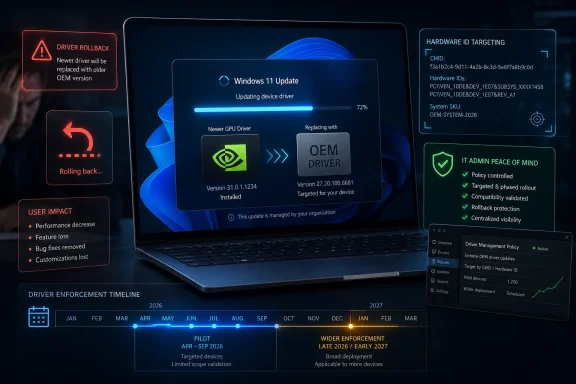
Microsoft acknowledged in May 2026 that Windows Update can replace manually installed Windows 11 graphics drivers with older OEM-published packages, and it is piloting a narrower targeting policy through September before broader enforcement arrives in late 2026 or early 2027. The admission matters because this is not a niche annoyance buried in Device Manager. It is the operating system overruling the user, the hardware vendor, and sometimes common sense. For gamers, creators, and administrators, the story is less about one bad driver than about an update pipeline that still confuses “approved” with “appropriate.”
The modern Windows pitch is built on trust: install the OS, accept the updates, let the platform keep itself safe and functional. That bargain works when Windows Update patches a remote-code-execution bug or installs a printer fix nobody wants to think about. It becomes harder to defend when the same machinery quietly takes a carefully installed GPU driver and replaces it with an older package because an OEM submission ranks more favorably in Microsoft’s distribution logic.
This is the kind of Windows problem that sounds absurd until you have lived through it. A laptop owner installs a newer Intel, AMD, or Nvidia graphics package to fix a game crash, restore a control panel, improve video encode behavior, or get support for a newly released title. Days later, Windows Update decides the machine should be running a different driver, often one published through the OEM channel, and the user is left wondering why performance dipped or vendor software broke.
Microsoft’s defense is not that users imagined the problem. The company’s emerging fix effectively concedes the core complaint: driver targeting has been too broad for display-class updates in some scenarios. A package intended for one system configuration can match another closely enough for Windows Update to offer it, and ranking then does what ranking systems do. It chooses the “best” package according to the rules it was given, not according to what the owner of the PC was trying to accomplish.
That distinction is important. This does not mean every Windows 11 PC is doomed to have its GPU driver rolled back, or that every OEM driver is inferior to a chipmaker’s latest public release. OEM display drivers often include system-specific tuning for power, thermals, hybrid graphics, docking behavior, panel quirks, and sleep states. The problem is that Windows Update has been too willing to make that decision globally and silently, even when the user has already made a more deliberate choice.
That is why the downgrade problem lands harder than an ordinary peripheral update. If Windows swaps a mouse driver, most people never notice. If Windows swaps a GPU driver, a game may lose frame pacing, a creative app may fall back to a less efficient code path, HDR behavior may change, or a vendor control panel may stop recognizing the installed package. On laptops, the symptoms can be even stranger because integrated graphics, discrete graphics, display output routing, and power profiles all intersect.
Microsoft’s driver ecosystem has always had to balance two competing truths. The first is that most users are better served when Windows automatically installs stable, tested drivers. The second is that advanced users often install newer drivers for good reasons, and Windows should not treat those choices as temporary deviations to be corrected at the next scan.
The downgrade issue shows what happens when the first truth consumes the second. Windows Update does not experience the machine as a gamer trying to run a newly optimized driver branch or a video editor chasing a codec fix. It sees matching IDs, policy classifications, publisher relationships, ranking inputs, and update metadata. The human context is stripped away, which is how an “update” becomes a downgrade without the system appearing to understand the contradiction.
The trouble is that broad targeting can be too broad for the way PCs are sold in 2026. Two machines may share a GPU family while differing sharply in firmware, thermal design, panel configuration, power limits, dock support, or OEM customization. A driver that is safe and desirable for one shipping configuration may be stale or inappropriate for another, especially when the user has manually installed a newer package from the silicon vendor.
Microsoft’s planned shift for new display driver submissions is to allow more precise targeting using two-part hardware IDs combined with CHIDs where appropriate. In plain English, the company wants display drivers to be scoped more tightly to the actual system configurations they are meant to serve. That should reduce the chance that an OEM-published package intended for one slice of the market splashes across a wider group of machines.
The catch is embedded in the rollout. This is not a magic retroactive cleanup of every problematic driver already sitting in the Windows Update ecosystem. The pilot runs through September 2026, with broader enforcement expected later, and the change is aimed at new display driver submissions for new devices. For users currently stuck in a tug-of-war between Windows Update and their chosen GPU driver, the policy future may be reassuring without being immediately useful.
There are reasons for the caution. Driver distribution at Windows scale is not the same as posting a download page. A bad display driver can black-screen systems, break sleep, trigger crashes, or cause support incidents across multiple OEMs. Microsoft cannot simply flip a switch and hope every vendor’s targeting metadata is correct.
Still, the burden of caution has been distributed unevenly. Users who install newer vendor drivers are the ones who discover the consequences. Enthusiasts reinstall packages, hide updates, edit policies, run cleanup tools, and compare version numbers. IT administrators have to decide whether to block drivers from Windows Update entirely, accept the risk of stale OEM packages, or build their own driver governance process around a consumer-grade behavior.
That is the deeper irritation. Microsoft is not merely fixing a bug; it is asking users to tolerate an automated system that has already proven too blunt. The company’s update infrastructure is powerful enough to override a GPU driver overnight, but not yet precise enough to always know when it should refrain. That asymmetry is what makes the problem feel less like maintenance and more like trespass.
A laptop maker may validate a driver against fan curves, battery targets, resume behavior, external display combinations, and BIOS versions that Intel, AMD, or Nvidia cannot fully account for in a general package. If a newer vendor driver breaks Modern Standby on a thin-and-light laptop, users will blame Windows or the OEM, not the chipmaker’s release notes. From that perspective, Windows Update favoring an OEM-published package is not irrational.
But the reverse is also true. GPU vendors release drivers to fix current games, creative applications, security issues, and platform bugs. They support new APIs, new engines, and new hardware behaviors faster than many OEM channels do. A driver that was prudent at launch can become a liability months later if the OEM does not keep pace.
The right answer is not to declare one channel permanently superior. The right answer is consent and context. If the user has never touched a driver, Windows Update should install the safest supported package. If the user has deliberately installed a newer vendor package, Windows should treat that as a meaningful signal rather than a temporary irregularity.
That is where Microsoft’s policy machinery has lagged behind user reality. The OS can tell when a driver is installed, ranked, signed, and applicable. It has historically been less graceful at recognizing user intent. In 2026, that is no longer a minor UX gap; it is a systems-management failure.
But this is not a free win. Once an organization blocks driver updates through Windows Update, it owns the driver lifecycle more completely. That means testing, deployment rings, rollback plans, inventory, and some way to track whether a vendor driver fixes a security or stability issue. The cure for unwanted automation is not no process; it is a better process.
For businesses with standardized hardware, the calculation is easier. A managed fleet of identical Dell, HP, Lenovo, or Surface devices can validate a driver branch and hold it until the next scheduled maintenance window. For mixed fleets, engineering workstations, gaming-adjacent creator rigs, and bring-your-own-device environments, driver policy becomes messier.
The worst answer is improvisation. Telling users to run random cleanup utilities after every Windows Update may work for a home gaming PC, but it is not a support model. Display Driver Uninstaller and similar tools have their place when cleaning up a stubborn GPU stack, yet they should be treated as surgical instruments, not routine hygiene.
What Microsoft’s admission should prompt in IT departments is a review of driver authority. Who decides which graphics driver belongs on which machine: Windows Update, the OEM management platform, the GPU vendor’s updater, Intune, Configuration Manager, a third-party patch tool, or the user? If the answer is “all of them,” the organization does not have a driver strategy. It has a race condition.
Graphics drivers sharpen that conflict because enthusiasts often live on newer branches by design. They install day-one game drivers, studio drivers, preview packages, hotfix releases, and vendor tools that expose features Microsoft’s generic update path may not prioritize. They are not always chasing novelty; often they are chasing a fix.
Windows does provide mechanisms to roll back drivers, hide updates in some cases, or disable driver inclusion through policy. But these mechanisms sit below the level of the everyday settings experience. A user can easily install a GPU driver from AMD, Intel, or Nvidia; preventing Windows from later interfering is comparatively obscure.
That imbalance shapes perception. Microsoft markets Windows 11 as a polished consumer platform, but the remedy for this problem often involves Group Policy, registry paths, Device Manager spelunking, or third-party cleanup utilities. That is not a coherent consumer story. It is an enthusiast workaround culture filling a gap left by the platform.
The company’s new targeting approach is therefore welcome but incomplete. Narrower applicability reduces accidental damage, yet it does not fully answer the user-control question. A better Windows would make driver authority legible: this driver came from Windows Update, this one came from the OEM, this one came from Nvidia or AMD or Intel, and this setting determines whether Windows may replace it.
Seen next to the downgrade issue, however, it also reveals Microsoft’s preferred answer to update risk. The company is not retreating from centralized driver management. It is making the central machinery more capable, more telemetry-driven, and more responsive. The Windows Update system that can install the wrong driver is being given better tools to recover from bad outcomes.
There is a logic to that. At Windows scale, user-by-user manual remediation is a fantasy. Microsoft needs cloud controls, driver quality metrics, staged rollouts, and automated recovery paths. The alternative is millions of users stranded with broken Wi-Fi, black screens, or malfunctioning audio while support forums try to reverse-engineer the fix.
But central recovery does not erase the need for local consent. A system that can automatically recover from bad driver deployments is valuable. A system that still replaces an intentionally installed driver without making the choice transparent remains paternalistic. Microsoft is improving the ambulance while leaving the intersection design under debate.
The most charitable reading is that these efforts are converging toward a more mature driver ecosystem. Better targeting should reduce mistaken deployments. Cloud recovery should reduce the blast radius when a bad package escapes. Driver quality telemetry should help Microsoft and partners reject risky submissions earlier. That is progress, but it still depends on Microsoft recognizing that some PCs are not generic endpoints. They are tuned tools.
Yet the broader product fix is about intent. Windows should distinguish between a machine that passively received whatever Windows Update offered and a machine where the user deliberately installed a newer package. Those are not equivalent states. Treating them as equivalent is how the platform ends up undoing troubleshooting work.
There are several ways Microsoft could improve the experience without abandoning automatic maintenance. Windows could expose a per-device option to preserve manually installed drivers unless a security update requires replacement. It could warn before installing an older display driver over a newer one. It could separate OEM-recommended packages from critical driver updates more clearly. It could give administrators cleaner reporting when Windows Update changes a display driver branch.
The company does not need to turn every Windows user into a driver engineer. It needs to stop hiding consequential driver decisions behind update generalities. “Updates are available” is not enough information when one of those updates may change the GPU stack that determines whether a workstation performs correctly.
For WindowsForum readers, the lesson is pragmatic. Trust Windows Update for what it is good at, but do not assume it is a neutral steward of every driver on your system. If GPU stability matters to your work or your gaming setup, driver versions are now part of your configuration baseline. Record them, control them, and do not let an invisible ranking decision become your troubleshooting starting point.
Microsoft deserves credit for acknowledging the failure and moving toward more precise targeting, but the episode exposes a familiar weakness in Windows’ design philosophy: automation often arrives before accountability. The next version of this system should not merely be better at choosing drivers; it should be better at explaining, preserving, and respecting the choices users and administrators have already made.
Source: Gadget Review Microsoft Admits Windows 11 Downgrades Graphics Drivers
 Windows Update Is Still Fighting the People Who Know Their Hardware Best
The modern Windows pitch is built on trust: install the OS, accept the updates, let the platform keep itself safe and functional. That bargain works when Windows Update patches a remote-code-execution bug or installs a printer fix nobody wants to think about. It becomes harder to defend when the same machinery quietly takes a carefully installed GPU driver and replaces it with an older package because an OEM submission ranks more favorably in Microsoft’s distribution logic.This is the kind of Windows problem that sounds absurd until you have lived through it. A laptop owner installs a newer Intel, AMD, or Nvidia graphics package to fix a game crash, restore a control panel, improve video encode behavior, or get support for a newly released title. Days later, Windows Update decides the machine should be running a different driver, often one published through the OEM channel, and the user is left wondering why performance dipped or vendor software broke.
Microsoft’s defense is not that users imagined the problem. The company’s emerging fix effectively concedes the core complaint: driver targeting has been too broad for display-class updates in some scenarios. A package intended for one system configuration can match another closely enough for Windows Update to offer it, and ranking then does what ranking systems do. It chooses the “best” package according to the rules it was given, not according to what the owner of the PC was trying to accomplish.
That distinction is important. This does not mean every Windows 11 PC is doomed to have its GPU driver rolled back, or that every OEM driver is inferior to a chipmaker’s latest public release. OEM display drivers often include system-specific tuning for power, thermals, hybrid graphics, docking behavior, panel quirks, and sleep states. The problem is that Windows Update has been too willing to make that decision globally and silently, even when the user has already made a more deliberate choice.
The Bug Was Really a Policy Failure Wearing a Driver Costume
Graphics drivers are no longer simple pieces of plumbing. They are performance layers, security boundaries, media stacks, power-management systems, and vendor ecosystems packaged as one installation. AMD’s Adrenalin software, Nvidia’s app stack, and Intel’s graphics tools are not decorative extras; they expose features, optimizations, and diagnostic controls that many users rely on.That is why the downgrade problem lands harder than an ordinary peripheral update. If Windows swaps a mouse driver, most people never notice. If Windows swaps a GPU driver, a game may lose frame pacing, a creative app may fall back to a less efficient code path, HDR behavior may change, or a vendor control panel may stop recognizing the installed package. On laptops, the symptoms can be even stranger because integrated graphics, discrete graphics, display output routing, and power profiles all intersect.
Microsoft’s driver ecosystem has always had to balance two competing truths. The first is that most users are better served when Windows automatically installs stable, tested drivers. The second is that advanced users often install newer drivers for good reasons, and Windows should not treat those choices as temporary deviations to be corrected at the next scan.
The downgrade issue shows what happens when the first truth consumes the second. Windows Update does not experience the machine as a gamer trying to run a newly optimized driver branch or a video editor chasing a codec fix. It sees matching IDs, policy classifications, publisher relationships, ranking inputs, and update metadata. The human context is stripped away, which is how an “update” becomes a downgrade without the system appearing to understand the contradiction.
Four-Part Hardware IDs Made Sense Until They Didn’t
The technical heart of the problem is driver targeting. Windows uses hardware identifiers to decide which driver packages apply to which devices, and Microsoft’s documentation has long described how Windows Update uses Computer Hardware IDs, or CHIDs, to reduce the set of systems a driver applies to before normal Plug and Play ranking occurs. The broad idea is sound: don’t offer every driver to every PC; narrow the candidate list to machines that look like valid targets.The trouble is that broad targeting can be too broad for the way PCs are sold in 2026. Two machines may share a GPU family while differing sharply in firmware, thermal design, panel configuration, power limits, dock support, or OEM customization. A driver that is safe and desirable for one shipping configuration may be stale or inappropriate for another, especially when the user has manually installed a newer package from the silicon vendor.
Microsoft’s planned shift for new display driver submissions is to allow more precise targeting using two-part hardware IDs combined with CHIDs where appropriate. In plain English, the company wants display drivers to be scoped more tightly to the actual system configurations they are meant to serve. That should reduce the chance that an OEM-published package intended for one slice of the market splashes across a wider group of machines.
The catch is embedded in the rollout. This is not a magic retroactive cleanup of every problematic driver already sitting in the Windows Update ecosystem. The pilot runs through September 2026, with broader enforcement expected later, and the change is aimed at new display driver submissions for new devices. For users currently stuck in a tug-of-war between Windows Update and their chosen GPU driver, the policy future may be reassuring without being immediately useful.
Microsoft’s Calendar Fix Leaves Today’s Users Holding the Wrench
The timeline is classic Microsoft: rational, staged, ecosystem-aware, and infuriating if your machine is broken now. A pilot from April through September gives OEMs, independent hardware vendors, and Microsoft’s driver shiproom time to validate the new approach. Broader enforcement in late 2026 or early 2027 gives the ecosystem runway. It also tells affected users that the fix is coming on Microsoft’s schedule, not theirs.There are reasons for the caution. Driver distribution at Windows scale is not the same as posting a download page. A bad display driver can black-screen systems, break sleep, trigger crashes, or cause support incidents across multiple OEMs. Microsoft cannot simply flip a switch and hope every vendor’s targeting metadata is correct.
Still, the burden of caution has been distributed unevenly. Users who install newer vendor drivers are the ones who discover the consequences. Enthusiasts reinstall packages, hide updates, edit policies, run cleanup tools, and compare version numbers. IT administrators have to decide whether to block drivers from Windows Update entirely, accept the risk of stale OEM packages, or build their own driver governance process around a consumer-grade behavior.
That is the deeper irritation. Microsoft is not merely fixing a bug; it is asking users to tolerate an automated system that has already proven too blunt. The company’s update infrastructure is powerful enough to override a GPU driver overnight, but not yet precise enough to always know when it should refrain. That asymmetry is what makes the problem feel less like maintenance and more like trespass.
OEM Stability and Vendor Freshness Are Both Right, Which Is the Problem
It is tempting to frame this as Microsoft and OEMs on one side, users and GPU vendors on the other. That makes for a clean internet argument, but it is too simple. OEM display drivers exist because laptops and prebuilt systems are not generic test benches. They are integrated products with vendor-specific constraints.A laptop maker may validate a driver against fan curves, battery targets, resume behavior, external display combinations, and BIOS versions that Intel, AMD, or Nvidia cannot fully account for in a general package. If a newer vendor driver breaks Modern Standby on a thin-and-light laptop, users will blame Windows or the OEM, not the chipmaker’s release notes. From that perspective, Windows Update favoring an OEM-published package is not irrational.
But the reverse is also true. GPU vendors release drivers to fix current games, creative applications, security issues, and platform bugs. They support new APIs, new engines, and new hardware behaviors faster than many OEM channels do. A driver that was prudent at launch can become a liability months later if the OEM does not keep pace.
The right answer is not to declare one channel permanently superior. The right answer is consent and context. If the user has never touched a driver, Windows Update should install the safest supported package. If the user has deliberately installed a newer vendor package, Windows should treat that as a meaningful signal rather than a temporary irregularity.
That is where Microsoft’s policy machinery has lagged behind user reality. The OS can tell when a driver is installed, ranked, signed, and applicable. It has historically been less graceful at recognizing user intent. In 2026, that is no longer a minor UX gap; it is a systems-management failure.
For IT Pros, the Workaround Is Governance, Not Vibes
Administrators already know the blunt instrument: disable driver delivery through Windows Update using policy. The setting to exclude drivers from Windows Updates can stop Microsoft’s update channel from replacing drivers, and for some fleets that is the correct move. It turns an unpredictable automatic behavior into a managed packaging problem.But this is not a free win. Once an organization blocks driver updates through Windows Update, it owns the driver lifecycle more completely. That means testing, deployment rings, rollback plans, inventory, and some way to track whether a vendor driver fixes a security or stability issue. The cure for unwanted automation is not no process; it is a better process.
For businesses with standardized hardware, the calculation is easier. A managed fleet of identical Dell, HP, Lenovo, or Surface devices can validate a driver branch and hold it until the next scheduled maintenance window. For mixed fleets, engineering workstations, gaming-adjacent creator rigs, and bring-your-own-device environments, driver policy becomes messier.
The worst answer is improvisation. Telling users to run random cleanup utilities after every Windows Update may work for a home gaming PC, but it is not a support model. Display Driver Uninstaller and similar tools have their place when cleaning up a stubborn GPU stack, yet they should be treated as surgical instruments, not routine hygiene.
What Microsoft’s admission should prompt in IT departments is a review of driver authority. Who decides which graphics driver belongs on which machine: Windows Update, the OEM management platform, the GPU vendor’s updater, Intune, Configuration Manager, a third-party patch tool, or the user? If the answer is “all of them,” the organization does not have a driver strategy. It has a race condition.
Enthusiasts Have Been Beta Testing the Boundary Between Safety and Control
For Windows enthusiasts, this episode feels familiar because driver overwrites have been part of the platform’s folklore for years. The details change, but the pattern remains. Windows assumes it is helping, the user assumes their explicit choice should persist, and the resulting conflict is discovered only after something regresses.Graphics drivers sharpen that conflict because enthusiasts often live on newer branches by design. They install day-one game drivers, studio drivers, preview packages, hotfix releases, and vendor tools that expose features Microsoft’s generic update path may not prioritize. They are not always chasing novelty; often they are chasing a fix.
Windows does provide mechanisms to roll back drivers, hide updates in some cases, or disable driver inclusion through policy. But these mechanisms sit below the level of the everyday settings experience. A user can easily install a GPU driver from AMD, Intel, or Nvidia; preventing Windows from later interfering is comparatively obscure.
That imbalance shapes perception. Microsoft markets Windows 11 as a polished consumer platform, but the remedy for this problem often involves Group Policy, registry paths, Device Manager spelunking, or third-party cleanup utilities. That is not a coherent consumer story. It is an enthusiast workaround culture filling a gap left by the platform.
The company’s new targeting approach is therefore welcome but incomplete. Narrower applicability reduces accidental damage, yet it does not fully answer the user-control question. A better Windows would make driver authority legible: this driver came from Windows Update, this one came from the OEM, this one came from Nvidia or AMD or Intel, and this setting determines whether Windows may replace it.
Cloud Rollbacks Show Microsoft Trusts the Update Machine More Than the User
The driver downgrade news is arriving alongside another Microsoft effort: cloud-initiated driver recovery. That system is meant to let Microsoft roll back faulty drivers delivered through Windows Update without waiting for users or OEMs to intervene. In isolation, that is a sensible feature. If Microsoft ships a bad driver to a broad population, it should be able to stop the bleeding quickly.Seen next to the downgrade issue, however, it also reveals Microsoft’s preferred answer to update risk. The company is not retreating from centralized driver management. It is making the central machinery more capable, more telemetry-driven, and more responsive. The Windows Update system that can install the wrong driver is being given better tools to recover from bad outcomes.
There is a logic to that. At Windows scale, user-by-user manual remediation is a fantasy. Microsoft needs cloud controls, driver quality metrics, staged rollouts, and automated recovery paths. The alternative is millions of users stranded with broken Wi-Fi, black screens, or malfunctioning audio while support forums try to reverse-engineer the fix.
But central recovery does not erase the need for local consent. A system that can automatically recover from bad driver deployments is valuable. A system that still replaces an intentionally installed driver without making the choice transparent remains paternalistic. Microsoft is improving the ambulance while leaving the intersection design under debate.
The most charitable reading is that these efforts are converging toward a more mature driver ecosystem. Better targeting should reduce mistaken deployments. Cloud recovery should reduce the blast radius when a bad package escapes. Driver quality telemetry should help Microsoft and partners reject risky submissions earlier. That is progress, but it still depends on Microsoft recognizing that some PCs are not generic endpoints. They are tuned tools.
The Real Fix Is Not Just CHID, It Is Respecting Intent
A narrower targeting model is the right engineering fix for one layer of the problem. If a driver should only apply to a specific system family, model, or configuration, Windows Update needs metadata precise enough to enforce that boundary. Broad matching is cheap until it becomes expensive for users.Yet the broader product fix is about intent. Windows should distinguish between a machine that passively received whatever Windows Update offered and a machine where the user deliberately installed a newer package. Those are not equivalent states. Treating them as equivalent is how the platform ends up undoing troubleshooting work.
There are several ways Microsoft could improve the experience without abandoning automatic maintenance. Windows could expose a per-device option to preserve manually installed drivers unless a security update requires replacement. It could warn before installing an older display driver over a newer one. It could separate OEM-recommended packages from critical driver updates more clearly. It could give administrators cleaner reporting when Windows Update changes a display driver branch.
The company does not need to turn every Windows user into a driver engineer. It needs to stop hiding consequential driver decisions behind update generalities. “Updates are available” is not enough information when one of those updates may change the GPU stack that determines whether a workstation performs correctly.
For WindowsForum readers, the lesson is pragmatic. Trust Windows Update for what it is good at, but do not assume it is a neutral steward of every driver on your system. If GPU stability matters to your work or your gaming setup, driver versions are now part of your configuration baseline. Record them, control them, and do not let an invisible ranking decision become your troubleshooting starting point.
The Driver Downgrade Lesson Microsoft Should Have Learned Earlier
The practical path forward is not panic, and it is not blind faith in the next Microsoft policy revision. It is treating graphics drivers as managed components rather than background noise. Microsoft’s fix should reduce the problem over time, but the transition period will leave plenty of machines exposed to the old behavior.- Windows Update can replace a manually installed graphics driver with an older OEM-published package when its targeting and ranking logic considers that package applicable.
- Microsoft’s planned mitigation uses narrower display-driver targeting with two-part hardware IDs and Computer Hardware IDs for new submissions and new devices.
- The pilot runs through September 2026, while broader enforcement is expected in late 2026 or early 2027.
- Existing problematic driver packages may not receive retroactive relief, so affected users may still need policy controls or manual cleanup.
- Administrators should decide which system owns graphics driver updates before Windows Update, OEM tools, GPU vendor utilities, and users compete with one another.
- Enthusiasts who depend on current GPU drivers should keep version records and be prepared to block driver delivery through Windows Update if the machine keeps reverting.
Microsoft deserves credit for acknowledging the failure and moving toward more precise targeting, but the episode exposes a familiar weakness in Windows’ design philosophy: automation often arrives before accountability. The next version of this system should not merely be better at choosing drivers; it should be better at explaining, preserving, and respecting the choices users and administrators have already made.
Source: Gadget Review Microsoft Admits Windows 11 Downgrades Graphics Drivers