

Windows users in 2026 still need to update Windows, Microsoft Store apps, hardware drivers, firmware utilities, browsers, and major third-party applications through separate channels, because Windows 11 has never turned PC maintenance into the single, automatic, phone-like system many people assume it already is. That gap is not just untidy; it is a security and reliability problem hiding in plain sight. The easy fix is not another nag screen or another AI assistant. Microsoft should make Windows Update the front door for everything the PC depends on, even when the work behind that door remains complicated.
Windows Update has trained users to believe that one blue button equals a healthy PC. Open Settings, click “Check for updates,” accept the reboot tax, and the machine feels morally clean. For millions of home users, students, freelancers, and even small offices, that ritual is the entire update strategy.
The problem is that Windows Update is only one lane of a much wider road. It delivers cumulative Windows fixes, security patches, Defender platform updates, some drivers, and occasional feature changes. It can also surface optional driver updates, though those are buried deeply enough that many users will never see them unless a support article or a desperate troubleshooting session points the way.
That makes the Windows maintenance model unusually dependent on user intuition. If Wi-Fi gets flaky, if Bluetooth audio starts stuttering, if a USB dock behaves strangely after a sleep cycle, the user is expected to know that an “optional” driver might matter. The word optional does a lot of damage here. In Microsoft’s vocabulary it often means “not mandatory for the broadest possible population.” In the user’s vocabulary it means “safe to ignore.”
This is where Windows differs sharply from the mobile platforms it is now inevitably compared with. iOS and Android are not perfect, and their update models have their own vendor and carrier politics. But from the ordinary user’s point of view, they present a simpler mental model: system updates are in one place, app updates are in one place, and the platform strongly nudges both toward automation.
Windows still asks users to understand the history of the PC ecosystem. That history includes OEM utilities, Store-packaged system components, Win32 installers, vendor updaters, device firmware tools, browser update engines, gaming overlays, GPU driver suites, and enterprise management agents. It is powerful precisely because it is messy. But the mess should be Microsoft’s problem, not the user’s.
Windows 11 has made that assumption increasingly wrong. Store-delivered packages now include pieces of the everyday Windows experience: Notepad, Photos, Phone Link, Xbox components, Web Experience Pack-style features, device utilities, and other inbox apps that feel like part of the operating system even when they are serviced outside the traditional OS update channel. The distinction may be architecturally sensible. It is not obvious to the person using the computer.
This creates a peculiar failure mode. A user can be fully patched according to Windows Update and still be running stale Microsoft-delivered apps. They can have current cumulative updates but outdated Store packages. They can also have Store auto-updates enabled and still discover a queue of pending downloads when they manually open the Store’s library or downloads page.
That is not merely an annoyance. Inbox apps increasingly mediate cross-device features, authentication experiences, media handling, screenshots, phone integration, gaming services, and parts of the modern Windows shell. If those components lag, the user experiences Windows as unreliable, inconsistent, or “buggy,” even when the core OS is technically current.
Microsoft has good engineering reasons for decoupling parts of Windows from the monolithic OS image. Shipping Notepad or Phone Link through the Store is faster than waiting for a semiannual platform moment. But decoupling delivery from comprehension has consequences. If a component looks like Windows, behaves like Windows, and is installed by default with Windows, users will expect Windows Update to handle it.
The Store should still exist. It should still manage app discovery, purchases, licensing, and package details. But the everyday maintenance surface should not require users to remember that the Store is also a second update console for the operating system’s furniture.
But “works” and “works well” are not the same thing. Graphics cards are the obvious case. Nvidia and AMD do not just ship drivers in the narrow sense. They ship control panels, recording tools, optimization profiles, scaling technologies, latency features, AI-assisted rendering options, game-specific fixes, and application compatibility improvements. The driver is now a platform.
A GeForce or Radeon owner who relies only on Windows Update may receive a functional baseline driver, but they are not getting the full experience that the hardware vendor is building around the card. That matters most to gamers, creators, machine-learning hobbyists, and anyone using GPU acceleration in serious applications. It also matters to ordinary users when a new driver fixes a display sleep bug, a crash in a popular game, or a performance regression after a Windows feature update.
The same pattern appears lower down the glamour scale. Docking stations, gaming mice, wireless headsets, printers, scanners, webcams, BIOS packages, SSD firmware, RGB controllers, and laptop thermal profiles all have vendor-specific update paths. Some are handled by Windows Update. Some are handled by OEM utilities such as Lenovo Vantage, Dell Command Update, HP Support Assistant, or Armoury Crate. Some are handled by peripheral apps such as Razer Synapse, Logitech G Hub, Corsair iCUE, or SteelSeries GG. Some are handled by obscure firmware flashers users will never install unless something has already broken.
This is not a trivial integration problem. Microsoft cannot simply seize control of every firmware package and vendor utility without introducing new risks. Firmware updates can brick hardware if mishandled. Peripheral utilities often include configuration interfaces that Windows does not and should not replicate wholesale.
But Windows can do a better job of brokering the relationship. The operating system already knows the hardware inventory. It already has device IDs, driver versions, Store package relationships, and update history. It should be able to tell a user, in plain language, “Your graphics driver is current from Windows Update, but Nvidia offers a newer Game Ready driver through its own app,” or “Your laptop vendor provides a BIOS update outside Windows Update.”
That kind of honesty would not eliminate fragmentation. It would make fragmentation visible.
The most dangerous ambiguity is around preview updates. Microsoft often uses optional preview releases to ship reliability fixes, quality improvements, and changes that will later roll into the next regular cumulative update. For a user chasing a specific bug, those previews can be useful. For an administrator managing risk, they can be a way to test what is coming.
For the average user, though, “preview” should be interpreted conservatively. It is not necessarily beta software in the chaotic sense, but it is also not the same proposition as a Patch Tuesday security update. It can contain fixes, regressions, interface changes, and the occasional unwanted surprise. In the Windows 11 era, those surprises may include Copilot placement, settings nudges, default app friction, search changes, or new promotional surfaces.
This is where Microsoft’s own ambitions complicate maintenance advice. The company wants Windows to evolve continuously, and it wants AI features to appear across the shell, productivity apps, and cloud-linked workflows. That means updates are no longer just about making the computer safer and less crash-prone. They are also a delivery mechanism for strategy.
Users have noticed. Enthusiasts increasingly read changelogs not just for bug fixes, but for signs of feature creep. Administrators look for policy changes, new defaults, and components that may need to be disabled or governed. The phrase “keep your PC updated” used to sound like hygiene. Now it also sounds like consent to a moving product roadmap.
That does not mean users should avoid updates. It means Microsoft has to separate urgency from experimentation more clearly. Security patches should feel non-negotiable. Preview changes should feel optional in the ordinary meaning of the word. Feature nudges should not be smuggled into the same psychological bucket as vulnerability fixes.
Some of these apps are disciplined. Chrome, Edge, Firefox, Slack, Discord, Steam, and other high-profile applications generally update themselves aggressively. Others are less consistent. Some only check for updates at launch. Some require administrator approval. Some hide updates behind a help menu. Some bundle update agents that users disable because they appear in startup lists and feel like bloat.
This is not just about features. Third-party applications are frequently exposed to hostile content. Browsers render the web. Email clients parse attachments. PDF readers open documents from strangers. Compression tools unpack archives. Media players process complex file formats. Password managers and VPN clients sit directly in the trust path. When these apps lag, Windows can be patched and still be vulnerable at the point of use.
The old advice was to “update your antivirus.” That advice now feels quaint. Modern Windows security depends on a stack: OS patches, Defender intelligence updates, browser fixes, application sandboxing, SmartScreen-style reputation checks, driver blocklists, firmware protections, and user behavior. A stale app can punch through the comfort provided by a current OS.
Microsoft has tried to address part of this with Windows Package Manager, better Store support for conventional apps, and enterprise tooling through Intune and related management systems. But for ordinary users, the default experience still lacks a trusted, friendly “show me everything that is out of date” dashboard. Winget can be powerful, but a command-line package manager is not a mainstream consumer solution by itself.
There is an opportunity here for Windows to become more opinionated without becoming locked down. It does not need to force every developer into the Store. It does need to make update status a first-class part of system health.
Call it Windows Update, because that is already the brand users recognize. Under the hood, it can call the Microsoft Store, Windows Package Manager, OEM update services, driver metadata, and vendor tools. The point is not to centralize every binary on Microsoft’s servers. The point is to centralize the user’s understanding.
A credible dashboard would not blindly install everything. It would rank updates by risk and relevance. Security updates would be flagged differently from feature updates. Firmware would receive stronger warnings and power-state checks. GPU drivers could be marked as vendor-delivered. Store components that affect Windows features would be grouped under system apps rather than treated like casual downloads.
This is the kind of problem AI is often advertised as solving, but it does not require magic. It requires metadata, policy, vendor cooperation, and interface discipline. Windows already collects enough information to make a better first pass. Microsoft already has relationships with OEMs and driver vendors. The missing piece is the willingness to admit that the current model is incoherent for non-experts.
The dashboard should also give administrators policy control. Enterprises do not want every user installing every driver on day one. Schools and small businesses may want Microsoft Store apps updated automatically but firmware staged carefully. Security-sensitive environments may want fast browser and PDF reader updates while holding back optional Windows previews. A single dashboard does not have to mean a single policy.
Done well, this would reduce support costs. Users would stop confusing Store app staleness with Windows bugs. OEMs would get fewer mystery complaints about devices running old firmware. Microsoft would have a cleaner place to explain why a preview update is optional and why a security update is not. The whole ecosystem would become less dependent on folklore.
That workflow works because power users know the map. It fails because the map is invisible to everyone else.
There is also an uncomfortable class divide in Windows maintenance. The people most likely to know about driver channels, Store queues, firmware updates, and package managers are the people least likely to need hand-holding. The people most likely to assume Windows Update handles everything are the ones most exposed to stale components, abandoned utilities, and confusing repair advice.
This divide matters because PCs are not just gaming rigs and developer workstations. They are tax machines, school machines, health care portals, small business registers, family photo archives, job application terminals, and remote work endpoints. A neglected update chain is not merely a hobbyist inconvenience. It is a weak link in everyday digital life.
The PC’s great virtue is that it lets hardware and software vendors innovate without waiting for a single gatekeeper. The PC’s great vice is that it then asks users to become systems integrators. Microsoft cannot abolish that tension. But it can stop pretending that the Settings app plus the Store plus vendor utilities plus random update agents amount to a coherent experience.
 The Windows Update Button Has Become a False Comfort
Windows Update has trained users to believe that one blue button equals a healthy PC. Open Settings, click “Check for updates,” accept the reboot tax, and the machine feels morally clean. For millions of home users, students, freelancers, and even small offices, that ritual is the entire update strategy.The problem is that Windows Update is only one lane of a much wider road. It delivers cumulative Windows fixes, security patches, Defender platform updates, some drivers, and occasional feature changes. It can also surface optional driver updates, though those are buried deeply enough that many users will never see them unless a support article or a desperate troubleshooting session points the way.
That makes the Windows maintenance model unusually dependent on user intuition. If Wi-Fi gets flaky, if Bluetooth audio starts stuttering, if a USB dock behaves strangely after a sleep cycle, the user is expected to know that an “optional” driver might matter. The word optional does a lot of damage here. In Microsoft’s vocabulary it often means “not mandatory for the broadest possible population.” In the user’s vocabulary it means “safe to ignore.”
This is where Windows differs sharply from the mobile platforms it is now inevitably compared with. iOS and Android are not perfect, and their update models have their own vendor and carrier politics. But from the ordinary user’s point of view, they present a simpler mental model: system updates are in one place, app updates are in one place, and the platform strongly nudges both toward automation.
Windows still asks users to understand the history of the PC ecosystem. That history includes OEM utilities, Store-packaged system components, Win32 installers, vendor updaters, device firmware tools, browser update engines, gaming overlays, GPU driver suites, and enterprise management agents. It is powerful precisely because it is messy. But the mess should be Microsoft’s problem, not the user’s.
The Store Is No Longer Just a Store
The Microsoft Store is the most underrated part of this problem because many Windows users still think of it as an app shop they rarely visit. That reputation was earned. For years, the Store was associated with light consumer apps, games, Xbox components, streaming services, and the occasional Microsoft-branded utility.Windows 11 has made that assumption increasingly wrong. Store-delivered packages now include pieces of the everyday Windows experience: Notepad, Photos, Phone Link, Xbox components, Web Experience Pack-style features, device utilities, and other inbox apps that feel like part of the operating system even when they are serviced outside the traditional OS update channel. The distinction may be architecturally sensible. It is not obvious to the person using the computer.
This creates a peculiar failure mode. A user can be fully patched according to Windows Update and still be running stale Microsoft-delivered apps. They can have current cumulative updates but outdated Store packages. They can also have Store auto-updates enabled and still discover a queue of pending downloads when they manually open the Store’s library or downloads page.
That is not merely an annoyance. Inbox apps increasingly mediate cross-device features, authentication experiences, media handling, screenshots, phone integration, gaming services, and parts of the modern Windows shell. If those components lag, the user experiences Windows as unreliable, inconsistent, or “buggy,” even when the core OS is technically current.
Microsoft has good engineering reasons for decoupling parts of Windows from the monolithic OS image. Shipping Notepad or Phone Link through the Store is faster than waiting for a semiannual platform moment. But decoupling delivery from comprehension has consequences. If a component looks like Windows, behaves like Windows, and is installed by default with Windows, users will expect Windows Update to handle it.
The Store should still exist. It should still manage app discovery, purchases, licensing, and package details. But the everyday maintenance surface should not require users to remember that the Store is also a second update console for the operating system’s furniture.
Optional Drivers Are Where the Abstraction Breaks
Drivers are the place where the PC’s openness collides with the fantasy of a clean update pipeline. Microsoft can distribute recommended hardware drivers through Windows Update, and for basic stability that model is usually enough. A keyboard types, a mouse moves, the display lights up, and the user gets on with life.But “works” and “works well” are not the same thing. Graphics cards are the obvious case. Nvidia and AMD do not just ship drivers in the narrow sense. They ship control panels, recording tools, optimization profiles, scaling technologies, latency features, AI-assisted rendering options, game-specific fixes, and application compatibility improvements. The driver is now a platform.
A GeForce or Radeon owner who relies only on Windows Update may receive a functional baseline driver, but they are not getting the full experience that the hardware vendor is building around the card. That matters most to gamers, creators, machine-learning hobbyists, and anyone using GPU acceleration in serious applications. It also matters to ordinary users when a new driver fixes a display sleep bug, a crash in a popular game, or a performance regression after a Windows feature update.
The same pattern appears lower down the glamour scale. Docking stations, gaming mice, wireless headsets, printers, scanners, webcams, BIOS packages, SSD firmware, RGB controllers, and laptop thermal profiles all have vendor-specific update paths. Some are handled by Windows Update. Some are handled by OEM utilities such as Lenovo Vantage, Dell Command Update, HP Support Assistant, or Armoury Crate. Some are handled by peripheral apps such as Razer Synapse, Logitech G Hub, Corsair iCUE, or SteelSeries GG. Some are handled by obscure firmware flashers users will never install unless something has already broken.
This is not a trivial integration problem. Microsoft cannot simply seize control of every firmware package and vendor utility without introducing new risks. Firmware updates can brick hardware if mishandled. Peripheral utilities often include configuration interfaces that Windows does not and should not replicate wholesale.
But Windows can do a better job of brokering the relationship. The operating system already knows the hardware inventory. It already has device IDs, driver versions, Store package relationships, and update history. It should be able to tell a user, in plain language, “Your graphics driver is current from Windows Update, but Nvidia offers a newer Game Ready driver through its own app,” or “Your laptop vendor provides a BIOS update outside Windows Update.”
That kind of honesty would not eliminate fragmentation. It would make fragmentation visible.
Preview Updates Are Not the Same as Being Safe
Microsoft’s monthly rhythm has also muddied the word update. Security updates, cumulative updates, optional non-security preview updates, feature enablement packages, Store app updates, driver updates, and Insider builds all live somewhere in the same conceptual cloud. To an enthusiast, those distinctions are manageable. To a normal user, they are mostly noise.The most dangerous ambiguity is around preview updates. Microsoft often uses optional preview releases to ship reliability fixes, quality improvements, and changes that will later roll into the next regular cumulative update. For a user chasing a specific bug, those previews can be useful. For an administrator managing risk, they can be a way to test what is coming.
For the average user, though, “preview” should be interpreted conservatively. It is not necessarily beta software in the chaotic sense, but it is also not the same proposition as a Patch Tuesday security update. It can contain fixes, regressions, interface changes, and the occasional unwanted surprise. In the Windows 11 era, those surprises may include Copilot placement, settings nudges, default app friction, search changes, or new promotional surfaces.
This is where Microsoft’s own ambitions complicate maintenance advice. The company wants Windows to evolve continuously, and it wants AI features to appear across the shell, productivity apps, and cloud-linked workflows. That means updates are no longer just about making the computer safer and less crash-prone. They are also a delivery mechanism for strategy.
Users have noticed. Enthusiasts increasingly read changelogs not just for bug fixes, but for signs of feature creep. Administrators look for policy changes, new defaults, and components that may need to be disabled or governed. The phrase “keep your PC updated” used to sound like hygiene. Now it also sounds like consent to a moving product roadmap.
That does not mean users should avoid updates. It means Microsoft has to separate urgency from experimentation more clearly. Security patches should feel non-negotiable. Preview changes should feel optional in the ordinary meaning of the word. Feature nudges should not be smuggled into the same psychological bucket as vulnerability fixes.
Third-Party Apps Are the Quietest Risk
The Windows update mess is not entirely Microsoft’s fault. Traditional desktop software predates the Store by decades, and many developers still prefer their own installers, licensing systems, telemetry pipelines, and update frameworks. Adobe Creative Cloud, game launchers, VPN clients, password managers, browsers, chat apps, IDEs, media tools, and backup clients often live in their own maintenance universes.Some of these apps are disciplined. Chrome, Edge, Firefox, Slack, Discord, Steam, and other high-profile applications generally update themselves aggressively. Others are less consistent. Some only check for updates at launch. Some require administrator approval. Some hide updates behind a help menu. Some bundle update agents that users disable because they appear in startup lists and feel like bloat.
This is not just about features. Third-party applications are frequently exposed to hostile content. Browsers render the web. Email clients parse attachments. PDF readers open documents from strangers. Compression tools unpack archives. Media players process complex file formats. Password managers and VPN clients sit directly in the trust path. When these apps lag, Windows can be patched and still be vulnerable at the point of use.
The old advice was to “update your antivirus.” That advice now feels quaint. Modern Windows security depends on a stack: OS patches, Defender intelligence updates, browser fixes, application sandboxing, SmartScreen-style reputation checks, driver blocklists, firmware protections, and user behavior. A stale app can punch through the comfort provided by a current OS.
Microsoft has tried to address part of this with Windows Package Manager, better Store support for conventional apps, and enterprise tooling through Intune and related management systems. But for ordinary users, the default experience still lacks a trusted, friendly “show me everything that is out of date” dashboard. Winget can be powerful, but a command-line package manager is not a mainstream consumer solution by itself.
There is an opportunity here for Windows to become more opinionated without becoming locked down. It does not need to force every developer into the Store. It does need to make update status a first-class part of system health.
The Easy Fix Is a Dashboard, Not a Miracle
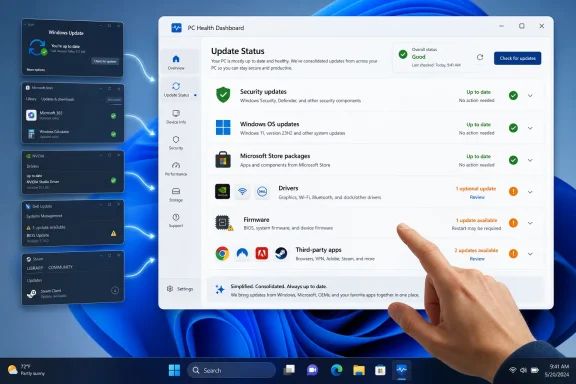
The easy fix is not technically easy in the sense of a weekend project. It is easy in the product sense: stop making users hunt. Windows needs one update dashboard that clearly separates security urgency, OS servicing, Store packages, drivers, firmware, and third-party applications while letting each channel retain the update mechanism it needs.Call it Windows Update, because that is already the brand users recognize. Under the hood, it can call the Microsoft Store, Windows Package Manager, OEM update services, driver metadata, and vendor tools. The point is not to centralize every binary on Microsoft’s servers. The point is to centralize the user’s understanding.
A credible dashboard would not blindly install everything. It would rank updates by risk and relevance. Security updates would be flagged differently from feature updates. Firmware would receive stronger warnings and power-state checks. GPU drivers could be marked as vendor-delivered. Store components that affect Windows features would be grouped under system apps rather than treated like casual downloads.
This is the kind of problem AI is often advertised as solving, but it does not require magic. It requires metadata, policy, vendor cooperation, and interface discipline. Windows already collects enough information to make a better first pass. Microsoft already has relationships with OEMs and driver vendors. The missing piece is the willingness to admit that the current model is incoherent for non-experts.
The dashboard should also give administrators policy control. Enterprises do not want every user installing every driver on day one. Schools and small businesses may want Microsoft Store apps updated automatically but firmware staged carefully. Security-sensitive environments may want fast browser and PDF reader updates while holding back optional Windows previews. A single dashboard does not have to mean a single policy.
Done well, this would reduce support costs. Users would stop confusing Store app staleness with Windows bugs. OEMs would get fewer mystery complaints about devices running old firmware. Microsoft would have a cleaner place to explain why a preview update is optional and why a security update is not. The whole ecosystem would become less dependent on folklore.
Power Users Already Built the Ritual Microsoft Should Productize
Enthusiasts have long compensated for Windows’ fragmentation with ritual. They check Windows Update. They open the Store and hit “Get updates.” They run the GPU vendor app. They launch the OEM utility. They update the browser. They open Creative Cloud, Steam, or their IDE’s toolbox. Some run winget upgrade. Some keep a folder of vendor utilities like a mechanic’s drawer of specialty tools.That workflow works because power users know the map. It fails because the map is invisible to everyone else.
There is also an uncomfortable class divide in Windows maintenance. The people most likely to know about driver channels, Store queues, firmware updates, and package managers are the people least likely to need hand-holding. The people most likely to assume Windows Update handles everything are the ones most exposed to stale components, abandoned utilities, and confusing repair advice.
This divide matters because PCs are not just gaming rigs and developer workstations. They are tax machines, school machines, health care portals, small business registers, family photo archives, job application terminals, and remote work endpoints. A neglected update chain is not merely a hobbyist inconvenience. It is a weak link in everyday digital life.
The PC’s great virtue is that it lets hardware and software vendors innovate without waiting for a single gatekeeper. The PC’s great vice is that it then asks users to become systems integrators. Microsoft cannot abolish that tension. But it can stop pretending that the Settings app plus the Store plus vendor utilities plus random update agents amount to a coherent experience.
A Windows PC Should Be Honest About Its Own Condition
Near the close of this argument, the practical advice is still worth stating plainly: today’s Windows users need a maintenance habit, because Microsoft has not yet built the product that would make that habit unnecessary. The habit does not need to be obsessive, but it does need to acknowledge that “Windows is up to date” is not the same as “the PC is up to date.”- Windows Update should be checked regularly, and optional driver updates are worth reviewing when hardware behaves strangely or performance changes after an update.
- Microsoft Store updates matter more than many users realize, because Store-delivered packages can include inbox apps and Windows-adjacent components rather than only downloadable consumer apps.
- GPU drivers should usually come from AMD, Nvidia, or Intel’s own software when performance, game compatibility, creator workloads, or advanced graphics features matter.
- OEM utilities remain important on laptops and prebuilt desktops because BIOS, firmware, thermal, battery, dock, and device-specific updates may never appear as ordinary Windows updates.
- Browsers, PDF tools, password managers, VPN clients, creative suites, game launchers, and communication apps deserve regular attention because they are common places where real-world attacks meet everyday files and links.
- Preview Windows updates should be treated differently from security updates, because they may be useful but can also introduce behavior changes before they become part of the regular servicing stream.
References
- Primary source: Pocket-lint
Published: 2026-07-03T00:00:12.037008
No one updates their Windows PC correctly - and I know an easy way to fix that
Windows Update should only be the beginning of your update routine. www.pocket-lint.com
- Related coverage: windowscentral.com
Windows 11 just took its first major step toward version 26H2, and Insiders can already test 9 features shaping Microsoft’s next big update | Windows Central
Windows 11 Insider builds close out June with the first 26H2 changes, a redesigned Privacy settings page, and more desktop customization.www.windowscentral.com - Official source: support.microsoft.com
Automatically get recommended and updated hardware drivers | Microsoft Support
Use Windows Update to automatically get updated and recommended drivers for hardware devices on a Windows device.support.microsoft.com - Official source: learn.microsoft.com
Checkpoint cumulative updates and the Microsoft Update Catalog | Microsoft Learn
This article describes how to handle checkpoint cumulative updates when you use the Microsoft Update Catalog to update devices and images.learn.microsoft.com - Related coverage: howtogeek.com
How to Update Apps on Windows 11
Use Microsoft Store, your app's built-in update option, or a command in Command Prompt. www.howtogeek.com
- Related coverage: techradar.com
Windows 11 now forcibly updates apps from the Microsoft Store – and not everyone is happy | TechRadar
A case of better security overriding choicewww.techradar.com
- Related coverage: allthings.how
How to Update Apps on Windows 11
You can update apps and games downloaded from the Microsoft Store automatically and manually on Windows 11 with these simple instructions.allthings.how - Related coverage: tomshardware.com
Microsoft issues emergency update for Windows 11 — fixes broken March preview update rollout from last week | Tom's Hardware
Out-of-band patch addresses installation failures.www.tomshardware.com - Related coverage: storcpdkenticomedia.blob.core.windows.net