

Microsoft has confirmed in May 2026 that Windows Update can replace manually installed Windows 11 graphics drivers with older OEM-published versions, and the company says a narrower driver-targeting policy will run as a pilot from April through September 2026 before broader enforcement in late 2026 or early 2027. The admission matters because it turns a long-running user complaint into a documented platform behavior. Windows is not merely “helping” with drivers; in some cases it is overruling the user’s chosen graphics stack. The fix Microsoft is proposing is sensible, but it also exposes how much of the Windows driver experience still depends on invisible ranking rules that ordinary users never asked to manage.
For years, Windows users have described the same maddening loop: install a new Intel, AMD, or Nvidia graphics driver, reboot into a working system, and later discover that Windows Update has silently put an older driver back. Sometimes the only visible symptom is a missing control panel or vendor utility. Sometimes it is worse: lower performance, broken GPU features, odd display behavior, or an OEM driver that was never intended to replace the one the user had deliberately installed.
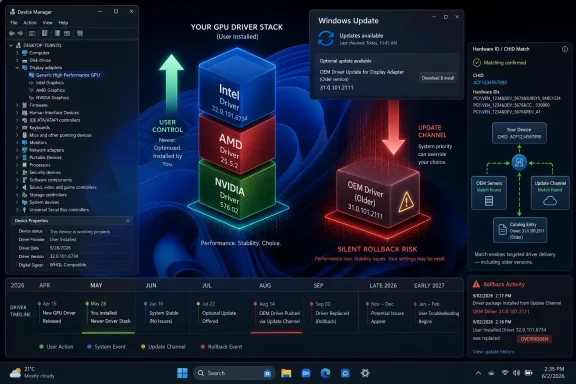
Microsoft’s new policy note does not frame this as a dramatic bug, but the meaning is hard to miss. The company acknowledges that display drivers published through Windows Update have used broad hardware targeting, and that this can establish a “highest ranked” driver on Windows Update even for machines where a customer has installed a preferred driver version. In plain English, Windows can decide that the driver in its channel is the best match, even when the user has installed something newer.
That distinction is the whole story. The problem is not simply that Windows Update has old drivers. It is that Windows Update has an authority model in which driver ranking can beat driver recency, vendor utilities, and user intent. A graphics driver chosen through Intel Driver & Support Assistant, AMD Software: Adrenalin Edition, or Nvidia’s installer may be treated as less relevant than a package distributed through Microsoft’s plumbing.
This is the kind of Windows problem that looks small until it lands on your desk. A gamer sees a performance regression. A creator loses a codec path or GPU acceleration behavior. A sysadmin gets a ticket after a fleet update changes display behavior across machines that were thought to be stable. The driver changed, the user did not ask for it, and the explanation is buried in the mechanics of hardware IDs.
Windows driver selection is not that simple. Microsoft’s support language has long emphasized that driver dates and version numbers can be misleading because providers choose their own schemes. Windows Update relies on targeting data and ranking logic to decide what driver is appropriate for a device. In many cases, that abstraction is defensible: the “newest” driver is not always the right one for a specific laptop panel, dock, firmware combination, or power-management design.
The trouble is that graphics drivers are no longer just small compatibility shims. They are large, fast-moving software stacks with control apps, game profiles, AI features, media engines, display pipelines, and vendor-specific configuration layers. Treating them like ordinary device plumbing ignores how users actually experience them.
A 2024-era driver pushed in 2026 may be perfectly valid for a particular OEM image. It may have passed certification. It may include customizations for a laptop model. But if Windows applies it to a system where the user has intentionally installed a newer driver from the chipmaker, the result feels less like maintenance and more like a rollback.
That is why the user anger has persisted. Microsoft can explain that the driver is “best ranked,” but the user sees a newer working driver replaced with an older one. Both statements can be true, and that is precisely the problem.
Hardware IDs are supposed to describe devices precisely enough for Windows to match the right driver to the right hardware. In practice, the PC ecosystem is a sprawling matrix of GPUs, laptop designs, firmware revisions, display panels, thermal envelopes, docks, detachable keyboards, and vendor utilities. A single GPU can appear in machines whose real-world requirements differ substantially.
Microsoft’s answer is to allow display drivers for new devices to use two-part hardware IDs combined with Computer Hardware IDs, or CHIDs, where appropriate. CHIDs describe the computer model or hardware configuration, giving Windows Update a way to scope a driver more tightly to the systems it was meant to serve. That is not glamorous, but it is exactly the sort of plumbing fix Windows needs.
The important shift is philosophical. Microsoft is not saying Windows Update should stop distributing graphics drivers. It is saying the targeting needs to become narrower so that OEM intent does not spill over into user-managed driver environments. That is a meaningful concession, because it admits that the old matching model was too blunt for modern graphics stacks.
The result should be fewer cases where a driver meant for one system population lands on another machine simply because the broad hardware match looks good enough. For users who have been fighting Windows Update after every GPU install, that is progress. But it is progress with a large asterisk.
That last clause is where expectations need to be managed. This is not a universal retroactive repair for every Windows 11 PC that has ever had an AMD or Intel driver replaced. Existing drivers using the older targeting model can continue to function as they do today. Existing device histories may remain outside the cleaner enforcement path.
That makes the policy less of a patch and more of a traffic redesign. Microsoft is trying to stop future wrong turns by changing the road markings for new driver submissions. It is not towing every car that is already in the wrong lane.
For OEMs and independent hardware vendors, the new model adds responsibility. If a graphics vendor publishes on behalf of an OEM, the OEM still needs to provide and approve the right CHIDs. The targeting gets better only if the data behind it is accurate. Bad metadata remains bad metadata, even in a more precise system.
For users, the message is less comforting than the headline might imply. Windows Update downgrades should become less common over time on newer systems, but the long tail of existing PCs and already-published driver packages may continue to behave unpredictably. The people most likely to notice the problem — enthusiasts, gamers, developers, and admins managing mixed hardware — are also the people least likely to accept “wait for the ecosystem to age out” as a satisfying answer.
That is the best argument for Windows Update’s current authority. It protects ordinary users from having to understand the difference between a GPU vendor driver, an OEM-customized driver, a Microsoft-supplied class driver, and a package sitting in the Windows Update Catalog. Most people do not want to manage this. They want the screen to turn on, the battery to last, and the system not to crash.
But the same model becomes hostile when applied to users who have made a deliberate choice. If someone downloads a graphics driver from Intel, AMD, or Nvidia and installs it manually, that is a strong signal of intent. If the system later overwrites that driver without a clear prompt, Windows has not simplified the experience; it has contradicted it.
This is where Microsoft’s “customer choice” language collides with Windows’ operational reality. Windows 11 gives users a polished Settings app, a modern Store, and increasingly sophisticated update messaging. Yet the driver pipeline can still make a consequential change in the background with little explanation beyond an entry in update history.
The proper balance is not obvious. A blanket “never replace user-installed drivers” rule could leave some systems unstable or insecure. A blanket “Windows Update knows best” rule creates exactly the downgrade problem Microsoft is now trying to reduce. What Windows needs is a memory of user intent that is stronger than today’s hidden ranking system.
In managed environments, graphics drivers can affect conferencing reliability, multi-monitor setups, hardware acceleration in browsers, CAD tools, creative suites, remote display protocols, and endpoint stability. A driver rollback can produce symptoms that look like application bugs. By the time the help desk identifies the driver as the root cause, the update may already have propagated across a device group.
Microsoft has better enterprise tooling than it once did. Windows Update for Business, Intune, Autopatch, and driver approval controls give organizations more ways to stage, defer, or approve driver and firmware updates. But those controls require maturity. Many small and midsize organizations live in the gap between consumer Windows automation and fully governed enterprise update rings.
For those shops, the driver downgrade issue is a reminder that “automatic” does not mean “risk-free.” The Windows update stack optimizes for broad compatibility, security, and vendor delivery at population scale. IT departments optimize for known-good configurations, predictable change windows, and the ability to explain what happened when something breaks.
The new CHID-based targeting policy should reduce accidental spread, but it does not remove the need for driver governance. Administrators who care about display stability should still treat GPU drivers as change-controlled components, not incidental updates. If Microsoft’s own policy change tells us anything, it is that driver targeting is powerful enough to deserve scrutiny.
Microsoft has been moving toward clearer driver titles in Windows Update, including publisher names and provider-supplied version numbers. That helps, but it does not solve the central problem. A better label on a surprise replacement is still a surprise replacement.
Windows should be more explicit when it is about to replace a user-installed graphics driver with a Windows Update package that appears older by vendor version. It does not need to drown normal users in INF ranking details. It could simply say that the OEM has published a driver targeted to this hardware and that installing it may replace the currently installed graphics package.
That kind of prompt would annoy Microsoft’s automation purists, but it would respect the difference between passive maintenance and active reversal. The user who never touches drivers can stay on autopilot. The user who deliberately installed a vendor driver gets a chance to keep it.
There is precedent for this kind of distinction throughout Windows. Optional updates, feature update holds, driver rollback, and device installation settings all recognize that not every update decision belongs on the same rail. Graphics drivers deserve that treatment because they are too visible and too consequential to be treated like invisible plumbing.
From that vantage point, allowing users to pin arbitrary graphics drivers forever is not a clean answer. A newer driver is not automatically safer. A vendor installer may include components that fall outside the neat model of Windows Update servicing. A driver that improves performance in one workload could introduce a stability or security regression elsewhere.
That is why Microsoft cannot simply abandon the driver business, however much some enthusiasts might like it to. Windows Update is part of the operating system’s trust and recovery model. It gives Microsoft and hardware partners a way to distribute fixes at scale when something is broken or dangerous.
But security does not justify every override. If Windows needs to replace a user-selected driver for security reasons, it should say so. If the replacement is compatibility-driven, it should say that. If the driver is merely a broadly targeted OEM package that ranks higher, the system should be humble enough not to pretend that is the same as a security imperative.
The best Windows experience would separate these cases. Security blocks should be firm and transparent. Compatibility recommendations should be clear and reversible. Routine OEM driver offers should not silently undo a user’s deliberate graphics stack unless the targeting is precise and the reason is defensible.
But every silent misfire taxes trust. A bad printer driver, a broken audio update, a BIOS surprise, or a graphics downgrade teaches users to fear the mechanism that is supposed to protect them. That is bad for Microsoft because a distrusted update system invites workarounds, registry hacks, third-party blockers, metered-connection tricks, and blanket update deferrals.
The graphics driver downgrade problem is especially damaging because it hits the users who are most likely to notice and explain it to everyone else. Enthusiasts may be a minority, but they are the family IT department, the office troubleshooter, the Reddit poster, the forum regular, and the person who tells a neighbor whether Windows 11 is “safe” to update. When their systems get rolled back without consent, the story travels.
Microsoft’s policy change is therefore not just an engineering tweak. It is a reputational repair. By admitting that broad targeting can cause unwanted downgrades, Microsoft gives users a concrete reason to believe the company has heard them. By limiting the fix mostly to new submissions and new devices, it also gives those same users a reason to remain skeptical.
Windows Update succeeds when it is boring. Graphics driver downgrades are not boring. They are visible, measurable, and emotionally annoying because they tell the user that the machine’s owner is not quite in charge.
Still, the policy leaves unanswered questions. How aggressively will Microsoft enforce the new model once the pilot ends? How many OEMs and graphics vendors will clean up their publishing practices quickly? How will Windows communicate cases where an old-style driver still supersedes a user-installed package?
The answer may be messy because the PC ecosystem is messy. Microsoft does not control every driver’s versioning scheme, every OEM’s support practice, or every graphics vendor’s release cadence. A gaming laptop bought in 2024, a business ultrabook deployed in 2025, and a workstation assembled from retail parts may all hit different branches of the driver pipeline.
That complexity is real. But complexity is not a license for silence. If Windows can determine that a Windows Update driver outranks the one installed on a device, it can also expose enough of that decision to help a user or administrator understand the change.
The next step should be a user-facing policy surface for display drivers specifically. Not a maze of legacy Control Panel toggles and Group Policy fragments, but a clear setting: keep OEM-recommended graphics drivers, prefer vendor-installed graphics drivers, or require approval before replacing a display driver with an older version. Power users would find it immediately. Everyone else could ignore it.
The safest approach is to know what driver you are running before and after major updates. GPU vendor tools, Device Manager, update history, and vendor release notes can help identify when a driver has changed. If a control app suddenly disappears or performance shifts after Windows Update, the graphics driver should be near the top of the suspect list.
Admins should go further. Driver and firmware updates should be tested in rings, especially on hardware models used for graphics-heavy work, docking, hybrid meetings, or specialized applications. If display stability matters, do not let driver updates arrive as an unexamined side effect of routine patching.
Microsoft’s change should gradually make these incidents less common on newer hardware, but it will not eliminate the need for awareness. The company is narrowing the pipe. It is not turning off the water.
Source: Windows Latest Microsoft admits Windows 11 has been downgrading graphics drivers, reveals when a fix is coming
 Microsoft Finally Says the Quiet Part Out Loud
For years, Windows users have described the same maddening loop: install a new Intel, AMD, or Nvidia graphics driver, reboot into a working system, and later discover that Windows Update has silently put an older driver back. Sometimes the only visible symptom is a missing control panel or vendor utility. Sometimes it is worse: lower performance, broken GPU features, odd display behavior, or an OEM driver that was never intended to replace the one the user had deliberately installed.Microsoft’s new policy note does not frame this as a dramatic bug, but the meaning is hard to miss. The company acknowledges that display drivers published through Windows Update have used broad hardware targeting, and that this can establish a “highest ranked” driver on Windows Update even for machines where a customer has installed a preferred driver version. In plain English, Windows can decide that the driver in its channel is the best match, even when the user has installed something newer.
That distinction is the whole story. The problem is not simply that Windows Update has old drivers. It is that Windows Update has an authority model in which driver ranking can beat driver recency, vendor utilities, and user intent. A graphics driver chosen through Intel Driver & Support Assistant, AMD Software: Adrenalin Edition, or Nvidia’s installer may be treated as less relevant than a package distributed through Microsoft’s plumbing.
This is the kind of Windows problem that looks small until it lands on your desk. A gamer sees a performance regression. A creator loses a codec path or GPU acceleration behavior. A sysadmin gets a ticket after a fleet update changes display behavior across machines that were thought to be stable. The driver changed, the user did not ask for it, and the explanation is buried in the mechanics of hardware IDs.
The Driver Version Number Was Never the Judge
The intuitive assumption is that Windows Update should compare versions and keep the newer graphics driver. That is what a normal person expects from an update system. Newer should beat older unless the newer package is known bad, blocked, or incompatible.Windows driver selection is not that simple. Microsoft’s support language has long emphasized that driver dates and version numbers can be misleading because providers choose their own schemes. Windows Update relies on targeting data and ranking logic to decide what driver is appropriate for a device. In many cases, that abstraction is defensible: the “newest” driver is not always the right one for a specific laptop panel, dock, firmware combination, or power-management design.
The trouble is that graphics drivers are no longer just small compatibility shims. They are large, fast-moving software stacks with control apps, game profiles, AI features, media engines, display pipelines, and vendor-specific configuration layers. Treating them like ordinary device plumbing ignores how users actually experience them.
A 2024-era driver pushed in 2026 may be perfectly valid for a particular OEM image. It may have passed certification. It may include customizations for a laptop model. But if Windows applies it to a system where the user has intentionally installed a newer driver from the chipmaker, the result feels less like maintenance and more like a rollback.
That is why the user anger has persisted. Microsoft can explain that the driver is “best ranked,” but the user sees a newer working driver replaced with an older one. Both statements can be true, and that is precisely the problem.
Broad Targeting Made Sense Until It Didn’t
The technical core of Microsoft’s change is the move away from relying on broad four-part hardware ID targeting for certain new display driver submissions. Today’s problematic behavior stems from the way display drivers published to Windows Update can match a device class broadly enough that Windows Update treats an OEM-approved package as applicable across systems that do not need it.Hardware IDs are supposed to describe devices precisely enough for Windows to match the right driver to the right hardware. In practice, the PC ecosystem is a sprawling matrix of GPUs, laptop designs, firmware revisions, display panels, thermal envelopes, docks, detachable keyboards, and vendor utilities. A single GPU can appear in machines whose real-world requirements differ substantially.
Microsoft’s answer is to allow display drivers for new devices to use two-part hardware IDs combined with Computer Hardware IDs, or CHIDs, where appropriate. CHIDs describe the computer model or hardware configuration, giving Windows Update a way to scope a driver more tightly to the systems it was meant to serve. That is not glamorous, but it is exactly the sort of plumbing fix Windows needs.
The important shift is philosophical. Microsoft is not saying Windows Update should stop distributing graphics drivers. It is saying the targeting needs to become narrower so that OEM intent does not spill over into user-managed driver environments. That is a meaningful concession, because it admits that the old matching model was too blunt for modern graphics stacks.
The result should be fewer cases where a driver meant for one system population lands on another machine simply because the broad hardware match looks good enough. For users who have been fighting Windows Update after every GPU install, that is progress. But it is progress with a large asterisk.
The Fix Arrives First for Machines That Have Not Yet Been Burned
Microsoft’s timeline is careful and limited. The pilot runs from April 2026 through September 2026. General availability enforcement is planned for the fourth quarter of 2026 through the first quarter of 2027. The change applies to new display driver submissions targeting new devices, particularly devices that have not already had a four-part hardware ID Windows Update driver installed.That last clause is where expectations need to be managed. This is not a universal retroactive repair for every Windows 11 PC that has ever had an AMD or Intel driver replaced. Existing drivers using the older targeting model can continue to function as they do today. Existing device histories may remain outside the cleaner enforcement path.
That makes the policy less of a patch and more of a traffic redesign. Microsoft is trying to stop future wrong turns by changing the road markings for new driver submissions. It is not towing every car that is already in the wrong lane.
For OEMs and independent hardware vendors, the new model adds responsibility. If a graphics vendor publishes on behalf of an OEM, the OEM still needs to provide and approve the right CHIDs. The targeting gets better only if the data behind it is accurate. Bad metadata remains bad metadata, even in a more precise system.
For users, the message is less comforting than the headline might imply. Windows Update downgrades should become less common over time on newer systems, but the long tail of existing PCs and already-published driver packages may continue to behave unpredictably. The people most likely to notice the problem — enthusiasts, gamers, developers, and admins managing mixed hardware — are also the people least likely to accept “wait for the ecosystem to age out” as a satisfying answer.
OEM Control Still Beats User Control More Often Than Microsoft Admits
Microsoft’s driver model is built on a defensible premise: the OEM knows the machine it shipped. Laptop makers tune graphics packages for power, sleep, display switching, thermals, hybrid graphics, and sometimes vendor-specific features that a generic chipmaker driver may not fully respect. A clean Windows install with no OEM driver path can be a worse experience for a mainstream customer.That is the best argument for Windows Update’s current authority. It protects ordinary users from having to understand the difference between a GPU vendor driver, an OEM-customized driver, a Microsoft-supplied class driver, and a package sitting in the Windows Update Catalog. Most people do not want to manage this. They want the screen to turn on, the battery to last, and the system not to crash.
But the same model becomes hostile when applied to users who have made a deliberate choice. If someone downloads a graphics driver from Intel, AMD, or Nvidia and installs it manually, that is a strong signal of intent. If the system later overwrites that driver without a clear prompt, Windows has not simplified the experience; it has contradicted it.
This is where Microsoft’s “customer choice” language collides with Windows’ operational reality. Windows 11 gives users a polished Settings app, a modern Store, and increasingly sophisticated update messaging. Yet the driver pipeline can still make a consequential change in the background with little explanation beyond an entry in update history.
The proper balance is not obvious. A blanket “never replace user-installed drivers” rule could leave some systems unstable or insecure. A blanket “Windows Update knows best” rule creates exactly the downgrade problem Microsoft is now trying to reduce. What Windows needs is a memory of user intent that is stronger than today’s hidden ranking system.
Enterprise IT Sees a Governance Problem, Not a Gaming Annoyance
It is tempting to treat this as a consumer graphics annoyance: AMD Adrenalin breaks, Intel’s newer graphics app disappears, Nvidia settings get weird, and enthusiasts complain on forums. That view is too narrow. Driver churn is a governance problem for enterprise IT.In managed environments, graphics drivers can affect conferencing reliability, multi-monitor setups, hardware acceleration in browsers, CAD tools, creative suites, remote display protocols, and endpoint stability. A driver rollback can produce symptoms that look like application bugs. By the time the help desk identifies the driver as the root cause, the update may already have propagated across a device group.
Microsoft has better enterprise tooling than it once did. Windows Update for Business, Intune, Autopatch, and driver approval controls give organizations more ways to stage, defer, or approve driver and firmware updates. But those controls require maturity. Many small and midsize organizations live in the gap between consumer Windows automation and fully governed enterprise update rings.
For those shops, the driver downgrade issue is a reminder that “automatic” does not mean “risk-free.” The Windows update stack optimizes for broad compatibility, security, and vendor delivery at population scale. IT departments optimize for known-good configurations, predictable change windows, and the ability to explain what happened when something breaks.
The new CHID-based targeting policy should reduce accidental spread, but it does not remove the need for driver governance. Administrators who care about display stability should still treat GPU drivers as change-controlled components, not incidental updates. If Microsoft’s own policy change tells us anything, it is that driver targeting is powerful enough to deserve scrutiny.
The Transparency Gap Is the Part Users Actually Feel
The downgrade itself is frustrating. The opacity is what makes it feel insulting. A user can understand a warning that says, “Your OEM recommends this older driver for this device.” A user can accept an optional driver listed with a clear version, publisher, and reason. What users resent is discovering after the fact that Windows made the decision for them.Microsoft has been moving toward clearer driver titles in Windows Update, including publisher names and provider-supplied version numbers. That helps, but it does not solve the central problem. A better label on a surprise replacement is still a surprise replacement.
Windows should be more explicit when it is about to replace a user-installed graphics driver with a Windows Update package that appears older by vendor version. It does not need to drown normal users in INF ranking details. It could simply say that the OEM has published a driver targeted to this hardware and that installing it may replace the currently installed graphics package.
That kind of prompt would annoy Microsoft’s automation purists, but it would respect the difference between passive maintenance and active reversal. The user who never touches drivers can stay on autopilot. The user who deliberately installed a vendor driver gets a chance to keep it.
There is precedent for this kind of distinction throughout Windows. Optional updates, feature update holds, driver rollback, and device installation settings all recognize that not every update decision belongs on the same rail. Graphics drivers deserve that treatment because they are too visible and too consequential to be treated like invisible plumbing.
Security Is the Complication Microsoft Cannot Ignore
Any argument for more user control has to confront the security side of driver distribution. Drivers run at privileged levels, and vulnerable or malicious drivers are a recurring Windows security problem. Microsoft has been tightening driver-blocking policies, enforcing vulnerable driver protections more aggressively, and pushing the ecosystem toward safer defaults.From that vantage point, allowing users to pin arbitrary graphics drivers forever is not a clean answer. A newer driver is not automatically safer. A vendor installer may include components that fall outside the neat model of Windows Update servicing. A driver that improves performance in one workload could introduce a stability or security regression elsewhere.
That is why Microsoft cannot simply abandon the driver business, however much some enthusiasts might like it to. Windows Update is part of the operating system’s trust and recovery model. It gives Microsoft and hardware partners a way to distribute fixes at scale when something is broken or dangerous.
But security does not justify every override. If Windows needs to replace a user-selected driver for security reasons, it should say so. If the replacement is compatibility-driven, it should say that. If the driver is merely a broadly targeted OEM package that ranks higher, the system should be humble enough not to pretend that is the same as a security imperative.
The best Windows experience would separate these cases. Security blocks should be firm and transparent. Compatibility recommendations should be clear and reversible. Routine OEM driver offers should not silently undo a user’s deliberate graphics stack unless the targeting is precise and the reason is defensible.
This Is Also a Trust Story About Windows Update
Windows Update has spent two decades acquiring more power over the PC. It installs monthly security fixes, feature enablement packages, firmware, drivers, Microsoft Store dependencies, Defender intelligence, and sometimes recovery logic. The trade-off has generally been worth it: modern Windows systems are easier to keep patched than the chaotic machines of the Windows XP era.But every silent misfire taxes trust. A bad printer driver, a broken audio update, a BIOS surprise, or a graphics downgrade teaches users to fear the mechanism that is supposed to protect them. That is bad for Microsoft because a distrusted update system invites workarounds, registry hacks, third-party blockers, metered-connection tricks, and blanket update deferrals.
The graphics driver downgrade problem is especially damaging because it hits the users who are most likely to notice and explain it to everyone else. Enthusiasts may be a minority, but they are the family IT department, the office troubleshooter, the Reddit poster, the forum regular, and the person who tells a neighbor whether Windows 11 is “safe” to update. When their systems get rolled back without consent, the story travels.
Microsoft’s policy change is therefore not just an engineering tweak. It is a reputational repair. By admitting that broad targeting can cause unwanted downgrades, Microsoft gives users a concrete reason to believe the company has heard them. By limiting the fix mostly to new submissions and new devices, it also gives those same users a reason to remain skeptical.
Windows Update succeeds when it is boring. Graphics driver downgrades are not boring. They are visible, measurable, and emotionally annoying because they tell the user that the machine’s owner is not quite in charge.
The New Rule Helps, but the Old Windows Habit Remains
Microsoft’s 2-part hardware ID plus CHID approach is the right kind of fix because it attacks the matching problem at the distribution layer. Instead of relying on users to hide updates or reinstall drivers after the damage is done, it should reduce the number of systems that receive the wrong display package in the first place. That is more durable than another troubleshooting article.Still, the policy leaves unanswered questions. How aggressively will Microsoft enforce the new model once the pilot ends? How many OEMs and graphics vendors will clean up their publishing practices quickly? How will Windows communicate cases where an old-style driver still supersedes a user-installed package?
The answer may be messy because the PC ecosystem is messy. Microsoft does not control every driver’s versioning scheme, every OEM’s support practice, or every graphics vendor’s release cadence. A gaming laptop bought in 2024, a business ultrabook deployed in 2025, and a workstation assembled from retail parts may all hit different branches of the driver pipeline.
That complexity is real. But complexity is not a license for silence. If Windows can determine that a Windows Update driver outranks the one installed on a device, it can also expose enough of that decision to help a user or administrator understand the change.
The next step should be a user-facing policy surface for display drivers specifically. Not a maze of legacy Control Panel toggles and Group Policy fragments, but a clear setting: keep OEM-recommended graphics drivers, prefer vendor-installed graphics drivers, or require approval before replacing a display driver with an older version. Power users would find it immediately. Everyone else could ignore it.
The Practical Lesson for Windows Users Is Caution, Not Panic
For now, the practical advice is less dramatic than the forum threads make it sound. Windows Update is not maliciously hunting down every new GPU driver. Many systems will never experience the downgrade loop. But users who manually manage graphics drivers should assume Windows Update can still interfere, especially on existing devices and with already-published OEM packages.The safest approach is to know what driver you are running before and after major updates. GPU vendor tools, Device Manager, update history, and vendor release notes can help identify when a driver has changed. If a control app suddenly disappears or performance shifts after Windows Update, the graphics driver should be near the top of the suspect list.
Admins should go further. Driver and firmware updates should be tested in rings, especially on hardware models used for graphics-heavy work, docking, hybrid meetings, or specialized applications. If display stability matters, do not let driver updates arrive as an unexamined side effect of routine patching.
Microsoft’s change should gradually make these incidents less common on newer hardware, but it will not eliminate the need for awareness. The company is narrowing the pipe. It is not turning off the water.
The Driver Downgrade Era Starts to Sunset Slowly
Microsoft’s admission gives Windows users something they have not had before: a clear explanation of why manually installed graphics drivers can lose to older Windows Update packages, and a timeline for reducing the behavior on future devices. The change is technical, incremental, and narrower than many users would like, but it is still a meaningful correction.- Microsoft has acknowledged that broad Windows Update display-driver targeting can cause unwanted downgrades for users who manually install preferred GPU drivers.
- The planned policy allows new display driver submissions for new devices to use 2-part hardware IDs combined with CHIDs for narrower targeting.
- The pilot period runs from April 2026 through September 2026, with broader enforcement planned for late 2026 into early 2027.
- Existing drivers and devices with older targeting histories may continue to behave as they do today.
- Users who manage their own graphics drivers should keep checking driver versions after Windows updates until the new model becomes common.
- IT departments should treat graphics drivers as governed change items, not harmless background updates.
Source: Windows Latest Microsoft admits Windows 11 has been downgrading graphics drivers, reveals when a fix is coming
