

The story of Windows Vista is not a simple tale of failure; it is a study in ambition, timing, and the costs of platform transition — an OS that reset Windows’ security and graphics foundations while tripping over hardware realities and marketing missteps at launch.
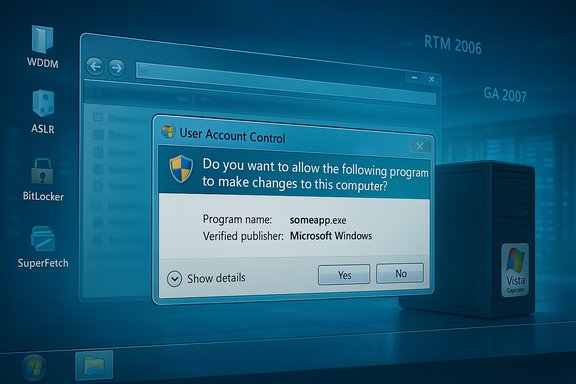
Windows Vista reached its first major milestone when Microsoft declared the code ready and released it to manufacturers on November 8, 2006. The consumer launch followed on January 30, 2007, after a long public beta and OEM ramp. Those two dates — RTM in November 2006 and GA at the end of January 2007 — matter because they bracket the period in which the platform’s technical decisions met real-world hardware and third‑party ecosystems. Vista was not a cosmetic update of Windows XP. It introduced a new driver model, a GPU‑composed desktop, built‑in system security primitives, and a set of services intended to exploit then-modern hardware. Many of those changes are still with us — in refined form — across later releases of Windows. At the same time, Vista’s initial rollout exposed friction points: higher‑end hardware expectations, noisy security prompts, and uneven third‑party support. Those launch problems hardened public perception quickly, creating a reputation that subsequent service packs and Windows 7 would later soften but never fully erase.
Windows 7’s success illustrates the remedy: keep the architectural investments, tune defaults to reduce friction, and ensure the ecosystem (drivers, OEM images, marketing) aligns with the platform’s actual minimum and recommended experience. In many ways, Windows 7 was a more cautious, better‑packaged incarnation of Vista’s ambitions — a reminder that product maturity is as much about messaging, ecosystem coordination, and defaults as it is about raw technical capability.
Vista’s legacy is built into modern Windows: not as the polished product many wanted on Day 1, but as the platform that enabled later polish and security hardening. The public memory remembers the pain; the technical record remembers the foundation. Both are true.
Source: MakeUseOf Windows Vista wasn’t the disaster we all remember it as
 Background
Windows Vista reached its first major milestone when Microsoft declared the code ready and released it to manufacturers on November 8, 2006. The consumer launch followed on January 30, 2007, after a long public beta and OEM ramp. Those two dates — RTM in November 2006 and GA at the end of January 2007 — matter because they bracket the period in which the platform’s technical decisions met real-world hardware and third‑party ecosystems. Vista was not a cosmetic update of Windows XP. It introduced a new driver model, a GPU‑composed desktop, built‑in system security primitives, and a set of services intended to exploit then-modern hardware. Many of those changes are still with us — in refined form — across later releases of Windows. At the same time, Vista’s initial rollout exposed friction points: higher‑end hardware expectations, noisy security prompts, and uneven third‑party support. Those launch problems hardened public perception quickly, creating a reputation that subsequent service packs and Windows 7 would later soften but never fully erase.What Vista changed — technical overview
A new graphics and driver stack: WDDM and Aero
One of Vista’s most visible and technically consequential moves was to shift the desktop to the GPU and introduce the Windows Display Driver Model (WDDM). This new driver architecture enabled compositing, protected video memory, and features such as Aero Glass. WDDM 1.0 debuted with Vista and remains the basis for later driver models, evolving in capability but not in fundamental intent. Aero itself required more than a cosmetic upgrade: Microsoft defined tiers of hardware readiness. The minimal “Vista Capable” baseline and the more demanding “Premium Ready/Aero” baseline had distinct requirements — 800 MHz/512 MB for the bare minimum, and roughly 1 GHz/1 GB RAM plus a DirectX‑9 class GPU with WDDM and Pixel Shader 2.0 for the Aero experience. These hardware thresholds were deliberate technical trade‑offs: move the OS forward cautiously on graphics and security, and accept that older machines would not deliver the full experience.Security foundations: UAC, ASLR, service hardening, BitLocker
Vista reset Windows’ security posture. User Account Control (UAC) introduced mandatory elevation prompts for actions that required higher privileges — a structural change intended to reduce silent privilege escalation and to make the OS less hospitable to malware. UAC’s early default behavior was overzealous for many users, prompting for actions that felt routine; Microsoft refined UAC in Windows 7 to reduce prompt fatigue without abandoning the protection model. Under the hood Vista also brought address space layout randomization (ASLR) for system components, service hardening to restrict service privileges, and kernel‑level improvements that increased the cost of kernel exploits. In higher SKUs, BitLocker provided OS‑integrated disk encryption tied to TPM-based attestation — a feature that helped normalize full‑disk encryption in enterprise environments. These were foundational security advances rather than minor UI tweaks.Responsiveness and memory management: SuperFetch and ReadyBoost
Vista extended prefetching with SuperFetch, a background behavior that analyzed application usage over time and preloaded commonly used components into RAM. Paired with ReadyBoost — the ability to use USB flash storage as an extra cache — Vista aimed to make real‑world workloads feel snappier even on systems with limited RAM. The approach had visible benefits for many workloads, but it also changed how memory looked to users (higher "used" memory) and could be counterproductive with certain storage types (notably some early flash devices and, later, SSDs).Platform components and APIs: Search, XPS, device scenarios
Vista formalized the modern search UX (Win+type search became viable), shipped XML Paper Specification (XPS) and an XPS viewer, and expanded multimedia capabilities via a redesigned audio stack (WASAPI) and multimedia APIs. Many of these pieces were not flashy but proved durable: search and improved audio plumbing were operational investments that later releases built on.Why Vista’s launch looked worse than the engineering work
1) Hardware timing and the “Vista Capable” controversy
Microsoft’s hardware tiers created a truth and a marketing problem. Machines labeled “Windows Vista Capable” could indeed run a version of Vista — usually Home Basic — but many of the mainstream features (Aero, Media Center) required the higher "Premium Ready" spec. That nuance was lost in retail marketing and led to customer confusion, legal challenges, and a well‑publicized consumer backlash. The “Vista Capable” sticker program became the center of lawsuits and press scrutiny, which amplified complaints about performance on underpowered machines. The practical result: large numbers of users bought new PCs or upgraded old ones only to find that the experience they’d seen in demos required hardware they did not own. That mismatch created a wave of negative impressions that spread faster than the technical explanations could follow.2) Third‑party driver shortfalls and OEM images
WDDM and driver signing raised the bar for driver quality — a net positive — but many device vendors were slow or unwilling to deliver high‑quality drivers for older hardware. Printers, USB devices, and graphics drivers often arrived late or were buggy. The combination of a new driver model and OEM machines shipped with heavily modified recovery images (often without clean install media) made troubleshooting difficult for average users and support staff. Independent accounts from the time and community threads show that driver incompatibility was a recurring theme in user reports.3) UAC’s user experience and “permission fatigue”
UAC’s design goal — enforce least privilege in practical deployments — was correct, but the initial default verbosity created a lot of friction. Users encountered prompts while doing routine tasks, and the dialog’s security weight felt punitive. Microsoft later acknowledged the trade‑off, and Windows 7 reduced prompts by changing when and how UAC elevated. The underlying security model remained; the user experience was tuned. This evolution is an important lesson in how security defaults must be usable to be effective.What Vista did right — a retrospective of strengths
Modernized driver and graphics model that enabled future UX
By moving the desktop to a composited GPU pipeline (DWM + WDDM), Vista laid the groundwork for consistent window composition, composited effects, and per‑window GPU isolation. Those investments made subsequent, richer UI capabilities possible without fundamental rewrites. In short, Microsoft bet on a GPU‑first model that was future‑proof — the kind of platform change that is expensive in the short term but enables decades of follow‑on work.Security baseline: built-in protections that became expected
Vista normalized a set of defenses that had been optional or piecemeal under XP: UAC, Windows Defender distributed as built‑in anti‑spyware, integrated firewall improvements, DEP/ASLR integration, and (in higher editions) BitLocker. These features moved security from add‑on to baseline, changing enterprise and consumer expectations. While early UAC UX was crude, the architectural shift to richer sandboxing and mandatory elevation was a structural win.Search, imaging, and backup improvements
Vista’s system‑wide search (search from the Start menu) made finding programs and files fast and more integrated, a user productivity improvement that’s still with us. The Backup and Restore functionality gained the ability to take full system images and offered better scheduling and automation than XP’s NTBackup-era approach. Those incremental but useful changes made life easier for many users and admins.Features that signaled modern computing needs
Features like ReadyBoost, SuperFetch, and BitLocker acknowledged actual user scenarios: commodity flash as cache, apps that benefit from predictive preloading, and disk encryption in enterprise contexts. Vista anticipated a world with faster networking, larger multimedia workloads, and the need to guard data — and it shipped first rather than waiting for all hardware to catch up. That tradeoff is an architectural stance: lead with capability, accept short‑term friction.The marketing, perception, and timing problem
Technical choices rarely live or die on merit alone; they succeed or fail in a market. Vista’s engineering roadmap was bullish: restructure drivers, raise the security baseline, and modernize the desktop. But Microsoft released Vista into an ecosystem that had not fully synchronized.- OEMs shipped many low‑end systems during the 2006 holiday season with “Vista Capable” stickers that miscommunicated the real experience buyers would get. That mismatch sparked litigation and left many buyers with a bad first impression.
- Hardware and driver readiness varied by vendor; for many users the first month or two of Vista involved driver updates, missing peripherals, or awkward OEM-customized recovery flows. Community threads from the time show a steady stream of troubleshooting threads recounting exactly these issues.
- The security UX (UAC) and new permission model were technically necessary but felt interruptive — and first impressions mattered.
Deep dive: the real‑world impact on users and IT
For consumers
- Early adopters with newer hardware often saw the benefits — Aero visuals, faster search, improved media capabilities. But users on pre‑Vista PCs or budget laptops often saw a slower, less responsive machine, which created the impression of an inherently “heavy” OS. The reality was that the OS’s feature set simply demanded more capable hardware.
- The Vista Capable sticker controversy left many consumers feeling misled. The legal and PR fallout reinforced a narrative that the OS didn’t deliver what Microsoft advertised, even when the problem was inadequate hardware for the premium experience.
For IT and enterprise
- Enterprises appreciated Vista’s security investments (UAC, service hardening, BitLocker), but the migration calculus factored in application compatibility and management complexity. Many large shops deferred mass rollouts until vendors produced validated drivers and the first service pack stabilized the deployment foothold. Service Pack 1, which RTM’d on February 4, 2008 and became broadly available in March 2008, helped close many gaps.
- The new capabilities — prefetching, improved search index, native image‑based backup — made sense for managed endpoints, but only when supported by consistent hardware and disciplined deployment practices.
Strengths vs. risks — a practical checklist
Strengths (what Vista gave Windows for the future)
- Modern graphics and driver model (WDDM) enabling compositing and safer graphics drivers.
- Security as architecture: elevation model, ASLR, service hardening, BitLocker normalizing disk encryption.
- System services that improved real‑world responsiveness: SuperFetch and ReadyBoost.
- Integrated search and improved backup that raised baseline usability.
Risks and trade‑offs (what went wrong at launch)
- Hardware mismatch: default marketing and OEM practices obscured the true hardware needed for Aero and premium features; many users bought machines unable to deliver the advertised experience.
- Driver and OEM ecosystem lag: driver availability and quality were uneven, producing real compatibility problems for peripherals.
- UAC UX friction: initially too chatty, causing user annoyance and prompting a redesign in Windows 7.
How history judges Vista: lessons for platform evolution
Vista’s engineering choices were largely forward‑looking. The OS pushed Windows onto a more secure, GPU‑accelerated, and service‑oriented track — a necessary platform modernization. But platform transitions are socio‑technical problems: they require hardware vendors, software makers, OEMs, and consumers to move together. Vista’s earliest weeks and months showed what happens when that alignment is imperfect.Windows 7’s success illustrates the remedy: keep the architectural investments, tune defaults to reduce friction, and ensure the ecosystem (drivers, OEM images, marketing) aligns with the platform’s actual minimum and recommended experience. In many ways, Windows 7 was a more cautious, better‑packaged incarnation of Vista’s ambitions — a reminder that product maturity is as much about messaging, ecosystem coordination, and defaults as it is about raw technical capability.
Reassessing the “disaster” verdict
Labeling Vista as a “disaster” is an understandable shorthand for a very public product with a painful early rollout. But that glosses over the durable technical contributions Vista made:- Many of its security, graphics, and system‑management changes are the scaffolding for what came after. The architecture shipped in Vista underpinning later refinement and stability.
- The immediate user experience at launch was compromised more by timing, OEM practices, and third‑party support gaps than by purely internal engineering failings. Community logs and contemporary reporting show that hardware capability and driver readiness accounted for a disproportionate share of support cases.
Final verdict and practical implications
Windows Vista was not a product without merit; it was an ambitious platform shift that arrived before the market was fully ready. For readers deciding how to remember Vista today, two propositions are useful:- Remember Vista for the architectural investments it made — WDDM, composited desktop, UAC, ASLR, service hardening, BitLocker, SuperFetch — all of which carried forward into later, more polished releases.
- Treat the launch as a cautionary case study: major platform changes require coordinated OEM readiness, clear marketing that distinguishes minimum and premium experiences, and conservative security UX defaults to avoid alienating users. The aftermath shows how policy, messaging, and ecosystem can matter as much as code quality.
Quick verified facts (dates and specs)
- Release to manufacturing (RTM): November 8, 2006.
- General availability (consumer): January 30, 2007.
- Service Pack 1 RTM: February 4, 2008; general release (Windows Update/Download Center): March 18, 2008.
- Service Pack 2 public availability: late April–May 2009 (SP2 RTM and staggered distribution).
- Windows 7 general availability (cleanup/next‑release): October 22, 2009.
- Typical Aero-ready hardware guidance: ~1 GHz CPU, 1 GB RAM, DirectX 9 GPU with WDDM driver and Pixel Shader 2.0; Premium experience typically expected with 128 MB+ GPU memory depending on resolution. These are the recommended/published guidance Microsoft and press circulated when Vista launched.
Vista’s legacy is built into modern Windows: not as the polished product many wanted on Day 1, but as the platform that enabled later polish and security hardening. The public memory remembers the pain; the technical record remembers the foundation. Both are true.
Source: MakeUseOf Windows Vista wasn’t the disaster we all remember it as
