

Wisenet’s SmartCam N1 is a competent indoor security camera with reliable facial recognition, local microSD recording and the sort of smart-assistant compatibility buyers expect — but its $150 asking price and the removal or monetization of cloud storage leave its value proposition unexpectedly thin compared with cheaper rivals.
Wisenet’s SmartCam line began as a capable, midrange alternative to Nest-style indoor cameras: 1080p video, motion detection, two‑way audio, and companion apps. The SmartCam N1 (model SNH-P6415BN in many listings) carries forward those basics while adding a much-touted facial recognition feature and support for Alexa and Google Assistant. Historically these cameras shipped with an optional vendor cloud service; more recently, the vendor’s cloud strategy has shifted, leaving local storage and paywalled cloud options to shoulder the burden of recorded video retention.
This shift matters because the market for consumer security cameras has bifurcated: a budget tier now offers many smart features for under $100, and vendor cloud services — once a selling point — are increasingly either limited or behind subscription paywalls. The SmartCam N1 sits squarely in that tension: technically sound, but priced at a level where competing devices may give better long-term value.
Note: the precise set of subscription options and their pricing has fluctuated across regions and over time; the vendor’s cloud service availability has been reduced for several SmartCam models. Prospective buyers should verify the current cloud offering and costs for their region before relying on vendor-hosted backups.
Two practical implications:
However, the camera’s value is weakened by the shifting cloud storage landscape and its $150 price — a price now contested by cheaper options that include free cloud retention or additional hardware features. For buyers who prioritize a pay‑once, privacy-controlled setup and who value a smooth facial-recognition experience, the N1 remains a reasonable choice. For buyers seeking the best bang for the buck with included cloud retention, several alternatives merit serious consideration.
In short: the SmartCam N1 is a fine facial recognition camera — technically sound and practical — but not a slam-dunk value at its price given how many capable, less expensive rivals now populate the market.
Source: Super Nowości https://supernowosci24.pl/eeeedxshop/reviews/wisenet-smartcam-n1-review/
 Background
Wisenet’s SmartCam line began as a capable, midrange alternative to Nest-style indoor cameras: 1080p video, motion detection, two‑way audio, and companion apps. The SmartCam N1 (model SNH-P6415BN in many listings) carries forward those basics while adding a much-touted facial recognition feature and support for Alexa and Google Assistant. Historically these cameras shipped with an optional vendor cloud service; more recently, the vendor’s cloud strategy has shifted, leaving local storage and paywalled cloud options to shoulder the burden of recorded video retention.This shift matters because the market for consumer security cameras has bifurcated: a budget tier now offers many smart features for under $100, and vendor cloud services — once a selling point — are increasingly either limited or behind subscription paywalls. The SmartCam N1 sits squarely in that tension: technically sound, but priced at a level where competing devices may give better long-term value.
What the SmartCam N1 gets right
Core hardware and video
- 1080p Full HD video at 30 fps provides clear daytime footage for general monitoring and identification.
- A wide-angle lens (around 130°) covers most small to medium rooms without noticeable fish-eye distortion.
- Night vision reliably illuminates interior scenes to practical distances for entranceways and living areas.
- Two‑way audio is present and functional for live checks and short exchanges.
Facial recognition and detection
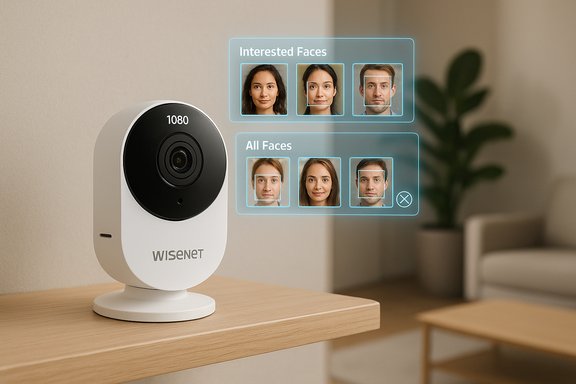
The N1’s facial recognition is the headline feature. It does the following:- Detects and extracts every face it sees, then classifies them into a user-managed “interested faces” group or an “all faces” bucket for review.
- Sends named push notifications when a face matches an entry in the interested‑faces library.
- Improves detection performance with continued use and manual confirmations.
Local storage: microSD support
A clear advantage for the N1 is a microSD card slot supporting up to 128 GB. This lets owners:- Keep event or continuous recordings locally, eliminating reliance on cloud uploads.
- Avoid monthly fees for basic on‑device recording and immediate access to footage.
- Maintain privacy boundaries by keeping video on hardware the owner controls.
Smart home compatibility and extra features
- Works with Amazon Alexa and Google Assistant for basic voice queries and streaming to displays.
- Offers motion detection zones, which reduce false alerts by focusing monitoring on meaningful areas (doorways, windows).
- Provides a web app in addition to mobile apps for remote viewing from a browser — useful for desktop monitoring and easier review workflows.
Where the SmartCam N1 falls short
Cloud storage: gone, limited or paywalled
The N1’s current cloud story is messy and must be called out. Historically the SmartCam line had vendor cloud options; more recently, the vendor has curtailed, disabled or restructured those offerings for specific models. The consequence:- Some customers who expected free or legacy cloud storage found those services unavailable or transitioned to service discontinuation policies.
- When cloud storage is offered, it is now typically behind paid subscription tiers rather than included for free.
- Exact pricing and retention tiers can vary regionally and have changed over time, which makes relying on vendor cloud terms risky unless confirmed at purchase.
Note: the precise set of subscription options and their pricing has fluctuated across regions and over time; the vendor’s cloud service availability has been reduced for several SmartCam models. Prospective buyers should verify the current cloud offering and costs for their region before relying on vendor-hosted backups.
Price vs market alternatives
At roughly $150 retail, the SmartCam N1 sits in a price band that used to be the sweet spot for fully featured indoor cameras. The market has moved: several competitors now offer comparable hardware and facial recognition features at significantly lower prices, and some include free rolling cloud storage or robust local storage without the same degree of vendor uncertainty.Two practical implications:
- If the microSD card slot is the primary requirement, the N1’s local recording capability may justify the price for privacy‑minded buyers.
- If the buyer expects included cloud storage or the lowest total cost of ownership, cheaper cameras with free cloud tiers undercut the N1’s value.
Interoperability hiccups
- Integration with Amazon Echo Show for live streams is generally straightforward, but Google Home integration has proven less reliable in some setups. Instances of Google Home returning “server response has problems” suggest server-side or account configuration issues can block streaming on certain platforms.
- The mobile/web apps are serviceable but not leading in polish; power users will find fewer advanced playback or clip management features than some competitors.
Face recognition in the real world: strengths and limits
Facial recognition succeeds when trained and when faces are presented reasonably (frontal, well-lit, not heavily occluded). The SmartCam N1 displays these practical traits:- High recall: In side‑by‑side testing against some rivals, the N1 consistently detected faces where others occasionally missed them entirely.
- Progressive learning: The database improves recognition with user corrections — the algorithm refines matches after several confirmed identifications.
- Clear UX for face management: Faces are surfaced in grouped thumbnails for quick confirmation or dismissal, which streamlines training.
- Misclassification occurs — the camera will sometimes place a familiar face into an “add faces” queue rather than auto-identify it, requiring manual confirmation.
- Bias and accuracy variance: As with any consumer facial recognition system, accuracy can vary across lighting, camera angle, skin tones and other factors. Expect edge cases and occasional failures.
- Biometric sensitivity: Storing faceprints is a privacy and security concern. Unlike passwords, biometric identifiers cannot be changed if compromised.
Local vs cloud: practical trade-offs
Choosing between local microSD storage and cloud recording is a central decision with the N1.- Local (microSD up to 128 GB)
- Pros: No recurring fees, immediate ownership of footage, faster local playback, privacy control.
- Cons: If a camera is stolen or damaged, recorded footage can be lost; local cards require maintenance and periodic backups for long-term retention.
- Cloud (vendor subscription)
- Pros: Offsite redundancy, easier sharing for evidence, no local storage management.
- Cons: Monthly fees, vendor policy changes can end access (historical precedents exist where vendors discontinued cloud services), and increased attack surface for biometric/recorded data.
How the SmartCam N1 compares to cheaper rivals
A notable competitor highlighted by reviewers is the Tend Secure Lynx family (including Lynx and Lynx Pro variants). The practical differences often come down to:- Cost: Some Lynx models retail for as little as $60, undercutting the N1 significantly.
- Cloud policy: A number of Tend Secure Lynx models include free seven‑day cloud rolling storage, which is a strong consumer-facing advantage over a camera that only offers local storage or paid cloud tiers.
- Build: The Lynx Pro often includes weatherproof casing and an internal battery for offline buffering in outages — useful for outdoor or unreliable-power scenarios.
- Performance: While the Lynx family is generally capable, some models can be less consistent at face detection than the N1. That is, cheaper models may miss faces or require more hands-on training to match the N1’s detection recall.
Security, privacy and legal considerations
Consumer facial recognition raises layered concerns that belong in the purchase decision.- Biometrics are sensitive: A faceprint is a biometric identifier. If biometric templates or associated logs are exposed, they cannot be “reset” like a password.
- Vendor policy risk: When a cloud provider changes or discontinues services, users may lose access to cloud-stored data unless they proactively back it up. Historical vendor moves show services can be withdrawn or restructured.
- Legal exposure: Local laws in some jurisdictions restrict biometric data collection and retention. Consumers should check state or local rules if deploying facial recognition in shared or public settings.
- Account and network security: Cameras connected to cloud services can be targeted. Use strong, unique passwords, enable two‑factor authentication where available, and keep firmware up to date.
- Data minimization and retention: Prefer solutions that allow fine control over how long facial templates and video clips are stored. If not available, plan for manual deletion or local-only recording.
Who should buy the SmartCam N1?
The SmartCam N1 is a good fit for buyers who:- Want reliable facial recognition that detects faces consistently and improves with teaching.
- Prioritize local storage (microSD up to 128 GB) and want to avoid being locked into cloud-only workflows.
- Need activity zones and a web app for desktop viewing.
- Prefer the security of proven 1080p video in an indoor use case and are comfortable paying for a midrange device.
- Want free cloud backups and minimal setup cost; cheaper cameras with free 7‑day cloud storage can beat the N1 on total cost of ownership.
- Require rock‑solid smart home interoperability across every platform; Google Home quirks have been reported and may require troubleshooting.
- Need an outdoor/weatherproof camera — the N1 is an indoor model.
Alternatives and buying checklist
If the SmartCam N1 is under consideration, weigh these alternatives and checks:- Compare total cost of ownership:
- Camera price + expected cloud fees (if cloud backups are required) vs. cheaper cameras with included cloud.
- Confirm cloud service status:
- Verify whether vendor cloud is available in your country and what the exact retention/pricing tiers are today.
- Consider local backup strategy:
- If relying on microSD, implement periodic copies to a PC, NAS or another offsite backup.
- Check interoperability:
- Test Google Home and Alexa integration behavior in the return window where possible.
- Evaluate facial recognition needs:
- If facial alerts are for convenience (family check‑ins), N1 is appropriate. If evidence-grade footage is needed, consider multi-camera systems with higher-grade recording options.
- Budget:Narrowing in on lower-cost cameras that still offer face detection and free cloud retention can save over $100 up front and hundreds over a few years.
- Robustness:If outdoor coverage is needed, look for IP-rated cameras with onboard battery/flash memory buffering.
Final assessment
The Wisenet SmartCam N1 is a competent indoor facial recognition camera that delivers on its core promises: steady 1080p video, dependable face detection and practical local storage via a microSD slot. Its strengths are most visible where detection reliability matters and when owners want physical control over recorded footage.However, the camera’s value is weakened by the shifting cloud storage landscape and its $150 price — a price now contested by cheaper options that include free cloud retention or additional hardware features. For buyers who prioritize a pay‑once, privacy-controlled setup and who value a smooth facial-recognition experience, the N1 remains a reasonable choice. For buyers seeking the best bang for the buck with included cloud retention, several alternatives merit serious consideration.
In short: the SmartCam N1 is a fine facial recognition camera — technically sound and practical — but not a slam-dunk value at its price given how many capable, less expensive rivals now populate the market.
Source: Super Nowości https://supernowosci24.pl/eeeedxshop/reviews/wisenet-smartcam-n1-review/


