

Storage fills up faster than most Windows users expect, and the problem is usually not that the disk is “mysteriously” full — it’s that the OS still doesn’t make the real culprits obvious. That’s why tools like WizTree keep winning over power users: they expose the largest files and folders immediately, instead of hiding them behind generic storage categories. The result is a far clearer cleanup process, especially on machines where every gigabyte matters.
Windows has long offered storage tools, but they were designed to be helpful at a glance, not forensic. Microsoft’s current Storage settings break usage into categories such as apps, temporary files, and system-reserved space, which is useful for a quick overview but still leaves users guessing about the exact files involved. Even Microsoft’s own documentation frames this as a categorized view rather than a file-by-file analysis, which is precisely where third-party utilities still have room to outperform the platform itself.
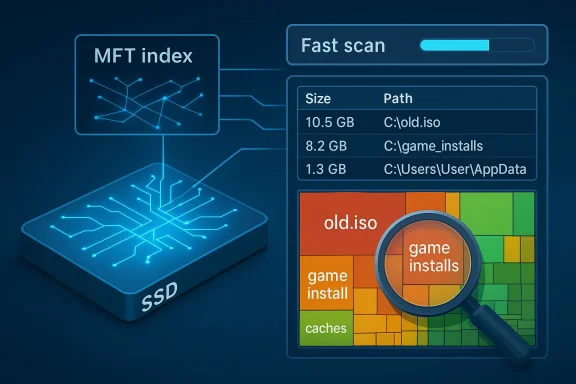
That gap has existed for years because Windows and NTFS are built around general-purpose usability, not disk archaeology. NTFS keeps an entry in the Master File Table for every file on a volume, and Microsoft documents the MFT as the internal index that stores the information needed to retrieve files. Tools like WizTree exploit that structure to map the drive far faster than a traditional full-file scan.
The popularity of this kind of utility is also a symptom of how modern Windows usage has changed. A typical PC now accumulates installers, ISO images, update leftovers, app caches, cloud sync remnants, and abandoned project folders across years of use. The problem is not just capacity; it is opacity. People can tell the machine is crowded, but they cannot easily tell what to remove without risking something important.
That is why disk-analysis apps have become a staple in the Windows power-user toolbox. They do not replace Windows storage management so much as expose the missing layer between “you are out of space” and “here is the exact 40 GB folder you forgot about.” In a world of SSDs, hybrid work machines, and long-lived laptops, that visibility is no longer a luxury.
WizTree’s appeal is especially strong because it keeps the experience simple. It doesn’t ask the user to understand NTFS internals, and it doesn’t force a scavenger hunt through folders. Instead, it translates storage into a visual and sortable map, which is exactly what users need when they are trying to recover space quickly.
The issue is not that Microsoft has done nothing. Storage Sense can clean temporary files automatically, and Windows can surface broad categories for drive usage. But for a user staring at a nearly full SSD, broad categories are a diagnosis, not a cure.
WizTree is designed around that exact frustration. It exposes the largest folders and files directly, allowing users to move from symptom to cause in a single view. That difference matters more on older systems and small SSDs, where waste accumulates silently.
Windows can show you the condition of the disk, but not the story of how it got that way. WizTree effectively writes that story in reverse, from the biggest footprint down to the smallest. That narrative is what makes cleanup feel manageable instead of random.
That speed is not just a performance brag. It changes the user experience by making disk analysis feel immediate, which encourages people to actually use the tool regularly. If a scan takes too long, cleanup becomes a chore; if it finishes quickly, it becomes part of routine maintenance.
This matters because storage problems are often time-sensitive. If a machine is nearly full, the user needs a fast answer before updates fail, downloads stall, or applications stop behaving normally. Microsoft itself notes that low disk space can trigger cleanup behavior, but by the time that happens, the machine is already in a degraded state.
The real value here is pattern recognition. A giant block may reveal a single old ISO, a forgotten game library, or a cache directory that has ballooned over time. Once that pattern is visible, cleanup becomes targeted rather than speculative.
This is where the “garbage” metaphor becomes apt. Much of what fills a drive is not critical data, but accumulated residue from work, testing, software trials, and software churn. The problem is that residue does not announce itself.
That context is important because not all large files are equal. A 30 GB folder might be a deliberate archive, a game library, or a temp directory. The path tells you which of those is most likely.
This also reduces the need for blind deletion. When a file is clearly tied to an installer or a dead project, the decision is easy. When it is not, users can investigate further before taking action.
The article’s emphasis on verification is a big part of the appeal. You can inspect the location of a file before deleting it, which is exactly the kind of control users want when space is tight and mistakes are costly.
That matters because disk cleanup is not just about speed; it is about preserving user trust. If a utility helps you reclaim space once and then causes a scare later, people stop using it. WizTree’s workflow helps avoid that by making inspection part of the process.
It is also why portable use is attractive. A USB-run utility can be brought in only when needed, without changing the machine permanently. That makes it a practical diagnostic tool rather than just another resident app.
Paid tiers, by contrast, appear to be aimed more at licensing and business usage than feature gating. For typical home users, that is a smart balance: the core product remains useful, while organizations can pay for the rights and support they need.
The portable edition also reinforces that convenience. Being able to run the utility without installation is handy for admins, repair techs, and people who simply don’t want to leave another app on the system.
For enterprises, this makes procurement simpler. For consumers, it means the app is easy to recommend without qualification.
Consumers benefit in a more personal way. Their reward is reclaiming space, extending device usefulness, and avoiding premature upgrades. In both cases, the common thread is visibility.
This is also where emotional value comes in. Seeing exactly what is taking up space often feels like regaining control of a machine that had become opaque.
That said, it should be treated as a diagnostic aid, not a policy engine. The person deleting files still needs judgment and local knowledge.
This pattern is common in Windows. The operating system provides a baseline experience, while third-party utilities fill in the precision layer. In this case, the precision layer is file-level storage intelligence.
That means third-party disk analyzers remain relevant even in a more modern Windows stack. Their purpose is different: not automatic cleanup, but actionable visibility.
WizTree benefits from that dynamic because it answers a universal question with unusual clarity: what exactly is using my disk? The more complex Windows becomes, the more valuable that answer gets.
The likely future is not replacement but coexistence. Windows will continue to offer maintenance dashboards and automated cleanup, while power users and support teams reach for tools that expose the underlying file structure. That separation of roles makes sense, and it is one reason utilities like WizTree endure.
Source: How-To Geek Your Windows storage is full of garbage—this free app shows you where it's hiding
 Background
Windows has long offered storage tools, but they were designed to be helpful at a glance, not forensic. Microsoft’s current Storage settings break usage into categories such as apps, temporary files, and system-reserved space, which is useful for a quick overview but still leaves users guessing about the exact files involved. Even Microsoft’s own documentation frames this as a categorized view rather than a file-by-file analysis, which is precisely where third-party utilities still have room to outperform the platform itself.That gap has existed for years because Windows and NTFS are built around general-purpose usability, not disk archaeology. NTFS keeps an entry in the Master File Table for every file on a volume, and Microsoft documents the MFT as the internal index that stores the information needed to retrieve files. Tools like WizTree exploit that structure to map the drive far faster than a traditional full-file scan.
The popularity of this kind of utility is also a symptom of how modern Windows usage has changed. A typical PC now accumulates installers, ISO images, update leftovers, app caches, cloud sync remnants, and abandoned project folders across years of use. The problem is not just capacity; it is opacity. People can tell the machine is crowded, but they cannot easily tell what to remove without risking something important.
That is why disk-analysis apps have become a staple in the Windows power-user toolbox. They do not replace Windows storage management so much as expose the missing layer between “you are out of space” and “here is the exact 40 GB folder you forgot about.” In a world of SSDs, hybrid work machines, and long-lived laptops, that visibility is no longer a luxury.
WizTree’s appeal is especially strong because it keeps the experience simple. It doesn’t ask the user to understand NTFS internals, and it doesn’t force a scavenger hunt through folders. Instead, it translates storage into a visual and sortable map, which is exactly what users need when they are trying to recover space quickly.
Why Windows Still Misses the Mark
Windows storage tools are better than they used to be, but they still lean toward categorization rather than investigation. Storage settings can tell you that space is being consumed by system files, temporary files, installed apps, or user content, but that is often not enough when one folder or one forgotten archive is the real problem. Microsoft even distinguishes system-reserved storage and temporary cleanup behavior, which is useful, yet still abstract for users chasing a specific offender.The issue is not that Microsoft has done nothing. Storage Sense can clean temporary files automatically, and Windows can surface broad categories for drive usage. But for a user staring at a nearly full SSD, broad categories are a diagnosis, not a cure.
Broad Categories Are Not Enough
The biggest weakness of the built-in approach is its lack of precision. A category like “other” or “temporary” might explain the general shape of the problem, but it won’t tell you whether a giant VM image, a leftover game install, or a dead software cache is responsible. That ambiguity makes cleanup slower and more error-prone.WizTree is designed around that exact frustration. It exposes the largest folders and files directly, allowing users to move from symptom to cause in a single view. That difference matters more on older systems and small SSDs, where waste accumulates silently.
- Windows categories are helpful, but still broad.
- Cleanup decisions are harder when the offending files are hidden inside a generic bucket.
- Users often need exact file paths, not summaries.
- Precision reduces accidental deletion and saves time.
Why Small Drives Feel Worse
On a 256 GB or 512 GB SSD, a few oversized installers or archives can create the illusion that the entire machine is unhealthy. In practice, the drive may be fine; it is just littered with forgotten data. That is why a tool that surfaces exact paths and sizes feels transformative rather than merely convenient.Windows can show you the condition of the disk, but not the story of how it got that way. WizTree effectively writes that story in reverse, from the biggest footprint down to the smallest. That narrative is what makes cleanup feel manageable instead of random.
How WizTree Finds Space Fast
WizTree’s technical edge comes from how it reads the disk. By working through the NTFS Master File Table instead of enumerating every file one by one, it can assemble a storage map extremely quickly on NTFS volumes. Microsoft’s documentation confirms that the MFT contains an entry for every file on the volume, which explains why this shortcut is so effective.That speed is not just a performance brag. It changes the user experience by making disk analysis feel immediate, which encourages people to actually use the tool regularly. If a scan takes too long, cleanup becomes a chore; if it finishes quickly, it becomes part of routine maintenance.
MFT Scanning in Practical Terms
For the average user, the technical detail boils down to this: WizTree avoids the drag of traditional crawling. Rather than waiting while a scanner opens file after file across the filesystem, it reads the metadata index that NTFS already maintains. That is why the app can feel almost instantaneous even on large volumes.This matters because storage problems are often time-sensitive. If a machine is nearly full, the user needs a fast answer before updates fail, downloads stall, or applications stop behaving normally. Microsoft itself notes that low disk space can trigger cleanup behavior, but by the time that happens, the machine is already in a degraded state.
Treemap Views Make Patterns Obvious
The other half of the experience is visual. WizTree’s treemap turns storage into blocks, making big files and directories jump out at a glance. That gives users an intuition for where the space is clustered before they even read the file list.The real value here is pattern recognition. A giant block may reveal a single old ISO, a forgotten game library, or a cache directory that has ballooned over time. Once that pattern is visible, cleanup becomes targeted rather than speculative.
- Fast MFT-based scanning helps on large volumes.
- The treemap surfaces dominant space consumers visually.
- Exact file sizes support confident decisions.
- The combination reduces manual folder hunting.
What It Reveals That Windows Hides
One of the strongest arguments for WizTree is not just that it is fast, but that it surfaces the kind of clutter users forget exists. The article’s examples — old ISOs, leftover installers, temporary data, and buried AppData folders — are exactly the sort of files that survive for months or years because they never appear in normal day-to-day use. That makes them easy to ignore and hard to rediscover without a specialized tool.This is where the “garbage” metaphor becomes apt. Much of what fills a drive is not critical data, but accumulated residue from work, testing, software trials, and software churn. The problem is that residue does not announce itself.
Forgotten Files Add Up
Old downloads are obvious, but not all bloat sits in the Downloads folder. App caches, unpacked archives, and leftover setup files can live in scattered locations that File Explorer does not naturally surface. WizTree’s advantage is that it gives those files context by showing where they live and how much space they consume.That context is important because not all large files are equal. A 30 GB folder might be a deliberate archive, a game library, or a temp directory. The path tells you which of those is most likely.
Paths Matter as Much as Sizes
Showing file size alone is only half the story. The full path tells you whether the item is part of an application, a user-created archive, a temporary extraction, or an abandoned cache. That detail is what allows users to clean up with confidence instead of fear.This also reduces the need for blind deletion. When a file is clearly tied to an installer or a dead project, the decision is easy. When it is not, users can investigate further before taking action.
- Hidden leftovers often live outside obvious folders.
- Full paths provide the context Windows categories lack.
- Large files are easier to evaluate when you know their origin.
- Context lowers the risk of deleting something important.
Why the Tool Feels Safer Than Manual Cleanup
Cleaning up storage manually sounds simple until you try to do it on a machine that has been used for years. Then the process turns into a mix of folder browsing, memory tests, and guesswork about what might be safe to remove. WizTree’s value is that it replaces guesswork with evidence.The article’s emphasis on verification is a big part of the appeal. You can inspect the location of a file before deleting it, which is exactly the kind of control users want when space is tight and mistakes are costly.
Confidence Beats Guesswork
The safer cleanup model is especially valuable on aging systems. Older PCs often contain years of accumulated software, downloads, and project output, which makes every large file a potential landmine. A scanning tool that lets you verify first and delete later is simply less risky than hand-wandering through the file tree.That matters because disk cleanup is not just about speed; it is about preserving user trust. If a utility helps you reclaim space once and then causes a scare later, people stop using it. WizTree’s workflow helps avoid that by making inspection part of the process.
The Human Factor in Cleanup
Most users don’t need an app that automatically deletes everything suspicious. They need one that shows them what is suspicious and lets them decide. That difference between automation and guidance is subtle, but it is essential for confidence.It is also why portable use is attractive. A USB-run utility can be brought in only when needed, without changing the machine permanently. That makes it a practical diagnostic tool rather than just another resident app.
- Verify before deleting.
- Inspect the full file path.
- Use targeted cleanup instead of mass deletion.
- Prefer tools that improve judgment, not just automation.
Free Version vs Paid Tiers
The free version is one of WizTree’s most important strengths, because it lowers the barrier to entry for a tool that most users will only need occasionally. According to the article, the free edition already includes the fast scans, treemap, file search, and the features that matter for everyday cleanup. That means the utility feels complete rather than intentionally hobbled.Paid tiers, by contrast, appear to be aimed more at licensing and business usage than feature gating. For typical home users, that is a smart balance: the core product remains useful, while organizations can pay for the rights and support they need.
Why the Free Edition Matters
A truly useful free version builds trust. If a cleanup tool is only valuable after a subscription, people are less likely to install it in the first place. WizTree’s model removes that friction, making it easier for ordinary users to solve a problem that already feels urgent.The portable edition also reinforces that convenience. Being able to run the utility without installation is handy for admins, repair techs, and people who simply don’t want to leave another app on the system.
Licensing vs Capability
The distinction between “personal use” and “business use” is common, but the important part is that the software doesn’t withhold its core value. That gives it the feel of a serious utility rather than a freemium experiment. Users are not being nudged into a false upgrade path just to find out where their files are.For enterprises, this makes procurement simpler. For consumers, it means the app is easy to recommend without qualification.
- The free tier is sufficient for most home users.
- The portable edition adds convenience.
- Paid tiers are mainly about licensing and support.
- Core functionality is not artificially restricted.
Enterprise and Consumer Impact
WizTree is useful in homes, but it is arguably even more valuable in mixed or managed environments where many devices age at different rates. In a business, space issues are rarely isolated; they become support tickets, failed updates, and avoidable downtime. A fast storage-visibility tool gives admins a quicker way to triage those cases.Consumers benefit in a more personal way. Their reward is reclaiming space, extending device usefulness, and avoiding premature upgrades. In both cases, the common thread is visibility.
For Home Users
On personal machines, the tool helps with everything from game installs to project work to accumulated downloads. It is especially useful on laptops with modest SSDs, where a few dozen gigabytes can make the difference between a system that feels healthy and one that feels cramped. The user gets a direct map of their own digital clutter.This is also where emotional value comes in. Seeing exactly what is taking up space often feels like regaining control of a machine that had become opaque.
For IT and Support Teams
In IT support, speed matters because every minute spent hunting storage waste is time not spent solving the real issue. A tool that quickly surfaces the largest offenders can shorten help-desk conversations and make remote diagnosis easier. It can also help distinguish between legitimate storage pressure and symptoms caused by a broken workflow or runaway application.That said, it should be treated as a diagnostic aid, not a policy engine. The person deleting files still needs judgment and local knowledge.
- Home users can reclaim meaningful space quickly.
- Support teams can triage storage complaints faster.
- Visibility helps separate clutter from true system issues.
- The tool reduces the need for broad, risky cleanup.
Competitive Context: Why This Matters Beyond One App
WizTree is not just a niche utility; it represents a category of software that exists because platform vendors still leave a gap. Microsoft has improved storage management, but the built-in tools remain oriented toward general maintenance. That leaves room for specialist apps that do one thing extraordinarily well.This pattern is common in Windows. The operating system provides a baseline experience, while third-party utilities fill in the precision layer. In this case, the precision layer is file-level storage intelligence.
Microsoft’s Built-In Improvements Help, But Don’t Replace It
Windows 11 and Windows 10 offer more storage insight than older versions ever did, and Microsoft continues to refine cleanup behavior through Storage Sense and related changes. The company has also been improving reliability in cleanup paths, including recent Insider work tied to storage cleanup behavior. But those improvements still do not equal an immediate, file-level map of what is eating the disk.That means third-party disk analyzers remain relevant even in a more modern Windows stack. Their purpose is different: not automatic cleanup, but actionable visibility.
Why the Market Keeps Space for Utilities Like This
The Windows ecosystem has always rewarded software that saves time and reduces uncertainty. That is why PowerToys, file managers, registry tools, and disk analyzers retain such a loyal audience. They don’t reinvent Windows; they make it legible.WizTree benefits from that dynamic because it answers a universal question with unusual clarity: what exactly is using my disk? The more complex Windows becomes, the more valuable that answer gets.
- Platform cleanup tools solve only part of the problem.
- Specialized apps give users actionable detail.
- Windows power users still depend on third-party utilities.
- Storage transparency is a persistent market need.
Strengths and Opportunities
WizTree’s biggest strength is that it solves a problem that feels bigger than its interface suggests. It turns a vague complaint about full storage into a concrete list of files and folders, and that makes it useful for everyone from casual users to admins. The app’s opportunity is to remain the default answer whenever someone says, “my drive is full and I don’t know why.”- Fast MFT-based scanning on NTFS volumes.
- Clear treemap visualization for instant pattern recognition.
- Precise file paths and sizes for safe cleanup.
- Accessible free version for personal use.
- Portable option for on-demand diagnostics.
- Practical on older systems and small SSDs.
- Low-friction workflow that encourages regular use.
Risks and Concerns
Any tool that makes deletion easy has to earn trust continuously. The main risk is not the software itself, but how people use the information it shows them, especially if they treat large files as automatically disposable. As with any cleanup utility, the best outcome depends on careful judgment and a willingness to verify before deleting.- Accidental deletion if users move too quickly.
- Misinterpretation of large files that are intentionally stored.
- NTFS dependence means the speed advantage is tied to that filesystem model.
- User overconfidence after seeing a neat ranked list.
- Business licensing may still matter for organizations.
- Limited value if users want automation rather than analysis.
- False sense of simplicity when storage issues are actually systemic.
Looking Ahead
The continued popularity of tools like WizTree says something important about Windows in 2026: users still want more than built-in summaries. They want visibility, speed, and enough context to act without second-guessing themselves. Microsoft may keep improving its storage features, but specialist utilities will remain valuable as long as the platform favors abstraction over inspection.The likely future is not replacement but coexistence. Windows will continue to offer maintenance dashboards and automated cleanup, while power users and support teams reach for tools that expose the underlying file structure. That separation of roles makes sense, and it is one reason utilities like WizTree endure.
- More emphasis on storage visibility in both Windows and third-party tools.
- Continued demand for portable troubleshooting utilities.
- Better cleanup automation inside Windows, but not full replacement for file-level analysis.
- Growing importance of small-SSD optimization on aging and budget systems.
- Persistent need for support-friendly tools that reduce manual triage.
Source: How-To Geek Your Windows storage is full of garbage—this free app shows you where it's hiding
