

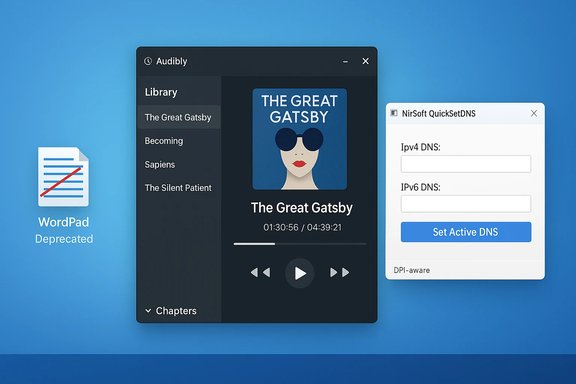
Five-hundred-and-fifty-nine in the series, this week’s BetaNews roundup delivered a compact but consequential set of updates for Windows users: Microsoft formally marked the long-lived WordPad as deprecated and scheduled its removal, a tidy open‑source audiobook player called Audibly grabbed attention for improving desktop listening workflows, and a small but indispensable NirSoft utility, QuickSetDNS, received quality‑of‑life updates aimed at high‑DPI systems and easier DNS switching. These are the highlights, what they mean for everyday users and IT professionals, and practical steps you should take now to prepare or to take advantage of the new apps and updates.
BetaNews’ weekly “Best Windows apps this week” series functions as a fast discovery feed — a curated one‑page guide to useful new Store arrivals, small utilities and notable platform changes that landed in the past seven days. The series is intentionally short and practical: a single “app of the week,” a list of other notable releases, and a short selection of discounts. That format helps readers find useful tools quickly, but it also requires confirmation on technical specs and availability because Store listings and small projects change rapidly. The latest issue continued that pattern while flagging one platform change that carries broader operational impact: WordPad’s deprecation and removal.
This feature expands on the week’s picks, verifies the most important technical claims with vendor and community sources, and offers hands‑on guidance: how to adapt to WordPad’s removal, whether Audibly is ready for prime time on the desktop, and why QuickSetDNS’ tweaks matter for power users and administrators.
On the app side, Audibly demonstrates that desktop‑first audiobook experiences still have space to improve and that open‑source projects can deliver a polished, privacy‑friendly alternative to browser or vendor‑locked players. QuickSetDNS shows how incremental improvements to small utilities (high‑DPI support, quick actions) meaningfully improve usability for professionals and testers.
BetaNews continues to provide a valuable weekly signal: use it to find leads, then corroborate the claims with vendor pages, changelogs and the Store before deploying or depending on a new app in production.
Source: BetaNews Best Windows apps this week
 Background / Overview
BetaNews’ weekly “Best Windows apps this week” series functions as a fast discovery feed — a curated one‑page guide to useful new Store arrivals, small utilities and notable platform changes that landed in the past seven days. The series is intentionally short and practical: a single “app of the week,” a list of other notable releases, and a short selection of discounts. That format helps readers find useful tools quickly, but it also requires confirmation on technical specs and availability because Store listings and small projects change rapidly. The latest issue continued that pattern while flagging one platform change that carries broader operational impact: WordPad’s deprecation and removal.This feature expands on the week’s picks, verifies the most important technical claims with vendor and community sources, and offers hands‑on guidance: how to adapt to WordPad’s removal, whether Audibly is ready for prime time on the desktop, and why QuickSetDNS’ tweaks matter for power users and administrators.
WordPad: deprecated, scheduled for removal — what changed and why it matters
What Microsoft announced (short version)
Microsoft formally listed WordPad among deprecated features and updated platform documentation to make the removal timeline explicit: WordPad will be removed from all editions of Windows starting in Windows 11, version 24H2 and Windows Server 2025. Microsoft recommends alternatives for everyday use — Microsoft Word for rich text and Notepad for plain text — and has published guidance for developers and IT teams to avoid direct dependencies on WordPad binaries.The state of the record
- Microsoft’s “Deprecated features” documentation shows WordPad’s status as deprecated and includes an update noting its removal in Windows 11 24H2 and Windows Server 2025.
- Independent reporting and Windows community coverage confirmed the removal in preview and release builds and pointed out that fresh installs of Windows 11 24H2 no longer include wordpad.exe in the Accessories folder.
Why Microsoft likely made this choice (inference and context)
Microsoft’s public note is succinct and does not provide an extended rationale, but there are consistent, defensible reasons vendors remove legacy components:- Maintenance cost: keeping legacy UI and code paths secure and compatible across new hardware and file formats has a real engineering cost.
- Product consolidation: Microsoft is steering users toward modern, actively developed editing experiences (Office/Word for rich documents and modern Notepad improvements for plain text).
- Image size and attack surface: removing seldom‑used binaries reduces OS bloat and the attack surface that must be tested on each update.
Practical impact for users and admins
- For casual users: If WordPad is part of your routine for opening RTF or quick formatting, your immediate alternative is Microsoft Word (paid or web) or a free office suite such as LibreOffice or OpenOffice. Notepad will still handle plain text, and other lightweight editors (for example, WordPad‑style open‑source projects) can fill the gap.
- For IT professionals and ISVs: Any automation, installer, policy, or help‑desk script that assumes wordpad.exe exists should be audited. Microsoft explicitly lists affected binaries (wordpad.exe, wordpadfilter.dll, write.exe) — do not rely on them to be present on new images. Update deployment scripts, GPOs, and documentation accordingly.
Options to retain WordPad now
If you need to continue using WordPad after upgrading:- On systems still running Windows 11 23H2 (or earlier), copy the WordPad binaries from C:\Program Files\Windows NT\Accessories and keep them in a secured archive. A manual copy may run for a while, although Microsoft warns these binaries are not being actively updated.
- Use a contemporary third‑party RTF editor or LibreOffice Writer for editing and viewing RTF files to avoid relying on an unmaintained binary.
- For enterprise environments, create a tested fallback plan that replaces WordPad in documentation and default file‑type associations before mass rollouts.
Risks and caveats
- Relying on a copy of the old WordPad is a temporary mitigation, not a long‑term solution — the binary will not receive security updates.
- Applications that programmatically call wordpad.exe or use its file‑filter DLLs may break silently on systems without WordPad installed. Testing and remediation should be prioritized for environments where RTF handling is part of automated workflows.
Audibly — Audiobook Player: a meaningful desktop entry for listeners
What the app is and why it’s notable
Audibly is a small, open‑source desktop audiobook player targeted at Windows 10 and 11 users. It aims to offer a focused library UI, reliable playback controls, and features that audiobook listeners expect: chapters, sleep timer, and cover art support. BetaNews highlighted Audibly as a new arrival that improves the desktop audiobook playback experience.Format support: the claim vs. the reality
- BetaNews noted Audibly initially supported .m4b only, which was accurate for early Store builds.
- The upstream project and current app listings show a more nuanced picture: the GitHub repository by the app author explicitly states the desktop player supports .m4b and .mp3 files, and the roadmap items and changelog indicate ongoing work to expand and stabilize file support. Community posts from the app author and Store descriptions show that early releases may have been m4b‑first with mp3 support arriving later. In short: Audibly began m4b‑centric but has since added or planned mp3 support — check the Store changelog for your region and app version before assuming format limitations.
Technical footprint and deployment
- Audibly is built with WinUI 3 and requires recent Windows 10/11 runtimes. The project is GPL‑3.0 licensed and open‑source, with the repository and release notes available on GitHub. That transparency is an advantage for privacy‑minded users and for IT teams who prefer reproducible installs.
- Installer and resource requirements are modest; the app uses the .NET Desktop Runtime and is distributed via the Microsoft Store and mirrored pages.
Feature list (what users should expect)
- Library management: Import and organize audiobooks, with a simple search and library view.
- Chapter support: Jump by chapters if audiobooks include embedded chapter metadata.
- Playback controls: Adjustable playback speed, resume‑from‑last position, and a sleep timer.
- Mini‑player: Compact player mode for multitasking.
- Multiple file handling: Support for audiobooks composed of multiple files, though earlier versions experienced bugs that were later patched.
Strengths and why it matters
- Desktop‑native experience: Many major audiobook services push browser‑based players or mobile apps; a native desktop player with audiobook‑specific features is a practical win.
- Open source: IT teams can inspect or fork the code if needed for private deployments or long‑term maintenance.
- Actively improved: The project’s changelog shows iterative fixes — a positive sign for stability and feature growth.
Limitations and things to watch
- Format support may vary by release and region; if you have a large collection in MP3 or other containers, verify local playback before committing time to imports.
- Some advanced audiobook features (DRM handling for commercial audiobooks, cloud‑sync across devices) are outside the scope of an open‑source player — audiences who rely on vendor DRM ecosystems will need the official clients.
- For accessibility (screen readers, keyboard navigation) and enterprise rollout, test the app in your environment before wide deployment.
Recommendations
- If you manage a local audiobook library (m4b or mp3), try Audibly as a lightweight, privacy‑friendly desktop player. Start with a small test library and confirm playback, chapter navigation and resume behavior.
- For interactivity or automated conversion needs, keep a reliable tool for rewrapping or converting formats (e.g., ffmpeg or dedicated audiobook tools) handy — Audibly will play the common desktop formats, but conversions remain useful for heterogeneous libraries.
QuickSetDNS — small update, practical impact for network users
What QuickSetDNS does
QuickSetDNS is a compact, portable utility by NirSoft that allows users to quickly set DNS servers for Windows network adapters. It’s a single‑executable tool that works without installation and is widely used by developers, testers, privacy‑conscious users, and admins who need to switch resolvers frequently. The utility’s simplicity — change DNS servers from a menu, or via command line — makes it a favorite when editing adapter settings through the GUI is too slow.Recent updates called out in this week’s roundup
The recent version improvements emphasized in BetaNews and the NirSoft changelog address usability on modern displays and add quick actions:- High DPI fixes to ensure the UI scales correctly on high‑resolution laptops and monitors.
- A toolbar “Set Active DNS (IPv4+IPv6)” button for one‑click activation of both IPv4 and IPv6 DNS entries.
- New double‑click and Enter‑key actions to let you trigger common tasks (edit, set DNS, open adapter in registry) faster.
Why this matters in practice
- High‑DPI fixes remove usability friction on modern hardware; small admin tools often suffer from scaling issues that make them hard to use on 4K displays.
- The toolbar and quick action settings save time in labs, testing scenarios and multi‑network environments where changing resolvers (e.g., switching between public resolvers and local ones for testing) is routine.
- Command‑line options allow scripting and integration with deployment or testing workflows; QuickSetDNS is convenient for automated test rigs or ephemeral VMs.
Security and operational considerations
- Changing DNS can affect network filtering, telemetry, and content blocking. For corporate environments, enforce approved resolver policies where necessary.
- Don’t treat DNS changes as a privacy cure‑all; while switching to a reputable public resolver (Cloudflare 1.1.1.1, Quad9, Google) may improve privacy versus ISP resolvers, upstream policies differ — evaluate resolver privacy policies before recommending them in production. QuickSetDNS simplifies switching but does not alter resolver trust.
Recommendations
- Use QuickSetDNS for lab and testing tasks where rapid DNS swaps are required; prefer managed frameworks for enterprise‑wide changes.
- Combine QuickSetDNS with a documented test plan to validate DNS‑dependent services (SSO, internal name resolution) before switching resolvers on a production machine.
- For scripting needs, use the /SetDNS and /SetDNS6 command‑line options to embed resolver changes into automated workflows.
Other notable items from the roundup and discounts
BetaNews’ list also mentioned a handful of other useful entries and Store discounts (a typical weekly selection includes utilities, small games, and occasionally larger cross‑platform ports). The weekly selection functions as a discovery prompt; it is worth checking the Store for limited‑time deals and verifying the current price and trial availability before purchasing. For readers who rely on curated picks, the digest approach is efficient but always worth corroborating with the Store page for region‑specific pricing and availability.Critical analysis — strengths, risks, and practical advice
Strengths of this week’s picks
- The roundup mixes platform news (WordPad) with practical app updates and small utilities. That blend matters because it pairs immediate user‑facing choices (try an audiobook player) with operational signals that require planning (WordPad removal).
- Highlighting small, well‑built utilities (QuickSetDNS, Audibly) surfaces tools that solve real, narrow problems without adding bloat — an important win for power users and IT pros.
- Open‑source and indie entries give users alternatives to large vendor ecosystems and offer transparency that corporate products do not.
Risks and downsides to watch
- Ephemerality: Small Store apps and one‑person utilities may be delisted or abandoned. Always check update history and developer activity before relying on a small project in production.
- API fragility: Third‑party clients for services that expose closed or rate‑limited APIs (YouTube, social networks) can break when upstream providers change contracts or throttle clients. Prefer official clients for mission‑critical workflows.
- Security assumptions: Tools that change networking settings (DNS) or handle media libraries may interact with other software (antivirus, firewall, store wrappers). Test in a controlled environment before broad rollout.
Cross‑verification summary (what was confirmed)
- Microsoft’s deprecation and removal timeline for WordPad is confirmed in Microsoft’s own documentation and widely reported in Windows‑focused outlets.
- Audibly exists as an open‑source WinUI app; early releases focused on .m4b, with community notes and the GitHub README showing the project supports or plans to support .mp3 as well. Always check the current Store release notes to confirm format support for your installed version.
- QuickSetDNS updates (high DPI support, new toolbar button and quick actions) are documented in the official NirSoft changelog and mirrored on reputable freeware sites.
Where claims are less certain
- If a BetaNews blurb asserts a specific app behavior that isn’t spelled out on the developer’s page (for example, cloud sync or DRM support), treat the mention as a lead. Verify by installing or checking the developer changelog. Small Store pages sometimes omit technical detail that matters.
Practical to‑do checklist
For home users
- If you use WordPad regularly, identify a replacement (LibreOffice Writer, Word for the web, or another RTF editor) and test opening your most‑common documents.
- Try Audibly with a few local audiobooks to validate playback and chapter support; convert a sample MP3 if necessary to confirm compatibility.
- Use QuickSetDNS only after confirming the resolver policies for any network you use. Keep a note of your original DNS settings to revert quickly.
For IT administrators
- Audit scripts, GPOs and support documentation for assumptions that WordPad exists on all client images. Update automation to use supported binaries or replace workflows that call wordpad.exe.
- Plan an application association strategy for RTF files across your fleet — either map them to an approved viewer (LibreOffice, Word) or provide user guidance.
- If allowing developers or support staff to switch DNS for testing, provide documented steps and an approved resolver list; consider using QuickSetDNS in a locked lab image, not on unmanaged endpoints.
For power users and reviewers
- Install Audibly from the Store and open several audiobook files (m4b and mp3) to test chapter metadata handling, multiple‑file books, and resume accuracy. Report issues upstream in the GitHub issue tracker if you rely on the tool.
- Keep a small toolkit: ffmpeg for conversions, a known‑good PDF/RTF viewer and a policy document for DNS changes.
Conclusion
This week’s round of Windows app news reads like the platform in microcosm: a thoughtful mix of small, useful utilities and a larger platform housekeeping move with material operational consequences. Microsoft’s decision to deprecate and remove WordPad is the most significant story — it’s a clear signal that older, low‑usage built‑in tools will be pared back in favor of consolidated, maintained experiences. For everyday users, the path forward is straightforward (use Word, Notepad, or a modern third‑party editor). For IT professionals, the change requires an audit of scripts and default handlers.On the app side, Audibly demonstrates that desktop‑first audiobook experiences still have space to improve and that open‑source projects can deliver a polished, privacy‑friendly alternative to browser or vendor‑locked players. QuickSetDNS shows how incremental improvements to small utilities (high‑DPI support, quick actions) meaningfully improve usability for professionals and testers.
BetaNews continues to provide a valuable weekly signal: use it to find leads, then corroborate the claims with vendor pages, changelogs and the Store before deploying or depending on a new app in production.
Source: BetaNews Best Windows apps this week
