

Workday Decides the Front Door No Longer Has to Be Workday
For decades, enterprise software vendors defended their portals as if the portal itself were the product. HR lived in one place, expenses in another, approvals in a third, and every employee was expected to remember which tile, tab, workflow, or intranet page applied to the task at hand. Workday’s move into Microsoft 365 Copilot is an admission that this model has finally run out of patience.
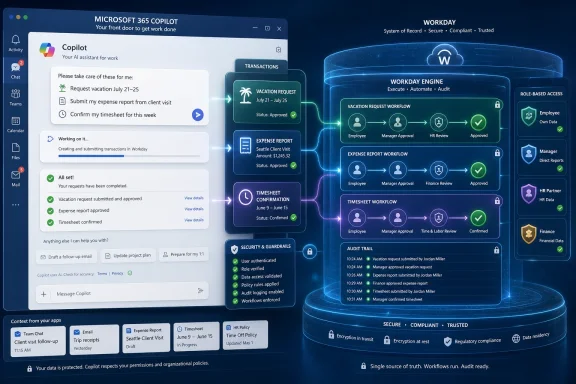
The new integration puts Workday’s Sana Self-Service Agent in the Copilot experience, where employees can ask plain-language questions about vacation balances, family leave, travel policies, pay statements, expenses, timesheets, and other HR or finance tasks. Managers can use it for actions such as initiating performance reviews and approving timesheets. The important distinction is that Sana is not merely surfacing a help article; it is intended to complete transactions through Workday’s configured workflows.
That is why the announcement lands differently from the chatbot wave of a few years ago. A chatbot that tells an employee where to find the parental leave policy is a convenience feature. An agent that files a time-off request, checks entitlement, routes approval, and returns the answer inside Copilot is part of the company’s operating machinery.
Workday’s language around “meeting employees where they work” is familiar vendor phrasing, but in this case it describes a real architectural shift. Microsoft owns the daily productivity surface for many large organizations. Workday owns sensitive HR and finance records. The integration is an attempt to make those two realities coexist without forcing workers to act as the API between them.
Copilot Becomes the Lobby, Not the Back Office
Microsoft 365 Copilot has always been more strategically interesting as a shell than as a wordsmith. Summarizing meetings and drafting emails are useful, but they do not by themselves transform enterprise computing. The more ambitious version of Copilot is a universal workbench: a place where employees ask for outcomes and delegated systems perform the underlying work.
Workday is now aligning itself with that model. The employee may begin in Copilot, but the transaction still lands in Workday. The agent uses Workday’s policies, permissions, approvals, and business processes rather than inventing a parallel HR universe inside Microsoft’s stack.
That division of labor is the key to understanding the deal. Microsoft gets another proof point that Copilot can become the front end for business processes beyond Microsoft 365 data. Workday gets a way to remain operationally central even if users spend less time inside its native interface.
This is also why Workday can argue that it is not surrendering the customer relationship. The employee remains a licensed Workday user, the workflow remains a Workday workflow, and the audit trail remains tied to Workday’s configuration. What changes is the place where the worker asks the question and receives the answer.
The tradeoff is real, though. Once HR self-service becomes something that happens inside Copilot, employees may increasingly perceive Microsoft as the workplace assistant and Workday as the invisible back-end engine. That is a dangerous place for any application vendor to stand, but it may be less dangerous than insisting employees keep returning to a portal they visit only when something is broken, late, or mandatory.
The Agentic AI Pitch Finally Meets the Expense Report
Enterprise AI has spent the last two years drowning in abstractions: reasoning engines, orchestration layers, copilots, agents, semantic indexes, retrieval pipelines, and “superintelligence” branding. HR and finance self-service is refreshingly unglamorous by comparison. People want to know how many vacation days they have, whether a hotel is reimbursable, where their pay statement is, and why an expense report has not moved.
That is exactly why this integration matters. The credibility of agentic AI will not be established by demo-stage workflows that book imaginary travel for fictional executives. It will be established by whether real employees can complete routine administrative tasks faster, with fewer tickets, fewer mistakes, and fewer policy violations.
Workday says Sana Self-Service Agent can automate a broad range of HR and finance workflows, and earlier Sana messaging has described hundreds of skills across pay, time, absence, expenses, and related processes. The Copilot integration gives those skills a more prominent surface. Instead of asking employees to discover Sana inside Workday, Workday is taking Sana to the place where the employee may already be asking work-related questions.
The challenge is that HR and finance are not forgiving domains. A hallucinated summary of a meeting is embarrassing. A hallucinated answer about pay, leave, benefits, or approval status can create compliance exposure, employee distrust, and administrative cleanup. That is why Workday keeps emphasizing guardrails, deterministic processes, and customer-configured rules.
This is the central tension of enterprise agents. The user wants a conversational interface that feels flexible and forgiving. The business needs execution that is rigid, permissioned, and auditable. Workday’s pitch is that Sana can provide the conversational layer while Workday continues to enforce the boring but essential mechanics underneath.
The Security Claim Is the Product Claim
The most important phrase in the announcement is not “AI” or “Copilot.” It is the promise that tasks are executed using the customer’s existing approvals, policies, processes, and controls. In HR and finance, that is not a supporting detail. It is the whole product.
Workday contains data that employees cannot casually paste into a general-purpose chatbot: compensation, leave status, performance information, payroll records, banking-related details, organizational changes, and expense data. Any AI interface touching that material must answer two questions before anyone should care how friendly it sounds. Who is allowed to see this, and who is allowed to act on it?
By keeping execution inside Workday, Sana can inherit the roles and business rules customers have already configured. That does not eliminate risk, but it narrows the risk surface. The agent is not supposed to become a rogue HR clerk; it is supposed to become a more accessible way to invoke approved Workday processes.
For IT and security teams, this is the difference between an integration they can evaluate and a shadow-AI nightmare they have to suppress. Employees are already asking AI tools for help with HR wording, policy interpretation, and administrative questions. If approved systems do not provide safe answers, workers will route around them with screenshots, copied policy text, and sensitive prompts in tools that were never meant to process company HR data.
Workday’s Copilot integration is therefore partly defensive. It gives organizations a sanctioned path for AI-assisted HR and finance self-service inside a tool many already license and govern. That may not stop all unsafe behavior, but it gives IT a better answer than “don’t use AI for that.”
Microsoft Wins Even When Workday Does the Work
Microsoft’s enterprise AI strategy becomes stronger every time a major application vendor accepts Copilot as a legitimate work surface. The company does not need to own every system of record if it can make Copilot the place where employees summon those systems. That is the Windows strategy reimagined for cloud work: own the environment where activity begins.
The Workday integration is especially useful for Microsoft because HR data has been one of Copilot’s obvious gaps. Microsoft 365 knows plenty about documents, meetings, email, calendars, Teams chats, and SharePoint content. It does not automatically know an employee’s vacation balance, pay statement, expense policy eligibility, or manager approval chain inside Workday.
That gap matters because many of the most useful workplace questions cross system boundaries. “Can I take next Friday off?” is not just a calendar question. It touches leave balances, team schedules, local policy, manager approval, and possibly payroll. “Can I expense this trip?” is not just a document question. It touches travel rules, cost centers, receipts, approvals, and finance controls.
By letting Workday’s agent answer and act from within Copilot, Microsoft can present a more complete assistant without having to replicate Workday. The user experience becomes more coherent, while the enterprise architecture remains federated. That is likely the model Microsoft wants across many domains: Copilot as the orchestrator, specialized vendors as trusted executors.
For WindowsForum readers, this is the enterprise version of a familiar platform story. The most valuable layer is often not the application that stores the data, but the environment that brokers attention. In the 1990s that was the desktop. In the 2010s it was the browser and the mobile app launcher. In the AI era, Microsoft wants it to be Copilot.
Workday Accepts the Risk of Becoming Infrastructure
The risk for Workday is that success may make its own interface less visible. If employees can complete routine HR and finance tasks in Copilot, Teams, Slack, or other touchpoints, fewer of them will develop any attachment to the Workday application itself. Workday becomes the place where rules live, not necessarily the place where work feels like it happens.
That can sound like commoditization, but it may also be survival. The average employee does not want a relationship with an HR system. They want the answer, the approval, the form, or the confirmation. If Workday forces too much ceremony around routine actions, it leaves room for Microsoft, ServiceNow, Salesforce, Moveworks, or another agent layer to become the more beloved interface.
Workday’s answer is to make itself both system of record and agentic execution layer. Sana gives Workday a branded intelligence layer that can travel outside the Workday UI while still pointing back to Workday’s governance model. That lets the company participate in the new interface economy without pretending every employee wants to live in its app.
There is precedent here. Many enterprise systems have become more valuable as APIs and workflow engines than as destinations. Salesforce data appears in email tools. ServiceNow approvals surface in collaboration apps. ERP actions increasingly happen through embedded workflows. Workday is moving along the same path, but the AI interface makes the shift more visible and more strategic.
The unresolved question is whether users will know or care that Sana is doing the work. If the Copilot interaction feels seamless, the brand credit may accrue to Microsoft. Workday seems willing to accept that risk because the alternative is worse: becoming the system users only touch when Copilot cannot help.
The Marketplace Detail Is More Than Packaging
Workday says the integration is available as an app in the Microsoft Marketplace, with no separate login, deployment, or additional licensing requirement. That detail will matter to administrators more than the AI branding. Enterprise software adoption often dies in the gap between a compelling demo and a messy rollout.
A marketplace-delivered app lowers the friction, but it does not make deployment trivial. Administrators still have to think about permissions, identity, governance, support ownership, training, and change management. The absence of separate licensing may remove one procurement obstacle, but it does not remove the need to decide which employees should use the agent and which tasks should be enabled.
The “no separate login” promise is especially important. Single sign-on is not glamorous, but it is foundational for sensitive workflows. If employees have to manage another credential or authenticate repeatedly, the convenience story collapses. If identity flows through existing Microsoft and Workday controls, the integration has a better chance of feeling native rather than bolted on.
There is also a subtle support implication. When an employee asks Copilot for a Workday task and something goes wrong, who owns the failure? Microsoft? Workday? The HR operations team? The identity administrator? The expense policy owner? Agentic integrations blur not only interfaces but also help desk boundaries.
IT organizations should expect that the first wave of issues will not be about whether the AI can produce a fluent answer. They will be about access, entitlement, policy configuration, workflow edge cases, and employee expectations. In other words, the hard problems will still look like enterprise IT.
The Old Employee Portal Is Losing the Attention War
The employee portal was supposed to be the grand unifier of workplace administration. In practice, many became searchable junk drawers: benefits links, policy PDFs, ticket forms, org charts, payroll tiles, training modules, and stale announcements competing for attention. Workers learned to avoid them until absolutely necessary.
AI assistants attack that failure directly. Instead of asking employees to know where information lives, they invite employees to state what they need. The interface becomes intent-driven rather than navigation-driven. That is a meaningful improvement, provided the agent can distinguish between giving an answer and taking an authorized action.
Workday’s Copilot move recognizes that the portal is no longer the center of gravity. Employees spend their days in email, documents, meetings, chat, browsers, and line-of-business tools. HR self-service is an interruption in that flow. The best interface for it may be the one that makes the interruption shortest.
This does not mean portals vanish. Complex tasks, benefits enrollment, sensitive changes, and exception handling will still need richer interfaces. But the long tail of routine questions and approvals is exactly where a conversational layer can reduce friction. That long tail is also where HR and finance teams spend an enormous amount of time answering repetitive requests.
The danger is overpromising. If employees are told they can “just ask Copilot” but the agent only handles a narrow slice of tasks, disappointment will arrive quickly. The integration’s success will depend less on the launch announcement than on how completely customers configure Sana for their actual policies, exceptions, and workflows.
Agent Sprawl Is the Next Enterprise Mess
Every major enterprise vendor now wants to provide agents. Microsoft has Copilot and Copilot Studio. Salesforce has its agent strategy. ServiceNow has workflows and AI agents. Workday has Sana. Specialized HR, IT support, finance, procurement, security, and developer tools are all adding their own assistants.
That creates a new version of an old problem. Enterprises spent years trying to reduce application sprawl, only to risk replacing it with agent sprawl. Employees may soon face multiple assistants, each claiming to be the right place to ask for help, each with partial access to systems, and each with different governance semantics.
Workday’s integration with Copilot is one possible answer: let the dominant productivity assistant serve as the entry point while specialized agents do the domain-specific work. That model is cleaner for users, but it increases the importance of routing, identity, context, and trust boundaries. Copilot has to know when a request belongs to Workday, and Workday has to execute only what the user and policy permit.
This is where vendor strategy and customer interest partially align. Vendors want their agents discoverable in the places employees already work. Customers want fewer interfaces and more consistent controls. The best outcome is a federated agent ecosystem where the user sees one conversation but the enterprise retains domain-specific enforcement underneath.
The worst outcome is a confusing hall of mirrors. An employee asks one assistant a policy question, another assistant gives a slightly different answer, and a third can take action but not explain why approval failed. That is not a futuristic AI workplace. It is the same enterprise fragmentation with a more confident tone of voice.
HR and Finance Are the Test of Whether Agents Can Be Trusted
HR and finance workflows are a useful proving ground because they are both common and sensitive. Everyone interacts with them, but mistakes carry real consequences. A bad answer about a lunch reimbursement is annoying. A bad answer about leave eligibility, pay, or performance documentation can become a legal, financial, or employee-relations problem.
That is why Workday’s insistence on existing guardrails is not just marketing. Agents that operate in these domains need narrow, auditable authority. They must respect regional policy differences, employee classifications, manager hierarchies, union rules where applicable, approval chains, and company-specific exceptions.
The agent also needs to know when not to act. A well-designed HR agent should be comfortable saying that a request requires human review, that a policy is ambiguous, or that the employee lacks permission to complete a transaction. The glamour of agentic AI is autonomous action; the maturity of agentic AI is controlled refusal.
Managers add another layer of complexity. Approving a timesheet or initiating a performance review may be routine, but those actions still affect records, pay, and employee development. The agent must make the action easier without making it casual. Speed is useful only if it does not dilute accountability.
For administrators, the practical lesson is to treat these integrations as workflow changes, not chat features. The natural-language box is the least important part. The important work is mapping which tasks are enabled, which users can perform them, how approvals are logged, what data is exposed, and how exceptions are escalated.
The AI Interface Will Not Fix Bad Process
There is a temptation to view Copilot plus Sana as a way to paper over ugly enterprise workflows. If employees hate the expense process, let them ask an agent. If leave policies are hard to understand, let AI explain them. If approvals are slow, let automation push them through.
Some of that will help. But an AI layer does not magically make a bad policy coherent or a broken approval chain rational. It can expose those flaws faster. If a company has inconsistent travel rules across regions, outdated HR articles, poorly maintained Workday configurations, or approval chains that depend on tribal knowledge, an agent will inherit the mess.
This is the part of the AI conversation that vendors tend to underplay. Agents are only as operationally useful as the systems, data, and business rules they can rely on. Workday has an advantage because it already houses structured HR and finance processes, but customers still configure those processes differently. The same agent may feel brilliant in one organization and brittle in another.
That means rollout should begin with mundane preparation. HR, finance, IT, and security teams need to decide which workflows are safe to expose first. They need to test edge cases. They need to verify that policy answers match current documents and actual practice. They need to monitor failures and employee confusion.
The companies that benefit most will not be the ones that simply enable the marketplace app and announce an AI transformation. They will be the ones that use the integration as a forcing function to clean up self-service processes that were already overdue for repair.
Windows Shops Should Watch the Identity and Governance Layer
For Microsoft-centric organizations, the Workday integration sits at the intersection of identity, productivity, and business applications. That makes it relevant beyond HR. If Copilot becomes the place where employees trigger actions in Workday, then Microsoft Entra identity, Microsoft 365 governance, Workday roles, and organizational policy all become part of the same user journey.
The operational questions are predictable but important. Which users can invoke the Workday agent from Copilot? How are permissions evaluated? What happens when an employee changes role, department, manager, or region? How quickly do those changes flow through the systems? How are prompts and actions logged? What data appears in Copilot’s response, and what remains behind Workday’s walls?
Security teams will also care about data minimization. An agent should not expose more information than the employee needs to complete the task. A manager approving a timesheet may need a different view than an employee checking their own balance. HR business partners may require broader access, but broader access creates higher audit expectations.
The integration also highlights the growing importance of administrative boundaries inside Copilot itself. As Copilot becomes a front end for more third-party actions, Microsoft 365 administrators will need clearer visibility into which agents are installed, what scopes they request, and how they interact with organizational data. Copilot governance cannot stop at document grounding and meeting summaries.
This is where Windows and Microsoft 365 professionals should resist the urge to dismiss HR integrations as someone else’s problem. The moment HR and finance actions enter Copilot, they become part of the Microsoft workplace platform. That makes them part of the IT governance conversation.
The Real Competition Is for Employee Habit
The enterprise AI market is often described as a contest over models, but in the workplace it may become a contest over habits. Which assistant does an employee ask first? Which one gives a reliable answer? Which one can actually complete the task? Which one does the organization trust enough to enable?
Workday’s move suggests that the company understands the stakes. It does not need every employee to open Workday for every task if Workday remains the trusted system that fulfills the request. In fact, reducing unnecessary visits to the Workday UI may improve the perception of Workday, because employees encounter it less as a portal and more as an invisible source of completed work.
Microsoft, meanwhile, wants Copilot to become the default habit. If employees learn that Copilot can summarize meetings, draft documents, search SharePoint, answer HR questions, file time off, and route approvals, Microsoft’s assistant becomes more deeply embedded in the workday. The more actions Copilot can broker, the harder it becomes for competitors to dislodge.
This is why the Workday integration is not just a feature announcement. It is a small but clear marker in the platform war over the AI-mediated workplace. The interface that captures intent will have enormous leverage over the systems that fulfill it.
For customers, the best outcome is not vendor lock-in under a friendlier name. It is a more composable enterprise environment where employees can work through a consistent assistant while specialized systems enforce domain rules. Whether the market gets there will depend on interoperability, governance, and whether vendors can resist turning every agent into a walled garden.
The Copilot Shortcut Only Pays Off If Workday Stays in Control
The practical read for IT leaders is that this integration is promising precisely because it does not pretend Copilot should become the HR system. Copilot is the conversational surface. Sana is the Workday agent. Workday remains the policy and transaction engine. That separation is what makes the model plausible.
The announcement also shows where enterprise AI is moving fastest: not toward replacing core systems, but toward changing how users reach them. Companies have already paid for complex SaaS platforms and configured years of business process into them. The near-term AI opportunity is to reduce the human friction around those systems, not rip them out.
The most concrete implications are straightforward:
- Workday’s Sana Self-Service Agent is now positioned as an action-taking HR and finance assistant inside Microsoft 365 Copilot, not merely a Workday-native chatbot.
- Routine employee tasks such as time-off requests, pay statement retrieval, expense questions, and policy answers are the first battleground for enterprise agents because they are common, measurable, and support-heavy.
- Workday is accepting a reduced role for its own user interface in exchange for preserving control over workflows, permissions, approvals, and auditability.
- Microsoft gains another major proof point for Copilot as an enterprise front door that can hand off specialized work to third-party systems.
- IT teams should treat the integration as a governed workflow deployment involving identity, access, logging, support, and policy validation, not as a casual productivity add-on.
- The biggest risk is not that the AI writes awkward prose, but that organizations expose sensitive HR and finance processes without cleaning up the rules and data those processes depend on.
The broader story is that enterprise software is being pulled away from destination apps and toward delegated work. Employees will not care which system completed the request if the answer is fast, correct, and authorized. Vendors, however, will care very much, because the company that owns the employee’s first prompt may shape the future of the whole stack. Workday’s Copilot integration is a smart compromise for this moment: let Microsoft own more of the doorway, as long as Workday still controls what happens once the door opens.