

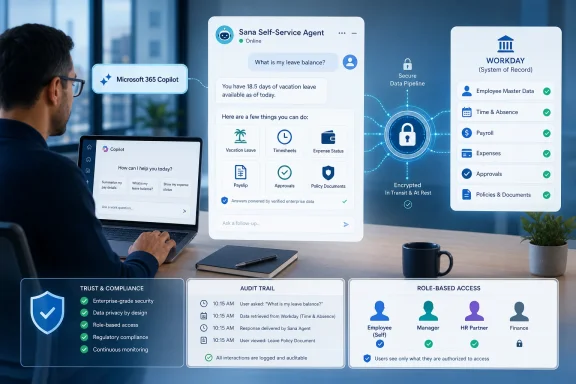
Workday made its Sana Self-Service Agent generally available inside Microsoft 365 Copilot on May 13, 2026, giving eligible Workday and Microsoft customers a way to ask HR and finance questions, initiate common Workday tasks, and receive results from within Microsoft 365. The move is less about one more chatbot button than about where enterprise software vendors now believe work should happen. Workday wants its system of record to remain authoritative, while Microsoft wants Copilot to become the daily front door for office work. The bargain is obvious: users get fewer browser tabs, and vendors get a deeper claim on the employee’s workday.
The headline feature sounds simple enough. An employee can ask Copilot how much vacation time they have left, request time off, check an expense status, view payslip information, or look up a company policy. A manager can approve timesheets, review team goals, submit payroll input, or kick off performance-review work without navigating the full Workday interface.
But the more important design choice is what does not move. Workday says the underlying HR and finance data, permissions, approval rules, and transaction logic remain inside Workday. Microsoft 365 Copilot becomes the conversational surface; Workday remains the execution layer.
That distinction matters because HR and finance are not casual productivity domains. A hallucinated paragraph in a draft email is annoying. A hallucinated tax withholding answer, leave-balance calculation, payroll instruction, or expense-policy determination can become a compliance problem, an audit issue, or an employee-relations mess.
Workday’s pitch is that Sana can bring agentic interaction to users without turning Workday into a loose pile of AI-generated guesses. The agent is supposed to reason over employee intent, but the transaction still runs through Workday’s deterministic business processes. In plainer English: Copilot may be where the conversation happens, but Workday wants to remain where the truth lives.
That is a much bigger ambition than “AI in Office.” Microsoft is trying to make Copilot the interface layer across the enterprise stack. If it succeeds, the question employees ask each morning is not “Which app do I open?” but “What do I ask Copilot to do?”
Workday benefits from that shift because HR and finance self-service is a classic example of software users touch reluctantly. Most employees do not want to “use Workday” in the rich, application-native sense. They want to know whether they can take Friday off, why an expense is stuck, or what form is needed for a life event.
The danger for Workday is equally clear. If Copilot becomes the interface employees actually see, Workday risks becoming infrastructure: essential, expensive, deeply embedded, but less visible. This integration is therefore both a partnership and a defensive move. Workday is meeting users where they are while trying to ensure the system of record is not reduced to a backend database behind someone else’s assistant.
The Copilot integration is one of the first places where that strategy becomes concrete for everyday users. Sana Self-Service Agent is not being described as a general-purpose companion. It is designed to handle a bounded set of HR and finance interactions where context, permissions, and process matter.
That boundedness may be the product’s strongest feature. The enterprise AI market is saturated with maximalist language: agents that transform work, automate everything, and understand the business. In practice, many organizations want something narrower and safer. They want an assistant that can answer policy questions accurately, route requests correctly, and avoid creating a second shadow process outside the official system.
Workday’s argument is that HR and finance are ideal proving grounds for agentic AI precisely because they are structured. Time off, payroll inputs, expense eligibility, performance workflows, and employee records are not free-form creative tasks. They are rule-bound processes with known states, approvals, and audit trails. If an enterprise agent cannot succeed there, it will struggle in murkier domains.
That switching cost is not just aesthetic. It creates delay, increases help-desk volume, and pushes low-value questions onto HR and finance teams. When employees cannot find a policy or interpret a workflow, the organization pays for that confusion through tickets, emails, and manual follow-up.
If Sana in Copilot works as advertised, some of that friction disappears. A worker in Microsoft 365 can ask a natural-language question, receive an answer governed by Workday permissions, and take the next action without launching a separate browser journey. That is the sort of mundane improvement that can matter more than a flashy generative demo.
Still, the phrase “without leaving the flow of work” should not be mistaken for “without risk.” Moving more actions into a chat interface can make processes feel easier, but it can also make them feel less consequential. Approving timesheets in bulk from a conversational surface may be efficient; it also demands thoughtful confirmation steps, clear summaries, and administrator visibility.
The company says each interaction runs through Workday and respects existing business rules. User activity appears in Copilot history, while underlying Workday data and transactions remain in Workday’s trusted system. The implication is that Microsoft provides the interface, but Workday enforces the policy boundary.
That architecture is meant to answer the obvious objection from IT and security teams: what exactly is Copilot allowed to see, remember, and do? For organizations that have spent years tuning Workday roles, approval chains, and compliance processes, the last thing they want is an AI assistant that bypasses those controls in the name of convenience.
The harder question is not whether the integration has guardrails in principle. It is how transparent those guardrails are in practice. Administrators will want to know which actions are supported, how prompts are logged, how errors are handled, what data appears in Copilot activity history, and how policy changes in Workday propagate into the agent experience.
Enterprise software adoption often dies in the gap between announcement and deployment. A useful integration can still languish if it requires a professional-services project, custom identity plumbing, separate user training, or a new procurement cycle. By presenting this as a configuration step for organizations already using Microsoft 365 Copilot and Workday, the companies are trying to remove excuses.
That does not mean rollout will be effortless. Sensible IT departments will still pilot the agent, define user groups, test permissions, review logging, and coordinate with HR and finance process owners. A “simple configuration step” in a vendor announcement can still translate into weeks of internal validation at a regulated company.
But the direction is notable. AI agents are being packaged less like standalone applications and more like extensions to existing work hubs. The install surface is the marketplace; the interaction surface is Copilot; the transaction system is Workday. That is the new enterprise software triangle.
The result was often a digital scavenger hunt. “Request time off” might be easy. “Find the policy for family leave in my state,” “change tax withholding after a life event,” or “understand whether this travel expense is reimbursable” could be much less obvious. Employees do not think in HR taxonomy. They think in life events and workplace problems.
Natural-language interaction is genuinely useful here. The value is not that AI writes pretty sentences. The value is that it maps messy human intent onto structured enterprise processes. If the employee asks in plain language, the agent should find the right policy, understand the user’s role and location, and either answer or start the correct workflow.
That is also where the risk concentrates. A good HR agent must know when it does not know. It must distinguish between a generic policy explanation, a personalized eligibility answer, and a legally sensitive situation that should be escalated to a human. In HR, the line between helpful automation and overconfident advice is thin.
A conversational interface could make those workflows less painful. Instead of searching a policy document, an employee can ask whether a particular expense is allowed. Instead of emailing finance about a delayed reimbursement, the employee can check the status directly. Instead of a manager opening a separate queue, approvals can surface in the same productivity environment where the manager already works.
But finance teams will be wary of ambiguity. Expense and travel policies often depend on geography, seniority, client billing rules, project codes, receipt requirements, and exceptions. If the agent merely summarizes policy text, it may not go far enough. If it interprets too aggressively, it could create inconsistency.
The best version of this product will not pretend every answer is simple. It will guide users to the right action, expose the basis for the answer, and preserve the approval flow. The goal should not be to make finance invisible. It should be to make the routine parts of finance less interruptive while keeping judgment and exception handling intact.
Microsoft has the advantage of daily user attention. Microsoft 365 is where many employees live: email, calendar, documents, meetings, chat, and search. Workday has the advantage of authoritative HR and finance data. The integration is an attempt to combine those strengths without forcing either company to surrender the strategic high ground.
This is where the politics of enterprise AI become visible. If Copilot asks Sana to complete a Workday task, who owns the user relationship? If an employee says “book my leave and update my team,” which agent coordinates the handoff among Workday, Outlook, Teams, and calendar systems? If something goes wrong, which vendor’s logs, support team, and admin console become the source of truth?
These questions may sound inside-baseball, but they will shape the daily experience of IT administrators. The more agents act across systems, the more organizations need governance across systems. Identity, permissioning, logging, retention, eDiscovery, and incident response cannot stop at product boundaries.
For administrators, the story is more complicated. They must evaluate not only whether the agent is useful, but whether it behaves predictably across roles, locations, business units, and policy regimes. A global enterprise may have many Workday configurations, localized HR rules, union constraints, finance policies, and approval exceptions.
The agent therefore becomes another surface that must be governed. IT teams will want staged deployment controls, documentation of supported actions, audit reports, error-handling behavior, and clear escalation paths. HR and finance teams will want assurance that the agent does not create inconsistent interpretations of policy.
There is also a training problem. Employees may treat Copilot as a single intelligence, even when the answer is being brokered through multiple systems. Organizations will need to explain, without overwhelming users, which tasks Copilot can complete, which require Workday confirmation, and which still need human intervention.
The irony is that the best user experience may hide the complexity that administrators most need to see. The agent should feel simple to the employee, but it must remain inspectable to the enterprise.
Organizations already standardized on Windows, Microsoft 365, Entra ID, Teams, Outlook, SharePoint, and Purview will see the appeal. Copilot becomes not just an AI add-on, but a connective layer over the systems employees use every day. If HR and finance actions can happen there, so can IT tickets, CRM updates, procurement requests, knowledge searches, and operational approvals.
That strengthens Microsoft’s enterprise moat. The more third-party systems plug into Copilot, the harder it becomes for rival AI assistants to displace it in Microsoft-heavy environments. Even if another model is more capable in abstract reasoning, Copilot’s advantage is integration, identity, compliance posture, and proximity to work.
This is also why admins should watch the economics carefully. Workday says this particular agent has no additional licensing requirement for eligible customers, but the broader enterprise AI stack is becoming a layered subscription landscape. Copilot licensing, SaaS entitlements, premium connectors, agent builders, governance tools, and consumption-based AI services can add up quickly.
That kind of boring automation is where enterprise AI may deliver its first durable wins. Not by replacing whole departments overnight, but by cutting the repetitive, interruptive, low-context work that makes internal operations feel heavier than they need to be.
The danger is that vendors oversell the agentic future before customers have basic trust. Employees will forgive a chatbot that cannot write a perfect poem. They will not forgive an HR assistant that mishandles a sensitive leave question or a finance agent that gives inconsistent reimbursement guidance.
Workday’s deterministic-rails message is therefore more than marketing. It is an acknowledgment that enterprise AI must be constrained to be useful. The question is whether the implementation lives up to that philosophy when real users ask messy questions.
Source: Workday Workday Brings Sana Self-Service Agent for HR and Finance Into Microsoft 365 Copilot
 Workday Is Moving the Front Door, Not the Database
The headline feature sounds simple enough. An employee can ask Copilot how much vacation time they have left, request time off, check an expense status, view payslip information, or look up a company policy. A manager can approve timesheets, review team goals, submit payroll input, or kick off performance-review work without navigating the full Workday interface.But the more important design choice is what does not move. Workday says the underlying HR and finance data, permissions, approval rules, and transaction logic remain inside Workday. Microsoft 365 Copilot becomes the conversational surface; Workday remains the execution layer.
That distinction matters because HR and finance are not casual productivity domains. A hallucinated paragraph in a draft email is annoying. A hallucinated tax withholding answer, leave-balance calculation, payroll instruction, or expense-policy determination can become a compliance problem, an audit issue, or an employee-relations mess.
Workday’s pitch is that Sana can bring agentic interaction to users without turning Workday into a loose pile of AI-generated guesses. The agent is supposed to reason over employee intent, but the transaction still runs through Workday’s deterministic business processes. In plainer English: Copilot may be where the conversation happens, but Workday wants to remain where the truth lives.
Microsoft 365 Copilot Becomes the Office Lobby
For Microsoft, the integration fits a broader strategy that has been visible for some time: Copilot is not merely a writing assistant embedded in Word and Outlook. It is being positioned as a universal enterprise workbench, the place where employees query documents, summarize meetings, draft communications, build agents, and now trigger third-party business processes.That is a much bigger ambition than “AI in Office.” Microsoft is trying to make Copilot the interface layer across the enterprise stack. If it succeeds, the question employees ask each morning is not “Which app do I open?” but “What do I ask Copilot to do?”
Workday benefits from that shift because HR and finance self-service is a classic example of software users touch reluctantly. Most employees do not want to “use Workday” in the rich, application-native sense. They want to know whether they can take Friday off, why an expense is stuck, or what form is needed for a life event.
The danger for Workday is equally clear. If Copilot becomes the interface employees actually see, Workday risks becoming infrastructure: essential, expensive, deeply embedded, but less visible. This integration is therefore both a partnership and a defensive move. Workday is meeting users where they are while trying to ensure the system of record is not reduced to a backend database behind someone else’s assistant.
Sana Gives Workday an Agent Story With Real Enterprise Stakes
Workday introduced Sana from Workday in March 2026 as a broader AI platform for search, action, learning, and workflow automation. The company’s acquisition of Sana, announced in 2025, gave it a more credible route into agentic AI than simply bolting a chatbot onto its existing HCM and finance products.The Copilot integration is one of the first places where that strategy becomes concrete for everyday users. Sana Self-Service Agent is not being described as a general-purpose companion. It is designed to handle a bounded set of HR and finance interactions where context, permissions, and process matter.
That boundedness may be the product’s strongest feature. The enterprise AI market is saturated with maximalist language: agents that transform work, automate everything, and understand the business. In practice, many organizations want something narrower and safer. They want an assistant that can answer policy questions accurately, route requests correctly, and avoid creating a second shadow process outside the official system.
Workday’s argument is that HR and finance are ideal proving grounds for agentic AI precisely because they are structured. Time off, payroll inputs, expense eligibility, performance workflows, and employee records are not free-form creative tasks. They are rule-bound processes with known states, approvals, and audit trails. If an enterprise agent cannot succeed there, it will struggle in murkier domains.
The “Flow of Work” Promise Is Real, But Overused
Every enterprise software launch now invokes the phrase flow of work, and the cliché has become almost unbearable. Yet in this case, the phrase points to a real pain. Employees routinely bounce among Teams, Outlook, intranet pages, ticketing systems, HR portals, finance systems, and manager approvals for small administrative tasks.That switching cost is not just aesthetic. It creates delay, increases help-desk volume, and pushes low-value questions onto HR and finance teams. When employees cannot find a policy or interpret a workflow, the organization pays for that confusion through tickets, emails, and manual follow-up.
If Sana in Copilot works as advertised, some of that friction disappears. A worker in Microsoft 365 can ask a natural-language question, receive an answer governed by Workday permissions, and take the next action without launching a separate browser journey. That is the sort of mundane improvement that can matter more than a flashy generative demo.
Still, the phrase “without leaving the flow of work” should not be mistaken for “without risk.” Moving more actions into a chat interface can make processes feel easier, but it can also make them feel less consequential. Approving timesheets in bulk from a conversational surface may be efficient; it also demands thoughtful confirmation steps, clear summaries, and administrator visibility.
Security Is the Product, Not the Fine Print
Workday’s announcement leans heavily on security, compliance, role-based permissions, approvals, governance, and auditability. That is not boilerplate. In HR and finance, those controls are the product.The company says each interaction runs through Workday and respects existing business rules. User activity appears in Copilot history, while underlying Workday data and transactions remain in Workday’s trusted system. The implication is that Microsoft provides the interface, but Workday enforces the policy boundary.
That architecture is meant to answer the obvious objection from IT and security teams: what exactly is Copilot allowed to see, remember, and do? For organizations that have spent years tuning Workday roles, approval chains, and compliance processes, the last thing they want is an AI assistant that bypasses those controls in the name of convenience.
The harder question is not whether the integration has guardrails in principle. It is how transparent those guardrails are in practice. Administrators will want to know which actions are supported, how prompts are logged, how errors are handled, what data appears in Copilot activity history, and how policy changes in Workday propagate into the agent experience.
The Marketplace Packaging Is a Quietly Important Detail
Workday says the Self-Service Agent is available as a single app in the Microsoft Marketplace, with no separate login, no new deployment project, and no additional licensing requirement for eligible customers. That packaging could be as important as the feature list.Enterprise software adoption often dies in the gap between announcement and deployment. A useful integration can still languish if it requires a professional-services project, custom identity plumbing, separate user training, or a new procurement cycle. By presenting this as a configuration step for organizations already using Microsoft 365 Copilot and Workday, the companies are trying to remove excuses.
That does not mean rollout will be effortless. Sensible IT departments will still pilot the agent, define user groups, test permissions, review logging, and coordinate with HR and finance process owners. A “simple configuration step” in a vendor announcement can still translate into weeks of internal validation at a regulated company.
But the direction is notable. AI agents are being packaged less like standalone applications and more like extensions to existing work hubs. The install surface is the marketplace; the interaction surface is Copilot; the transaction system is Workday. That is the new enterprise software triangle.
HR Self-Service Has Always Been a UX Problem
The Workday-Copilot integration lands because HR self-service has historically promised more than it delivered. Companies moved forms and workflows online, but employees still had to know where to look, what the process was called, and which menu contained the thing they needed.The result was often a digital scavenger hunt. “Request time off” might be easy. “Find the policy for family leave in my state,” “change tax withholding after a life event,” or “understand whether this travel expense is reimbursable” could be much less obvious. Employees do not think in HR taxonomy. They think in life events and workplace problems.
Natural-language interaction is genuinely useful here. The value is not that AI writes pretty sentences. The value is that it maps messy human intent onto structured enterprise processes. If the employee asks in plain language, the agent should find the right policy, understand the user’s role and location, and either answer or start the correct workflow.
That is also where the risk concentrates. A good HR agent must know when it does not know. It must distinguish between a generic policy explanation, a personalized eligibility answer, and a legally sensitive situation that should be escalated to a human. In HR, the line between helpful automation and overconfident advice is thin.
Finance Automation Needs More Than a Friendly Chat Box
The finance side of the announcement may receive less attention than HR, but it is equally important. Expense status, travel policy, corporate-card eligibility, payroll inputs, and reimbursement workflows are high-volume tasks that clog internal support channels.A conversational interface could make those workflows less painful. Instead of searching a policy document, an employee can ask whether a particular expense is allowed. Instead of emailing finance about a delayed reimbursement, the employee can check the status directly. Instead of a manager opening a separate queue, approvals can surface in the same productivity environment where the manager already works.
But finance teams will be wary of ambiguity. Expense and travel policies often depend on geography, seniority, client billing rules, project codes, receipt requirements, and exceptions. If the agent merely summarizes policy text, it may not go far enough. If it interprets too aggressively, it could create inconsistency.
The best version of this product will not pretend every answer is simple. It will guide users to the right action, expose the basis for the answer, and preserve the approval flow. The goal should not be to make finance invisible. It should be to make the routine parts of finance less interruptive while keeping judgment and exception handling intact.
Agent-to-Agent Work Is the Next Vendor Battleground
Workday’s announcement also points toward “interoperable agent-to-agent solutions,” a phrase that sounds abstract but captures the next major fight in enterprise software. Every major vendor wants its agent to be the one that coordinates work across systems. None wants to be demoted to a passive data source.Microsoft has the advantage of daily user attention. Microsoft 365 is where many employees live: email, calendar, documents, meetings, chat, and search. Workday has the advantage of authoritative HR and finance data. The integration is an attempt to combine those strengths without forcing either company to surrender the strategic high ground.
This is where the politics of enterprise AI become visible. If Copilot asks Sana to complete a Workday task, who owns the user relationship? If an employee says “book my leave and update my team,” which agent coordinates the handoff among Workday, Outlook, Teams, and calendar systems? If something goes wrong, which vendor’s logs, support team, and admin console become the source of truth?
These questions may sound inside-baseball, but they will shape the daily experience of IT administrators. The more agents act across systems, the more organizations need governance across systems. Identity, permissioning, logging, retention, eDiscovery, and incident response cannot stop at product boundaries.
The Employee Experience May Improve Before the Admin Experience Does
For end users, this kind of integration is easy to understand. Ask a question in Copilot. Get an answer. Take action. Avoid another login.For administrators, the story is more complicated. They must evaluate not only whether the agent is useful, but whether it behaves predictably across roles, locations, business units, and policy regimes. A global enterprise may have many Workday configurations, localized HR rules, union constraints, finance policies, and approval exceptions.
The agent therefore becomes another surface that must be governed. IT teams will want staged deployment controls, documentation of supported actions, audit reports, error-handling behavior, and clear escalation paths. HR and finance teams will want assurance that the agent does not create inconsistent interpretations of policy.
There is also a training problem. Employees may treat Copilot as a single intelligence, even when the answer is being brokered through multiple systems. Organizations will need to explain, without overwhelming users, which tasks Copilot can complete, which require Workday confirmation, and which still need human intervention.
The irony is that the best user experience may hide the complexity that administrators most need to see. The agent should feel simple to the employee, but it must remain inspectable to the enterprise.
Windows Shops Get Another Reason to Standardize Around Copilot
For WindowsForum readers, the significance is not that Workday added a convenience feature. It is that Microsoft 365 Copilot continues to become the aggregation point for enterprise workflows that used to live in separate SaaS silos.Organizations already standardized on Windows, Microsoft 365, Entra ID, Teams, Outlook, SharePoint, and Purview will see the appeal. Copilot becomes not just an AI add-on, but a connective layer over the systems employees use every day. If HR and finance actions can happen there, so can IT tickets, CRM updates, procurement requests, knowledge searches, and operational approvals.
That strengthens Microsoft’s enterprise moat. The more third-party systems plug into Copilot, the harder it becomes for rival AI assistants to displace it in Microsoft-heavy environments. Even if another model is more capable in abstract reasoning, Copilot’s advantage is integration, identity, compliance posture, and proximity to work.
This is also why admins should watch the economics carefully. Workday says this particular agent has no additional licensing requirement for eligible customers, but the broader enterprise AI stack is becoming a layered subscription landscape. Copilot licensing, SaaS entitlements, premium connectors, agent builders, governance tools, and consumption-based AI services can add up quickly.
The Best Case Is Boring, and That Is the Point
The most successful version of Sana in Copilot will not look like science fiction. It will look like a manager approving timesheets in 30 seconds, an employee finding the right leave policy without opening a ticket, or a finance user routing a request correctly the first time.That kind of boring automation is where enterprise AI may deliver its first durable wins. Not by replacing whole departments overnight, but by cutting the repetitive, interruptive, low-context work that makes internal operations feel heavier than they need to be.
The danger is that vendors oversell the agentic future before customers have basic trust. Employees will forgive a chatbot that cannot write a perfect poem. They will not forgive an HR assistant that mishandles a sensitive leave question or a finance agent that gives inconsistent reimbursement guidance.
Workday’s deterministic-rails message is therefore more than marketing. It is an acknowledgment that enterprise AI must be constrained to be useful. The question is whether the implementation lives up to that philosophy when real users ask messy questions.
The Copilot Button Now Reaches Payroll Country
This launch is concrete enough to matter, but narrow enough that organizations should evaluate it with discipline. The promise is less app-switching and faster self-service; the test is whether the integration preserves the controls that made Workday trustworthy in the first place.- The Sana Self-Service Agent is now generally available in Microsoft 365 Copilot for eligible Workday and Microsoft customers.
- Employees can use natural language in Microsoft 365 to ask HR and finance questions and start common Workday actions.
- Workday says transactions continue to run through existing Workday permissions, approvals, policies, and business rules.
- The integration is packaged through the Microsoft Marketplace as a single app, with no separate login or additional licensing requirement for eligible customers.
- IT, HR, and finance teams should pilot the agent against real policy edge cases before broad deployment.
- The larger strategic shift is that Copilot is becoming a front end for enterprise systems, not merely an assistant inside Office apps.
Source: Workday Workday Brings Sana Self-Service Agent for HR and Finance Into Microsoft 365 Copilot
