

After Microsoft made Windows Subsystem for Android and the Amazon Appstore unavailable in the Microsoft Store on March 5, 2025, community WSA builds became the practical path for Windows users who still want Android apps, Google Play support, or Windows 10 backports.
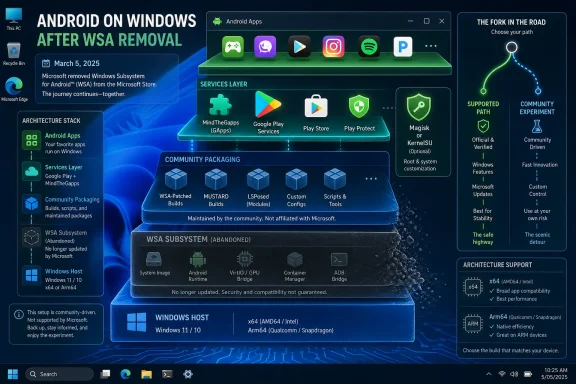
That is the concrete answer, but it is not the whole story. The post-Microsoft WSA ecosystem is no longer a single product with one owner, one update channel, and one support boundary. It is now a stack of replaceable parts: Microsoft’s abandoned subsystem at the base, community packaging around it, Google app integration layered on top, and optional root frameworks that live or die by volunteer maintenance.
For WindowsForum readers, the important distinction is not whether “WSA still works.” In many cases, it does. The sharper question is what part of the experience is still Microsoft’s, what part is now maintained by projects such as WSABuilds, and what part has become a rolling compatibility experiment that admins should treat very differently from a supported Windows feature.
The official line is stark: starting March 5, 2025, Windows Subsystem for Android and the Amazon Appstore are not available in the Microsoft Store. That is the practical end of WSA as a Microsoft-distributed consumer feature. If a user expects to open the Store, search for the Amazon Appstore, and install Android support as a sanctioned Windows 11 capability, that era is over.
What Microsoft removed was the official acquisition and support route. It did not erase the technical architecture from memory, nor did it prevent enthusiasts from packaging the remaining pieces into installable community builds. That gap between unsupported and impossible is where the current WSA scene lives.
The community answer has coalesced around prebuilt packages that keep WSA usable after Microsoft’s cutoff. The leading example is MustardChef’s WSABuilds project, which advertises builds for Windows 11 and Windows 10, x64 and Arm64 variants, Google Play support through MindTheGapps, and optional root through Magisk or KernelSU.
That matters because the center of gravity has shifted. WSA is no longer best understood as a Windows feature. It is now closer to a community-maintained compatibility layer that happens to run on Windows.
The important choices come before installation. A Windows 11 x64 user who wants Android productivity apps from Google Play is looking for a different package than a Windows 10 user experimenting with a backported subsystem. An Arm64 device needs an Arm64 build. A security-conscious user probably does not want a rooted package unless they have a specific reason for it.
The Google Play question is the biggest everyday fork. WSABuilds advertises Play support through MindTheGapps, which is the piece that turns WSA from a sideloading curiosity into something closer to the Android app environment many users expected Microsoft to deliver in the first place. Without that layer, WSA can still run Android apps, but the app-discovery and services story is thinner.
Root is the second fork, and it should not be treated as a casual toggle. Magisk and KernelSU support are attractive to Android power users, developers, and tinkerers, but they expand the maintenance and trust surface. In a home lab, that may be the point. In a work environment, it is the kind of thing that should trigger a policy conversation before anyone calls it “just Android apps on Windows.”
That sentence tells you how the post-Microsoft model actually works. The WSA base is no longer moving like a first-party Microsoft platform. The surrounding components are the things still changing. In practical terms, the subsystem becomes the foundation, while root tooling and Google integration become the active maintenance surface.
This is both reassuring and limiting. It is reassuring because users are not necessarily stuck with a frozen bundle of Android-side components from the day Microsoft stepped away. It is limiting because an LTS build does not magically convert WSA back into a Microsoft-supported Windows component.
The word LTS also means different things in different worlds. In enterprise Linux, it usually implies a vendor contract, published support windows, security bulletins, and a predictable patching process. In a community WSA project, it means something more modest but still valuable: a maintainer is choosing stability over chasing every possible subsystem mutation.
For WindowsForum’s enthusiast audience, that is often enough. For sysadmins, it is a warning label as much as a comfort label.
This is why the current WSA ecosystem feels more useful to many enthusiasts than Microsoft’s official version ever did. The Amazon Appstore catalog on Windows was always narrower than the Android universe users had in mind. A WSA build with Google Play support is closer to what people assumed “Android apps on Windows” meant when Windows 11 was announced.
But this is also where the legal, operational, and trust boundaries become blurry. MindTheGapps is not Microsoft. Google Play services are not a Windows component. A community package that integrates them may be convenient, but it is not equivalent to receiving a first-party platform feature through the Microsoft Store.
The most honest way to describe the replacement is this: community builds replace Microsoft’s delivery mechanism and expand the app ecosystem, but they do not replace Microsoft’s accountability. That distinction is easy to wave away when testing a notes app. It is harder to ignore when Android apps touch work accounts, payment data, authentication prompts, or corporate files.
That is not a minor footnote. It shows that community maintenance is not just about preserving access after Microsoft’s cutoff. It is about changing the platform assumptions Microsoft made in the first place.
Windows 10 backporting also changes the risk profile. A Windows 11 community WSA package is at least operating in the neighborhood Microsoft originally designed for. A Windows 10 patching project is explicitly about making a subsystem run where Microsoft did not offer it as a supported consumer path.
That does not make it useless. For hobbyists, spare machines, lab benches, and legacy workflows, it may be the most interesting part of the entire post-support WSA story. But it also means the Windows 10 branch belongs in the “experiment deliberately” bucket, not the “roll this into the office image” bucket.
WindowsForum has always had a build-curious streak, from old Windows 7 build-chasing threads to modern community WSA experiments. That culture is an asset when a feature falls out of official support. It is also why the forum needs to be precise about what is being replaced: not Windows support, not Microsoft servicing, and not a real enterprise lifecycle.
Community builds restore the runtime better than they restore that mainstream trust story. Google Play support may give users a richer app catalog, but it does not recreate Microsoft Store governance. It also does not recreate the simplicity of telling a nontechnical user to install a supported Store app and let Windows handle the rest.
That matters most for people who support other people’s PCs. A community WSA installation may be perfectly manageable for the person who installed it. It is less attractive when the next person inherits the machine and has no idea which build was used, whether it includes root, what Google package was bundled, or where updates are supposed to come from.
The missing Store path also affects documentation. In the official era, troubleshooting began with Windows version, Store installation state, and Amazon Appstore behavior. In the community era, troubleshooting begins with the exact build source, architecture, package variant, optional components, and whether the user followed the project’s installation steps cleanly.
That is a very different support conversation.
For administrators, it is a bright red line. Rooted Android environments can be legitimate tools, but they are not neutral from a governance perspective. They can alter app behavior, bypass assumptions made by mobile software, and complicate the already awkward boundary between Windows identity, Android identity, and cloud service identity.
This is where “it runs fine” becomes an insufficient test. A rooted WSA instance may run smoothly on a desktop and still be unacceptable on a managed device. A package with updated root tooling may be technically healthier than an old one, yet still inappropriate for machines subject to compliance or audit requirements.
The community deserves credit for making these options explicit. WSABuilds does not hide the existence of Magisk, KernelSU, or GApps. The burden now falls on users and admins to choose intentionally instead of grabbing the biggest-looking download and hoping it matches their needs.
That is the reverse of how many Windows users think about platform maintenance. With Windows itself, the operating system is the moving target and most apps follow. With community WSA, the base may be comparatively static while the surrounding Android ecosystem keeps shifting.
This is why app compatibility should be treated as empirical, not assumed. The existence of Google Play support does not mean every Play Store app behaves like it would on a phone. The existence of a Windows 10 patch does not mean Windows 10 becomes a supported Android platform. The existence of LTS does not mean every future Google-side change will be painless.
The better mental model is a layered compatibility sandwich. Windows hosts WSA. WSA hosts Android. Google services may be layered into that Android environment. Root may be layered into the same environment. Every layer can work, and every layer can introduce a new failure mode.
That does not make the project fragile by default. It makes it different from a normal Windows feature.
The real issue is trust discipline. A community WSA build is powerful because it packages a runtime, Android components, optional Google services, and optional root capabilities into something Windows will execute. That is a lot of authority to delegate to a project maintainer.
Users should therefore treat source selection as part of the installation process, not an afterthought. The difference between a known community repository with visible releases and a random reupload matters. The difference between a package with no root and one with root matters. The difference between a machine used for experimentation and a machine used for banking, work credentials, or production administration matters.
For IT pros, the practical stance is boring and correct: keep community WSA off managed endpoints unless there is a documented reason, a known build source, and an owner for updates. If the organization would not allow a random Android emulator with bundled services and root on that machine, it should not wave WSA through just because the letters once belonged to Microsoft.
Security is not a vibe. It is a maintenance plan.
That contrast is useful because it shows Microsoft is not allergic to subsystems. It is selective about which ones serve the company’s current platform strategy. Linux on Windows aligns with developers, cloud workflows, and enterprise tooling. Android on Windows, at least through the Amazon Appstore arrangement, apparently did not justify the ongoing product commitment.
For readers following WindowsForum’s broader subsystem coverage, including the recent attention around WSL, WSA now looks like the road not taken. One subsystem becomes an increasingly strategic bridge. The other becomes a community artifact kept alive by people who still find it useful.
That does not mean Microsoft made an irrational choice. It means users should stop waiting for WSA to re-enter the official roadmap unless Microsoft says so. The practical future of WSA is not in Redmond’s Store pipeline. It is in the repositories and release notes of the maintainers who still care.
For a sysadmin, the case narrows quickly. Community WSA is not a supported Microsoft endpoint capability. It does not come through the Microsoft Store. It introduces Android app behavior, Google service dependencies, and possibly root into the Windows environment.
There are still legitimate professional use cases. Developers may need Android app testing. Support teams may need to reproduce customer behavior. Lab environments may need WSA precisely because it is lighter than maintaining separate devices for every test.
The difference is that professional use needs containment. Put it on lab hardware, virtualized test environments where appropriate, or dedicated developer machines with clear ownership. Do not let it become a shadow platform on ordinary business desktops.
That is the line between useful enthusiast infrastructure and unmanaged drift.
Who updates the build when Google-side components change? Who decides whether a root framework update is safe? Who documents which machines have it installed? Who removes it if the project goes quiet? Who explains to a user that Microsoft support does not cover the thing they installed because it resembles a retired Microsoft feature?
These questions sound bureaucratic because real computing is bureaucratic. The difference between a clever workaround and a supported platform is not whether it boots. It is whether someone owns the lifecycle.
That is why the LTS claim from WSABuilds matters, but also why it should not be overread. Long-term support from a community project is a maintenance signal. It is not the same as Microsoft servicing. It is not a guarantee that the Android app you care about will keep working forever.
The mature answer is neither panic nor hype. Community WSA builds are useful, technically impressive, and clearly filling a demand Microsoft left behind. They are also now their own platform, with their own trust model.
Community builds can replace the practical ability to install and run WSA after the Microsoft Store path disappears. They can add Google Play support through MindTheGapps. They can offer rooted variants through Magisk or KernelSU. They can extend the idea to Windows 10 through projects such as WSAPatch.
They do not replace Microsoft’s official support channel. They do not restore the Amazon Appstore as a Store-distributed Windows feature. They do not turn Android apps into native Windows apps. They do not make every app compatible, every device supported, or every security concern irrelevant.
That map is more useful than a simple yes-or-no verdict. WSA is not dead in the hands of the community. It is just no longer the thing Microsoft launched.
What remains is more interesting and less tidy. WSABuilds has turned WSA into an LTS-style community package with updated Magisk, KernelSU, and GApps components. WSAPatch and similar work show that users are willing to push the subsystem beyond Microsoft’s Windows 11 boundary. WindowsForum users discussing Play Store-enabled community WSA builds are not clinging to nostalgia; they are participating in a small but real platform fork.
The future of WSA will not be decided by a Microsoft Store listing. It will be decided by whether community maintainers can keep the layered stack useful, whether Google-side dependencies remain workable, whether users choose sane package variants, and whether admins draw the right boundary between experiment and estate standard. For now, WSA after Microsoft is alive — but it is alive as community infrastructure, and that means the freedom is inseparable from the responsibility.
That is the concrete answer, but it is not the whole story. The post-Microsoft WSA ecosystem is no longer a single product with one owner, one update channel, and one support boundary. It is now a stack of replaceable parts: Microsoft’s abandoned subsystem at the base, community packaging around it, Google app integration layered on top, and optional root frameworks that live or die by volunteer maintenance.
For WindowsForum readers, the important distinction is not whether “WSA still works.” In many cases, it does. The sharper question is what part of the experience is still Microsoft’s, what part is now maintained by projects such as WSABuilds, and what part has become a rolling compatibility experiment that admins should treat very differently from a supported Windows feature.
 Microsoft Removed the Store Path, Not the Idea
The official line is stark: starting March 5, 2025, Windows Subsystem for Android and the Amazon Appstore are not available in the Microsoft Store. That is the practical end of WSA as a Microsoft-distributed consumer feature. If a user expects to open the Store, search for the Amazon Appstore, and install Android support as a sanctioned Windows 11 capability, that era is over.What Microsoft removed was the official acquisition and support route. It did not erase the technical architecture from memory, nor did it prevent enthusiasts from packaging the remaining pieces into installable community builds. That gap between unsupported and impossible is where the current WSA scene lives.
The community answer has coalesced around prebuilt packages that keep WSA usable after Microsoft’s cutoff. The leading example is MustardChef’s WSABuilds project, which advertises builds for Windows 11 and Windows 10, x64 and Arm64 variants, Google Play support through MindTheGapps, and optional root through Magisk or KernelSU.
That matters because the center of gravity has shifted. WSA is no longer best understood as a Windows feature. It is now closer to a community-maintained compatibility layer that happens to run on Windows.
The Practical Path Is Now a Community Build, With Caveats Up Front
For a user arriving cold, the basic path is simple in concept. You choose a community WSA build matching your Windows version and CPU architecture, decide whether you want Google apps, decide whether you want root, extract the package, and run the included installer or setup script according to that project’s instructions.The important choices come before installation. A Windows 11 x64 user who wants Android productivity apps from Google Play is looking for a different package than a Windows 10 user experimenting with a backported subsystem. An Arm64 device needs an Arm64 build. A security-conscious user probably does not want a rooted package unless they have a specific reason for it.
The Google Play question is the biggest everyday fork. WSABuilds advertises Play support through MindTheGapps, which is the piece that turns WSA from a sideloading curiosity into something closer to the Android app environment many users expected Microsoft to deliver in the first place. Without that layer, WSA can still run Android apps, but the app-discovery and services story is thinner.
Root is the second fork, and it should not be treated as a casual toggle. Magisk and KernelSU support are attractive to Android power users, developers, and tinkerers, but they expand the maintenance and trust surface. In a home lab, that may be the point. In a work environment, it is the kind of thing that should trigger a policy conversation before anyone calls it “just Android apps on Windows.”
LTS Sounds Boring, Which Is Exactly Why It Matters
The most consequential claim from WSABuilds is not that it can package WSA with Google Play. It is that the project has entered long-term support for WSA versions 2311.40000.5.0 and newer, while keeping Magisk, KernelSU, and GApps updated through new releases.That sentence tells you how the post-Microsoft model actually works. The WSA base is no longer moving like a first-party Microsoft platform. The surrounding components are the things still changing. In practical terms, the subsystem becomes the foundation, while root tooling and Google integration become the active maintenance surface.
This is both reassuring and limiting. It is reassuring because users are not necessarily stuck with a frozen bundle of Android-side components from the day Microsoft stepped away. It is limiting because an LTS build does not magically convert WSA back into a Microsoft-supported Windows component.
The word LTS also means different things in different worlds. In enterprise Linux, it usually implies a vendor contract, published support windows, security bulletins, and a predictable patching process. In a community WSA project, it means something more modest but still valuable: a maintainer is choosing stability over chasing every possible subsystem mutation.
For WindowsForum’s enthusiast audience, that is often enough. For sysadmins, it is a warning label as much as a comfort label.
Google Play Is the Feature Microsoft Never Really Owned
Microsoft’s original WSA strategy revolved around the Amazon Appstore. That was the sanctioned storefront, the public-facing partner story, and the Store-integrated route for regular users. Community builds invert that assumption by making Google Play support one of the main attractions.This is why the current WSA ecosystem feels more useful to many enthusiasts than Microsoft’s official version ever did. The Amazon Appstore catalog on Windows was always narrower than the Android universe users had in mind. A WSA build with Google Play support is closer to what people assumed “Android apps on Windows” meant when Windows 11 was announced.
But this is also where the legal, operational, and trust boundaries become blurry. MindTheGapps is not Microsoft. Google Play services are not a Windows component. A community package that integrates them may be convenient, but it is not equivalent to receiving a first-party platform feature through the Microsoft Store.
The most honest way to describe the replacement is this: community builds replace Microsoft’s delivery mechanism and expand the app ecosystem, but they do not replace Microsoft’s accountability. That distinction is easy to wave away when testing a notes app. It is harder to ignore when Android apps touch work accounts, payment data, authentication prompts, or corporate files.
Windows 10 Support Is the Clearest Sign This Has Become a Fork Culture
Microsoft positioned WSA as a Windows 11 feature. The community has pushed beyond that boundary, and the existence of WSAPatch is the cleanest evidence. WSAPatch exists specifically to make WSA run on Windows 10.That is not a minor footnote. It shows that community maintenance is not just about preserving access after Microsoft’s cutoff. It is about changing the platform assumptions Microsoft made in the first place.
Windows 10 backporting also changes the risk profile. A Windows 11 community WSA package is at least operating in the neighborhood Microsoft originally designed for. A Windows 10 patching project is explicitly about making a subsystem run where Microsoft did not offer it as a supported consumer path.
That does not make it useless. For hobbyists, spare machines, lab benches, and legacy workflows, it may be the most interesting part of the entire post-support WSA story. But it also means the Windows 10 branch belongs in the “experiment deliberately” bucket, not the “roll this into the office image” bucket.
WindowsForum has always had a build-curious streak, from old Windows 7 build-chasing threads to modern community WSA experiments. That culture is an asset when a feature falls out of official support. It is also why the forum needs to be precise about what is being replaced: not Windows support, not Microsoft servicing, and not a real enterprise lifecycle.
The Amazon Appstore Exit Leaves a Store-Shaped Hole
The removal of the Amazon Appstore from the Microsoft Store closes the loop on Microsoft’s original user-friendly pitch. The promise was not merely that Android apps could run. It was that Windows users could discover, install, and manage them through familiar storefront plumbing.Community builds restore the runtime better than they restore that mainstream trust story. Google Play support may give users a richer app catalog, but it does not recreate Microsoft Store governance. It also does not recreate the simplicity of telling a nontechnical user to install a supported Store app and let Windows handle the rest.
That matters most for people who support other people’s PCs. A community WSA installation may be perfectly manageable for the person who installed it. It is less attractive when the next person inherits the machine and has no idea which build was used, whether it includes root, what Google package was bundled, or where updates are supposed to come from.
The missing Store path also affects documentation. In the official era, troubleshooting began with Windows version, Store installation state, and Amazon Appstore behavior. In the community era, troubleshooting begins with the exact build source, architecture, package variant, optional components, and whether the user followed the project’s installation steps cleanly.
That is a very different support conversation.
Root Turns WSA Into a Developer Toy and an Admin Headache
Magisk and KernelSU support are among the reasons community WSA builds have a serious following. They open the door to deeper Android modification, app testing, and workflows that Microsoft never prioritized. For Android developers and power users, that is not a fringe feature; it is the feature.For administrators, it is a bright red line. Rooted Android environments can be legitimate tools, but they are not neutral from a governance perspective. They can alter app behavior, bypass assumptions made by mobile software, and complicate the already awkward boundary between Windows identity, Android identity, and cloud service identity.
This is where “it runs fine” becomes an insufficient test. A rooted WSA instance may run smoothly on a desktop and still be unacceptable on a managed device. A package with updated root tooling may be technically healthier than an old one, yet still inappropriate for machines subject to compliance or audit requirements.
The community deserves credit for making these options explicit. WSABuilds does not hide the existence of Magisk, KernelSU, or GApps. The burden now falls on users and admins to choose intentionally instead of grabbing the biggest-looking download and hoping it matches their needs.
The Stable Part Is the Base; the Moving Parts Are Everything Users Notice
Post-March 2025 WSA has an odd stability profile. The core subsystem version may be relatively fixed under LTS, but the components people interact with most — Google services, root tooling, app compatibility, installer packaging — remain active variables.That is the reverse of how many Windows users think about platform maintenance. With Windows itself, the operating system is the moving target and most apps follow. With community WSA, the base may be comparatively static while the surrounding Android ecosystem keeps shifting.
This is why app compatibility should be treated as empirical, not assumed. The existence of Google Play support does not mean every Play Store app behaves like it would on a phone. The existence of a Windows 10 patch does not mean Windows 10 becomes a supported Android platform. The existence of LTS does not mean every future Google-side change will be painless.
The better mental model is a layered compatibility sandwich. Windows hosts WSA. WSA hosts Android. Google services may be layered into that Android environment. Root may be layered into the same environment. Every layer can work, and every layer can introduce a new failure mode.
That does not make the project fragile by default. It makes it different from a normal Windows feature.
The Security Conversation Has to Start With Trust, Not Malware Panic
There is a lazy version of the WSA debate that reduces everything community-maintained to “unsafe.” That is not useful. Open-source and community-maintained software runs much of the modern infrastructure world, and Windows power users have always lived partly on GitHub, forums, and unsigned utilities.The real issue is trust discipline. A community WSA build is powerful because it packages a runtime, Android components, optional Google services, and optional root capabilities into something Windows will execute. That is a lot of authority to delegate to a project maintainer.
Users should therefore treat source selection as part of the installation process, not an afterthought. The difference between a known community repository with visible releases and a random reupload matters. The difference between a package with no root and one with root matters. The difference between a machine used for experimentation and a machine used for banking, work credentials, or production administration matters.
For IT pros, the practical stance is boring and correct: keep community WSA off managed endpoints unless there is a documented reason, a known build source, and an owner for updates. If the organization would not allow a random Android emulator with bundled services and root on that machine, it should not wave WSA through just because the letters once belonged to Microsoft.
Security is not a vibe. It is a maintenance plan.
Microsoft’s WSL Move Shows the Fork in the Road
There is an interesting contrast with Microsoft’s developer strategy elsewhere on Windows. Windows Subsystem for Linux has become more open and more central to the developer story, while Windows Subsystem for Android has been removed from the Store path and left to community preservation.That contrast is useful because it shows Microsoft is not allergic to subsystems. It is selective about which ones serve the company’s current platform strategy. Linux on Windows aligns with developers, cloud workflows, and enterprise tooling. Android on Windows, at least through the Amazon Appstore arrangement, apparently did not justify the ongoing product commitment.
For readers following WindowsForum’s broader subsystem coverage, including the recent attention around WSL, WSA now looks like the road not taken. One subsystem becomes an increasingly strategic bridge. The other becomes a community artifact kept alive by people who still find it useful.
That does not mean Microsoft made an irrational choice. It means users should stop waiting for WSA to re-enter the official roadmap unless Microsoft says so. The practical future of WSA is not in Redmond’s Store pipeline. It is in the repositories and release notes of the maintainers who still care.
The Home User Case Is Stronger Than the Enterprise Case
For a home Windows enthusiast, community WSA builds can be genuinely compelling. They offer a way to run Android apps in windows, pin them like desktop tools, and access a broader app ecosystem than Microsoft’s Amazon-centered approach ever delivered. If the machine is personal, backed up, and not relied on for regulated work, the experiment is easy to justify.For a sysadmin, the case narrows quickly. Community WSA is not a supported Microsoft endpoint capability. It does not come through the Microsoft Store. It introduces Android app behavior, Google service dependencies, and possibly root into the Windows environment.
There are still legitimate professional use cases. Developers may need Android app testing. Support teams may need to reproduce customer behavior. Lab environments may need WSA precisely because it is lighter than maintaining separate devices for every test.
The difference is that professional use needs containment. Put it on lab hardware, virtualized test environments where appropriate, or dedicated developer machines with clear ownership. Do not let it become a shadow platform on ordinary business desktops.
That is the line between useful enthusiast infrastructure and unmanaged drift.
The Download Is the Least Interesting Part of the Decision
Most coverage of community WSA builds gravitates toward availability: where to get it, whether it includes Play Store, and whether it runs on Windows 10. Those are fair questions, but they are first-hour questions. The second-day questions are better.Who updates the build when Google-side components change? Who decides whether a root framework update is safe? Who documents which machines have it installed? Who removes it if the project goes quiet? Who explains to a user that Microsoft support does not cover the thing they installed because it resembles a retired Microsoft feature?
These questions sound bureaucratic because real computing is bureaucratic. The difference between a clever workaround and a supported platform is not whether it boots. It is whether someone owns the lifecycle.
That is why the LTS claim from WSABuilds matters, but also why it should not be overread. Long-term support from a community project is a maintenance signal. It is not the same as Microsoft servicing. It is not a guarantee that the Android app you care about will keep working forever.
The mature answer is neither panic nor hype. Community WSA builds are useful, technically impressive, and clearly filling a demand Microsoft left behind. They are also now their own platform, with their own trust model.
The Replacement Map Is Clearer Than the Hype
The cleanest way to think about post-Microsoft WSA is to separate what community builds replace from what they merely approximate. That distinction prevents both disappointment and overconfidence.Community builds can replace the practical ability to install and run WSA after the Microsoft Store path disappears. They can add Google Play support through MindTheGapps. They can offer rooted variants through Magisk or KernelSU. They can extend the idea to Windows 10 through projects such as WSAPatch.
They do not replace Microsoft’s official support channel. They do not restore the Amazon Appstore as a Store-distributed Windows feature. They do not turn Android apps into native Windows apps. They do not make every app compatible, every device supported, or every security concern irrelevant.
That map is more useful than a simple yes-or-no verdict. WSA is not dead in the hands of the community. It is just no longer the thing Microsoft launched.
The Checklist WindowsForum Readers Should Actually Use
Before installing a community WSA build, readers should treat the decision less like grabbing a utility and more like adding a secondary app platform to Windows. The goal is not to scare anyone away. It is to make the trade-offs explicit before the first package is unpacked.- Choose a build that matches your Windows version, CPU architecture, and actual need for Google Play support rather than downloading the most feature-packed package by default.
- Avoid rooted builds unless you specifically need Magisk or KernelSU for development, testing, or Android modification work.
- Treat Windows 10 WSA support as a community backport, not as a belated Microsoft feature for Windows 10.
- Keep a record of the exact build source and package variant so troubleshooting does not become guesswork later.
- Do not deploy community WSA builds broadly on managed business PCs without a clear owner, update plan, and security exception.
- Assume the base WSA layer may be relatively stable while Google apps, root frameworks, and app compatibility remain moving targets.
The Community Now Owns the Interesting Parts
Microsoft’s March 5, 2025 cutoff did not end Android apps on Windows so much as it ended Microsoft’s version of that story. The official Store-backed path is gone, and with it the comforting fiction that WSA was just another Windows feature waiting for normal updates.What remains is more interesting and less tidy. WSABuilds has turned WSA into an LTS-style community package with updated Magisk, KernelSU, and GApps components. WSAPatch and similar work show that users are willing to push the subsystem beyond Microsoft’s Windows 11 boundary. WindowsForum users discussing Play Store-enabled community WSA builds are not clinging to nostalgia; they are participating in a small but real platform fork.
The future of WSA will not be decided by a Microsoft Store listing. It will be decided by whether community maintainers can keep the layered stack useful, whether Google-side dependencies remain workable, whether users choose sane package variants, and whether admins draw the right boundary between experiment and estate standard. For now, WSA after Microsoft is alive — but it is alive as community infrastructure, and that means the freedom is inseparable from the responsibility.
References
- Primary source: learn.microsoft.com
Ending Support in 2025 - Microsoft Lifecycle | Microsoft Learn
Find out which products will retire, reach end of support or move from mainstream support to extended support in 2025.learn.microsoft.com - Independent coverage: github.com
- Independent coverage: support.microsoft.com
What does it mean if Windows isn't supported? | Microsoft Support
Learn what it means if you have an older version of Windows that's no longer supported.support.microsoft.com
