

On June 29, 2026, Microsoft put WSL Containers into public preview for Windows 11, adding a
For years, the Windows container story has been quietly split in two. Windows containers existed for Windows workloads, while most developers who wanted Linux containers on a Windows laptop installed Docker Desktop and let it manage the WSL 2 backend. That arrangement worked well enough that it became invisible: Docker Desktop was the product people touched, and WSL was the substrate underneath.
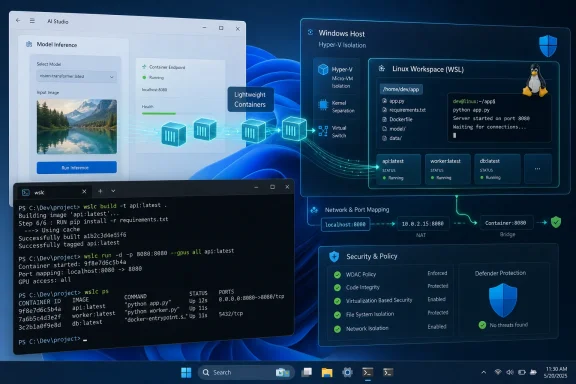
WSL Containers changes the framing. Microsoft is no longer merely providing the Linux compatibility layer that another company’s tool wraps. It is exposing a first-party container experience directly through WSL, complete with Docker-like commands, image builds, port forwarding, GPU access, and a programmable API for Windows applications.
The important word is first-party. Microsoft is not reinventing Linux containers, nor is it pretending Moby, container images, registries, and Docker-style workflows suddenly belong to Windows. The company is doing something more strategically useful: it is making the Windows host itself a credible place to launch and supervise Linux container workloads without forcing users through Docker Desktop as the front door.
That matters because Docker Desktop has become both essential and awkward. It is polished, familiar, and deeply embedded in development workflows. It is also a separate product with its own licensing model, update cadence, resource profile, GUI assumptions, and enterprise governance surface. WSL Containers is Microsoft’s attempt to pull the baseline experience into the operating system layer.
That is not laziness. It is adoption strategy. Container developers already have enough layers to think about: image formats, registry authentication, build contexts, bind mounts, networking, GPU runtimes, Compose files, Kubernetes manifests, and cloud deployment targets. If Microsoft had shipped a conceptually pure but unfamiliar CLI, the preview would have become another Windows-specific island.
Instead,
That is the kind of mundane success that makes platform changes stick. The headline is not that Windows can run a toy
This is a subtle but important shift. Docker Desktop is primarily a developer tool. WSL Containers can also become an application infrastructure feature. A Windows app that depends on a Linux-only component could package that dependency behind the scenes, run it in a container, and tear it down when finished without asking the user to understand what happened.
Microsoft’s Moonray demonstration illustrates the idea. A Windows executable can rely on a Linux rendering engine while hiding the container boundary from the user. That model is not just useful for rendering. It could apply to scientific tools, internal enterprise apps, security analyzers, AI utilities, legacy Unix components, and anything else that is easier to ship as Linux software than to port cleanly to Windows.
The catch is that this convenience comes with architectural choices. Microsoft says each Windows app using the API gets its own Hyper-V-backed virtual machine, while the CLI has its own VM as well. Docker Desktop traditionally concentrates containers inside a shared VM. The Microsoft model favors isolation and manageability over raw density.
That story becomes more compelling when tied to Microsoft Defender for Endpoint and policy controls. Microsoft says Defender’s WSL integration is being extended so container events can be seen by security teams, though parts of that story remain in private preview. Group Policy and ADMX controls are also part of the initial management picture, including the ability to decide whether users can access WSL distros, WSL containers, or both.
The registry allowlist is especially telling. Enterprises do not merely worry that developers will run containers. They worry that developers will pull arbitrary images from public registries, embed unknown dependencies, and normalize an unreviewed software supply chain. A native WSL container stack that can be constrained to approved registries is easier to defend than a patchwork of desktop runtimes and individual developer habits.
This is where WSL Containers becomes more than a Docker alternative. It becomes another piece of Microsoft’s broader attempt to make Windows a governed developer workstation: local Linux, local AI, local containers, endpoint visibility, and policy enforcement all under the same administrative roof.
That matters because many modern development environments are not single-container affairs. A typical web project may bring up an application server, a database, Redis, a message queue, object storage emulation, and one or two background workers from a single
The same applies to teams that rely on Docker Desktop’s polish. Developers often underestimate how much convenience hides in a tray icon, a dashboard, log viewers, volume inspection, image cleanup tools, Kubernetes toggles, credential handling, and extension integrations.
That is why the right conclusion is not “uninstall Docker Desktop.” The better conclusion is that Microsoft has made Docker Desktop less mandatory for the simplest and most common Windows container cases. That is a different kind of competitive pressure, and possibly a more durable one.
A built-in Windows capability changes that conversation. If a developer only needs to build an image, run a local service, test a Linux CLI tool, or start a GPU-enabled container,
Docker is not defenseless here. Docker Desktop is more than a runtime wrapper, and Docker the company remains deeply tied to developer experience, registries, collaboration, security tooling, and cloud workflows. But once the operating system provides a baseline Linux container path, Docker has to justify itself on higher-level value rather than mere necessity.
That is usually how platform shifts happen. The incumbent product does not vanish. It moves up the stack, becomes more specialized, or sells convenience above the commodity layer. Microsoft is now making the commodity layer look much more native to Windows.
WSL has already been part of that story for years. CUDA support in WSL 2 made it plausible to run Linux ML frameworks on Windows hardware. Containers complete the local reproducibility story by letting developers package the runtime, libraries, and model tooling in a way that resembles production environments.
This is particularly important now that AI development has spread beyond specialized research teams. A Windows developer experimenting with inference servers, embedding pipelines, local model tooling, or GPU-accelerated data processing may not want to maintain a full Linux workstation. If WSL Containers can make a GPU-backed Linux container feel like a native part of the Windows dev loop, Microsoft gains a stronger position in AI workstation workflows.
There will still be edge cases. GPU drivers, CUDA versions, image compatibility, and framework assumptions can all break in boring but time-consuming ways. But the fact that the syntax and workflow look familiar lowers the activation energy dramatically.
Microsoft says virtiofs can make Windows file access substantially faster inside containers. That could matter enormously for real projects, where source trees, dependency folders, build caches, and mounted volumes create constant file-system pressure. Slow file I/O has historically made Windows-hosted Linux workflows feel worse than they should, especially in large repositories.
Consomme is aimed at the networking side by relaying Linux traffic through the Windows networking stack rather than relying on older NAT behavior. If it reduces the VPN and proxy incompatibilities that have haunted WSL in corporate environments, it may prove as important as
For now, both technologies are tied to WSL Containers rather than regular WSL distributions. Microsoft says it wants to bring them more broadly to WSL eventually. If that happens, the container preview may become the testing ground for improvements that make the whole WSL platform feel less like a clever compromise.
Developers do not adopt container workflows merely because a runtime exists. They adopt them when opening a repository can produce a consistent development environment. VS Code’s Dev Containers feature turns a container into the shape of a workspace, not just a thing running somewhere in the background.
If
That is a very Microsoft move in the best and most strategic sense. Rather than asking developers to admire a new subsystem, the company is wiring it into the tools they already use.
The install path is straightforward enough: update WSL with the pre-release switch, shut WSL down, restart the terminal, and verify that
The feature also depends on modern virtualization support. That is not unusual for WSL 2-era functionality, but it means the user’s firmware settings, Windows edition, Hyper-V configuration, endpoint policy, and hardware can all become part of the troubleshooting story. For enthusiasts, that is normal terrain. For help desks, it is another support matrix.
The safest use today is parallel evaluation. Install it on test machines, run existing single-container workloads, try GPU images, test local web services, and see how it behaves with corporate networking. Keep Docker Desktop where Compose, dashboards, plugins, and mature support are required.
WSL Containers gives the story a clearer center. Windows can now say it has a native route for Linux containers, not merely a tolerated route through third-party desktop software. That distinction matters to enterprise buyers, platform architects, and developers who want fewer moving pieces.
It also reveals the next competition. The fight is no longer about whether Linux containers can run on Windows. They can. The fight is about who owns the developer experience above that runtime: Microsoft through WSL, VS Code, Defender, Intune, and Windows policy, or Docker through its desktop product, registry integrations, security tooling, and ecosystem.
The likely answer is both. Docker Desktop will remain the better all-around product for many teams, especially those already standardized on Compose-heavy workflows. WSL Containers will become the lower-friction default for simpler cases, embedded app scenarios, and managed environments where Microsoft’s policy and security story carries weight.
wslc.exe command-line tool and developer API that can build, run, and manage Linux containers without Docker Desktop. That is not the same thing as saying Docker Desktop is obsolete. It is, however, the clearest sign yet that Microsoft wants container plumbing to become a native Windows capability rather than a third-party add-on. For developers, admins, and security teams, the preview is less a curiosity than an early look at where Windows development is heading.
 Microsoft Turns Docker’s Best Windows Trick Into a Platform Feature
For years, the Windows container story has been quietly split in two. Windows containers existed for Windows workloads, while most developers who wanted Linux containers on a Windows laptop installed Docker Desktop and let it manage the WSL 2 backend. That arrangement worked well enough that it became invisible: Docker Desktop was the product people touched, and WSL was the substrate underneath.WSL Containers changes the framing. Microsoft is no longer merely providing the Linux compatibility layer that another company’s tool wraps. It is exposing a first-party container experience directly through WSL, complete with Docker-like commands, image builds, port forwarding, GPU access, and a programmable API for Windows applications.
The important word is first-party. Microsoft is not reinventing Linux containers, nor is it pretending Moby, container images, registries, and Docker-style workflows suddenly belong to Windows. The company is doing something more strategically useful: it is making the Windows host itself a credible place to launch and supervise Linux container workloads without forcing users through Docker Desktop as the front door.
That matters because Docker Desktop has become both essential and awkward. It is polished, familiar, and deeply embedded in development workflows. It is also a separate product with its own licensing model, update cadence, resource profile, GUI assumptions, and enterprise governance surface. WSL Containers is Microsoft’s attempt to pull the baseline experience into the operating system layer.
The New Command Is Familiar Because That Is the Point
The preview’s most visible piece iswslc.exe, with container.exe available as an alias. The syntax is deliberately unsurprising. Commands such as wslc run, wslc build, wslc ps, wslc attach, and wslc image ls are designed to make Docker users feel as if they have changed the executable name rather than learned a new mental model.That is not laziness. It is adoption strategy. Container developers already have enough layers to think about: image formats, registry authentication, build contexts, bind mounts, networking, GPU runtimes, Compose files, Kubernetes manifests, and cloud deployment targets. If Microsoft had shipped a conceptually pure but unfamiliar CLI, the preview would have become another Windows-specific island.
Instead,
wslc borrows the muscle memory of Docker while moving the control plane closer to Windows. A developer can pull Debian, run an interactive shell, detach with the familiar key sequence, list the container, and reattach later without installing Docker Desktop. A local Flask app can be built from a Containerfile, started with a port mapping, and reached from the Windows browser over localhost.That is the kind of mundane success that makes platform changes stick. The headline is not that Windows can run a toy
hello-world container. It is that a normal service in a normal Linux image can run on the local Windows machine with ordinary container commands and no obvious ceremony.The API Is the More Ambitious Half of the Story
The CLI will get the screenshots, but the WSL Container API may be the more consequential part of the preview. Microsoft is distributing it as a NuGet package for Windows developers using C, C++, and C#. That lets a Windows application spin up Linux container workloads programmatically as part of its own behavior.This is a subtle but important shift. Docker Desktop is primarily a developer tool. WSL Containers can also become an application infrastructure feature. A Windows app that depends on a Linux-only component could package that dependency behind the scenes, run it in a container, and tear it down when finished without asking the user to understand what happened.
Microsoft’s Moonray demonstration illustrates the idea. A Windows executable can rely on a Linux rendering engine while hiding the container boundary from the user. That model is not just useful for rendering. It could apply to scientific tools, internal enterprise apps, security analyzers, AI utilities, legacy Unix components, and anything else that is easier to ship as Linux software than to port cleanly to Windows.
The catch is that this convenience comes with architectural choices. Microsoft says each Windows app using the API gets its own Hyper-V-backed virtual machine, while the CLI has its own VM as well. Docker Desktop traditionally concentrates containers inside a shared VM. The Microsoft model favors isolation and manageability over raw density.
Isolation Is the Enterprise Sales Pitch
The isolation model explains why Microsoft is already talking about WSL Containers in enterprise terms even though the feature is still in preview. A shared developer VM is efficient, but shared infrastructure is also harder to reason about in regulated environments. If each application receives a stronger boundary, administrators and security teams have a clearer story.That story becomes more compelling when tied to Microsoft Defender for Endpoint and policy controls. Microsoft says Defender’s WSL integration is being extended so container events can be seen by security teams, though parts of that story remain in private preview. Group Policy and ADMX controls are also part of the initial management picture, including the ability to decide whether users can access WSL distros, WSL containers, or both.
The registry allowlist is especially telling. Enterprises do not merely worry that developers will run containers. They worry that developers will pull arbitrary images from public registries, embed unknown dependencies, and normalize an unreviewed software supply chain. A native WSL container stack that can be constrained to approved registries is easier to defend than a patchwork of desktop runtimes and individual developer habits.
This is where WSL Containers becomes more than a Docker alternative. It becomes another piece of Microsoft’s broader attempt to make Windows a governed developer workstation: local Linux, local AI, local containers, endpoint visibility, and policy enforcement all under the same administrative roof.
Docker Desktop Is Still the Complete Product
The preview also makes clear how much Docker Desktop still does. WSL Containers can build and run containers, but it does not yet replace Docker’s full desktop experience. There is no Docker Compose equivalent built into the preview, no mature GUI dashboard, no Docker Scout-style scanning workflow, and no comparable extension ecosystem.That matters because many modern development environments are not single-container affairs. A typical web project may bring up an application server, a database, Redis, a message queue, object storage emulation, and one or two background workers from a single
compose.yaml file. If WSL Containers requires each piece to be launched and coordinated manually, it is not yet the default tool for that class of project.The same applies to teams that rely on Docker Desktop’s polish. Developers often underestimate how much convenience hides in a tray icon, a dashboard, log viewers, volume inspection, image cleanup tools, Kubernetes toggles, credential handling, and extension integrations.
wslc may be elegant, but a command-line preview is not the same thing as a productized developer environment.That is why the right conclusion is not “uninstall Docker Desktop.” The better conclusion is that Microsoft has made Docker Desktop less mandatory for the simplest and most common Windows container cases. That is a different kind of competitive pressure, and possibly a more durable one.
The Licensing Shadow Is Impossible to Ignore
Microsoft does not need to make licensing the center of the WSL Containers pitch for everyone else to notice it. Docker Desktop’s licensing terms have been a recurring source of friction for larger organizations. Many developers love the tool, while procurement and compliance departments treat it as one more commercial dependency to track.A built-in Windows capability changes that conversation. If a developer only needs to build an image, run a local service, test a Linux CLI tool, or start a GPU-enabled container,
wslc may eventually be “good enough” without triggering a separate desktop product decision. That is not a moral judgment on Docker’s business model. It is the natural consequence of a platform vendor absorbing a common workflow.Docker is not defenseless here. Docker Desktop is more than a runtime wrapper, and Docker the company remains deeply tied to developer experience, registries, collaboration, security tooling, and cloud workflows. But once the operating system provides a baseline Linux container path, Docker has to justify itself on higher-level value rather than mere necessity.
That is usually how platform shifts happen. The incumbent product does not vanish. It moves up the stack, becomes more specialized, or sells convenience above the commodity layer. Microsoft is now making the commodity layer look much more native to Windows.
GPU Workloads Make This More Than a Web Developer Convenience
The preview’s GPU support is another sign that Microsoft is thinking beyond simple local services. The--gpus all flag mirrors the syntax Docker users already know, and the demonstrated PyTorch workflows show why this matters. AI and machine learning developers want Windows laptops and workstations to behave like credible Linux development machines without turning setup into a weekend project.WSL has already been part of that story for years. CUDA support in WSL 2 made it plausible to run Linux ML frameworks on Windows hardware. Containers complete the local reproducibility story by letting developers package the runtime, libraries, and model tooling in a way that resembles production environments.
This is particularly important now that AI development has spread beyond specialized research teams. A Windows developer experimenting with inference servers, embedding pipelines, local model tooling, or GPU-accelerated data processing may not want to maintain a full Linux workstation. If WSL Containers can make a GPU-backed Linux container feel like a native part of the Windows dev loop, Microsoft gains a stronger position in AI workstation workflows.
There will still be edge cases. GPU drivers, CUDA versions, image compatibility, and framework assumptions can all break in boring but time-consuming ways. But the fact that the syntax and workflow look familiar lowers the activation energy dramatically.
Networking and File I/O Are the Old WSL Wounds
The preview also contains two pieces of plumbing that deserve more attention than they will get: virtiofs file access and an experimental networking mode called Consomme. Both target long-standing WSL pain points. Developers care about container commands, but they complain about slow file access, VPN weirdness, proxy failures, and localhost behavior when the magic stops working.Microsoft says virtiofs can make Windows file access substantially faster inside containers. That could matter enormously for real projects, where source trees, dependency folders, build caches, and mounted volumes create constant file-system pressure. Slow file I/O has historically made Windows-hosted Linux workflows feel worse than they should, especially in large repositories.
Consomme is aimed at the networking side by relaying Linux traffic through the Windows networking stack rather than relying on older NAT behavior. If it reduces the VPN and proxy incompatibilities that have haunted WSL in corporate environments, it may prove as important as
wslc itself. Enterprise developers do not live on clean home networks; they live behind endpoint agents, traffic inspection, VPN clients, split tunnels, proxy rules, and internal certificate chains.For now, both technologies are tied to WSL Containers rather than regular WSL distributions. Microsoft says it wants to bring them more broadly to WSL eventually. If that happens, the container preview may become the testing ground for improvements that make the whole WSL platform feel less like a clever compromise.
VS Code Support Shows Microsoft Knows Where Developers Live
The VS Code Dev Containers extension has already picked up pre-release support forwslc, and the setup is intentionally simple: change the Docker Path setting to point at wslc. That single setting matters because Dev Containers is one of the most practical bridges between container technology and everyday coding.Developers do not adopt container workflows merely because a runtime exists. They adopt them when opening a repository can produce a consistent development environment. VS Code’s Dev Containers feature turns a container into the shape of a workspace, not just a thing running somewhere in the background.
If
wslc can become a supported backend for that flow, Microsoft gets an adoption route that does not require developers to consciously switch container platforms. The editor becomes the interface, the repository defines the environment, and WSL Containers becomes the local execution layer.That is a very Microsoft move in the best and most strategic sense. Rather than asking developers to admire a new subsystem, the company is wiring it into the tools they already use.
The Preview Is Useful, but It Is Not Yet Boring
The best infrastructure eventually becomes boring. WSL Containers is not there yet. It is public preview software, installed through the WSL pre-release channel, and early testers have already reported rough edges such as first-run failures. That is acceptable for experimentation, but not for standardizing a production development fleet.The install path is straightforward enough: update WSL with the pre-release switch, shut WSL down, restart the terminal, and verify that
wslc reports the expected version. But the mere fact that this requires the pre-release channel should slow down anyone tempted to roll it out casually across a company. Preview software is where Microsoft learns which assumptions fail on real machines.The feature also depends on modern virtualization support. That is not unusual for WSL 2-era functionality, but it means the user’s firmware settings, Windows edition, Hyper-V configuration, endpoint policy, and hardware can all become part of the troubleshooting story. For enthusiasts, that is normal terrain. For help desks, it is another support matrix.
The safest use today is parallel evaluation. Install it on test machines, run existing single-container workloads, try GPU images, test local web services, and see how it behaves with corporate networking. Keep Docker Desktop where Compose, dashboards, plugins, and mature support are required.
The Windows Container Story Finally Has a Center of Gravity
Windows has spent years being a surprisingly good Linux development host while still feeling like it was borrowing pieces from elsewhere. WSL made Linux shells and tools practical. Docker Desktop made Linux containers usable. VS Code made remote and containerized development approachable. The result worked, but the ownership was distributed.WSL Containers gives the story a clearer center. Windows can now say it has a native route for Linux containers, not merely a tolerated route through third-party desktop software. That distinction matters to enterprise buyers, platform architects, and developers who want fewer moving pieces.
It also reveals the next competition. The fight is no longer about whether Linux containers can run on Windows. They can. The fight is about who owns the developer experience above that runtime: Microsoft through WSL, VS Code, Defender, Intune, and Windows policy, or Docker through its desktop product, registry integrations, security tooling, and ecosystem.
The likely answer is both. Docker Desktop will remain the better all-around product for many teams, especially those already standardized on Compose-heavy workflows. WSL Containers will become the lower-friction default for simpler cases, embedded app scenarios, and managed environments where Microsoft’s policy and security story carries weight.
The Preview Draws a New Line Between Need and Habit
The practical lesson is not that every Windows developer should abandon Docker Desktop today. It is that everyone should separate what they truly need from what they installed out of habit. WSL Containers already covers enough ground to deserve testing, and the gaps are clear enough to keep expectations sane.- WSL Containers is available now as a public preview through the WSL pre-release channel, not as a finished general-availability feature.
- The
wslc.execommand can build, run, list, attach to, and expose Linux containers using syntax that will feel familiar to Docker users. - Single-container development workloads, local web services, Linux utilities, and some GPU-backed AI workflows are the strongest early fits.
- Docker Desktop remains the more complete choice for Compose-based projects, GUI management, image scanning, plugins, and mature team workflows.
- The enterprise significance lies in isolation, registry controls, Defender visibility, and the possibility of managing Linux container use as a Windows platform capability.
References
- Primary source: Windows Latest
Published: Thu, 02 Jul 2026 00:01:05 GMT
Loading…
www.windowslatest.com - Official source: devblogs.microsoft.com
WSL container is now available for public preview - Windows Command Line
At Microsoft Build 2026, we introduced WSL containers, bringing Linux container development directly into Windows through the Windows Subsystem for Linuxdevblogs.microsoft.com - Official source: learn.microsoft.com
WSL container | Microsoft Learn
An overview of what the WSL container feature is, and how to use it to run Linux container workflows on Windowslearn.microsoft.com - Related coverage: windowsreport.com
Loading…
windowsreport.com - Official source: techcommunity.microsoft.com
Announcing Azure Linux 4.0: Purpose-Built for Azure, Now in Public Preview | Microsoft Community Hub
Today at Microsoft Build, we're announcing the public preview of Azure Linux 4.0 - Microsoft's first party Linux distribution, purpose-built for Azure. Azure... techcommunity.microsoft.com
- Official source: blogs.windows.com
Build 2026: Furthering Windows as the trusted platform for development
Build is one of our favorite moments each year - a chance to connect with the global developer community and share what we’ve been building. Over the past year, we have connected with many developers pushing the boundaries of what’s possible onblogs.windows.com
- Related coverage: gihyo.jp
Loading…
gihyo.jp - Related coverage: insight.tmcnet.com
Loading…
insight.tmcnet.com - Official source: github.com
Loading…
github.com - Related coverage: windowscentral.com
I break down 4 new Windows 11 tools from Build 2026 that genuinely stood out and show where the OS is heading | Windows Central
Microsoft unveiled a lot of AI projects at Build 2026, but these four Windows 11 tools caught my attention the most.www.windowscentral.com - Related coverage: files.dlink.com.au