

Microsoft released WSL Containers into public preview on June 29, 2026, giving Windows 11 developers a built-in way to create, run, and manage Linux containers through the Windows Subsystem for Linux without installing Docker Desktop. The preview arrives several weeks after its Build 2026 reveal and lands as part of the latest pre-release WSL update. The practical message is simple: Microsoft wants Windows to stop feeling like a guest OS for Linux-native development. The strategic message is sharper: the company is moving container workflows from an app-layer add-on into the operating system’s developer substrate.
For most of the WSL 2 era, Linux containers on Windows have been a success story with an asterisk. Docker Desktop, Podman, Rancher Desktop, and similar tools made the experience workable, often excellent, but the basic shape remained indirect: Windows hosted WSL, WSL hosted Linux plumbing, and third-party tools turned that stack into a container development environment.
WSL Containers changes that relationship. Microsoft is not merely documenting a blessed Docker Desktop configuration or adding a convenience wrapper around an existing workflow. It is introducing a native WSL container command line,
That distinction matters because container tooling has become less like a specialty developer utility and more like a baseline operating environment. Web services, test harnesses, AI experiments, database sandboxes, CI pipeline replicas, and cross-platform build systems increasingly assume a Linux container is one command away. On Windows, Microsoft now wants that command to belong to Windows.
The preview is still exactly that: a preview. It requires the pre-release WSL channel, installed with
Windows is no longer content to be the place where Linux development tools are tolerated. Microsoft wants Windows to be the place where they are orchestrated.
But the monopoly moment is over for a large class of local development tasks. If a developer simply needs to pull an image, run a service, expose a port, mount files, test a build, or verify a GPU-enabled workload, the operating system now has an answer. That answer may not yet replace a full platform, but it can replace a surprising amount of daily friction.
This is where
That familiarity is not accidental. Microsoft does not need to defeat Docker by building a better Docker Desktop overnight. It only needs to make the first-party path good enough that developers and IT departments start asking why a separate desktop container product is mandatory for basic workflows.
This is the classic platform move. First, the platform hosts the tool. Then it integrates the tool. Eventually, the tool has to justify why it is still separate.
The API is the more consequential piece. Microsoft says Windows applications can now embed Linux container operations directly, without exposing the command line to users. That turns WSL Containers from a developer convenience into a component that native Windows software can depend on.
This could matter for IDEs, build systems, security tools, scientific applications, AI workbenches, education software, and enterprise utilities that need a controlled Linux execution environment. Instead of telling users to install Docker Desktop, configure WSL integration, accept a licensing prompt, and troubleshoot networking, an app can theoretically ask Windows to run the Linux container it needs.
Microsoft’s integration with MSBuild and CMake points in the same direction. Container steps can move into project files rather than living as external setup instructions in a README. That is a subtle but important shift: containerization becomes part of the build graph, not just part of the developer’s local machine ritual.
For Windows developers who already live in Visual Studio, CMake, PowerShell, and WSL, this narrows the distance between native Windows development and Linux-targeted deployment. For enterprise developers, it creates the possibility of more repeatable builds without making every workstation a snowflake of separately configured container tooling.
That architecture is a meaningful security statement. A container launched by one application should not be casually peering into another application’s container environment or a user’s everyday Ubuntu distribution. Isolation is not a decorative feature when containers are pulling images from public registries, running build scripts, executing test workloads, or handling source code.
The tradeoff is complexity that users may not see until something goes wrong. Hidden utility VMs are great when they work and mysterious when they do not. Anyone who has debugged WSL networking, Hyper-V conflicts, corporate endpoint security, or file-sharing performance knows that invisible layers have a way of becoming very visible at 4:55 p.m. on a Friday.
Microsoft is betting that tighter platform ownership will let it absorb that complexity better than a loosely assembled stack of third-party components. That may be true. The company controls Windows, WSL, Hyper-V, Defender, developer tooling, and enterprise policy surfaces in a way no outside vendor can.
But the architecture also means WSL Containers should not be mistaken for “just containers” bolted onto the existing WSL distro model. This is a separate execution path, managed by Windows, with its own performance characteristics, failure modes, and administrative implications.
A decade ago, WSL’s value proposition was often framed around shell tools and Linux compatibility. Today, the practical pressure comes from cloud-native development, local AI, data tooling, and reproducible environments. A Windows workstation that cannot run Linux GPU workloads comfortably is a compromised machine for a growing number of developers.
This is especially true in organizations that standardize on Windows hardware but deploy to Linux servers or Kubernetes clusters. Developers do not want to dual-boot, fight driver stacks, or maintain a separate Linux workstation simply to test a CUDA-enabled package or run a containerized inference workload locally. They want the workstation IT gave them to behave like a credible development machine.
By putting GPU support into the first public preview, Microsoft is signaling that WSL Containers is not merely chasing yesterday’s Docker workflows. It is trying to serve the workloads developers are moving toward now: AI, accelerated computing, reproducible model environments, and local testing before cloud deployment.
That ambition raises the stakes. If GPU-enabled containers are flaky, inconsistent across hardware, or awkward under enterprise controls, developers will quickly retreat to proven tools. If they work well, WSL Containers becomes more than a convenience; it becomes part of Windows’ argument for staying on developer desks.
Microsoft’s plan to use
The promise is up to twice the performance for Windows file access in WSL container scenarios. The number will need real-world testing, because filesystem benchmarks are famously sensitive to file size, metadata operations, antivirus scanning, editor behavior, and project layout. Still, the direction is right.
Containers amplify filesystem pain. A slow source tree mount can make tests drag, hot reload stutter, dependency installation crawl, and build systems misbehave. Developers often blame the container runtime or the framework, when the real bottleneck is the boundary between host and guest filesystems.
If
That matters because corporate VPNs have been a recurring source of WSL pain. Developers connect to a VPN, Windows traffic works, the browser works, Teams works, and then a Linux process inside WSL cannot resolve a hostname, reach a private registry, or connect to a development database. The result is a support ticket that sits somewhere between networking, security, desktop engineering, and “works on my machine.”
By routing Linux traffic through Windows, Microsoft is trying to reduce the split-brain networking model that makes WSL feel alien inside managed environments. If Windows knows how to reach the network, WSL-hosted workloads should not have to rediscover that path through a parallel universe of adapters, resolvers, NAT rules, and VPN quirks.
This is not merely convenience. Enterprises care about where traffic flows, which controls inspect it, how identity is applied, and whether endpoint policy remains enforceable. A Linux container that bypasses normal Windows networking assumptions can look like a governance problem, even if the developer sees it as a productivity tool.
Consomme is experimental, so no one should build policy around it yet. But it shows that Microsoft understands the target customer is not just the individual developer on a home PC. It is the Windows fleet inside a company where VPNs, proxies, endpoint agents, and compliance controls are part of the furniture.
WSL has always been both a concession and a strategy. Microsoft conceded that modern development had become inseparable from Linux tooling. Then it turned that concession into a strategy for making Windows a credible host for that tooling.
WSL Containers fits that pattern perfectly. It gives developers something they genuinely need while also making Windows more central to the workflow. The more container operations flow through
That will make some Linux purists uncomfortable, and not without reason. Containers are supposed to be portable abstractions, but local container platforms always carry host-specific assumptions. A workflow tuned around WSL Containers could behave differently from the same workflow on a Linux laptop or a macOS machine.
The practical counterargument is that developers already live with host differences. Docker Desktop on macOS is not bare-metal Linux. Docker Desktop on Windows has long relied on WSL 2 integration. Cloud CI runners differ from laptops. The question is not whether WSL Containers creates a pure Linux environment; it is whether it creates a predictable enough environment to reduce friction.
That framing is not just marketing. The modern developer workstation is a mess of runtimes, SDKs, package managers, secrets, containers, hypervisors, language servers, AI assistants, and build caches. The operating system that reduces that mess has leverage.
Apple has long benefited from a strong developer-laptop identity in parts of the software industry. Linux remains the natural home for many backend and infrastructure engineers. Windows, meanwhile, has often had to argue that it can be made into a good development environment with enough setup.
WSL Containers is part of Microsoft’s attempt to change that sentence. The goal is not “Windows can be configured to run Linux containers.” The goal is “Windows runs Linux containers.”
That difference is small in wording and large in perception. Developers choose platforms based on accumulated friction. Every missing prerequisite, every driver conflict, every VPN workaround, every “install this first” instruction in a project README is a tax. Microsoft is trying to collect fewer taxes.
Anxiety comes from the same source. First-party integration lowers the barrier to use. Developers who previously needed approval to install Docker Desktop may soon be able to run Linux containers through a WSL pre-release, and later perhaps through a mainstream WSL update. That changes the governance conversation.
Containers can be benign local sandboxes, but they can also pull unvetted images, run vulnerable software, expose ports, mount sensitive directories, and execute opaque build scripts. A built-in runtime does not eliminate those risks. It makes them more accessible.
Microsoft’s challenge is to ensure WSL Containers fits into enterprise controls without turning into a helpdesk arms race. Admins will want policy knobs, logging, image-source controls, network behavior predictability, resource limits, and compatibility with endpoint security tools. Developers will want the feature to stay fast and unobtrusive.
That tension defines almost every modern developer-platform feature. Lock it down too hard and developers route around it. Leave it too open and security teams block it wholesale. WSL Containers will succeed in businesses only if Microsoft makes the managed path easier than the shadow IT path.
Developers have years of scripts, compose files, CI assumptions, registry authentication flows, volume patterns, networking conventions, and documentation built around existing tooling. A near match may be enough for interactive use but insufficient for automated workflows. The difference between “works for demos” and “works for my repo” is often one unsupported flag.
The presence of
This is where Docker Desktop’s maturity still matters. It is not merely a command named
The best version of WSL Containers may not be a Docker Desktop killer. It may be a Windows-native container substrate that other tools can target. If Microsoft gets the API right, the command line may be only the first interface, not the final one.
But the preview label should temper expectations. Developers should expect bugs, command differences, documentation gaps, and changes before general availability. Anyone using WSL Containers for serious work should keep existing tooling available and avoid rewriting critical workflows around preview behavior.
The GPU story is similarly promising but needs validation across real hardware. Passing
The file and networking improvements also deserve cautious optimism.
Still, the direction is hard to dismiss. Microsoft has identified the right friction points: installation, command familiarity, API integration, GPU access, filesystem performance, networking compatibility, and isolation. That is the correct map of the problem.
A first-party container runtime narrows that credibility gap. It gives Windows a stronger answer in teams where some developers use macOS, some use Linux, and some use corporate Windows machines. If the project setup instructions can say “run this container” and Windows can do it natively, fewer arguments begin with operating-system preference.
That does not mean local development becomes identical across platforms. It never has been. But it may become boring in the best possible way: less ceremony, fewer prerequisites, fewer Slack threads about why the database container will not bind to a port on one person’s machine.
For open source maintainers, this could eventually reduce support burden if WSL Containers becomes common enough and compatible enough. For WindowsForum readers, the more immediate benefit is that Windows continues to gain serious developer infrastructure without requiring users to abandon the Windows desktop.
This is Microsoft’s long game. It does not need every developer to love Windows. It needs enough developers to stop seeing Windows as the wrong starting point.
The Preview’s Real Test Starts After the First Successful
The first successful demo will be easy. A developer runs an Ubuntu container, exposes a port, maybe launches a desktop container or verifies GPU access with PyTorch. The terminal prints what it should print, and the feature feels real.
The hard test begins after that. Can a team use it for an existing project? Can a corporate laptop run it behind the VPN? Can security teams observe and govern it? Can Windows file access stay fast when the repo has hundreds of thousands of files? Can the API remain stable enough for app developers to trust?
Those questions will decide whether WSL Containers becomes another useful WSL feature or a genuine platform shift. The preview gives Microsoft room to change, but it also starts the clock. Developers are generous with experiments and ruthless with daily tools.
The stakes are also higher because Microsoft is not entering an empty market. Docker, Podman, containerd-based workflows, cloud IDEs, remote development environments, and Linux laptops already exist. WSL Containers must compete not with the idea of containers on Windows, but with tools developers already use.
Yet Microsoft has one advantage no one else has: it can make the local Windows path the path of least resistance. If WSL Containers ships broadly, integrates cleanly, and behaves predictably, many users will adopt it not because they switched loyalties, but because it is already there.
The preview should be treated as an early platform signal, not a finished replacement for every existing tool. Its most concrete implications are already visible:
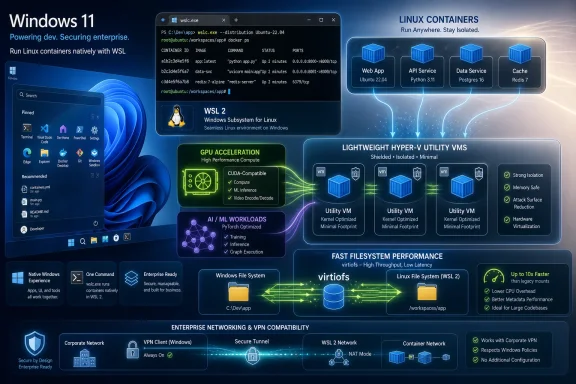 Microsoft Moves the Container Runtime Closer to Windows
For most of the WSL 2 era, Linux containers on Windows have been a success story with an asterisk. Docker Desktop, Podman, Rancher Desktop, and similar tools made the experience workable, often excellent, but the basic shape remained indirect: Windows hosted WSL, WSL hosted Linux plumbing, and third-party tools turned that stack into a container development environment.WSL Containers changes that relationship. Microsoft is not merely documenting a blessed Docker Desktop configuration or adding a convenience wrapper around an existing workflow. It is introducing a native WSL container command line,
wslc.exe, plus a programmable API that Windows applications can call directly.That distinction matters because container tooling has become less like a specialty developer utility and more like a baseline operating environment. Web services, test harnesses, AI experiments, database sandboxes, CI pipeline replicas, and cross-platform build systems increasingly assume a Linux container is one command away. On Windows, Microsoft now wants that command to belong to Windows.
The preview is still exactly that: a preview. It requires the pre-release WSL channel, installed with
wsl --update --pre-release, and it will inevitably carry rough edges that conservative shops should not confuse with production readiness. But previews are often where Microsoft reveals direction, and the direction here is unmistakable.Windows is no longer content to be the place where Linux development tools are tolerated. Microsoft wants Windows to be the place where they are orchestrated.
Docker Desktop Is Not Dead, but Its Monopoly Moment Is Over
The most tempting headline is that Microsoft has made Docker Desktop unnecessary. That is too neat, and too early. Docker Desktop remains a mature product with a broad ecosystem, enterprise management features, extensions, commercial support, Kubernetes integration, and a decade of user expectation behind it.But the monopoly moment is over for a large class of local development tasks. If a developer simply needs to pull an image, run a service, expose a port, mount files, test a build, or verify a GPU-enabled workload, the operating system now has an answer. That answer may not yet replace a full platform, but it can replace a surprising amount of daily friction.
This is where
wslc.exe becomes politically interesting. Microsoft says the command line uses a familiar format, and early examples make the intention obvious: if you know common Docker-style commands, you are not supposed to relearn the container world. There is even a container.exe alias, a small ergonomic decision that makes the feature feel less like an isolated WSL experiment and more like a Windows-native interface to container work.That familiarity is not accidental. Microsoft does not need to defeat Docker by building a better Docker Desktop overnight. It only needs to make the first-party path good enough that developers and IT departments start asking why a separate desktop container product is mandatory for basic workflows.
This is the classic platform move. First, the platform hosts the tool. Then it integrates the tool. Eventually, the tool has to justify why it is still separate.
The Command Line Is the Headline, but the API Is the Platform Play
The CLI will get the attention because it is visible. Developers can runwslc, see containers start, expose ports, pass --gpus all, and feel the workflow immediately. That is the kind of feature that demos well and spreads quickly through screenshots.The API is the more consequential piece. Microsoft says Windows applications can now embed Linux container operations directly, without exposing the command line to users. That turns WSL Containers from a developer convenience into a component that native Windows software can depend on.
This could matter for IDEs, build systems, security tools, scientific applications, AI workbenches, education software, and enterprise utilities that need a controlled Linux execution environment. Instead of telling users to install Docker Desktop, configure WSL integration, accept a licensing prompt, and troubleshoot networking, an app can theoretically ask Windows to run the Linux container it needs.
Microsoft’s integration with MSBuild and CMake points in the same direction. Container steps can move into project files rather than living as external setup instructions in a README. That is a subtle but important shift: containerization becomes part of the build graph, not just part of the developer’s local machine ritual.
For Windows developers who already live in Visual Studio, CMake, PowerShell, and WSL, this narrows the distance between native Windows development and Linux-targeted deployment. For enterprise developers, it creates the possibility of more repeatable builds without making every workstation a snowflake of separately configured container tooling.
The Hyper-V Utility VM Is a Security Boundary with a Usability Cost
One of the more important implementation details is also the easiest to miss: WSL Containers do not run inside a user’s normal WSL distribution. They run in lightweight Hyper-V utility VMs created in the background for container workloads.That architecture is a meaningful security statement. A container launched by one application should not be casually peering into another application’s container environment or a user’s everyday Ubuntu distribution. Isolation is not a decorative feature when containers are pulling images from public registries, running build scripts, executing test workloads, or handling source code.
The tradeoff is complexity that users may not see until something goes wrong. Hidden utility VMs are great when they work and mysterious when they do not. Anyone who has debugged WSL networking, Hyper-V conflicts, corporate endpoint security, or file-sharing performance knows that invisible layers have a way of becoming very visible at 4:55 p.m. on a Friday.
Microsoft is betting that tighter platform ownership will let it absorb that complexity better than a loosely assembled stack of third-party components. That may be true. The company controls Windows, WSL, Hyper-V, Defender, developer tooling, and enterprise policy surfaces in a way no outside vendor can.
But the architecture also means WSL Containers should not be mistaken for “just containers” bolted onto the existing WSL distro model. This is a separate execution path, managed by Windows, with its own performance characteristics, failure modes, and administrative implications.
GPU Support Shows the Real Target Is Modern Development, Not Nostalgia
The preview’s GPU story is not a side note. Microsoft is explicitly demonstrating machine learning workloads, including PyTorch containers, with--gpus all passed into the run command. That is the sort of example that tells us who this feature is really for.A decade ago, WSL’s value proposition was often framed around shell tools and Linux compatibility. Today, the practical pressure comes from cloud-native development, local AI, data tooling, and reproducible environments. A Windows workstation that cannot run Linux GPU workloads comfortably is a compromised machine for a growing number of developers.
This is especially true in organizations that standardize on Windows hardware but deploy to Linux servers or Kubernetes clusters. Developers do not want to dual-boot, fight driver stacks, or maintain a separate Linux workstation simply to test a CUDA-enabled package or run a containerized inference workload locally. They want the workstation IT gave them to behave like a credible development machine.
By putting GPU support into the first public preview, Microsoft is signaling that WSL Containers is not merely chasing yesterday’s Docker workflows. It is trying to serve the workloads developers are moving toward now: AI, accelerated computing, reproducible model environments, and local testing before cloud deployment.
That ambition raises the stakes. If GPU-enabled containers are flaky, inconsistent across hardware, or awkward under enterprise controls, developers will quickly retreat to proven tools. If they work well, WSL Containers becomes more than a convenience; it becomes part of Windows’ argument for staying on developer desks.
Virtiofs Is Microsoft Admitting the Filesystem Was Always the Pain Point
WSL’s filesystem performance has long been one of those issues that separates casual users from daily users. If you keep Linux files inside the Linux filesystem, life is often fine. If your workflow crosses the Windows-Linux boundary heavily, performance and semantics can get weird fast.Microsoft’s plan to use
virtiofs as the new default file system for WSL Containers is therefore more than a tuning note. The company is aiming at one of the most durable complaints about WSL-based development: moving files between Windows and Linux worlds can feel slower and more fragile than it should.The promise is up to twice the performance for Windows file access in WSL container scenarios. The number will need real-world testing, because filesystem benchmarks are famously sensitive to file size, metadata operations, antivirus scanning, editor behavior, and project layout. Still, the direction is right.
Containers amplify filesystem pain. A slow source tree mount can make tests drag, hot reload stutter, dependency installation crawl, and build systems misbehave. Developers often blame the container runtime or the framework, when the real bottleneck is the boundary between host and guest filesystems.
If
virtiofs delivers, WSL Containers may feel less like a clever compatibility layer and more like a normal local development environment. That is the bar Microsoft must clear. Developers do not reward architecture diagrams; they reward fast edit-build-test loops.Consomme Is a Strange Name for a Very Real Enterprise Problem
The experimental networking mode calledconsomme may become one of the preview’s most important features, despite sounding like something smuggled out of a restaurant menu. Its purpose is to route Linux network traffic through Windows so Linux applications inherit the same networking environment, security policies, and enterprise integrations as Windows applications.That matters because corporate VPNs have been a recurring source of WSL pain. Developers connect to a VPN, Windows traffic works, the browser works, Teams works, and then a Linux process inside WSL cannot resolve a hostname, reach a private registry, or connect to a development database. The result is a support ticket that sits somewhere between networking, security, desktop engineering, and “works on my machine.”
By routing Linux traffic through Windows, Microsoft is trying to reduce the split-brain networking model that makes WSL feel alien inside managed environments. If Windows knows how to reach the network, WSL-hosted workloads should not have to rediscover that path through a parallel universe of adapters, resolvers, NAT rules, and VPN quirks.
This is not merely convenience. Enterprises care about where traffic flows, which controls inspect it, how identity is applied, and whether endpoint policy remains enforceable. A Linux container that bypasses normal Windows networking assumptions can look like a governance problem, even if the developer sees it as a productivity tool.
Consomme is experimental, so no one should build policy around it yet. But it shows that Microsoft understands the target customer is not just the individual developer on a home PC. It is the Windows fleet inside a company where VPNs, proxies, endpoint agents, and compliance controls are part of the furniture.
The Preview Also Reopens the Old WSL Trust Debate
Every major WSL improvement revives the same argument: is Microsoft embracing Linux because developers demanded it, or is it domesticating Linux inside Windows to keep developers from leaving? The honest answer is yes.WSL has always been both a concession and a strategy. Microsoft conceded that modern development had become inseparable from Linux tooling. Then it turned that concession into a strategy for making Windows a credible host for that tooling.
WSL Containers fits that pattern perfectly. It gives developers something they genuinely need while also making Windows more central to the workflow. The more container operations flow through
wslc.exe, Windows APIs, MSBuild, CMake, Hyper-V utility VMs, and Windows networking, the more Microsoft owns the local development control plane.That will make some Linux purists uncomfortable, and not without reason. Containers are supposed to be portable abstractions, but local container platforms always carry host-specific assumptions. A workflow tuned around WSL Containers could behave differently from the same workflow on a Linux laptop or a macOS machine.
The practical counterargument is that developers already live with host differences. Docker Desktop on macOS is not bare-metal Linux. Docker Desktop on Windows has long relied on WSL 2 integration. Cloud CI runners differ from laptops. The question is not whether WSL Containers creates a pure Linux environment; it is whether it creates a predictable enough environment to reduce friction.
Microsoft Is Turning Windows into a Developer Appliance
The timing of WSL Containers matters because it arrives amid a broader Microsoft push to make Windows feel less like a general-purpose desktop with developer tools installed and more like a managed developer appliance. Build 2026 was full of this framing: native tooling, local AI, improved setup, workload-specific scripts, better terminal experiences, and deeper WSL integration.That framing is not just marketing. The modern developer workstation is a mess of runtimes, SDKs, package managers, secrets, containers, hypervisors, language servers, AI assistants, and build caches. The operating system that reduces that mess has leverage.
Apple has long benefited from a strong developer-laptop identity in parts of the software industry. Linux remains the natural home for many backend and infrastructure engineers. Windows, meanwhile, has often had to argue that it can be made into a good development environment with enough setup.
WSL Containers is part of Microsoft’s attempt to change that sentence. The goal is not “Windows can be configured to run Linux containers.” The goal is “Windows runs Linux containers.”
That difference is small in wording and large in perception. Developers choose platforms based on accumulated friction. Every missing prerequisite, every driver conflict, every VPN workaround, every “install this first” instruction in a project README is a tax. Microsoft is trying to collect fewer taxes.
Where IT Departments Will Applaud and Then Reach for Policy
For enterprise IT, WSL Containers creates both relief and anxiety. Relief comes from first-party integration. If Linux containers are now a Microsoft-supported WSL feature, administrators may get a clearer policy surface, more predictable update channels, and fewer ad hoc third-party installations.Anxiety comes from the same source. First-party integration lowers the barrier to use. Developers who previously needed approval to install Docker Desktop may soon be able to run Linux containers through a WSL pre-release, and later perhaps through a mainstream WSL update. That changes the governance conversation.
Containers can be benign local sandboxes, but they can also pull unvetted images, run vulnerable software, expose ports, mount sensitive directories, and execute opaque build scripts. A built-in runtime does not eliminate those risks. It makes them more accessible.
Microsoft’s challenge is to ensure WSL Containers fits into enterprise controls without turning into a helpdesk arms race. Admins will want policy knobs, logging, image-source controls, network behavior predictability, resource limits, and compatibility with endpoint security tools. Developers will want the feature to stay fast and unobtrusive.
That tension defines almost every modern developer-platform feature. Lock it down too hard and developers route around it. Leave it too open and security teams block it wholesale. WSL Containers will succeed in businesses only if Microsoft makes the managed path easier than the shadow IT path.
The Open Question Is Compatibility, Not Ambition
The obvious technical question is how closewslc.exe will be to the Docker workflows developers already know. Microsoft is emphasizing familiarity, and that is wise. But familiarity is not perfect compatibility.Developers have years of scripts, compose files, CI assumptions, registry authentication flows, volume patterns, networking conventions, and documentation built around existing tooling. A near match may be enough for interactive use but insufficient for automated workflows. The difference between “works for demos” and “works for my repo” is often one unsupported flag.
The presence of
container.exe as an alias is useful, but aliases do not solve ecosystem compatibility. If WSL Containers wants to become a default local runtime, it will need to either support the workflows developers already have or provide migration paths that do not feel like unpaid platform labor.This is where Docker Desktop’s maturity still matters. It is not merely a command named
docker. It is a set of expectations around Compose, registries, credentials, networking, file sharing, Kubernetes, UI affordances, enterprise settings, extensions, and documentation. Microsoft does not need to clone all of that, but it must be clear about which layer it is trying to own.The best version of WSL Containers may not be a Docker Desktop killer. It may be a Windows-native container substrate that other tools can target. If Microsoft gets the API right, the command line may be only the first interface, not the final one.
Developers Get a Shorter Path, but Not a Free Lunch
For individual developers, the appeal is immediate. Install the pre-release WSL update, restart the terminal, and a new container command appears on the path. That is far simpler than explaining the current state of Windows container development to someone setting up a project for the first time.But the preview label should temper expectations. Developers should expect bugs, command differences, documentation gaps, and changes before general availability. Anyone using WSL Containers for serious work should keep existing tooling available and avoid rewriting critical workflows around preview behavior.
The GPU story is similarly promising but needs validation across real hardware. Passing
--gpus all is a familiar and welcome gesture, yet the practical experience will depend on drivers, WSL kernel behavior, container images, CUDA versions, and the messy reality of developer PCs. AI workloads are where small mismatches become long debugging sessions.The file and networking improvements also deserve cautious optimism.
virtiofs and consomme target real pain points, but both need testing under the conditions where WSL has historically struggled: large monorepos, antivirus-heavy environments, locked-down corporate networks, split DNS, VPN clients, proxies, and endpoint inspection.Still, the direction is hard to dismiss. Microsoft has identified the right friction points: installation, command familiarity, API integration, GPU access, filesystem performance, networking compatibility, and isolation. That is the correct map of the problem.
A Native Runtime Changes the Politics of Local Development
The deeper impact of WSL Containers may be cultural. For years, Windows developers working on Linux-targeted systems have had to justify their environment. They could absolutely get work done, often very well, but the setup story carried caveats.A first-party container runtime narrows that credibility gap. It gives Windows a stronger answer in teams where some developers use macOS, some use Linux, and some use corporate Windows machines. If the project setup instructions can say “run this container” and Windows can do it natively, fewer arguments begin with operating-system preference.
That does not mean local development becomes identical across platforms. It never has been. But it may become boring in the best possible way: less ceremony, fewer prerequisites, fewer Slack threads about why the database container will not bind to a port on one person’s machine.
For open source maintainers, this could eventually reduce support burden if WSL Containers becomes common enough and compatible enough. For WindowsForum readers, the more immediate benefit is that Windows continues to gain serious developer infrastructure without requiring users to abandon the Windows desktop.
This is Microsoft’s long game. It does not need every developer to love Windows. It needs enough developers to stop seeing Windows as the wrong starting point.
The Preview’s Real Test Starts After the First Successful wslc run
The first successful demo will be easy. A developer runs an Ubuntu container, exposes a port, maybe launches a desktop container or verifies GPU access with PyTorch. The terminal prints what it should print, and the feature feels real.The hard test begins after that. Can a team use it for an existing project? Can a corporate laptop run it behind the VPN? Can security teams observe and govern it? Can Windows file access stay fast when the repo has hundreds of thousands of files? Can the API remain stable enough for app developers to trust?
Those questions will decide whether WSL Containers becomes another useful WSL feature or a genuine platform shift. The preview gives Microsoft room to change, but it also starts the clock. Developers are generous with experiments and ruthless with daily tools.
The stakes are also higher because Microsoft is not entering an empty market. Docker, Podman, containerd-based workflows, cloud IDEs, remote development environments, and Linux laptops already exist. WSL Containers must compete not with the idea of containers on Windows, but with tools developers already use.
Yet Microsoft has one advantage no one else has: it can make the local Windows path the path of least resistance. If WSL Containers ships broadly, integrates cleanly, and behaves predictably, many users will adopt it not because they switched loyalties, but because it is already there.
The Part Windows Developers Should Actually Remember
WSL Containers is easy to describe as a new command, but that undersells the move. Microsoft is folding Linux container workflows deeper into Windows at the exact moment containers, local AI, and reproducible development environments are becoming ordinary expectations rather than specialist habits.The preview should be treated as an early platform signal, not a finished replacement for every existing tool. Its most concrete implications are already visible:
- Windows 11 now has a first-party public preview path for running Linux containers through WSL without requiring Docker Desktop for basic workflows.
- The new
wslc.execommand line is designed to feel familiar to developers who already know common Docker-style container commands. - The programmable API is the more strategic feature because it lets native Windows applications embed Linux container operations directly.
- GPU support in the preview shows Microsoft is targeting AI and accelerated development workloads from the start, not merely simple web-server demos.
- The planned
virtiofsand experimentalconsommework address two of WSL’s most persistent practical pain points: file performance and corporate networking. - The use of lightweight Hyper-V utility VMs improves isolation, but it also creates a new execution path that administrators and developers will need to understand.
References
- Primary source: Neowin
Published: 2026-06-29T19:10:13.957290
Microsoft finally launches WSL Containers in public preview | Neowin
Microsoft is bringing WSL containers to public preview, letting devs run Linux containers natively on Windows without Docker Desktop. www.neowin.net
- Related coverage: phoronix.com
Microsoft Announces Public Preview For Linux Containers On WSL - Phoronix
Microsoft today shipped the first public preview of WSL Containers 'WSLC' as their latest extension of the Windows Subsystem for Linux on Windows 11.www.phoronix.com
- Official source: devblogs.microsoft.com
WSL container is now available for public preview - Windows Command Line
At Microsoft Build 2026, we introduced WSL containers, bringing Linux container development directly into Windows through the Windows Subsystem for Linuxdevblogs.microsoft.com - Related coverage: windowslatest.com
Microsoft denies WSL 3 exists, reveals Windows 11's WSL Containers ship next week
Microsoft's WSL team has confirmed WSL 3 doesn't exist. It was mistaken for WSL Containers, which is arriving in few days as a WSL update www.windowslatest.com
- Related coverage: windowscentral.com
I break down 4 new Windows 11 tools from Build 2026 that genuinely stood out and show where the OS is heading | Windows Central
Microsoft unveiled a lot of AI projects at Build 2026, but these four Windows 11 tools caught my attention the most.www.windowscentral.com - Related coverage: ebisuda.net
「WSL 3」は存在しない——MicrosoftがWindows 11向け「WSL Containers」を今週リリースと発表 | ebisuda.net
MicrosoftがWSL 3の存在を否定。Build 2026発表の「WSL Containers」はDocker Desktop不要でLinuxコンテナを実行できる全く新しい機能だ。www.ebisuda.net
- Related coverage: windowsreport.com
Microsoft Confirms WSL 3 Doesn't Exist, Explains What WSL Containers Really Is
Microsoft says WSL 3 doesn't exist and explains that WSL Containers is a new feature built on WSL 2, arriving as a regular WSL update. windowsreport.com
- Related coverage: allthings.how
WSL Containers: How Windows Runs Linux Containers With wslc
Microsoft's new wslc tool and NuGet API let Windows apps build and run Linux containers without separate software.allthings.how - Related coverage: byteiota.com
- Official source: techcommunity.microsoft.com
Announcing Azure Linux 4.0: Purpose-Built for Azure, Now in Public Preview | Microsoft Community Hub
Today at Microsoft Build, we're announcing the public preview of Azure Linux 4.0 - Microsoft's first party Linux distribution, purpose-built for Azure. Azure... techcommunity.microsoft.com
- Official source: news.microsoft.com
Microsoft Build Live
The home for real-time coverage of the news as it is announced from Microsoft Build, June 2-3, 2026.news.microsoft.com - Related coverage: cdrdv2-public.intel.com
