

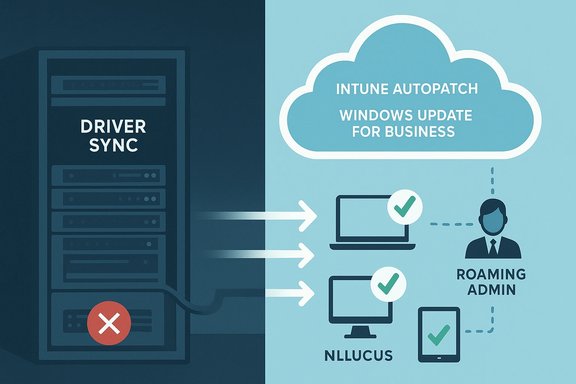
Microsoft's plan to remove driver synchronization from Windows Server Update Services (WSUS) has forced a rethink of how enterprises manage drivers — but the story is more complex than a simple cutoff: the feature was slated for deprecation on April 18, 2025, Microsoft later postponed the hard removal after customer feedback, and administrators now face a clear choice: migrate to cloud-first driver management (Intune, Windows Autopatch, Windows Update for Business) or implement on‑premises workarounds such as Device Driver Packages and custom distribution pipelines.
WSUS has sat at the center of many on‑premises Windows update strategies for years, allowing IT teams to download, approve and distribute Microsoft updates — including drivers — from a single internal server. Historically, driver synchronization in WSUS let administrators import driver updates from Windows Update / Microsoft Update Catalog so they could test and stage those updates across managed fleets. That capability removed the need to manually track vendor downloads for many mainstream device drivers.
In mid‑2024 Microsoft announced plans to deprecate WSUS driver synchronization, citing low usage relative to other features and a strategic shift toward cloud update services. The company initially set April 18, 2025, as the deprecation date and recommended alternatives such as Microsoft Intune, Windows Autopatch and the Windows Update for Business deployment service, as well as on‑premises options like Device Driver Packages for offline environments. After receiving substantial feedback — particularly from organizations with disconnected or air‑gapped systems — Microsoft revised its approach and postponed the immediate removal, saying it would continue to support WSUS driver synchronization while it works on a revised timeline. That reversal changes the immediate urgency for some, but it does not alter the long‑term direction: WSUS is being deprioritized in favor of cloud‑native driver management.
Yet the migration is not frictionless. Enterprises with offline fleets, stringent compliance needs, or large estates of legacy hardware must plan carefully. A hybrid, phased approach that uses co‑management, pilot rings, and Device Driver Packages for offline endpoints provides the safest path forward.
Administrators should prioritize three concrete actions now:
Microsoft’s announcement and the subsequent customer‑driven revision reveal an important dynamic: vendor roadmaps and enterprise realities must align. Acting now — by inventorying devices, piloting cloud alternatives, and hardening offline processes — gives IT teams control during a transition that will touch one of the most mundane but mission‑critical parts of endpoint management: the humble device driver.
Source: BetaNews Microsoft announces deprecation of WSUS driver synchronization
 Background
WSUS has sat at the center of many on‑premises Windows update strategies for years, allowing IT teams to download, approve and distribute Microsoft updates — including drivers — from a single internal server. Historically, driver synchronization in WSUS let administrators import driver updates from Windows Update / Microsoft Update Catalog so they could test and stage those updates across managed fleets. That capability removed the need to manually track vendor downloads for many mainstream device drivers.In mid‑2024 Microsoft announced plans to deprecate WSUS driver synchronization, citing low usage relative to other features and a strategic shift toward cloud update services. The company initially set April 18, 2025, as the deprecation date and recommended alternatives such as Microsoft Intune, Windows Autopatch and the Windows Update for Business deployment service, as well as on‑premises options like Device Driver Packages for offline environments. After receiving substantial feedback — particularly from organizations with disconnected or air‑gapped systems — Microsoft revised its approach and postponed the immediate removal, saying it would continue to support WSUS driver synchronization while it works on a revised timeline. That reversal changes the immediate urgency for some, but it does not alter the long‑term direction: WSUS is being deprioritized in favor of cloud‑native driver management.
What Microsoft actually said (and what we verified)
The official position
- Microsoft published the original announcement on the Windows IT Pro Blog and in the Windows Message Center, stating that WSUS driver synchronization would be deprecated on April 18, 2025, and that drivers would still be available via the Microsoft Update Catalog but could no longer be imported into WSUS.
- The company recommended migrating to cloud driver services (Microsoft Intune, Windows Autopatch, Windows Update for Business deployment service) or using Device Driver Packages for on‑premises distribution.
The revision
- Following customer feedback — especially from organizations that manage disconnected endpoints — Microsoft issued a postponement and said it will continue WSUS driver synchronization while it works on a revised timeline. That statement came in April 2025 and was reported by independent outlets and reiterated by Microsoft in a Message Center update.
Usage numbers and survey data
- Microsoft quoted internal survey results indicating about 34% of WSUS users used driver synchronization and roughly 8% were concerned about deprecation impact. Those figures were included in Microsoft’s communications; external verification of the exact survey sample or methodology is not publicly available and should be treated as Microsoft reporting rather than an independently audited statistic. Treat these numbers as organization‑reported, not independently validated.
Why this matters: practical implications for admins
Even with the postponement, the direction is clear: Microsoft expects most customers to adopt cloud‑centric driver management. The practical effect differs by environment:- For cloud‑connected organizations already using Intune, Autopatch or Windows Update for Business (WUfB), the shift is largely a nudge: these services already provide integrated driver workflows, approvals, and telemetry and are built for scale and automation. Microsoft documentation shows explicit driver management features in Intune and Autopatch (approval controls, device enrollment, programmatic APIs).
- For organizations that rely on WSUS because they are disconnected, have strict regulatory constraints, or prefer full on‑prem control, the change is harder. Options include building driver distribution workflows using Device Driver Packages, embedding drivers into images, or adopting third‑party offline update tools. Microsoft explicitly recognized offline fleets in its reversal and has urged affected organizations to plan migrations or to use alternative in‑place techniques.
- For environments using Configuration Manager (ConfigMgr / SCCM) or other on‑prem deployment pipelines, co‑management and hybrid strategies (ConfigMgr + Intune) become more compelling ways to keep local controls while leveraging cloud features. Public guidance and community reporting emphasize co‑management as a practical bridge.
Technical deep dive: how WSUS driver synchronization worked and what changes
WSUS driver synchronization — a quick recap
- WSUS could synchronize driver metadata and packages from Windows Update / Microsoft Update Catalog, making driver updates visible in the WSUS console for approval and distribution.
- Admins could approve/decline drivers and use WSUS to manage network bandwidth by caching updates centrally.
- This meant fewer manual downloads and consistent driver distribution across many sites.
What would stop working under the original plan
- Importing drivers into the WSUS catalog would be disabled; WSUS would no longer be able to pull driver updates from Microsoft Update automatically.
- Drivers would continue to exist on the Microsoft Update Catalog for direct download, but the import pathway into WSUS would close — pushing admins to alternate distribution techniques.
Cloud alternatives provide richer controls
- Intune, Windows Autopatch and Windows Update for Business provide:
- Programmatic approval APIs and granular deployment rings
- Driver visibility and selective approvals per device group
- Telemetry and reporting on installation success/failure
- Integration with Microsoft Graph for automation
- Microsoft Learn docs detail how Autopatch and Intune manage driver flows, including manual vs automatic modes and how to approve driver updates for controlled rollouts.
Risk assessment — what could go wrong
- Air‑gapped/disconnected environments: these remain the highest risk group. If Microsoft eventually disables driver sync in WSUS with no full offline alternative, organizations that cannot connect to cloud services will face operational friction unless they build custom import pipelines or vendor-validated driver repositories. Microsoft’s postponement shows this concern is material.
- Legacy hardware and vendor drivers: removing WSUS sync increases the maintenance burden for legacy hardware whose drivers are not available from vendor portals or when vendors stop publishing older drivers to the Update Catalog. A cleanup of “legacy” drivers in Windows Update has been discussed publicly and may compound this problem. Administrators should inventory hardware and determine which devices depend on older drivers.
- Operational costs: migrating to cloud services like Intune or Autopatch can incur licensing and bandwidth costs and require staff training. Conversely, building and maintaining on‑prem distribution workflows also consumes operational resources. Both paths have real TCO implications.
- Compliance and change control: some regulated industries require strict control over update sources and testing cadences; moving to cloud services can be acceptable but may require new validation and audit processes. The annual/less‑frequent element of Microsoft’s servicing cadence in other product lines means fewer changes but larger validation windows — that tradeoff matters for compliance teams.
- Single‑vendor dependency: shifting to Microsoft cloud update paths increases dependency on Microsoft services; organizations must evaluate vendor lock‑in risks and build contingency plans.
Practical migration playbook — a prioritized 180‑day plan
The following plan is practical, vendor‑neutral where possible, and grounded in Microsoft guidance and community practice. Each step is actionable and ordered for risk reduction.- Inventory and discovery (Day 0–14)
- Catalog devices by model, driver dependencies, and network topology (online vs offline).
- Identify mission‑critical assets and any devices with proprietary or legacy drivers.
- Stakeholder alignment (Day 0–21)
- Convene application owners, compliance, networking and security teams.
- Agree on risk tolerance, test rings, and migration milestones.
- Pilot selection and proof of concept (Day 14–45)
- Choose a small but representative pilot group (mix of hardware, locations, connected/disconnected).
- For cloud‑connected devices: pilot Intune or Windows Autopatch driver workflows; document approval flows and rollback steps. For offline devices: test Device Driver Packages distribution and driver embedding into images. Microsoft Learn provides step‑by‑step Autopatch and Intune driver procedures.
- Build or refine deployment artifacts (Day 30–60)
- Create signed driver packages for critical devices using Microsoft‑recommended practices; the Microsoft Learn topic on distributing driver packages should be your guide for secure packaging and WHQL considerations.
- Co‑management and hybrid set up (Day 45–90)
- If using ConfigMgr, enable co‑management to split workloads (e.g., keep imaging on ConfigMgr, move driver approvals to Intune).
- Validate policies that control update scan sources and driver update handling (WUfB vs WSUS). Community resources and Microsoft samples describe the policy controls required.
- Validation and ringed rollout (Day 75–135)
- Roll out drivers in progressive rings: pilot → pre‑production → broad deployment.
- Monitor telemetry for driver install success, performance regressions, and application compatibility.
- Offline device strategy (parallel)
- For disconnected sites, build a local driver repository with signed packages; establish repeatable import and distribution processes (SCCM/ConfigMgr packages, network shares, or vendor provisioning).
- If vendor support exists, request driver republishing to the Microsoft Update Catalog or secure alternative channels.
- Training and runbooks (Day 90–150)
- Train IT staff on new consoles (Intune/Autopatch) and automation scripts (Graph API workflows).
- Create rollback and remediation runbooks for driver‑related outages.
- Cutover and sunsetting WSUS driver workflows (Day 120–180)
- After validating new processes, formally remove WSUS driver approvals from your change control lists.
- Keep WSUS for quality/feature/security updates as needed but unbind driver flows once confident.
- Continuous review (Ongoing)
- Periodically review driver inventory, vendor status, and cloud service announcements. Microsoft and industry outlets will continue to evolve guidance; plan quarterly checkups.
Alternatives and technical choices: pros and cons
- Microsoft Intune / Windows Autopatch / WUfB
- Pros: Centralized approvals, automation, telemetry, integration into Microsoft 365 stack; granular control via Graph APIs.
- Cons: Licensing costs, reliance on cloud connectivity, migration overhead for large scale environments.
- Device Driver Packages and manual distribution
- Pros: Full control for air‑gapped environments, offline compatibility.
- Cons: Much heavier operational workload; packaging, signing, distribution, and testing are manual and error‑prone if not automated. Microsoft Learn outlines the secure distribution model and benefits of Windows Update when possible.
- Configuration Manager (ConfigMgr) + System Center Updates Publisher
- Pros: Deep on‑prem control, familiar tooling for many enterprises; co‑management allows gradual migration.
- Cons: Not all customers have the licensing or staff expertise; still requires extra pipeline work to handle driver imports if WSUS path is removed. Community discussions highlight co‑management as a pragmatic bridge.
- Third‑party update/distribution tools
- Pros: Specialized offline/update management vendors can fill gaps for disconnected or complex estates.
- Cons: Extra vendor cost, another operational dependency, and a need to carefully validate security posture.
What remains uncertain — and what to watch for
- Final timeline and permanence: Microsoft’s postponement buys time, but it did not reverse the strategic intent. Administrators should watch for a revised timeline and any feature‑parity commitments for on‑prem customers. Treat the current postponement as temporary relief, not cancellation.
- Exact survey methodology: Microsoft’s reported adoption figures (34% usage; 8% expressed concern) appear in Microsoft communications and press coverage. Those numbers inform public messaging but are not independently audited; use them as a directional indicator rather than a definitive market study.
- Vendor behavior: expect OEMs and driver vendors to adjust their Windows Update support strategies (some legacy drivers may be removed over time). Organizations that depend on old drivers should urgently inventory affected devices and request vendor support if needed.
Bottom line: a balanced conclusion for Windows admins
Microsoft’s move to deprecate WSUS driver synchronization (then postponing the hard removal after user feedback) signals a broader strategy: invest engineering capacity in cloud‑native update services and steer customers toward those services. For many organizations this is a sensible evolution — cloud services yield automation, telemetry and centralized controls that WSUS was never designed to provide.Yet the migration is not frictionless. Enterprises with offline fleets, stringent compliance needs, or large estates of legacy hardware must plan carefully. A hybrid, phased approach that uses co‑management, pilot rings, and Device Driver Packages for offline endpoints provides the safest path forward.
Administrators should prioritize three concrete actions now:
- Inventory all driver dependencies and classify devices by risk and connectivity.
- Pilot a cloud driver workflow (Intune or Autopatch) for a representative device cohort.
- Build an offline distribution plan using signed Device Driver Packages for disconnected fleets.
Microsoft’s announcement and the subsequent customer‑driven revision reveal an important dynamic: vendor roadmaps and enterprise realities must align. Acting now — by inventorying devices, piloting cloud alternatives, and hardening offline processes — gives IT teams control during a transition that will touch one of the most mundane but mission‑critical parts of endpoint management: the humble device driver.
Source: BetaNews Microsoft announces deprecation of WSUS driver synchronization
