

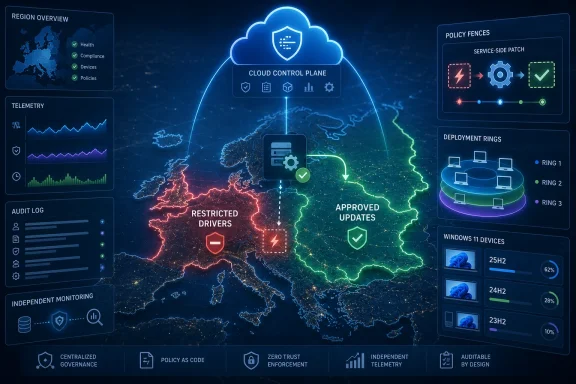
Microsoft has fixed a Windows Autopatch service bug that unintentionally installed restricted or optional driver updates on a limited subset of managed Windows 11 devices in the European Union, affecting versions 25H2, 24H2, and 23H2. The fix did not arrive as a traditional patch because the failure was not primarily on the endpoint; it was in the cloud machinery deciding what those endpoints were allowed to receive. That distinction matters, because Autopatch is sold on the premise that Microsoft can safely absorb update complexity on behalf of IT departments. When the service itself overruns an administrator’s driver policy, the issue is not just a bad driver day — it is a reminder that delegated control is still control handed away.
The entire point of Windows Autopatch is that enterprise update deployment should become less artisanal and less panic-driven. Instead of every IT shop building its own patching choreography from scratch, Microsoft provides a managed pipeline that stages updates through rings, watches telemetry, and tries to keep fleets current without turning every Patch Tuesday into a small war room.
That model only works if the boundaries are trustworthy. Administrators may accept Microsoft’s automation for quality updates, Microsoft 365 Apps updates, or driver and firmware management, but they still expect their policies to define the outer fence. A restricted driver is not supposed to become available merely because a cloud workflow gets confused.
That is what makes this incident more interesting than its “limited subset” framing suggests. Microsoft says some Autopatch-managed devices in the EU region received unexpected driver updates from Windows Update despite administrative policies configured to restrict driver deployment. The company says the issue has now been resolved by a service-side fix and that customers do not need to install a client update or take further action.
In narrow operational terms, that is good news. In strategic terms, it is also awkward. Autopatch is supposed to reduce update risk by making Microsoft’s cloud the trusted broker between Windows Update and corporate endpoints; here, the broker appears to have briefly misread the rules of the deal.
Drivers sit at the uncomfortable boundary between Windows and the physical machine. A graphics driver can destabilize conferencing setups. A storage driver can affect boot behavior. A Wi-Fi or Bluetooth driver can strand a remote worker at the exact moment support cannot reach the machine. A chipset or firmware-related package can turn what looked like routine maintenance into an outage whose symptoms are scattered across models and manufacturers.
That is why modern endpoint management treats driver deployment differently from monthly security fixes. IT teams may allow some drivers automatically, hold others for manual approval, test them on representative devices, or decline them altogether if an OEM package is known to regress a specific fleet. Optional and restricted drivers are not merely “updates that haven’t happened yet”; they are often updates an administrator has deliberately decided should not happen automatically.
Microsoft’s own driver-management story reflects that caution. Autopatch can become the authority for driver updates coming from Windows Update when devices are enrolled into driver management, but authority is supposed to flow through policy. The service is meant to automate the rollout path, not erase the difference between approved and restricted content.
The reported symptoms — unexpected restarts, instability, and possible failures depending on the installed driver — are exactly the sort of outcomes that make driver governance politically sensitive inside IT departments. A bad cumulative update is painful enough; a bad driver update can feel arbitrary, device-specific, and hard to explain to a user who only knows the laptop rebooted or stopped behaving normally.
But regional containment does not make the governance question disappear. Cloud-managed update services increasingly operate as policy engines, not just content delivery systems. If a policy engine can accidentally approve what an administrator restricted, then the impact is measured not only in the number of affected devices but in the confidence administrators place in the abstraction.
The EU detail is also a reminder that cloud services are rarely monolithic from the customer’s point of view. Tenants, regions, service rings, backend deployments, and regulatory boundaries can produce bugs that are intensely real for one slice of customers and invisible to everyone else. That can make incidents harder to detect early, because the community signal is fragmented.
For IT teams, the practical problem is not whether every Autopatch tenant was exposed. It is whether their own tenant’s observed behavior still matches policy intent. If devices received drivers they should not have received, the cleanup is not merely “wait for Microsoft’s fix.” Administrators still need to know which devices changed state, which driver versions landed, whether restarts occurred, and whether any model-specific regressions followed.
That is the quiet cost of a service-side incident. Microsoft can stop the bad deployment path centrally, but it cannot retroactively make every endpoint’s hardware and user experience identical to what it would have been had the policy been honored.
This is the bargain customers increasingly make with Microsoft 365 and Windows cloud management. They give Microsoft more operational authority, and in return Microsoft can move faster than a traditional enterprise change process. A bug in the service can be repaired centrally. A bad configuration can be rolled back centrally. A deployment rule can be changed without waiting for every endpoint to install new bits.
But the same architecture also concentrates trust. When Windows Update for Business, Intune, Autopatch, Microsoft 365 Apps servicing, and Windows 365 Cloud PCs are all parts of a broader cloud-managed endpoint story, the administrative console becomes less like a remote control and more like a cockpit. If the instruments lie, the operator may still be technically in charge, but not in a way that feels satisfying.
The Autopatch driver bug is therefore a classic cloud-control incident. It was not catastrophic, and Microsoft says it was limited. Yet it touched the precise layer customers are being asked to trust more deeply every year: Microsoft’s ability to interpret enterprise intent safely at scale.
There is an important difference between “Microsoft deployed an update that caused problems” and “Microsoft deployed an update administrators had configured the service not to deploy.” The first is an old Windows story. The second is a governance story.
That matters for driver behavior. A driver that behaves acceptably on one Windows 11 release may expose issues on another, especially when the fleet includes varied OEM models and peripheral ecosystems. Windows 11 24H2, in particular, has already trained administrators to be wary of compatibility holds, driver-related upgrade blockers, and edge-case regressions. Windows 11 25H2 shares a servicing branch with 24H2, but the operational reality is still that organizations are managing transition, not a static platform.
The inclusion of 23H2 also matters because many enterprises still treat it as a known-good baseline while they validate newer releases. If restricted drivers landed on those systems, the affected organizations may need to separate two questions that can easily get muddled: did the driver itself cause the symptom, or did the unexpected driver change interact with an already-planned OS upgrade path?
That is where update automation can become harder, not easier. A human administrator may have a mental model of which device groups are conservative, which are pilots, which are vendor-sensitive, and which are scheduled for replacement. A cloud service can encode much of that policy, but when the encoding fails, the resulting incident can cut across the human logic the organization thought it had imposed.
Windows 365 is Microsoft’s Cloud PC platform, and it turns the endpoint itself into a service-managed object. Office installation problems on Cloud PCs may not have the visceral drama of a physical laptop rebooting after an unexpected driver update, but they hit the same promise: Microsoft’s cloud should make endpoint provisioning and maintenance more predictable, not less.
The phrase “configuration change” is doing a lot of work here. In cloud operations, configuration is code’s quieter sibling. It can change behavior instantly, apply broadly, and create customer-visible failures without a new application binary ever appearing on a device. For administrators, that means the root cause of a broken Office install may not be a local image, a user mistake, or a traditional patch. It may be a backend service state they cannot inspect directly.
That is the new troubleshooting burden of cloud-first endpoint management. The local machine still matters, but the cause of failure may live in Microsoft’s service fabric, an Intune policy interaction, a deployment profile, an Autopatch ring, or a transient configuration rollout. The endpoint is where the pain appears; the cloud is where the explanation may be hiding.
Microsoft is hardly alone in this. Every large SaaS management plane has moments when centralization magnifies an error. But Windows has a uniquely broad hardware and software surface, and enterprise Windows management carries decades of accumulated caution. When Microsoft asks administrators to let the service drive, incidents like this become disproportionately important because they test the cultural migration as much as the technology.
If restricted drivers reached devices, administrators should still identify what changed. Update history, Intune reporting, Autopatch reports, device inventory, OEM management tools, and help-desk tickets can all become evidence. The goal is not to second-guess Microsoft’s fix, but to restore the organization’s own picture of endpoint state.
This is especially important for devices that experienced unexpected restarts or instability. A driver rollback may be unnecessary in many cases, and in some environments the installed driver may be harmless or even beneficial. But assuming harmlessness across a fleet is not management; it is hope with a dashboard.
The larger lesson is that managed services do not eliminate the need for independent observability. If anything, they make it more important. When a cloud control plane acts unexpectedly, the customer needs enough telemetry to answer basic questions without waiting for a vendor incident report to become specific to their tenant.
That telemetry should be boring by design. Which devices received driver updates? Which driver classes were involved? Which models were affected? Did reboot patterns change? Did crash rates move? Did help-desk tickets cluster by hardware family? Those are not glamorous questions, but they are the difference between “Microsoft says it is fixed” and “we know what happened in our fleet.”
The stronger argument is that Autopatch is powerful precisely because it is close to the controls that matter. It can stage deployment, respect rings, align update classes, and reduce the amount of bespoke work needed to keep Windows current. But anything that powerful needs clearly auditable behavior when it goes wrong.
Microsoft’s messaging leans on limited scope and service-side resolution, which is understandable. Customers want reassurance that the issue is contained. But IT professionals also need specificity: affected regions, affected policies, affected update classes, affected timelines, and whether the same failure mode could reappear in adjacent workflows.
The driver issue also lands in a market where Microsoft is steadily pushing customers toward cloud-native endpoint management. Group Policy and Configuration Manager are not disappearing overnight, but the gravitational pull is obvious: Intune, Windows Update for Business, Autopatch, Entra ID, Windows 365, and Microsoft 365 Apps admin controls are the center of the modern Microsoft endpoint pitch.
That pitch is not weakened by every incident. It is weakened when customers feel they have fewer ways to verify, constrain, or explain incidents. Trust in automation is earned less by claims of perfection than by transparent failure handling.
The question is no longer simply whether Windows Update installs something inconvenient. It is whether Microsoft’s cloud services accurately translate organizational policy into endpoint behavior. That is a subtler and more consequential debate, because it touches compliance, change management, auditability, and accountability.
A restricted-driver policy may exist because of a known vendor issue. It may exist because a regulated environment requires explicit approval. It may exist because a global fleet has fragile hardware dependencies in one region. The policy itself is part of the organization’s risk model. If the service bypasses it, even briefly, the organization has to treat that as a change-control event.
This is where Microsoft’s consumer and enterprise instincts can collide. In the consumer world, automatic driver updates can be framed as helpful maintenance. In the enterprise world, the same automatic update can be an unauthorized change. Autopatch exists to bridge those worlds, but bridging them requires respecting the enterprise side’s insistence that not now is sometimes the correct answer.
The fact that this involved optional or restricted drivers rather than a major feature update makes the incident easier to miss. It should not. The smallest policy exceptions are often the ones that reveal whether a management plane is enforcing intent or merely approximating it.
Autopatch should have a clearly documented role in the organization’s update strategy. If it manages drivers, everyone should understand which devices are enrolled, which policies govern approval, how exceptions are handled, and where reporting lives. If it does not manage drivers, administrators should verify that the policy state reflects that choice and that no overlapping configuration undermines it.
Organizations should also separate update classes in their mental model. Quality updates, feature updates, Microsoft 365 Apps updates, drivers, and firmware do not carry the same operational risk. A single “patching” conversation can obscure the fact that drivers deserve their own testing and approval strategy, particularly in hardware-diverse fleets.
Most of all, IT teams should preserve a local record of cloud decisions. Cloud dashboards are useful, but incident response benefits from exportable logs, inventory snapshots, and historical baselines. If an endpoint suddenly behaves differently, the team should not have to reconstruct the past from user complaints and vendor blog posts.
Microsoft, for its part, should recognize that Autopatch incidents are judged against a higher bar than ordinary update bugs. The product’s value proposition is trust transfer. Customers are not merely receiving updates from Microsoft; they are letting Microsoft participate in change management. That makes service-side correctness a product feature, not an implementation detail.
Source: Petri IT Knowledgebase Microsoft Fixes Windows Autopatch Bug Installing Restricted Drivers on Windows 11
 Autopatch Breaks the One Rule It Was Built to Enforce
The entire point of Windows Autopatch is that enterprise update deployment should become less artisanal and less panic-driven. Instead of every IT shop building its own patching choreography from scratch, Microsoft provides a managed pipeline that stages updates through rings, watches telemetry, and tries to keep fleets current without turning every Patch Tuesday into a small war room.That model only works if the boundaries are trustworthy. Administrators may accept Microsoft’s automation for quality updates, Microsoft 365 Apps updates, or driver and firmware management, but they still expect their policies to define the outer fence. A restricted driver is not supposed to become available merely because a cloud workflow gets confused.
That is what makes this incident more interesting than its “limited subset” framing suggests. Microsoft says some Autopatch-managed devices in the EU region received unexpected driver updates from Windows Update despite administrative policies configured to restrict driver deployment. The company says the issue has now been resolved by a service-side fix and that customers do not need to install a client update or take further action.
In narrow operational terms, that is good news. In strategic terms, it is also awkward. Autopatch is supposed to reduce update risk by making Microsoft’s cloud the trusted broker between Windows Update and corporate endpoints; here, the broker appears to have briefly misread the rules of the deal.
Driver Updates Are Small Packages With Outsized Blast Radius
To a home user, a driver update often looks like housekeeping. To an enterprise administrator, it can look more like firmware-adjacent surgery performed across thousands of devices with varying hardware, peripherals, docks, VPN clients, disk encryption states, and remote-user habits.Drivers sit at the uncomfortable boundary between Windows and the physical machine. A graphics driver can destabilize conferencing setups. A storage driver can affect boot behavior. A Wi-Fi or Bluetooth driver can strand a remote worker at the exact moment support cannot reach the machine. A chipset or firmware-related package can turn what looked like routine maintenance into an outage whose symptoms are scattered across models and manufacturers.
That is why modern endpoint management treats driver deployment differently from monthly security fixes. IT teams may allow some drivers automatically, hold others for manual approval, test them on representative devices, or decline them altogether if an OEM package is known to regress a specific fleet. Optional and restricted drivers are not merely “updates that haven’t happened yet”; they are often updates an administrator has deliberately decided should not happen automatically.
Microsoft’s own driver-management story reflects that caution. Autopatch can become the authority for driver updates coming from Windows Update when devices are enrolled into driver management, but authority is supposed to flow through policy. The service is meant to automate the rollout path, not erase the difference between approved and restricted content.
The reported symptoms — unexpected restarts, instability, and possible failures depending on the installed driver — are exactly the sort of outcomes that make driver governance politically sensitive inside IT departments. A bad cumulative update is painful enough; a bad driver update can feel arbitrary, device-specific, and hard to explain to a user who only knows the laptop rebooted or stopped behaving normally.
The EU Scope Limits the Incident, Not the Lesson
Microsoft’s description narrows the blast radius to a limited subset of Autopatch-managed devices in the European Union region. That matters. This was not a worldwide driver free-for-all, and there is no indication that unmanaged consumer PCs were affected by this Autopatch-specific failure.But regional containment does not make the governance question disappear. Cloud-managed update services increasingly operate as policy engines, not just content delivery systems. If a policy engine can accidentally approve what an administrator restricted, then the impact is measured not only in the number of affected devices but in the confidence administrators place in the abstraction.
The EU detail is also a reminder that cloud services are rarely monolithic from the customer’s point of view. Tenants, regions, service rings, backend deployments, and regulatory boundaries can produce bugs that are intensely real for one slice of customers and invisible to everyone else. That can make incidents harder to detect early, because the community signal is fragmented.
For IT teams, the practical problem is not whether every Autopatch tenant was exposed. It is whether their own tenant’s observed behavior still matches policy intent. If devices received drivers they should not have received, the cleanup is not merely “wait for Microsoft’s fix.” Administrators still need to know which devices changed state, which driver versions landed, whether restarts occurred, and whether any model-specific regressions followed.
That is the quiet cost of a service-side incident. Microsoft can stop the bad deployment path centrally, but it cannot retroactively make every endpoint’s hardware and user experience identical to what it would have been had the policy been honored.
Microsoft’s Service-Side Fix Shows the Power and the Fragility of Cloud Patching
The upside of a service-side fix is obvious: no emergency client patch, no manual remediation package, and no new update to approve in order to fix the update system. Microsoft can correct the backend logic and stop the unwanted behavior before most customers have even built a workaround.This is the bargain customers increasingly make with Microsoft 365 and Windows cloud management. They give Microsoft more operational authority, and in return Microsoft can move faster than a traditional enterprise change process. A bug in the service can be repaired centrally. A bad configuration can be rolled back centrally. A deployment rule can be changed without waiting for every endpoint to install new bits.
But the same architecture also concentrates trust. When Windows Update for Business, Intune, Autopatch, Microsoft 365 Apps servicing, and Windows 365 Cloud PCs are all parts of a broader cloud-managed endpoint story, the administrative console becomes less like a remote control and more like a cockpit. If the instruments lie, the operator may still be technically in charge, but not in a way that feels satisfying.
The Autopatch driver bug is therefore a classic cloud-control incident. It was not catastrophic, and Microsoft says it was limited. Yet it touched the precise layer customers are being asked to trust more deeply every year: Microsoft’s ability to interpret enterprise intent safely at scale.
There is an important difference between “Microsoft deployed an update that caused problems” and “Microsoft deployed an update administrators had configured the service not to deploy.” The first is an old Windows story. The second is a governance story.
The Windows 11 Version Spread Adds Another Administrative Wrinkle
The affected Windows 11 versions — 25H2, 24H2, and 23H2 — span the living reality of enterprise fleets. Very few organizations move all endpoints to a single Windows version in perfect lockstep. Hardware readiness, application compatibility, regional deployment schedules, support deadlines, and risk appetite all create mixed estates.That matters for driver behavior. A driver that behaves acceptably on one Windows 11 release may expose issues on another, especially when the fleet includes varied OEM models and peripheral ecosystems. Windows 11 24H2, in particular, has already trained administrators to be wary of compatibility holds, driver-related upgrade blockers, and edge-case regressions. Windows 11 25H2 shares a servicing branch with 24H2, but the operational reality is still that organizations are managing transition, not a static platform.
The inclusion of 23H2 also matters because many enterprises still treat it as a known-good baseline while they validate newer releases. If restricted drivers landed on those systems, the affected organizations may need to separate two questions that can easily get muddled: did the driver itself cause the symptom, or did the unexpected driver change interact with an already-planned OS upgrade path?
That is where update automation can become harder, not easier. A human administrator may have a mental model of which device groups are conservative, which are pilots, which are vendor-sensitive, and which are scheduled for replacement. A cloud service can encode much of that policy, but when the encoding fails, the resulting incident can cut across the human logic the organization thought it had imposed.
Office Trouble on Windows 365 Points to a Broader Cloud Endpoint Pattern
The Autopatch driver issue did not arrive alone. Microsoft also acknowledged problems installing Office on some Windows 365 machines, apparently tied to a configuration change from a recent service update. That is a different symptom in a different product area, but it rhymes with the same operational theme.Windows 365 is Microsoft’s Cloud PC platform, and it turns the endpoint itself into a service-managed object. Office installation problems on Cloud PCs may not have the visceral drama of a physical laptop rebooting after an unexpected driver update, but they hit the same promise: Microsoft’s cloud should make endpoint provisioning and maintenance more predictable, not less.
The phrase “configuration change” is doing a lot of work here. In cloud operations, configuration is code’s quieter sibling. It can change behavior instantly, apply broadly, and create customer-visible failures without a new application binary ever appearing on a device. For administrators, that means the root cause of a broken Office install may not be a local image, a user mistake, or a traditional patch. It may be a backend service state they cannot inspect directly.
That is the new troubleshooting burden of cloud-first endpoint management. The local machine still matters, but the cause of failure may live in Microsoft’s service fabric, an Intune policy interaction, a deployment profile, an Autopatch ring, or a transient configuration rollout. The endpoint is where the pain appears; the cloud is where the explanation may be hiding.
Microsoft is hardly alone in this. Every large SaaS management plane has moments when centralization magnifies an error. But Windows has a uniquely broad hardware and software surface, and enterprise Windows management carries decades of accumulated caution. When Microsoft asks administrators to let the service drive, incidents like this become disproportionately important because they test the cultural migration as much as the technology.
Administrators Still Need Their Own Telemetry
Microsoft’s statement that no further action is required should be read carefully. It means customers do not need to deploy a fix for the Autopatch service issue. It does not mean every affected organization can skip post-incident review.If restricted drivers reached devices, administrators should still identify what changed. Update history, Intune reporting, Autopatch reports, device inventory, OEM management tools, and help-desk tickets can all become evidence. The goal is not to second-guess Microsoft’s fix, but to restore the organization’s own picture of endpoint state.
This is especially important for devices that experienced unexpected restarts or instability. A driver rollback may be unnecessary in many cases, and in some environments the installed driver may be harmless or even beneficial. But assuming harmlessness across a fleet is not management; it is hope with a dashboard.
The larger lesson is that managed services do not eliminate the need for independent observability. If anything, they make it more important. When a cloud control plane acts unexpectedly, the customer needs enough telemetry to answer basic questions without waiting for a vendor incident report to become specific to their tenant.
That telemetry should be boring by design. Which devices received driver updates? Which driver classes were involved? Which models were affected? Did reboot patterns change? Did crash rates move? Did help-desk tickets cluster by hardware family? Those are not glamorous questions, but they are the difference between “Microsoft says it is fixed” and “we know what happened in our fleet.”
Autopatch’s Promise Survives, But Its Trust Model Gets More Complicated
It would be too easy to treat this as proof that Autopatch is unsafe. That conclusion does not follow. Manual patching has its own long history of mistakes, blind spots, slow remediations, and uneven enforcement. Many organizations are better served by a managed update pipeline than by a patch process held together by spreadsheets, late-night maintenance windows, and tribal knowledge.The stronger argument is that Autopatch is powerful precisely because it is close to the controls that matter. It can stage deployment, respect rings, align update classes, and reduce the amount of bespoke work needed to keep Windows current. But anything that powerful needs clearly auditable behavior when it goes wrong.
Microsoft’s messaging leans on limited scope and service-side resolution, which is understandable. Customers want reassurance that the issue is contained. But IT professionals also need specificity: affected regions, affected policies, affected update classes, affected timelines, and whether the same failure mode could reappear in adjacent workflows.
The driver issue also lands in a market where Microsoft is steadily pushing customers toward cloud-native endpoint management. Group Policy and Configuration Manager are not disappearing overnight, but the gravitational pull is obvious: Intune, Windows Update for Business, Autopatch, Entra ID, Windows 365, and Microsoft 365 Apps admin controls are the center of the modern Microsoft endpoint pitch.
That pitch is not weakened by every incident. It is weakened when customers feel they have fewer ways to verify, constrain, or explain incidents. Trust in automation is earned less by claims of perfection than by transparent failure handling.
The Old Windows Update Argument Has Moved Upstairs
For years, the Windows update debate centered on the endpoint: forced reboots, bad patches, compatibility holds, update deferrals, and the tension between security urgency and user control. That argument has not vanished, but for managed organizations it has moved upstairs into the cloud control plane.The question is no longer simply whether Windows Update installs something inconvenient. It is whether Microsoft’s cloud services accurately translate organizational policy into endpoint behavior. That is a subtler and more consequential debate, because it touches compliance, change management, auditability, and accountability.
A restricted-driver policy may exist because of a known vendor issue. It may exist because a regulated environment requires explicit approval. It may exist because a global fleet has fragile hardware dependencies in one region. The policy itself is part of the organization’s risk model. If the service bypasses it, even briefly, the organization has to treat that as a change-control event.
This is where Microsoft’s consumer and enterprise instincts can collide. In the consumer world, automatic driver updates can be framed as helpful maintenance. In the enterprise world, the same automatic update can be an unauthorized change. Autopatch exists to bridge those worlds, but bridging them requires respecting the enterprise side’s insistence that not now is sometimes the correct answer.
The fact that this involved optional or restricted drivers rather than a major feature update makes the incident easier to miss. It should not. The smallest policy exceptions are often the ones that reveal whether a management plane is enforcing intent or merely approximating it.
The Lesson for IT Is Not to Abandon Automation, But to Fence It Better
The rational response to this incident is not a retreat to fully manual patching. That path has its own risks, and in many environments it leads to slower security remediation, inconsistent device state, and administrator burnout. The better response is to treat automation as infrastructure that needs governance, monitoring, and periodic challenge.Autopatch should have a clearly documented role in the organization’s update strategy. If it manages drivers, everyone should understand which devices are enrolled, which policies govern approval, how exceptions are handled, and where reporting lives. If it does not manage drivers, administrators should verify that the policy state reflects that choice and that no overlapping configuration undermines it.
Organizations should also separate update classes in their mental model. Quality updates, feature updates, Microsoft 365 Apps updates, drivers, and firmware do not carry the same operational risk. A single “patching” conversation can obscure the fact that drivers deserve their own testing and approval strategy, particularly in hardware-diverse fleets.
Most of all, IT teams should preserve a local record of cloud decisions. Cloud dashboards are useful, but incident response benefits from exportable logs, inventory snapshots, and historical baselines. If an endpoint suddenly behaves differently, the team should not have to reconstruct the past from user complaints and vendor blog posts.
Microsoft, for its part, should recognize that Autopatch incidents are judged against a higher bar than ordinary update bugs. The product’s value proposition is trust transfer. Customers are not merely receiving updates from Microsoft; they are letting Microsoft participate in change management. That makes service-side correctness a product feature, not an implementation detail.
The Concrete Signals IT Should Pull From This Incident
The Autopatch bug is narrow enough that most Windows users will never notice it, but it is specific enough to be useful. It shows where cloud-managed Windows is strong, where it is brittle, and where administrators need to keep their own hands on the instrumentation.- Microsoft says the restricted-driver deployment problem affected only a limited subset of Autopatch-managed Windows 11 devices in the EU region.
- The affected platform range included Windows 11 versions 25H2, 24H2, and 23H2, which means mixed enterprise fleets may need to review more than one servicing baseline.
- The fix was deployed service-side, so customers do not need to install a client patch to stop the Autopatch behavior Microsoft identified.
- Organizations that saw unexpected restarts or instability should still review which drivers were installed and whether any affected hardware models need rollback or vendor validation.
- The separate Office installation problem on Windows 365 machines reinforces that cloud configuration changes can create endpoint symptoms even when the endpoint image itself is not the root cause.
- Autopatch remains a useful management model, but it should be paired with independent reporting, change records, and driver-specific governance rather than treated as a black box.
Source: Petri IT Knowledgebase Microsoft Fixes Windows Autopatch Bug Installing Restricted Drivers on Windows 11
