

Microsoft’s Hotpatch release notes for Windows 11 Enterprise version 24H2 confirm that eligible managed PCs can receive certain monthly security updates without a restart, with Microsoft using Windows Autopatch and Intune policy to shift enterprises from twelve disruptive Patch Tuesday reboot cycles to a quarterly baseline model. The change is not the death of Windows restarts, but it is the most serious attempt yet to make them predictable. For IT departments, the prize is not convenience; it is a shorter gap between “patched” and “actually protected.” For everyone else, it is a reminder that the best Windows features increasingly arrive first for organizations willing to live inside Microsoft’s management stack.
For decades, the rhythm of Windows security has been simple enough to be folklore: Patch Tuesday lands, devices download updates, users postpone restarts, and administrators spend the rest of the week chasing machines that are technically updated but not yet secured. Hotpatch changes that bargain by applying supported security fixes to running Windows 11 Enterprise 24H2 systems without requiring a reboot during designated hotpatch months.
The important word is supported. This is not a magical mechanism that rewrites every component of Windows while the system is fully alive. Microsoft’s model still depends on quarterly baseline updates that behave much more like traditional cumulative updates and require a restart. In the two months after each baseline, eligible devices can receive smaller security-focused hotpatch packages that take effect without the usual reboot ceremony.
That distinction matters because it keeps the feature grounded. Microsoft is not promising a reboot-free Windows client. It is promising fewer reboots, smaller update packages, and a servicing calendar that enterprises can plan around instead of constantly negotiating with.
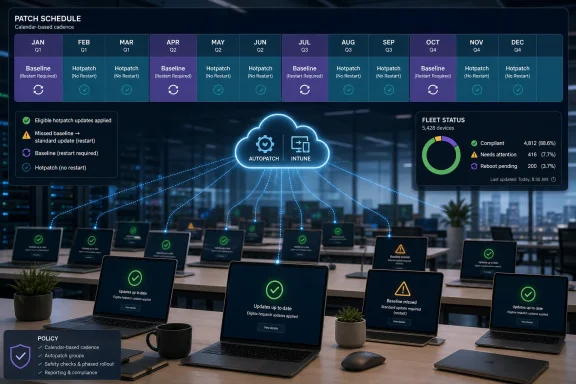
The annual cadence is the real product. January, April, July, and October are baseline months. The following two months in each quarter are hotpatch months. In practice, that means an organization that keeps devices eligible and current can reduce routine security-update restart pressure from monthly to quarterly.
That logic has aged badly. Modern endpoint fleets are no longer just office desktops waiting on a local LAN. They are remote laptops, shared devices, call-center terminals, clinical workstations, classroom machines, kiosk-like systems, and developer PCs running long builds, virtual machines, and collaboration sessions. The client endpoint has become a productivity surface, an identity boundary, and a security sensor all at once.
Hotpatch for Windows 11 Enterprise 24H2 is Microsoft acknowledging that client availability now has enterprise value. It also reflects a more uncomfortable truth: security updates are most useful when they are actually active, and reboot deferral has always been one of Windows’ quietest security liabilities.
The hotpatch pitch is therefore less about sparing users a nuisance and more about shrinking the exposure window. If an update can be installed and take effect without waiting for a reboot, administrators can be more aggressive about deployment deadlines without provoking the same user backlash. That is the kind of operational improvement that rarely makes consumer headlines but can change patch compliance numbers in a real environment.
This makes the feature powerful and narrower than the headline might suggest. Eligible devices need the right Windows edition and version, a compatible baseline, management through Intune and Windows Autopatch policy, and security prerequisites such as virtualization-based security. If those conditions are not met, the device falls back to the standard latest cumulative update path, which brings the familiar restart requirement back into the picture.
From Microsoft’s perspective, this is sensible. Hotpatching a live operating system requires confidence in device state, update targeting, compliance reporting, and rollback assumptions. Autopatch gives Microsoft and administrators a controlled framework for rings, deadlines, eligibility detection, and monitoring.
From an administrator’s perspective, it is also a form of lock-in by architecture. The feature rewards organizations already invested in Intune, Microsoft 365 licensing, Windows Autopatch, and modern endpoint management. The more traditional your update workflow is, the less immediate this revolution becomes.
Windows cumulative updates have improved over the years, but they still represent a monthly logistics exercise. Bandwidth planning, delivery optimization, user disruption, and install reliability all shape whether patching is merely scheduled or actually completed. Smaller security-focused packages reduce friction at every stage of that process.
There is also a psychological benefit for IT. The less intrusive an update is, the easier it is to justify faster rollout. The easier it is to justify faster rollout, the less time organizations spend in the gray zone where a vulnerability is known, a patch exists, and the fleet is still waiting for users and maintenance windows to cooperate.
That is where Hotpatch could matter most. Not in a perfect lab where every device behaves, but in the messy middle of enterprise IT, where the difference between a three-day and ten-day compliance curve can be the difference between resilience and incident response.
Baseline updates include the full cumulative set of security fixes, features, and enhancements. They reset the foundation on which the following hotpatches depend. If a device misses the current baseline, it cannot simply float along indefinitely collecting rebootless fixes; it must catch up, and that catch-up requires a restart.
This creates a new kind of discipline. Under the old model, every month was a reboot negotiation. Under the hotpatch model, the organization gets more breathing room during hotpatch months but must take baseline months seriously. January, April, July, and October become the moments when IT must ensure the fleet lands on the correct servicing foundation.
That may actually be easier to govern. Quarterly restart campaigns can be communicated, scheduled, and measured with more precision than monthly disruption. Users may also be more willing to accept a reboot when it feels like part of a predictable enterprise maintenance rhythm rather than a nagging pop-up that never stops returning.
That split is becoming more common. Microsoft’s most interesting Windows capabilities increasingly assume cloud identity, device compliance, management policy, and subscription licensing. Security features that look like operating-system improvements are often delivered as ecosystem improvements. The OS is only one part of the bargain.
There is a defensible reason for that. Enterprise features need reporting, targeting, and policy control. But it also means Windows is less uniform than its branding implies. Two machines may both be running Windows 11 version 24H2, yet one participates in a reboot-minimizing hotpatch cycle while the other receives the conventional cumulative update.
That divergence will frustrate power users who manage their own systems carefully and would happily opt into fewer restarts. But Microsoft is clearly optimizing for fleet safety over enthusiast autonomy. In Redmond’s current worldview, the managed device is the ideal device.
That fallback is important. Microsoft is not leaving ineligible devices stranded. But the fallback also means administrators must watch eligibility as closely as deployment status. A report that says a device received an update is not the same as knowing whether it received the hotpatch package or the standard reboot-requiring package.
This is where Autopatch reporting becomes central. Hotpatch is not just a binary feature; it is a compliance state. IT teams will need to know which devices are in the quarterly baseline, which received the no-restart security update, which reverted to the LCU path, and which are waiting on user action.
The risk is not that Hotpatch fails dramatically. The risk is that organizations assume they are getting rebootless security coverage across a fleet when a meaningful subset of devices has silently fallen back to the old behavior. In enterprise patching, assumptions are where dashboards go to die.
For administrators, the benefit comes with sharper accountability. If hotpatch updates install faster and take effect without restarts, there are fewer excuses for slow security deployment. The maintenance-window argument weakens. The “we are waiting for users to reboot” defense becomes less persuasive in hotpatch months.
That could shift internal security politics. Vulnerability management teams will expect faster patch compliance. Audit and risk teams will want evidence that eligible devices are receiving hotpatch updates promptly. Endpoint teams will be asked why specific machines fell back to standard updates or missed the baseline.
In other words, Hotpatch removes one class of friction and exposes another. It makes the update process less dependent on user behavior, but more dependent on management hygiene. For mature IT organizations, that is a good trade. For messy environments, it may simply make the mess more visible.
That does not make the feature cynical. Enterprises have been asking for exactly this kind of servicing improvement for years, and the technical case is strong. But Microsoft rarely solves a Windows problem these days without also nudging customers deeper into its platform architecture.
This is the bargain modern Windows increasingly offers. Give Microsoft more control over update orchestration, and Microsoft will give you better uptime, faster compliance, and simpler reporting. Keep a more manual or fragmented management model, and you keep more of the old pain.
For many organizations, that bargain will be acceptable. The endpoint management market has already moved toward cloud policy and telemetry. Hotpatch simply gives IT another practical reason to accelerate the move.
That rhythm is designed to reduce surprise. Baselines happen quarterly. Hotpatches arrive in the intervening months. Devices that do not qualify fall back to standard cumulative updates. Administrators get a model they can explain to users and defend to security leadership.
The tradeoff is complexity behind the curtain. Hotpatch introduces new distinctions between baseline and hotpatch months, eligible and ineligible devices, hotpatch KBs and standard cumulative updates, rebootless protection and reboot-required catch-up. The user experience gets simpler only if the administrative layer gets more disciplined.
That is a familiar Microsoft pattern. Complexity does not disappear; it moves. In this case, it moves away from the user’s restart prompt and into the policy, reporting, and eligibility systems that enterprise IT already lives in.
That shift may matter beyond Windows 11 Enterprise 24H2. Once organizations experience two out of three months without routine security-update reboots, the old model will feel increasingly archaic. Expectations will change. Administrators will ask why more components cannot be serviced this way. Users will wonder why a reboot is required this month when it was not required last month.
Microsoft will have to manage those expectations carefully. Hotpatch is security-focused; it is not a universal servicing vehicle for every fix and feature. But once the company demonstrates that rebootless monthly protection is practical for parts of Windows, it invites pressure to expand the boundary.
That pressure is healthy. Windows servicing has improved enormously since the worst days of multi-hour cumulative updates and unpredictable restart behavior, but the reboot remains a cultural scar. Hotpatch does not erase it. It begins to make it negotiable.
That changes planning. Update rings, communications, help desk staffing, compliance deadlines, and exception handling should revolve around the quarterly baseline cycle. The organizations that benefit most from Hotpatch will not be the ones that merely enable a policy; they will be the ones that build a maintenance culture around the new cadence.
There is also a lifecycle implication. Windows 11 version 24H2 is not just another feature update in this story. It is the platform requirement for this client hotpatch model, and that gives enterprises another reason to move lagging fleets forward. If a company is still treating 24H2 migration as a distant desktop engineering project, Hotpatch turns it into a security operations conversation.
That is how Microsoft tends to win these transitions. It does not simply say “upgrade because support ends eventually.” It attaches operational advantages to the newer platform until staying behind becomes harder to justify.
Source: Microsoft Support Release notes for Hotpatch on Windows 11 Enterprise version 24H2 - Microsoft Support
 Microsoft Turns the Reboot Into a Quarterly Event
For decades, the rhythm of Windows security has been simple enough to be folklore: Patch Tuesday lands, devices download updates, users postpone restarts, and administrators spend the rest of the week chasing machines that are technically updated but not yet secured. Hotpatch changes that bargain by applying supported security fixes to running Windows 11 Enterprise 24H2 systems without requiring a reboot during designated hotpatch months.The important word is supported. This is not a magical mechanism that rewrites every component of Windows while the system is fully alive. Microsoft’s model still depends on quarterly baseline updates that behave much more like traditional cumulative updates and require a restart. In the two months after each baseline, eligible devices can receive smaller security-focused hotpatch packages that take effect without the usual reboot ceremony.
That distinction matters because it keeps the feature grounded. Microsoft is not promising a reboot-free Windows client. It is promising fewer reboots, smaller update packages, and a servicing calendar that enterprises can plan around instead of constantly negotiating with.
The annual cadence is the real product. January, April, July, and October are baseline months. The following two months in each quarter are hotpatch months. In practice, that means an organization that keeps devices eligible and current can reduce routine security-update restart pressure from monthly to quarterly.
The Client PC Finally Gets a Server-Class Patch Trick
Hotpatching has long made more intuitive sense on servers than on laptops. A database server, a domain controller, or a line-of-business application host has a clear uptime value that can be measured in dollars and angry phone calls. A client PC, by contrast, has often been treated as disposable from an availability standpoint: reboot it at lunch, reboot it overnight, reboot it when the user gets tired of clicking “remind me later.”That logic has aged badly. Modern endpoint fleets are no longer just office desktops waiting on a local LAN. They are remote laptops, shared devices, call-center terminals, clinical workstations, classroom machines, kiosk-like systems, and developer PCs running long builds, virtual machines, and collaboration sessions. The client endpoint has become a productivity surface, an identity boundary, and a security sensor all at once.
Hotpatch for Windows 11 Enterprise 24H2 is Microsoft acknowledging that client availability now has enterprise value. It also reflects a more uncomfortable truth: security updates are most useful when they are actually active, and reboot deferral has always been one of Windows’ quietest security liabilities.
The hotpatch pitch is therefore less about sparing users a nuisance and more about shrinking the exposure window. If an update can be installed and take effect without waiting for a reboot, administrators can be more aggressive about deployment deadlines without provoking the same user backlash. That is the kind of operational improvement that rarely makes consumer headlines but can change patch compliance numbers in a real environment.
Autopatch Is the Gatekeeper, Not a Side Feature
Microsoft’s release notes frame Hotpatch as something you manage and apply using Autopatch with Windows 11 Enterprise version 24H2. That is not incidental wording. Hotpatch is not simply another Windows Update toggle sitting on a standalone PC; it is a managed servicing feature tied to Microsoft’s cloud update machinery.This makes the feature powerful and narrower than the headline might suggest. Eligible devices need the right Windows edition and version, a compatible baseline, management through Intune and Windows Autopatch policy, and security prerequisites such as virtualization-based security. If those conditions are not met, the device falls back to the standard latest cumulative update path, which brings the familiar restart requirement back into the picture.
From Microsoft’s perspective, this is sensible. Hotpatching a live operating system requires confidence in device state, update targeting, compliance reporting, and rollback assumptions. Autopatch gives Microsoft and administrators a controlled framework for rings, deadlines, eligibility detection, and monitoring.
From an administrator’s perspective, it is also a form of lock-in by architecture. The feature rewards organizations already invested in Intune, Microsoft 365 licensing, Windows Autopatch, and modern endpoint management. The more traditional your update workflow is, the less immediate this revolution becomes.
The Smaller Package Is a Bigger Deal Than It Sounds
The reboot is the visible pain point, but package size may become the quieter operational win. Microsoft says hotpatch packages are smaller, install faster, and are easier to orchestrate. In a small office, that sounds like marginal polish. In a global enterprise with tens of thousands of endpoints spread across homes, branches, VPNs, weak Wi-Fi, metered links, and shared workstations, it is infrastructure relief.Windows cumulative updates have improved over the years, but they still represent a monthly logistics exercise. Bandwidth planning, delivery optimization, user disruption, and install reliability all shape whether patching is merely scheduled or actually completed. Smaller security-focused packages reduce friction at every stage of that process.
There is also a psychological benefit for IT. The less intrusive an update is, the easier it is to justify faster rollout. The easier it is to justify faster rollout, the less time organizations spend in the gray zone where a vulnerability is known, a patch exists, and the fleet is still waiting for users and maintenance windows to cooperate.
That is where Hotpatch could matter most. Not in a perfect lab where every device behaves, but in the messy middle of enterprise IT, where the difference between a three-day and ten-day compliance curve can be the difference between resilience and incident response.
The Quarterly Baseline Keeps Windows Honest
The baseline month is the part of Hotpatch that will disappoint anyone expecting a clean break from reboots. It is also the part that makes the model credible. Windows is too large, too stateful, and too dependent on boot-time servicing for Microsoft to plausibly eliminate restarts from the security update process altogether.Baseline updates include the full cumulative set of security fixes, features, and enhancements. They reset the foundation on which the following hotpatches depend. If a device misses the current baseline, it cannot simply float along indefinitely collecting rebootless fixes; it must catch up, and that catch-up requires a restart.
This creates a new kind of discipline. Under the old model, every month was a reboot negotiation. Under the hotpatch model, the organization gets more breathing room during hotpatch months but must take baseline months seriously. January, April, July, and October become the moments when IT must ensure the fleet lands on the correct servicing foundation.
That may actually be easier to govern. Quarterly restart campaigns can be communicated, scheduled, and measured with more precision than monthly disruption. Users may also be more willing to accept a reboot when it feels like part of a predictable enterprise maintenance rhythm rather than a nagging pop-up that never stops returning.
The Enterprise Requirement Splits Windows Into Two Experiences
For Windows enthusiasts, the catch is obvious: this is not the Windows 11 experience most people will see on their personal PCs. Hotpatch is aimed at Windows 11 Enterprise and Education-style managed environments, not unmanaged consumer machines. The everyday Windows 11 Home or Pro user is still living in the familiar cumulative update world.That split is becoming more common. Microsoft’s most interesting Windows capabilities increasingly assume cloud identity, device compliance, management policy, and subscription licensing. Security features that look like operating-system improvements are often delivered as ecosystem improvements. The OS is only one part of the bargain.
There is a defensible reason for that. Enterprise features need reporting, targeting, and policy control. But it also means Windows is less uniform than its branding implies. Two machines may both be running Windows 11 version 24H2, yet one participates in a reboot-minimizing hotpatch cycle while the other receives the conventional cumulative update.
That divergence will frustrate power users who manage their own systems carefully and would happily opt into fewer restarts. But Microsoft is clearly optimizing for fleet safety over enthusiast autonomy. In Redmond’s current worldview, the managed device is the ideal device.
Security Gains Depend on Eligibility, Not Marketing
Hotpatch’s security value depends on whether devices remain eligible. That is the operational trap hidden behind the attractive headline. A device needs to be on the correct baseline, targeted by the right policy, running the right edition and version, and configured with required security features. If it drifts out of that lane, it does not become unprotected, but it does lose the hotpatch path and receives the conventional cumulative update instead.That fallback is important. Microsoft is not leaving ineligible devices stranded. But the fallback also means administrators must watch eligibility as closely as deployment status. A report that says a device received an update is not the same as knowing whether it received the hotpatch package or the standard reboot-requiring package.
This is where Autopatch reporting becomes central. Hotpatch is not just a binary feature; it is a compliance state. IT teams will need to know which devices are in the quarterly baseline, which received the no-restart security update, which reverted to the LCU path, and which are waiting on user action.
The risk is not that Hotpatch fails dramatically. The risk is that organizations assume they are getting rebootless security coverage across a fleet when a meaningful subset of devices has silently fallen back to the old behavior. In enterprise patching, assumptions are where dashboards go to die.
Users Get Fewer Interruptions, Admins Get New Accountability
For end users, the benefit is easy to understand: fewer forced restarts after security updates. That matters in the real world, where restarts interrupt meetings, close unsaved work, break remote sessions, and push users into adversarial relationships with their own IT departments. A less disruptive update model can make security feel less like punishment.For administrators, the benefit comes with sharper accountability. If hotpatch updates install faster and take effect without restarts, there are fewer excuses for slow security deployment. The maintenance-window argument weakens. The “we are waiting for users to reboot” defense becomes less persuasive in hotpatch months.
That could shift internal security politics. Vulnerability management teams will expect faster patch compliance. Audit and risk teams will want evidence that eligible devices are receiving hotpatch updates promptly. Endpoint teams will be asked why specific machines fell back to standard updates or missed the baseline.
In other words, Hotpatch removes one class of friction and exposes another. It makes the update process less dependent on user behavior, but more dependent on management hygiene. For mature IT organizations, that is a good trade. For messy environments, it may simply make the mess more visible.
Microsoft Is Selling Calm, but It Is Also Selling Control
The strategic layer is hard to miss. Hotpatch makes Windows more secure and less disruptive, but it also strengthens Microsoft’s preferred management model. The best version of the feature lives in a world of Intune, Autopatch, Microsoft 365 licensing, policy-driven update rings, and cloud-delivered compliance data.That does not make the feature cynical. Enterprises have been asking for exactly this kind of servicing improvement for years, and the technical case is strong. But Microsoft rarely solves a Windows problem these days without also nudging customers deeper into its platform architecture.
This is the bargain modern Windows increasingly offers. Give Microsoft more control over update orchestration, and Microsoft will give you better uptime, faster compliance, and simpler reporting. Keep a more manual or fragmented management model, and you keep more of the old pain.
For many organizations, that bargain will be acceptable. The endpoint management market has already moved toward cloud policy and telemetry. Hotpatch simply gives IT another practical reason to accelerate the move.
The 24H2 Release Notes Are Really a Servicing Manifesto
The release notes themselves are modest: security updates, fewer restarts, smaller packages, Autopatch management, better protection. But taken together, they describe a larger change in how Microsoft wants Windows servicing to work. The operating system is no longer just patched; it is enrolled into a managed rhythm.That rhythm is designed to reduce surprise. Baselines happen quarterly. Hotpatches arrive in the intervening months. Devices that do not qualify fall back to standard cumulative updates. Administrators get a model they can explain to users and defend to security leadership.
The tradeoff is complexity behind the curtain. Hotpatch introduces new distinctions between baseline and hotpatch months, eligible and ineligible devices, hotpatch KBs and standard cumulative updates, rebootless protection and reboot-required catch-up. The user experience gets simpler only if the administrative layer gets more disciplined.
That is a familiar Microsoft pattern. Complexity does not disappear; it moves. In this case, it moves away from the user’s restart prompt and into the policy, reporting, and eligibility systems that enterprise IT already lives in.
The Patch Tuesday Reboot Era Starts to Lose Its Inevitability
Patch Tuesday is not going away. The monthly security cadence remains, and Windows will still need reboots for baseline updates, feature work, firmware, drivers, and plenty of non-hotpatch scenarios. But Hotpatch weakens the idea that every meaningful Windows security update must end with a restart.That shift may matter beyond Windows 11 Enterprise 24H2. Once organizations experience two out of three months without routine security-update reboots, the old model will feel increasingly archaic. Expectations will change. Administrators will ask why more components cannot be serviced this way. Users will wonder why a reboot is required this month when it was not required last month.
Microsoft will have to manage those expectations carefully. Hotpatch is security-focused; it is not a universal servicing vehicle for every fix and feature. But once the company demonstrates that rebootless monthly protection is practical for parts of Windows, it invites pressure to expand the boundary.
That pressure is healthy. Windows servicing has improved enormously since the worst days of multi-hour cumulative updates and unpredictable restart behavior, but the reboot remains a cultural scar. Hotpatch does not erase it. It begins to make it negotiable.
The Calendar Is Now Part of the Security Boundary
The operational lesson for IT is simple: the calendar now matters as much as the package. A hotpatch month is only valuable if devices entered it from the right baseline. A baseline month is only successful if the organization treats it as the foundation for the next two months of rebootless security.That changes planning. Update rings, communications, help desk staffing, compliance deadlines, and exception handling should revolve around the quarterly baseline cycle. The organizations that benefit most from Hotpatch will not be the ones that merely enable a policy; they will be the ones that build a maintenance culture around the new cadence.
There is also a lifecycle implication. Windows 11 version 24H2 is not just another feature update in this story. It is the platform requirement for this client hotpatch model, and that gives enterprises another reason to move lagging fleets forward. If a company is still treating 24H2 migration as a distant desktop engineering project, Hotpatch turns it into a security operations conversation.
That is how Microsoft tends to win these transitions. It does not simply say “upgrade because support ends eventually.” It attaches operational advantages to the newer platform until staying behind becomes harder to justify.
The New Patch Bargain for Windows 11 Enterprise Fleets
Hotpatch will not remove the need for testing, staged rollout, inventory hygiene, or restart planning. It changes where those disciplines matter most. The practical value is clearest when administrators treat it as a servicing model rather than a feature checkbox.- Organizations still need quarterly baseline updates, and those baseline updates still require restarts.
- Eligible Windows 11 Enterprise 24H2 devices can receive security-focused hotpatch updates in the two months after each quarterly baseline.
- Devices that miss prerequisites or fall off the current baseline receive standard cumulative updates instead, preserving security but restoring reboot requirements.
- Autopatch and Intune policy are central to the experience, making Hotpatch most useful for organizations already committed to Microsoft’s modern management stack.
- The biggest security gain is faster effective patching, because protection no longer has to wait for users to accept a restart in hotpatch months.
- The biggest administrative risk is assuming every targeted device is actually eligible, rather than verifying hotpatch status through reporting.
Source: Microsoft Support Release notes for Hotpatch on Windows 11 Enterprise version 24H2 - Microsoft Support
