

Microsoft’s April 14, 2026 baseline release for Windows 11 Enterprise hotpatch marks another quarterly reset point in the servicing model that IT teams now rely on to keep security moving without forcing unnecessary restarts. The update, identified in Microsoft Support as the April 2026 security baseline and linked to KB5083769, is more than just another Patch Tuesday event; it is the anchor that keeps the hotpatch cadence on track for both Windows 11 Enterprise version 25H2 and version 24H2. For organizations already enrolled in the right management channels, the significance is straightforward: stay on the latest baseline and you stay eligible for the lighter-touch hotpatch updates that follow. That is the promise, and it is one Microsoft keeps reinforcing in the release notes. (support.microsoft.com)
Microsoft’s hotpatch strategy has become one of the clearest examples of how Windows servicing is evolving for enterprise environments. Rather than waiting for monthly cumulative updates to deliver all security content in a single restart-heavy package, hotpatch lets qualifying devices receive many security fixes without rebooting, reducing disruption while preserving patch velocity. Microsoft says the approach is an extension of Windows Update and that it requires Autopatch to create and deploy updates to devices enrolled in the Autopatch quality update policy. That matters because hotpatch is not a consumer feature; it is a managed, policy-driven enterprise capability. (support.microsoft.com)
The basic rhythm is simple but strategically important. Microsoft releases baseline updates quarterly as standard cumulative updates, and those baseline releases serve as the foundation for the next stretch of hotpatch-capable months. In the release notes for Windows 11 Enterprise version 25H2, Microsoft states explicitly that eligible devices must be on the latest baseline release to qualify for hotpatch updates. In other words, hotpatch is not a free-floating alternative to normal servicing; it is a layered model that depends on disciplined baseline maintenance. (support.microsoft.com)
That design gives Microsoft a useful balance between security and operational continuity. The company positions hotpatch around three core advantages: immediate protection, consistent security, and minimized disruptions. It also notes that while hotpatch updates themselves do not require a restart for the remainder of the quarter, OS feature updates, firmware, and some application updates may still force one. That caveat is important because it prevents the idea of a “restart-free Windows” from becoming marketing shorthand for a much more nuanced engineering model. (support.microsoft.com)
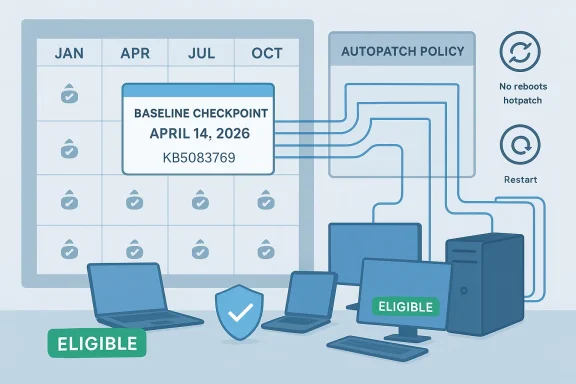
This April 14, 2026 baseline arrives in a broader context where Microsoft has been refining the calendar for both 24H2 and 25H2 hotpatch releases. The release notes for the two Windows 11 Enterprise versions show the same quarterly structure, with January, April, July, and October serving as baseline months in the calendar, and the other months generally reserved for hotpatch updates. That cadence has now become familiar enough that enterprise administrators can plan maintenance windows around it instead of reacting to every month as if it were a clean slate. (support.microsoft.com)
That stability matters because the hotpatch model depends on trust. Enterprises adopting hotpatch are effectively agreeing to a disciplined rhythm: keep the device current, let Microsoft deliver interim security fixes without restarts, and accept that the quarterly baseline is the price of admission. This is a trade-off, but it is a practical one for organizations that have struggled for years with reboot fatigue across thousands of endpoints. (support.microsoft.com)
A healthy enterprise response usually looks like this:
Still, the practical meaning can differ. In mixed-version environments, administrators may have to account for different build lines, deployment rings, and compatibility constraints even if the update rhythm looks identical. The policy logic is the same, but the operational reality is rarely perfectly symmetrical. That is why hotpatch is valuable: it standardizes the update experience even when the endpoint population remains diverse. (support.microsoft.com)
In consumer terms, the April baseline would look like just another cumulative update. In enterprise terms, it is a eligibility gate, a servicing dependency, and a marker in the calendar that determines how much of the next quarter can be handled without a restart. That is why the language around baseline updates is so operationally dense: it is built for administrators, not casual users. (support.microsoft.com)
The implication is broader than a single release. Microsoft is normalizing the idea that Windows can be serviced in a more modular way, where some updates are “structural” and others are “interim.” That is a meaningful evolution in how the platform is maintained at scale. It also makes Windows look more like a cloud-serviced operating environment and less like a purely monthly patch event.
Predictability is not glamorous, but it is the foundation of enterprise patching. When admins can forecast restart months, pilot the right builds, and align change windows with quarterly cycles, they get less resistance from the business. That can translate directly into better patch compliance, fewer exceptions, and less pressure on help desks. (support.microsoft.com)
That matters because a no-restart promise is only credible if the underlying system is periodically re-anchored. Without the baseline, hotpatch would drift from its own support model. With the baseline, Microsoft can preserve the promise while still keeping a strong update hygiene framework.
There is also a competitive dimension. Other modern endpoint ecosystems often market seamless or background servicing as a product advantage, and Microsoft has every incentive to show that Windows can match those expectations without losing control of security discipline. Hotpatch allows the company to argue that Windows can be both enterprise-grade and operationally civilized. That is not just a technical claim; it is a market positioning statement. (support.microsoft.com)
At the same time, Microsoft is careful not to oversell the model. The company still preserves restart boundaries for the baseline months and reminds customers that not every type of update can be hotpatched. That honesty gives the framework credibility, because enterprises know that any promise of zero disruption is usually too good to be true.
In practice, that means the baseline is not merely about getting patches installed. It is about keeping the estate inside the supported operating envelope. If one ring lags behind, or if a subset of devices misses the quarterly checkpoint, hotpatch eligibility can become uneven, and uneven eligibility creates operational complexity fast. (support.microsoft.com)
This is why the April baseline should be read as a governance event as much as a technical one. It validates policy enforcement, ring progression, and update health. In an enterprise, patching success is often less about the patch itself and more about the machinery wrapped around it.
There is also the issue of organizational readiness. A quarterly reset is helpful only if the enterprise has enough discipline to use it correctly. If device management is fragmented, if policies are stale, or if inventory is incomplete, the baseline becomes one more thing to chase rather than a clean servicing pivot. That is a process problem, not a Microsoft problem, but Microsoft’s model still depends on customers getting the process right. (support.microsoft.com)
If anything, the baseline model protects Microsoft from the false promise of full-time no-reboot computing. It recognizes that modern endpoints are too complex for a single servicing philosophy. The result is a more credible and sustainable model, even if it is less dramatic than a headline about “restart-free Windows.”
What will matter most is execution. Microsoft has already done the hard work of defining the framework and documenting the cadence, but customers still have to carry it through their own management stacks. In that sense, the April baseline is both a release and a reminder: the no-restart promise only works when the quarterly foundation is kept intact. (support.microsoft.com)
Microsoft’s quarterly baseline cadence is now an essential part of the enterprise Windows calendar, and KB5083769 fits that pattern neatly. The real significance is not the update itself, but the system it supports: a world where security is delivered faster, disruptions are reduced, and administrators can plan with greater confidence. That is the kind of incremental but durable improvement that changes how a platform is experienced at scale, and it is why this baseline deserves attention well beyond the usual Patch Tuesday noise.
Source: Microsoft Support April 14, 2026—Baseline - Microsoft Support
 Background
Microsoft’s hotpatch strategy has become one of the clearest examples of how Windows servicing is evolving for enterprise environments. Rather than waiting for monthly cumulative updates to deliver all security content in a single restart-heavy package, hotpatch lets qualifying devices receive many security fixes without rebooting, reducing disruption while preserving patch velocity. Microsoft says the approach is an extension of Windows Update and that it requires Autopatch to create and deploy updates to devices enrolled in the Autopatch quality update policy. That matters because hotpatch is not a consumer feature; it is a managed, policy-driven enterprise capability. (support.microsoft.com)The basic rhythm is simple but strategically important. Microsoft releases baseline updates quarterly as standard cumulative updates, and those baseline releases serve as the foundation for the next stretch of hotpatch-capable months. In the release notes for Windows 11 Enterprise version 25H2, Microsoft states explicitly that eligible devices must be on the latest baseline release to qualify for hotpatch updates. In other words, hotpatch is not a free-floating alternative to normal servicing; it is a layered model that depends on disciplined baseline maintenance. (support.microsoft.com)
That design gives Microsoft a useful balance between security and operational continuity. The company positions hotpatch around three core advantages: immediate protection, consistent security, and minimized disruptions. It also notes that while hotpatch updates themselves do not require a restart for the remainder of the quarter, OS feature updates, firmware, and some application updates may still force one. That caveat is important because it prevents the idea of a “restart-free Windows” from becoming marketing shorthand for a much more nuanced engineering model. (support.microsoft.com)
This April 14, 2026 baseline arrives in a broader context where Microsoft has been refining the calendar for both 24H2 and 25H2 hotpatch releases. The release notes for the two Windows 11 Enterprise versions show the same quarterly structure, with January, April, July, and October serving as baseline months in the calendar, and the other months generally reserved for hotpatch updates. That cadence has now become familiar enough that enterprise administrators can plan maintenance windows around it instead of reacting to every month as if it were a clean slate. (support.microsoft.com)
Why baseline months matter
Baseline months are the moments when the hotpatch model briefly returns to a more conventional servicing pattern. Devices must absorb a restart-based cumulative update, and that update becomes the platform for the next sequence of hotpatch releases. If an organization misses the baseline, it risks falling out of the hotpatch eligibility stream, which is exactly why Microsoft emphasizes the latest baseline requirement so heavily. (support.microsoft.com)What Microsoft is signaling with KB5083769
The April 14 baseline tied to KB5083769 signals continuity more than novelty, and that is exactly the point. Microsoft is not trying to create a dramatic break in the update model; it is reinforcing a predictable servicing contract that lets administrators make planning assumptions. When a company like Microsoft repeats the same quarter-by-quarter structure, it is telling customers that the system is stable enough to build processes around. (support.microsoft.com)That stability matters because the hotpatch model depends on trust. Enterprises adopting hotpatch are effectively agreeing to a disciplined rhythm: keep the device current, let Microsoft deliver interim security fixes without restarts, and accept that the quarterly baseline is the price of admission. This is a trade-off, but it is a practical one for organizations that have struggled for years with reboot fatigue across thousands of endpoints. (support.microsoft.com)
The practical meaning for IT teams
For IT administrators, the April baseline is not something to ignore until the end of the month. It is a checkpoint, and missing it can have downstream effects on both compliance and supportability. Microsoft’s wording around eligibility makes clear that baseline compliance is the gate through which hotpatch flows. (support.microsoft.com)A healthy enterprise response usually looks like this:
- Validate that managed devices are on the required baseline build.
- Confirm Autopatch or equivalent policy enrollment.
- Test the baseline in pilot rings before broad deployment.
- Verify hotpatch eligibility after the baseline lands.
- Watch for any restart dependencies outside the hotpatch channel.
Why this release is not just “another Tuesday”
The industry often treats Windows patching as a monthly event, but hotpatch changes the mental model. The baseline is the structural moment, and the hotpatch months are the operational optimization. In that sense, the April 14 release is not merely a security update; it is a reset that keeps the enterprise update machine aligned. (support.microsoft.com)- It preserves the quarterly restart cycle.
- It enables the no-restart security model for the months that follow.
- It keeps devices inside Microsoft’s supported servicing lane.
- It reduces the likelihood of patch drift across large fleets.
- It reinforces the Autopatch-managed enterprise workflow.
Windows 11 Enterprise 25H2 and 24H2: same model, different context
Microsoft’s release notes show the same hotpatch pattern for Windows 11 Enterprise version 25H2 and version 24H2, which tells us the company wants a unified enterprise servicing story across current supported branches. That continuity reduces confusion for multi-version estates, especially in organizations where not every device migrates at the same pace. A common servicing model across versions makes policy design easier and compliance reporting cleaner. (support.microsoft.com)Still, the practical meaning can differ. In mixed-version environments, administrators may have to account for different build lines, deployment rings, and compatibility constraints even if the update rhythm looks identical. The policy logic is the same, but the operational reality is rarely perfectly symmetrical. That is why hotpatch is valuable: it standardizes the update experience even when the endpoint population remains diverse. (support.microsoft.com)
Enterprise adoption versus consumer expectations
Consumers often think of Windows updates in terms of interruption, prompts, and the occasional inconvenient reboot. Enterprises think in terms of uptime, compliance, and support load. Hotpatch exists because Microsoft knows those are different worlds, and the baseline model is the part that bridges them. (support.microsoft.com)In consumer terms, the April baseline would look like just another cumulative update. In enterprise terms, it is a eligibility gate, a servicing dependency, and a marker in the calendar that determines how much of the next quarter can be handled without a restart. That is why the language around baseline updates is so operationally dense: it is built for administrators, not casual users. (support.microsoft.com)
The implication is broader than a single release. Microsoft is normalizing the idea that Windows can be serviced in a more modular way, where some updates are “structural” and others are “interim.” That is a meaningful evolution in how the platform is maintained at scale. It also makes Windows look more like a cloud-serviced operating environment and less like a purely monthly patch event.
The cadence advantage
One of the most important things about this April 2026 baseline is that it confirms the cadence is still intact. Microsoft’s calendar shows baseline months in January, April, July, and October, with hotpatch updates filling many of the intervening months. That structure is predictable enough to be operationally useful and flexible enough to absorb security changes as they arise. (support.microsoft.com)Predictability is not glamorous, but it is the foundation of enterprise patching. When admins can forecast restart months, pilot the right builds, and align change windows with quarterly cycles, they get less resistance from the business. That can translate directly into better patch compliance, fewer exceptions, and less pressure on help desks. (support.microsoft.com)
Why quarterly baselines are the backbone
Quarterly baselines do two things at once. First, they reset the servicing state so the device remains eligible for the next stretch of hotpatch updates. Second, they create a natural checkpoint for deeper validation, including application compatibility and endpoint policy alignment. (support.microsoft.com)That matters because a no-restart promise is only credible if the underlying system is periodically re-anchored. Without the baseline, hotpatch would drift from its own support model. With the baseline, Microsoft can preserve the promise while still keeping a strong update hygiene framework.
- Quarterly baselines keep hotpatch grounded in a known state.
- Administrators can align change management with fixed windows.
- Compliance teams gain an easier audit trail.
- Support teams get fewer surprises from ad hoc restarts.
- Security teams preserve timely remediation without sacrificing stability.
Why hotpatch is strategically important for Microsoft
Microsoft has been pushing Windows closer to a managed service model for years, and hotpatch is one of the most visible enterprise-facing results of that effort. The company benefits when Windows feels less disruptive and more predictable, especially in organizations that measure productivity in thousands of device-hours. The April 14 baseline is part of that larger strategy, not a standalone artifact. (support.microsoft.com)There is also a competitive dimension. Other modern endpoint ecosystems often market seamless or background servicing as a product advantage, and Microsoft has every incentive to show that Windows can match those expectations without losing control of security discipline. Hotpatch allows the company to argue that Windows can be both enterprise-grade and operationally civilized. That is not just a technical claim; it is a market positioning statement. (support.microsoft.com)
The message to rivals
Microsoft’s message to competitors is subtle but firm: restart-heavy patching no longer has to define enterprise Windows. By combining baseline control with hotpatch continuity, Microsoft is making a case that Windows can reduce operational friction without giving up the rigor of centralized servicing. That is exactly the kind of narrative that matters when CIOs are evaluating endpoint platforms at scale. (support.microsoft.com)At the same time, Microsoft is careful not to oversell the model. The company still preserves restart boundaries for the baseline months and reminds customers that not every type of update can be hotpatched. That honesty gives the framework credibility, because enterprises know that any promise of zero disruption is usually too good to be true.
What the cadence says about product maturity
A mature servicing strategy is one that can explain when restarts are required, when they are not, and why. Hotpatch does that better than many prior Windows update models because it separates security urgency from infrastructure interruption. The April baseline is the quarterly reminder that the model is being maintained, not improvised. (support.microsoft.com)- It supports large-scale endpoint standardization.
- It lowers the friction of monthly security operations.
- It creates a more cloud-like servicing expectation.
- It strengthens Microsoft’s enterprise value proposition.
- It helps Windows compete on operational efficiency, not just feature depth.
Deployment and compliance implications
The operational burden of the April baseline will fall most heavily on organizations with mature endpoint management. Those teams already know that eligibility, build level, and policy enrollment all have to line up before hotpatch delivers its full value. Microsoft’s release notes make that dependency explicit by tying hotpatch access to the latest baseline release. (support.microsoft.com)In practice, that means the baseline is not merely about getting patches installed. It is about keeping the estate inside the supported operating envelope. If one ring lags behind, or if a subset of devices misses the quarterly checkpoint, hotpatch eligibility can become uneven, and uneven eligibility creates operational complexity fast. (support.microsoft.com)
The hidden cost of inconsistency
Consistency is where hotpatch can either shine or frustrate. A well-managed environment will barely notice the baseline beyond a planned restart cycle. A poorly managed one may discover that some devices are eligible for hotpatch while others are not, forcing administrators to handle exceptions manually. That is the kind of administrative asymmetry that drains time and weakens trust in the patching process. (support.microsoft.com)This is why the April baseline should be read as a governance event as much as a technical one. It validates policy enforcement, ring progression, and update health. In an enterprise, patching success is often less about the patch itself and more about the machinery wrapped around it.
A useful checklist for administrators
- Confirm the device is on the correct Windows 11 Enterprise branch.
- Verify the latest baseline has been applied.
- Check that Autopatch or the equivalent deployment path is active.
- Review pilot ring results before expanding rollout.
- Audit hotpatch eligibility after baseline completion.
- Watch for firmware or application updates that still require restarts.
Operational risks the baseline cannot eliminate
The baseline gives hotpatch its foundation, but it does not eliminate the more stubborn realities of Windows administration. Some updates still require a restart, and Microsoft says so plainly. That includes OS features, firmware, and certain application updates, which means the dream of uninterrupted operations remains conditional rather than absolute. (support.microsoft.com)There is also the issue of organizational readiness. A quarterly reset is helpful only if the enterprise has enough discipline to use it correctly. If device management is fragmented, if policies are stale, or if inventory is incomplete, the baseline becomes one more thing to chase rather than a clean servicing pivot. That is a process problem, not a Microsoft problem, but Microsoft’s model still depends on customers getting the process right. (support.microsoft.com)
The restart paradox
Hotpatch reduces the number of reboots, but it does not eliminate the need for them. That paradox is actually a strength because it keeps expectations realistic. Enterprises can enjoy lower disruption during the quarter while still accepting that some maintenance events must happen on schedule. (support.microsoft.com)If anything, the baseline model protects Microsoft from the false promise of full-time no-reboot computing. It recognizes that modern endpoints are too complex for a single servicing philosophy. The result is a more credible and sustainable model, even if it is less dramatic than a headline about “restart-free Windows.”
Risk categories to monitor
- Devices missing the April baseline and dropping out of eligibility.
- Ring drift between pilot and broad deployment groups.
- Confusion between hotpatchable security fixes and restart-required updates.
- Delays in Autopatch policy synchronization.
- Firmware maintenance windows colliding with quarterly baseline cycles.
- Help desk overload if users do not understand the restart months.
Strengths and Opportunities
Microsoft’s April 14, 2026 baseline reinforces one of the strongest aspects of the hotpatch model: its ability to reduce interruption without weakening the security posture. For enterprises that have spent years balancing compliance pressure against user productivity, that is a meaningful operational gain. It also gives Microsoft a durable story to tell about Windows as a manageable, modern enterprise platform.- Lower disruption for end users during hotpatch months.
- Predictable servicing through quarterly baseline planning.
- Better compliance when organizations align policy and cadence.
- Stronger enterprise appeal compared with older restart-centric models.
- Simpler change management for large device estates.
- Improved security responsiveness because patches take effect quickly.
- Clearer governance because baseline months provide natural checkpoints.
Risks and Concerns
The biggest concern is that hotpatch can create a false sense of simplicity. The model is elegant on paper, but it still relies on proper enrollment, policy control, and quarterly compliance. If those pieces break down, the organization may end up with a patching scheme that is more complicated than the one it replaced.- Eligibility drift if devices miss the latest baseline.
- Hidden operational overhead when exceptions accumulate.
- Restart fatigue still appears during baseline and non-hotpatch updates.
- Policy complexity in environments with multiple device rings.
- Support confusion if users expect every update to be restart-free.
- Partial adoption if only some endpoints are managed through Autopatch.
- Maintenance conflicts when other infrastructure work lands in the same window.
Looking Ahead
The next test for Microsoft’s hotpatch model is not whether the April 14 baseline exists, but whether enterprises continue to treat the cadence as a predictable operational routine. If they do, hotpatch becomes part of the normal rhythm of Windows administration. If they do not, the model risks being misunderstood as a convenience feature instead of a disciplined servicing architecture. (support.microsoft.com)What will matter most is execution. Microsoft has already done the hard work of defining the framework and documenting the cadence, but customers still have to carry it through their own management stacks. In that sense, the April baseline is both a release and a reminder: the no-restart promise only works when the quarterly foundation is kept intact. (support.microsoft.com)
What to watch next
- Whether Microsoft keeps the 25H2 and 24H2 hotpatch calendars tightly aligned.
- How quickly organizations apply the April baseline across all managed rings.
- Whether out-of-band fixes continue to appear between scheduled hotpatch months.
- How Microsoft communicates restart dependencies outside the hotpatch channel.
- Whether more enterprises expand Autopatch use to simplify compliance.
Microsoft’s quarterly baseline cadence is now an essential part of the enterprise Windows calendar, and KB5083769 fits that pattern neatly. The real significance is not the update itself, but the system it supports: a world where security is delivered faster, disruptions are reduced, and administrators can plan with greater confidence. That is the kind of incremental but durable improvement that changes how a platform is experienced at scale, and it is why this baseline deserves attention well beyond the usual Patch Tuesday noise.
Source: Microsoft Support April 14, 2026—Baseline - Microsoft Support
Last edited:
