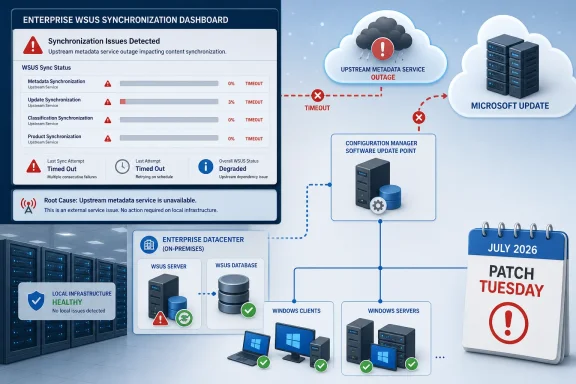
The disclosure appeared in Microsoft’s Windows Release Health reporting on July 17, with Neowin first flagging the unusually broad scope. Microsoft says a buildup of publishing metadata caused the degraded service, with the most severe impact occurring around July 13 — one day before the July 14 Patch Tuesday release. Server-side repair work is under way, and Microsoft expects synchronization performance to improve as those changes roll out.
For IT teams that schedule weekend testing and staged rollout after Patch Tuesday, the practical problem is straightforward: a WSUS server may take far longer than normal to complete a sync, or it may fail before the update catalog is refreshed. That can delay approval workflows even where the Windows updates themselves install without issue.
 The fault sits upstream of local WSUS servers
Microsoft’s wording matters. The company has not identified a faulty Windows update, a defective WSUS Server role installation, or a local database corruption issue. Instead, it attributes the incident to metadata accumulated on the publishing side of the update service.
WSUS synchronization is not merely a file download. The server retrieves update metadata, classifications, product categories, revisions, and expiration information from Microsoft Update or an upstream WSUS server. That information determines what updates are visible, applicable, and available for approval before endpoints ever receive the update payload.
Microsoft’s WSUS documentation describes synchronization as the process that imports both update metadata and update files from an update source. In a typical hierarchy, the top-level WSUS server connects to Microsoft Update, while downstream servers inherit their catalog from that upstream system. A slowdown at the Microsoft Update tier can therefore ripple through a multi-tier deployment rather than being isolated to a single server.
The company has not published a customer-side mitigation, nor has it provided a specific completion time for the server-side repair. That is important: indiscriminately rebuilding a WSUS database, clearing local content, or making broad product-selection changes is unlikely to solve an upstream publishing degradation — and may create a more disruptive recovery task once service normalizes.
Nearly every supported Windows estate is in scope
Microsoft’s affected-platform list includes current Windows 11 releases, still-serviced Windows 10 editions, long-term servicing channels, and Windows Server versions reaching back to Windows Server 2012.
The client side includes Windows 11 versions 26H1, 25H2, 24H2, and 23H2; Windows 10 versions 22H2, 21H2, 1809, and 1607; and Windows 10 Enterprise LTSC releases. The server list covers Windows Server 2025, Windows Server 2022, Windows Server version 1809, Windows Server 2019, Windows Server 2016, Windows Server 2012 R2, and Windows Server 2012.
That breadth reflects the nature of the fault. It is not tied to a single servicing stack, hardware configuration, or July cumulative-update package. A WSUS server configured to synchronize Microsoft product metadata can encounter the issue regardless of whether it ultimately patches Windows 11 24H2 workstations, Windows Server 2022 application hosts, or legacy Server 2012 R2 infrastructure.
The inclusion of Windows 11 version 26H1 is also a reminder that the incident concerns the service catalog rather than a broad deployment wave. Microsoft positions 26H1 as a hardware-optimized release intended for select new devices, while Windows 11 24H2 and 25H2 remain the wider enterprise deployment targets. All can be affected when the shared update-publishing path is struggling.
This can become a Patch Tuesday delay, not necessarily a security outage
A WSUS timeout does not automatically mean endpoints are unpatched. Machines that already downloaded approved updates, or that obtain updates through another managed channel, may continue on their existing schedules. Likewise, an organization can have a healthy local WSUS server and still be unable to complete the external synchronization that brings in new July content.
But for environments that deliberately hold updates until validation is complete, the consequence is tangible. Administrators may not see newly published updates in WSUS on schedule, may encounter incomplete synchronization results, or may have a catalog that does not yet reflect the revisions and supersedence information needed for a clean approval decision.
That matters more than the raw time shown in a synchronization job. WSUS is often the approval gate for constrained or disconnected networks, server maintenance rings, manufacturing systems, and organizations with formal change-control processes. The update pipeline is designed around a predictable sequence: synchronize, review, approve, download, deploy, verify. Microsoft’s incident disrupts the first step.
Organizations using Microsoft Configuration Manager can feel the impact as well, because its software-update point relies on WSUS synchronization and metadata. Microsoft’s Configuration Manager guidance notes that scheduled software update synchronization imports changes to update metadata into the site database. If the upstream WSUS operation is delayed or timing out, a Configuration Manager deployment workflow may not have current update information to work from.
Monitor first; avoid turning an upstream incident into local damage
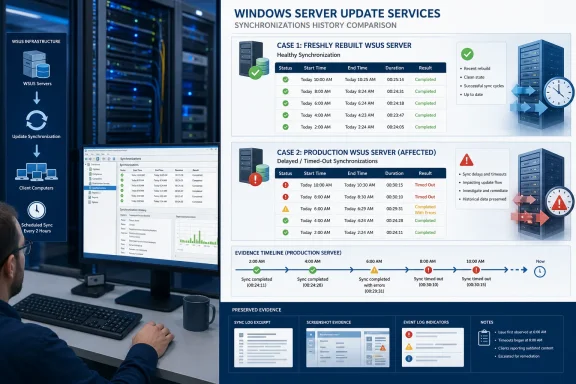
The most useful immediate response is to distinguish this known service degradation from a separate environmental failure. Check whether sync jobs that previously completed are now slow or timing out, review the WSUS console synchronization history, and preserve relevant entries from SoftwareDistribution.log before making invasive changes.
Administrators should also keep normal patch governance intact. Do not approve an incomplete or unexpected catalog simply because a monthly deadline is approaching, and do not assume that a failed sync proves July updates are absent from Microsoft Update. It proves only that the local server did not finish its metadata transaction.
A sensible weekend posture is:
- Leave existing approved update deployments and maintenance windows in place unless local evidence shows a separate installation problem.
- Record synchronization start and finish times, timeout messages, and the affected upstream server path for later comparison.
- Avoid unnecessary WSUS cleanup, reindexing, database rebuilds, or content-store resets solely in response to Microsoft’s acknowledged publishing issue.
- Re-run synchronization after Microsoft reports that server-side repairs have completed, then verify the catalog before resuming normal approvals.
WSUS is deprecated — Microsoft says it will receive no new features — but it remains supported for production deployments and continues to receive security and quality servicing under the relevant product lifecycles. That makes an outage-like degradation especially awkward: many enterprises still depend on the mature, locally controlled workflow even as Microsoft’s broader update-management strategy moves toward cloud services.
Microsoft’s next Release Health update will determine whether this remains a weekend inconvenience or becomes a more consequential delay in July’s enterprise patch cycle. Until then, the key point is that the repair belongs with Microsoft’s publishing service, not with every WSUS server that happens to report a slow synchronization.
Update: Microsoft’s mitigation currently covers only new or rebuilt WSUS servers (July 20, 2026)
Microsoft has deployed a mitigation effective July 18, but it applies only to WSUS servers installed or rebuilt after the change. The Register reports that existing WSUS installations which have already accumulated the problematic publishing metadata can still experience prolonged synchronization or timeouts.
Microsoft is developing guidance to safely remove the affected metadata from established servers, but has not yet published a customer-executable repair. Administrators should therefore avoid unverified database deletions or cleanup scripts while awaiting that guidance.
Windows Server Update Services buckle under Microsoft's metadata mountain
Update: Additional details (July 20, 2026)
Microsoft documentation notes that after KB5070881 or later updates, WSUS no longer displays synchronization error details through its usual console reporting experience. The change was made during Microsoft’s response to CVE-2025-59287.
For affected existing servers, administrators may therefore need to rely more heavily on WSUS service and IIS logs, proxy records, and Configuration Manager’s wsyncmgr.log while awaiting Microsoft’s metadata-cleanup guidance.
Update chaos after patch day: WSUS server refuses synchronization – Research Snipers
Update: Microsoft releases manual cleanup steps for affected existing WSUS servers (July 22, 2026)
Microsoft has now published the promised remediation for existing WSUS environments still affected by accumulated publishing metadata. Administrators are advised to back up every SUSDB database, run Microsoft’s cleanup query across the full WSUS hierarchy—including replica servers—then reindex the databases and run the WSUS Server Cleanup Wizard.
The procedure also calls for restoring the default MaxXMLPerRequest setting where it was changed as a workaround, followed by an IIS reset or WsusPool recycle to clear cached catalog data. This replaces the earlier wait-and-monitor posture for established servers: organizations can now take a supported, customer-executable path to remove the excess metadata rather than rebuilding infrastructure or attempting unverified deletions.
Microsoft cautions that the first post-cleanup Windows Update scan on managed devices may remain unusually slow while clients process the refreshed catalog. Later scans should return to normal. The client-side DataStore.edb file may not shrink afterward, but Microsoft says its size alone does not require further action or indicate an ongoing scan-performance problem.
For Configuration Manager and multi-tier WSUS deployments, the important operational detail is scope: apply the cleanup to every SUSDB instance in the hierarchy. Leaving replica databases untouched can allow synchronization delays to persist.
References
- Primary source: Neowin
Published: July 18, 2026 at 7:32 PM UTC
Microsoft confirms WSUS service degradation impacting all versions of Windows - Neowin
Microsoft's latest Windows headache is hitting IT admins hard, with a critical update service faltering across nearly every supported Windows version. www.neowin.net
- Official source: learn.microsoft.com
Windows 11, version 26H1 known issues and notifications | Microsoft Learn
View announcements and review known issues and fixes for Windows 11, version 26H1learn.microsoft.com