

Microsoft’s latest Xbox dashboard update is more than a cosmetic refresh. It gives players new control over the Home experience, expands the number of groups they can create, and adds more flexible color customization that can make the interface feel far more personal than before. For Xbox Insiders, the rollout starts first, but the changes are clearly aimed at the wider Xbox audience and at a broader idea of what console UI should be in 2026: faster, cleaner, and more individual.
What makes this update noteworthy is not just one feature, but the direction it signals. Microsoft has spent the last few years reworking Xbox Home in stages, and this latest pass continues that pattern by turning the dashboard into something that can be tuned rather than merely tolerated. For fans who have long wanted more control over layout, background visibility, and menu organization, this looks like one of the more meaningful interface upgrades Xbox has delivered in a long time.
Xbox Home has been on a long road toward greater personalization. In July 2023, Microsoft rolled out a redesigned Home experience to Xbox Series X|S and Xbox One, emphasizing quicker navigation, more space for backgrounds, and the ability to pin favorite games, curated groups, and system groups such as Quick Resume. That update was framed as a response to player feedback, and it set the tone for everything that followed. (news.xbox.com)
The 2023 redesign mattered because it acknowledged a longstanding complaint about console dashboards: they often grow cluttered, over-sorted, and overly prescriptive. Microsoft’s answer was to simplify the layout and create more room for game art and personal expression. That was a sensible move, but it still left many players wanting more granular control over what appeared, where it appeared, and how it looked. (news.xbox.com)
Since then, Xbox Insider previews have repeatedly served as the laboratory for those changes. In May 2025, Microsoft introduced new ways to personalize Home by letting Insiders hide system apps, pin up to three recent games or apps, and reduce the visible tile count. That update showed the company was thinking less about a static home screen and more about a dashboard that could adapt to different play styles, from minimalist users to people who want everything surfaced at a glance. (news.xbox.com)
This newest update extends that same logic. Instead of treating the dashboard as a fixed shell, Microsoft is opening up more of the interface to preference-based tuning. The result is a Home screen that can be more playful, more practical, and, perhaps most importantly, more yours.
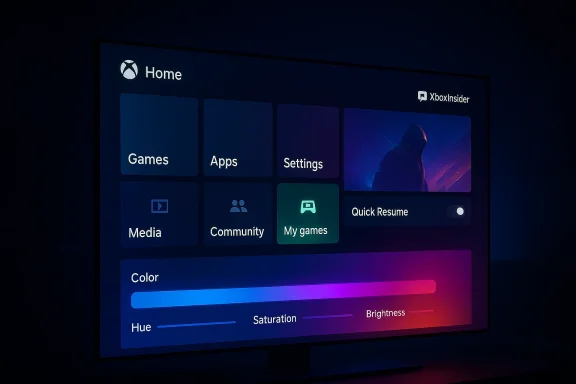
The other major visible change is broader color scheme customization. Instead of being restricted to a smaller selection of preset interface colors, users can now choose a custom color through sliders. That means the dashboard can move from generic branding toward something much more personal, whether you want something subtle and dark or deliberately loud and attention-grabbing.
It also matters because Xbox has been pushing the idea of continuity across devices. If your dashboard can surface the titles and groups you care about more cleanly, it reduces friction every time you return to the console. In practical terms, that means less scrolling, less hunting, and less feeling that the dashboard is making decisions for you.
There is also a subtle accessibility angle here. More control over contrast, tone, and saturation can help users shape the visual experience to their taste, even if Microsoft stops short of making this a full accessibility feature. That kind of fine control has become increasingly expected in modern consumer software.
The per-game toggle is a pragmatic answer to a long-running user complaint. Rather than forcing players to work around Quick Resume’s behavior, Microsoft is letting them decide where it helps and where it gets in the way. That is a sign of a platform maturing: the feature remains available, but no longer imposes a one-size-fits-all workflow.
That is a smart compromise because it protects the convenience Quick Resume offers in single-player and local games. Players can keep the fast-boot magic where it makes sense and remove it where it causes friction. In other words, Microsoft is turning a clever system feature into a more mature one.
It also shows that Microsoft is willing to refine a marquee feature rather than rest on its reputation. That matters in a market where competitors often frame their operating systems as either simpler or more customizable. Xbox is trying to be both, and this update is part of that balancing act.
Profiles on modern consoles are no longer just login shells. They are social surfaces, achievement showcases, and reputation spaces. Badges help tell a more current story about what someone has been doing lately, and showing recent ones gives profiles a more active, living quality.
The five-badge display also adds immediacy. Instead of forcing visitors to dig through history, it highlights what is most recent, which makes profiles feel less static and more dynamic. That is a subtle but meaningful upgrade for Xbox’s social layer.
It also complements the dashboard updates well. A customizable home screen and a more expressive profile both point toward the same goal: making Xbox feel like a personal space rather than a generic appliance. That is an increasingly important distinction in a crowded gaming market.
This update follows that familiar pattern, but it also shows how Microsoft uses Insiders to test experience philosophy as much as code. The company is not merely checking whether a feature works; it is checking whether users want the level of control being offered and whether the new layout feels better in everyday use.
By staging the rollout, Microsoft can observe whether players actually use the extra groups, whether custom colors are genuinely appreciated, and whether per-game Quick Resume control reduces complaints. That makes the Insider release more than a preview; it is a behavioral test.
That is where the company’s long-term cadence matters. If Insiders help confirm the usefulness of the changes, Microsoft can roll them out with confidence to the broader audience. If not, it can adjust without exposing everyone to a half-baked experience.
That matters because consumer expectations have changed. Players now live inside ecosystems where theming, pinning, hiding, sorting, and rearranging are standard behaviors. If Xbox wants to stay competitive on experience, it has to meet people where they are, and this update does exactly that.
The Quick Resume setting is also a consumer-friendly improvement because it prevents accidental frustration. If a particular game behaves badly when resumed, the user now has a direct fix. That can save time and reduce the feeling that you need a workaround just to play normally.
For this audience, the update is not just about appearance. It is about reducing friction across repeated, everyday actions. That is where UI upgrades become genuinely valuable.
The enterprise angle is less about business customers and more about platform discipline. Microsoft is showing that it can ship iterative improvements, gather telemetry, and refine the experience at scale. That matters because platform quality is increasingly judged by the smoothness of the surrounding services, not only by raw hardware specs.
That is especially true when the market is mature and hardware leaps are less dramatic than they once were. Small but meaningful interface wins can shape long-term loyalty. In that sense, this update is a strategic move as much as a feature drop.
That is a powerful story because it makes the platform feel modern without relying on flashy gimmicks. Instead of shouting innovation, the update demonstrates it through utility.
That history matters because it reveals a pattern: Microsoft tends to improve Xbox UI in response to feedback, but it does so in stages. That can frustrate users who want everything at once, yet it also suggests the company is learning from real usage rather than imposing a fixed vision. In UI design, especially for consoles, that humility can be a strength.
The stakes are even higher for a company like Microsoft because Xbox is part of a larger strategic story that includes Game Pass, cloud access, PC integration, and accessibility. A good dashboard is a promise that the rest of the ecosystem will also be coherent and user-focused.
This update helps close that gap, but it does not erase it entirely. The real question is whether Microsoft can keep turning Insider feedback into visible, broadly useful improvements at a steady pace.
If the rollout goes well, the next logical step would be even deeper control over Home layout, richer theming options, and smarter ways to surface content based on play habits. Microsoft does not need to reinvent Xbox Home again; it needs to keep making it feel intentional. That is how a dashboard becomes a selling point rather than just the thing you pass through on the way to a game.
Source: TechRadar New Xbox dashboard update gives you fresh ways to customize the look of your machine
What makes this update noteworthy is not just one feature, but the direction it signals. Microsoft has spent the last few years reworking Xbox Home in stages, and this latest pass continues that pattern by turning the dashboard into something that can be tuned rather than merely tolerated. For fans who have long wanted more control over layout, background visibility, and menu organization, this looks like one of the more meaningful interface upgrades Xbox has delivered in a long time.
 Background
Xbox Home has been on a long road toward greater personalization. In July 2023, Microsoft rolled out a redesigned Home experience to Xbox Series X|S and Xbox One, emphasizing quicker navigation, more space for backgrounds, and the ability to pin favorite games, curated groups, and system groups such as Quick Resume. That update was framed as a response to player feedback, and it set the tone for everything that followed. (news.xbox.com)The 2023 redesign mattered because it acknowledged a longstanding complaint about console dashboards: they often grow cluttered, over-sorted, and overly prescriptive. Microsoft’s answer was to simplify the layout and create more room for game art and personal expression. That was a sensible move, but it still left many players wanting more granular control over what appeared, where it appeared, and how it looked. (news.xbox.com)
Since then, Xbox Insider previews have repeatedly served as the laboratory for those changes. In May 2025, Microsoft introduced new ways to personalize Home by letting Insiders hide system apps, pin up to three recent games or apps, and reduce the visible tile count. That update showed the company was thinking less about a static home screen and more about a dashboard that could adapt to different play styles, from minimalist users to people who want everything surfaced at a glance. (news.xbox.com)
This newest update extends that same logic. Instead of treating the dashboard as a fixed shell, Microsoft is opening up more of the interface to preference-based tuning. The result is a Home screen that can be more playful, more practical, and, perhaps most importantly, more yours.
What’s Changing in the New Update
The headline change is the addition of more flexibility in organizing content on the Xbox dashboard. Microsoft is giving players the ability to create up to 10 groups on the home menu, a substantial increase over the older limit. For anyone who organizes a library by genre, mood, multiplayer status, or platform ecosystem, that is a very real quality-of-life improvement.The other major visible change is broader color scheme customization. Instead of being restricted to a smaller selection of preset interface colors, users can now choose a custom color through sliders. That means the dashboard can move from generic branding toward something much more personal, whether you want something subtle and dark or deliberately loud and attention-grabbing.
Why More Groups Matter
More groups sounds like a small thing until you live inside a large game library. Once a console becomes a primary entertainment hub, organization matters just as much as speed or raw performance. A 10-group limit gives players a lot more room to sort their games, apps, and shortcuts in a way that reflects how they actually use the system.It also matters because Xbox has been pushing the idea of continuity across devices. If your dashboard can surface the titles and groups you care about more cleanly, it reduces friction every time you return to the console. In practical terms, that means less scrolling, less hunting, and less feeling that the dashboard is making decisions for you.
Why Custom Color Sliders Are a Bigger Deal Than They Sound
At first glance, interface color sliders may look like a cosmetic flourish. In reality, they’re a recognition that console UI is part utility, part identity. Players spend a lot of time staring at these menus, and a dashboard that feels visually aligned with the user is a dashboard that feels less generic and more premium.There is also a subtle accessibility angle here. More control over contrast, tone, and saturation can help users shape the visual experience to their taste, even if Microsoft stops short of making this a full accessibility feature. That kind of fine control has become increasingly expected in modern consumer software.
- More groups help players separate large libraries by use case.
- Custom color sliders expand personalization beyond preset themes.
- The update continues Microsoft’s gradual shift toward user-tuned dashboards.
- Visual identity is becoming a feature, not just decoration.
- The interface is being treated as a living workspace.
Quick Resume Gets Smarter
One of the most interesting additions is the new ability to disable Quick Resume on a per-game basis. That may sound niche, but for many players it is the most technically meaningful part of the update. Quick Resume is one of the Xbox Series X and Series S’ signature features, but it is not universally ideal for every game, especially for online or live-service titles that depend on maintaining fresh network sessions.The per-game toggle is a pragmatic answer to a long-running user complaint. Rather than forcing players to work around Quick Resume’s behavior, Microsoft is letting them decide where it helps and where it gets in the way. That is a sign of a platform maturing: the feature remains available, but no longer imposes a one-size-fits-all workflow.
Why Live-Service Games Benefit Most
Games such as Fortnite have historically been cited by players as titles that do not always mesh perfectly with suspended sessions and resumptions. When a game expects a constant connection to servers, background state can become a liability rather than a convenience. A per-game Quick Resume control lets players avoid some of those headaches without disabling the feature across the whole console.That is a smart compromise because it protects the convenience Quick Resume offers in single-player and local games. Players can keep the fast-boot magic where it makes sense and remove it where it causes friction. In other words, Microsoft is turning a clever system feature into a more mature one.
The Broader Significance of Feature Granularity
This kind of control is important because console ecosystems live or die on simplicity. Features should feel invisible when they work well, but when they don’t, they can create support issues, confusion, and frustration. Giving users a per-title setting is a small engineering choice with outsized user experience benefits.It also shows that Microsoft is willing to refine a marquee feature rather than rest on its reputation. That matters in a market where competitors often frame their operating systems as either simpler or more customizable. Xbox is trying to be both, and this update is part of that balancing act.
- Per-game control makes Quick Resume more adaptable.
- Live-service titles are likely to benefit most.
- Players keep the convenience of Quick Resume for other games.
- The feature reduces support friction and user confusion.
- Microsoft is refining, not retreating from, one of Xbox’s signature selling points.
Profile and Social Touches
The update also adds the ability to view a player’s five most recently unlocked badges when looking at their profile. On paper, that may seem minor compared with dashboard organization or Quick Resume tuning, but it contributes to a larger shift in how Xbox presents player identity.Profiles on modern consoles are no longer just login shells. They are social surfaces, achievement showcases, and reputation spaces. Badges help tell a more current story about what someone has been doing lately, and showing recent ones gives profiles a more active, living quality.
Why Badges Matter in a Console Ecosystem
Badges are not just decorative tokens. They act as lightweight signals of participation, accomplishment, and involvement in platform events or community features. In a social console environment, those signals help users understand who they are interacting with and what kind of player they might be.The five-badge display also adds immediacy. Instead of forcing visitors to dig through history, it highlights what is most recent, which makes profiles feel less static and more dynamic. That is a subtle but meaningful upgrade for Xbox’s social layer.
A Small Change With a Larger Purpose
This kind of feature may not sell consoles by itself, but it strengthens the impression that Xbox is trying to make identity visible across the system. That matters for a platform that wants users to feel invested not only in games, but in the broader ecosystem around them.It also complements the dashboard updates well. A customizable home screen and a more expressive profile both point toward the same goal: making Xbox feel like a personal space rather than a generic appliance. That is an increasingly important distinction in a crowded gaming market.
- Recent badges make profiles feel more current.
- Social identity becomes easier to surface at a glance.
- The feature reinforces Xbox’s community-first presentation.
- It pairs well with Home customization.
- Small touches can deepen platform engagement over time.
Xbox Insider Strategy and Rollout
As with many Xbox features, the rollout begins with Xbox Insiders before expanding more broadly. That approach has become one of Microsoft’s most reliable product-development tools. It lets the company validate changes with a real audience, gather feedback, and smooth out rough edges before a feature reaches the entire installed base.This update follows that familiar pattern, but it also shows how Microsoft uses Insiders to test experience philosophy as much as code. The company is not merely checking whether a feature works; it is checking whether users want the level of control being offered and whether the new layout feels better in everyday use.
Why Insiders Matter More Than Ever
The Insider ecosystem is effectively Microsoft’s feedback engine for living software. Console dashboards are especially sensitive because they affect everything a user does, from launching games to managing settings to checking social activity. A bad UI decision is not a minor inconvenience; it can shape the perception of the entire platform.By staging the rollout, Microsoft can observe whether players actually use the extra groups, whether custom colors are genuinely appreciated, and whether per-game Quick Resume control reduces complaints. That makes the Insider release more than a preview; it is a behavioral test.
The Consumer Timing Question
There is always a tension between early access and broad rollout. Enthusiasts are happy to test features early, but mainstream users usually want stability more than novelty. The challenge for Microsoft is to make these changes feel both adventurous and safe.That is where the company’s long-term cadence matters. If Insiders help confirm the usefulness of the changes, Microsoft can roll them out with confidence to the broader audience. If not, it can adjust without exposing everyone to a half-baked experience.
- Xbox Insider testing reduces the risk of shipping problematic UI changes.
- The rollout strategy gives Microsoft real-world usage data.
- Early adopters shape the final form of the feature set.
- Stability remains critical for mainstream console users.
- The update is as much about validation as it is about innovation.
Consumer Impact
For everyday players, the biggest win is likely the feeling of control. The Xbox dashboard has often been functional but not always deeply personal, and this update pushes it closer to the kind of customization users expect from phones, PCs, and other modern devices. It is a small step toward making the console feel less like a closed appliance and more like a configurable personal system.That matters because consumer expectations have changed. Players now live inside ecosystems where theming, pinning, hiding, sorting, and rearranging are standard behaviors. If Xbox wants to stay competitive on experience, it has to meet people where they are, and this update does exactly that.
What Casual Users Will Notice
Not everyone will immediately create 10 groups or change the dashboard color to something dramatic. But casual players will still benefit from the broader simplicity that comes from better organization and cleaner menus. The effect is often indirect: less clutter, faster access, and a stronger sense that the system respects the way you use it.The Quick Resume setting is also a consumer-friendly improvement because it prevents accidental frustration. If a particular game behaves badly when resumed, the user now has a direct fix. That can save time and reduce the feeling that you need a workaround just to play normally.
What Power Users Will Appreciate
Power users are likely to get the most out of the expanded grouping tools and custom colors. They are the players who notice dashboard workflow inefficiencies first and who care most about turning a console into a tailored entertainment hub.For this audience, the update is not just about appearance. It is about reducing friction across repeated, everyday actions. That is where UI upgrades become genuinely valuable.
- Casual users get a cleaner, more manageable dashboard.
- Power users gain more organizational depth.
- Quick Resume becomes less of a “take it or leave it” feature.
- Personalization is now practical, not just decorative.
- The console feels more responsive to individual habits.
Enterprise and Platform Implications
Even though Xbox is a consumer platform, interface changes like these matter to Microsoft’s broader platform strategy. The company has spent years refining the idea that Xbox is not just a box under the TV, but part of a larger gaming ecosystem that spans console, PC, cloud, and subscriptions. A more flexible dashboard strengthens that identity because it makes the hardware side feel more coherent with Microsoft’s software-first mindset.The enterprise angle is less about business customers and more about platform discipline. Microsoft is showing that it can ship iterative improvements, gather telemetry, and refine the experience at scale. That matters because platform quality is increasingly judged by the smoothness of the surrounding services, not only by raw hardware specs.
UX as a Competitive Asset
User experience is one of the quiet battlegrounds in console gaming. Sony, Nintendo, and Microsoft all sell games and hardware, but the feel of the system is part of the buying decision. A customizable dashboard can be a differentiator for players who spend years in the ecosystem and want the interface to keep improving rather than stagnating.That is especially true when the market is mature and hardware leaps are less dramatic than they once were. Small but meaningful interface wins can shape long-term loyalty. In that sense, this update is a strategic move as much as a feature drop.
Microsoft’s Platform Message
Microsoft’s broader message is that Xbox should be flexible, accessible, and personalized. Those values line up with the company’s wider product philosophy across Windows, Surface, and cloud services. When a feature like this lands on Xbox, it reinforces the idea that Microsoft is trying to unify its software experience around user choice.That is a powerful story because it makes the platform feel modern without relying on flashy gimmicks. Instead of shouting innovation, the update demonstrates it through utility.
- Better UX helps Xbox compete on experience, not just content.
- Platform consistency strengthens Microsoft’s ecosystem message.
- Iterative updates show responsiveness to user feedback.
- Console polish can influence long-term loyalty.
- Small UI wins become strategic advantages over time.
Historical Context and Competitive Pressure
Xbox has not always been the most customizable console dashboard. Over the years, the interface has often reflected Microsoft’s broader software ambition, but not always with the consistency or elegance that players wanted. The 2023 Home redesign was a major reset, and the 2025 personalization tweaks showed the company was willing to keep iterating rather than declare victory too early. (news.xbox.com)That history matters because it reveals a pattern: Microsoft tends to improve Xbox UI in response to feedback, but it does so in stages. That can frustrate users who want everything at once, yet it also suggests the company is learning from real usage rather than imposing a fixed vision. In UI design, especially for consoles, that humility can be a strength.
How Rivals Shape the Stakes
Competition in console UX has become less about raw menus and more about ecosystem polish. If one platform gives players cleaner organization, faster access, and more obvious personalization, that can influence perception even if the underlying games library is similar. The dashboard becomes a silent ambassador for the platform.The stakes are even higher for a company like Microsoft because Xbox is part of a larger strategic story that includes Game Pass, cloud access, PC integration, and accessibility. A good dashboard is a promise that the rest of the ecosystem will also be coherent and user-focused.
The Risk of Doing Too Little
There is, however, a danger in incrementalism. If UI improvements arrive too slowly, users may feel that Microsoft is always halfway to the dashboard they want but never quite there. That can create a perception gap, especially when competitors appear to move faster or present a cleaner vision.This update helps close that gap, but it does not erase it entirely. The real question is whether Microsoft can keep turning Insider feedback into visible, broadly useful improvements at a steady pace.
- Xbox UI evolution has been gradual, not sudden.
- Microsoft’s staged approach reflects feedback-driven development.
- Competitive pressure makes dashboard polish more important.
- Ecosystem coherence is part of the Xbox value proposition.
- Slow iteration can be both a strength and a frustration.
Strengths and Opportunities
This update’s biggest strength is that it makes the Xbox dashboard more like a workspace and less like a fixed billboard. Microsoft is clearly listening to the common request for more control, and the changes are practical enough to matter without being disruptive. They also create room for future refinements, which is often the real value of an interface update.- More groups give users better organization.
- Custom color sliders make the interface feel more personal.
- Per-game Quick Resume control improves day-to-day usability.
- Recent badge visibility adds life to player profiles.
- Xbox Insider testing lowers rollout risk.
- Cleaner Home layouts can reduce visual fatigue.
- The update supports both casual and power users.
Risks and Concerns
The main risk is that too many options can still leave users confused if the settings are not presented clearly. A dashboard becomes more useful only if the customization is discoverable and easy to manage. There is also the perennial risk that one person’s “personalized” interface becomes another person’s cluttered one.- Too many settings can create decision fatigue.
- Feature visibility may remain too buried for some users.
- Per-game controls could complicate support if poorly explained.
- Visual customization may not be enough for users who want deeper layout changes.
- Insider feedback does not always translate cleanly to mainstream users.
- Rollout timing can vary across regions and devices.
- Minor-feeling changes may still require careful QA to avoid regressions.
Looking Ahead
The key question now is whether this update is the beginning of a broader dashboard philosophy shift or simply another useful refinement in a long series of tweaks. The signs point toward the former. Microsoft has consistently moved Xbox Home toward a more adaptable, user-shaped interface, and this release fits that pattern neatly. (news.xbox.com)If the rollout goes well, the next logical step would be even deeper control over Home layout, richer theming options, and smarter ways to surface content based on play habits. Microsoft does not need to reinvent Xbox Home again; it needs to keep making it feel intentional. That is how a dashboard becomes a selling point rather than just the thing you pass through on the way to a game.
- Watch for broader rollout timing beyond Xbox Insiders.
- Watch for whether Microsoft expands layout controls further.
- Watch for refinements to Quick Resume behavior on problematic titles.
- Watch for additional profile and social identity features.
- Watch for whether this personalization trend reaches other Xbox surfaces.
Source: TechRadar New Xbox dashboard update gives you fresh ways to customize the look of your machine
