

Microsoft’s push to fold a console‑style front door into Windows is no longer academic: the Xbox Full Screen Experience — soon rebranded and expanded as Xbox Mode — is spreading beyond the ASUS ROG Xbox Ally family and handhelds, and Microsoft’s GDC disclosures around Project Helix make it clear the company intends this console‑like shell to be a central piece of its next‑generation strategy. What looks at first like a tidy usability fix for tiny, controller‑first screens could instead be the early blueprint for a hybrid console that runs PC games natively — but the current implementation still feels like Windows with a tarp rather than a purpose‑built platform. This article pulls together the technical announcements, hands‑on signals from reviewers and handheld users, and the strategic implications for Project Helix — and explains what Microsoft needs to change before Xbox Mode graduates from helpful stopgap to genuinely competitive gaming platform.
Microsoft unveiled the Xbox Full Screen Experience (FSE) initially as the default shell on the ASUS ROG Xbox Ally handheld late last year. The concept is simple: boot into a console‑style, controller‑first UI that homes the Xbox PC app and trims away many of Windows 11’s background services and desktop cruft, improving usability for small screens and gamepad navigation. Since then, FSE has been visible on other handhelds — notably Lenovo’s Legion Go series — and Microsoft used GDC 2026 to announce a wider rollout to Windows 11 devices under the new name Xbox Mode, beginning in April 2026 in selected markets. At the same event Microsoft also publicized details about Project Helix, its next‑generation Xbox platform; notably, alpha dev kits for Helix are scheduled to ship to developers in 2027.
Why should this matter to PC gamers and Windows enthusiasts? Because these two moves — surface‑level UX changes inside Windows and a console architecture that Microsoft describes as capable of running both Xbox and PC games — are two halves of the same strategic pivot. If Xbox Mode becomes the canonical way Microsoft expects players to interact with games on Windows, and Helix ships with a software front end aligned to that posture, Microsoft can blur the lines between console simplicity and PC openness. But the devil is in the details: execution, UX priorities, and platform openness will determine whether this is a genuine innovation or a marketing veneer.
But the pragmatic reality is uneven. Adoption across devices has been messy: OEMs like Lenovo and MSI have shipped support or promised updates at differing cadences, and some devices only expose FSE behind Insider builds, registry tweaks, or OEM tool updates. Community threads and support pages show users toggling registry keys, joining Insider programs, and wrestling with transient bugs to get FSE working on non‑Ally hardware — a sign that Microsn’t yet smoothed the distribution and QA path.
Independent hands‑on reports and tests show that the framerate and frame‑time improvements provided by FSE are at best modest and at worst negligible. Several reviewers observed no meaningful FPS uplift after switching from the standard Windows desktop to FSE on the same hardware; in some edge cases a 1–2 FPS decline was recorded. Aggregate community testing also suggests that OS overheads are not the only or even primary limiter on handheld framerates; thermal limits, driver maturity, and game engine behaviour dominate performance outcomes. In other words, FSE’s current optimisations are helpful for UX and may slightly reduce platform noise, but they do not reliably produce the kind of performance jump a purpose‑built gaming OS can deliver.
But as a technical product today, FSE reads like a useful prototype rather than a finished platform: optimisation gains are inconsistent; the interface still leans toward promotional placement; OEM rollout and QA are fragmented; and Windows’ underlying complexity remains visible in edge cases. If Microsoft treats FSE merely as a UX skin that will be inherited by Helix, it risks shipping a console that looks like Windows with better fonts. To succeed, Helix must pair a polished, privacy‑ and player‑first front end with meaningful hardware and driver advances and a public commitment to openness for third‑party stores and tools.
For readers and owners of handheld Windows devices, the immediate takeaway is pragmatic: Xbox Mode will make your handheld easier to use for gamepad play, but don’t expect it to magically add 20–30% FPS to demanding titles. For developers and partners, the next 12–24 months matter: Microsoft must demonstrate that its cross‑device strategy helps, rather than complicates, multi‑target development. For the industry at large, Project Helix could be a breakthrough — or it could be the latest high‑profile example of a great idea undone by half‑measures. The coming months of beta testing, dev kits, and public feedback will determine which path Microsoft takes.
Conclusion: Xbox Mode is a necessary and perceptive answer to the awkwardness of Windows on handhelds; Project Helix is an ambitious answer to the hard problem of merging console simplicity with PC openness. But the current Full Screen Experience is only a sketch of the future Microsoft describes. The company has sketched the lines — now it needs to refine them into a platform that is faster, lighter, and less cynically laid out than the first draft.
Source: Rock Paper Shotgun Xbox Full Screen Experience shows a potential glimpse of how Project Helix will work – though right now, it’s a flawed PC platform
 Background / Overview
Microsoft unveiled the Xbox Full Screen Experience (FSE) initially as the default shell on the ASUS ROG Xbox Ally handheld late last year. The concept is simple: boot into a console‑style, controller‑first UI that homes the Xbox PC app and trims away many of Windows 11’s background services and desktop cruft, improving usability for small screens and gamepad navigation. Since then, FSE has been visible on other handhelds — notably Lenovo’s Legion Go series — and Microsoft used GDC 2026 to announce a wider rollout to Windows 11 devices under the new name Xbox Mode, beginning in April 2026 in selected markets. At the same event Microsoft also publicized details about Project Helix, its next‑generation Xbox platform; notably, alpha dev kits for Helix are scheduled to ship to developers in 2027.Why should this matter to PC gamers and Windows enthusiasts? Because these two moves — surface‑level UX changes inside Windows and a console architecture that Microsoft describes as capable of running both Xbox and PC games — are two halves of the same strategic pivot. If Xbox Mode becomes the canonical way Microsoft expects players to interact with games on Windows, and Helix ships with a software front end aligned to that posture, Microsoft can blur the lines between console simplicity and PC openness. But the devil is in the details: execution, UX priorities, and platform openness will determine whether this is a genuine innovation or a marketing veneer.
What is the Xbox Full Screen Experience / Xbox Mode?
A controller‑first shell, not a separate OS
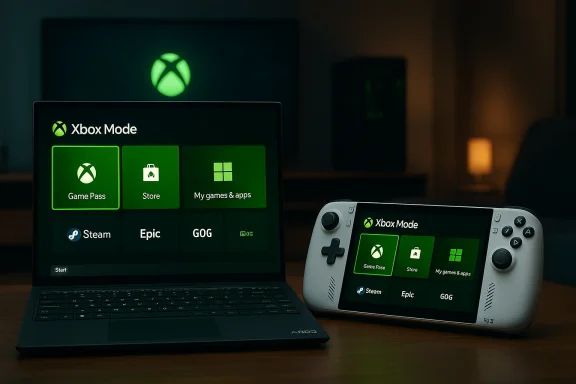
At its core, Xbox FSE / Xbox Mode is an alternate Windows session posture: the OS still runs, but the session boots into a full‑screen Xbox PC app shell optimized for gamepad navigation and small displays. The interface emphasizes large tiles, an on‑screen keyboard, controller shortcuts, and a consolidated view of games from multiple storefronts. Crucially for players who run many launchers, Microsoft has built in one‑tap installers or shortcuts for Steam, Epic, GOG, and other stores so that the Xbox home can aggregate and launch games without repeatedly pitching the Microsoft Store. That aggregation is central to the idea of making Windows behave like a console while preserving openness.What it does technically
- Suspends or deprioritizes many non‑essential Windows background processes and startup apps while the full‑screen session is active, aimed at freeing memory and CPU headroom for games.
- Provides a controller‑first input model with dedicated shortcuts, thumbstick navigation, and mapped shoulder/face buttons for UI shortcuts.
- Presents a curated home with recent games, Game Pass offers, Xbox Cloud Gaming access, and store promotions.
- Boots quickly into a single‑app experience to reduce friction on handheld devices that behave more like living‑room consoles than traditional Windows laptops. ([//news.xbox.com/en-us/2025/11/25/xbox-november-update-gaming-copilot-full-screen-experience/)
Hands‑on reality: how FSE behaves on actual handhelds
The ROG Xbox Ally and Lenovo Legion Go experience
Early adopters and reviewers have seen the best and worst of FSE in hand. On the positive side, the FSE UI is intentionally gamepadable: it’s easy to navigate with a thumbstick, the Y button jumps to the search bar, and trunk‑style shortcuts reduce friction when browsing large libraries. It also simplifies installations of non‑Microsoft launchers, making Steam and other launchers appear as first‑class citizens in the Xbox home. This is a genuine UX improvement over stock Windows for users who primarily want to play.But the pragmatic reality is uneven. Adoption across devices has been messy: OEMs like Lenovo and MSI have shipped support or promised updates at differing cadences, and some devices only expose FSE behind Insider builds, registry tweaks, or OEM tool updates. Community threads and support pages show users toggling registry keys, joining Insider programs, and wrestling with transient bugs to get FSE working on non‑Ally hardware — a sign that Microsn’t yet smoothed the distribution and QA path.
Performance: the promise versus the practice
One of the selling points Microsoft has pushed is that suspending Windows background services in FSE will free resources and improve game performance. That expectation is believable at a conceptual level — fewer background processes should free memory and CPU time — but real‑world benchmarks tell a more nuanced story.Independent hands‑on reports and tests show that the framerate and frame‑time improvements provided by FSE are at best modest and at worst negligible. Several reviewers observed no meaningful FPS uplift after switching from the standard Windows desktop to FSE on the same hardware; in some edge cases a 1–2 FPS decline was recorded. Aggregate community testing also suggests that OS overheads are not the only or even primary limiter on handheld framerates; thermal limits, driver maturity, and game engine behaviour dominate performance outcomes. In other words, FSE’s current optimisations are helpful for UX and may slightly reduce platform noise, but they do not reliably produce the kind of performance jump a purpose‑built gaming OS can deliver.
Project Helix: Microsoft’s next Xbox, and the role of FSE
What Microsoft has announced so far
At GDC 2026 Microsoft framed the next‑gen Xbox — codenamed Project Helix — as a console that will also run PC games. Public details included confirmation that Helix would be built around a custom AMD system‑on‑chip, that it would pursue advanced path tracing and machine‑learning powered frame generation, and that alpha developer kits will begin shipping in 2027. Microsoft also tied Helix to a broader Windows initiative: the company will roll the Xbox FSE concept into Windows 11 as Xbox Mode starting in April 2026. Those moves together signtion to make console and PC experiences more similar across Microsoft’s ecosystem.Why FSE looks like a potential dry‑run for Helix
There are strong conceptual overlaps between FSE and the stated ambitions of Helix:- Both are console‑style experiences that prioritize controller navigation and quick, frictionless play.
- Both seek to aggregate game libraries across storefronts, not lock players to a single curated store.
- Both are efforts to reduce load times, shader stutter, and the friction of running PC games across heterogeneous hardware.
- Both envision a closer engineering relationship between Windows and Xbox development tooling.
Strengths: what Microsoft gets right so far
- Controller‑first navigation: FSE answers a real pain point for handheld Windows devices by designing an interface around stulder buttons. For players who primarily use controllers, the experience is immediately better than stock Windows.
- Store openness: Microsoft deliberately makes it easy to install and surface non‑Microsoft launchers. That is strategically important: if Helix is to attract PC gamers, it can’t be a closed store silo.
- Consolidation and discoverability: A central Xbox home that groups games from multiple libraries can reduce friction and simplify discovery on handhelds and living‑room PCs.
- Platform signalling: Rolling Xbox Mode to Windows 11 desktops and laptops communicates Microsoft’s long‑term vision — that consoles and PCs should be able to share more of the same software architecture and tooling. This will matter to developers and publishers when they plan cross‑device releases.
Weaknesses and risks: where FSE falls short today
1) Performance gains are underwhelming
Real‑world tests show negligible FPS improvements from FSE’s background‑process suspension. Handhelds remain limited by thermals, drivers, and GPU/CPU throttling, not the presence of background apps alone. That means FSE’s optimisation story is currently more marketing than measurable uplift for most titles. If Helix is to claim performance superiority, the platform needs hardware and rendering stack advantages — not just a trimmed UI.2) UI and UX still tilt toward promotion
The FSE home prioritises promotional content and Game Pass tiles in a way that can bury a user’s installed library and cloud‑streaming options. For players who want quick access to their titles, this layout feels like a recurring commercial interruption. If Helix inherits that hierarchy wholesale, it risks alienating users who expect an uncluttered launch experience. This is a design problem with real retention consequences.3) Fragmented rollout and OEM friction
Getting FSE running well on non‑Ally devices has required registry tweaks, Insider builds, and OEM updates. That fragmentation creates a poor first impression and raises questions about how Microsoft will ensure consistent Helix behaviour across partners. A console should feel consistent out of the box; the current state of FSE suggests the company has work to do on distribution and QA.4) Windows baggage remains
Because FSE is a session on top of Windows, it inherits driver complexity, software conflicts, and the risk of Windows updates breaking behaviour. Helix may choose a different path — possibly shipping a more locked, console‑grade runtime — but if Microsoft’s strategy is to keep Helix and Windows tightly federated, it will need stronger process isolation and driver certification than FSE currently offers.What Microsoft needs to do next (recommendations)
- Harden and standardize the distribution pipeline
- Deliver Xbox Mode as a clean, sign‑posted option in Windows Update and the Xbox PC app, not an Insider‑only toggle. OEMs must ship certified support at release. This reduces fragmentation and improves first‑run satisfaction.
- Make performance claims verifiable and meaningful
- Publish a clear list of background services that FSE suspends and provide reproducible benchmarks across representative handheld hardware. If Helix claims console‑grade performance benefits, Microsoft should demonstrate them with open methodology.
- Rebalance the home UI toward the player’s library
- Prioritize installed games, compatibility recommendations, and hardware‑aware suggestions ahead of promotional tiles. Users should see what they own first, not what the platform wants to sell them.
- Invest in driver and thermal optimizations, not just session trimming
- The biggest gains on handhelds come from better drivers, power management, and thermals. Microsoft and OEM partners should target those engineering problems to make Helix credible as a high‑performance platform.
- Clarify Helix’s software model for third‑party storefronts and modding
- Developers and players alike will want to know whether Helix supports Steam, Epic, GOG, and user mods with equal footing. Microsoft should commit publicly to an open storefront policy for Helix to reassure PC‑centric audiences.
The strategic gamble: why Helix matters — and why it could backfire
Project Helix is an audacious bet: Microsoft wants the simplicity and consistency of a console while preserving the reach and openness of PC gaming. If Helix delivers a level of performance and developer tooling that truly makes “build once, ship to Xbox and PC seamlessly” frictionless, Microsoft could reshape console economics and player expectations. But the company also risks two failure modes:- Alienating the PC community by over‑commercializing the user experience and limiting openness. The PC audience values choice; any impression that Helix narrows that choice will trigger backlash.
- Falling short on hardware credibility. Promising ray/path tracing and ML‑assisted frame generation is compelling on paper, but those capabilities will be judged by how they perform in real games under thermal and power constraints. If Helix ships with underpowered or overpriced hardware, it will not meet expectations.
A closer look at developer implications
Microsoft’s messaging at GDC and in developer documentation frames Helix as a platform that should be treated more like Windows than a traditional tightly‑controlled console. The company is pushing tooling and documentation to make cross‑target development easier, and it plans to start shipping alpha dev kits in 2027 so studios can adapt. For developers, this is both an opportunity and a headache:- Opportunity: A unified target that runs both PC and Xbox titles could simplify QA and broaden the market for each release.
- Headache: Fragmentation of hardware peifferences in I/O/thermal characteristics require extra engineering time, especially for performance‑sensitive code paths like ray tracing and ML‑driven frame generation.
Final appraisal: a promising prototype, not yet a platform
Xbox Full Screen Experience — now being rebadged as Xbox Mode and slated to arrive broadly on Windows 11 in April 2026 — is a pragmatic, user‑focused attempt to make Windows feel more like a console on handhelds and living‑room PCs. It solves legitimate UX problems: controller navigation, consolidated libraries, and a boot‑to‑play posture. Microsoft’s broader roadmap for Project Helix indicates the company is thinking in systems: hardware, OS posture, developer tooling, and cloud streaming as a single stack.But as a technical product today, FSE reads like a useful prototype rather than a finished platform: optimisation gains are inconsistent; the interface still leans toward promotional placement; OEM rollout and QA are fragmented; and Windows’ underlying complexity remains visible in edge cases. If Microsoft treats FSE merely as a UX skin that will be inherited by Helix, it risks shipping a console that looks like Windows with better fonts. To succeed, Helix must pair a polished, privacy‑ and player‑first front end with meaningful hardware and driver advances and a public commitment to openness for third‑party stores and tools.
For readers and owners of handheld Windows devices, the immediate takeaway is pragmatic: Xbox Mode will make your handheld easier to use for gamepad play, but don’t expect it to magically add 20–30% FPS to demanding titles. For developers and partners, the next 12–24 months matter: Microsoft must demonstrate that its cross‑device strategy helps, rather than complicates, multi‑target development. For the industry at large, Project Helix could be a breakthrough — or it could be the latest high‑profile example of a great idea undone by half‑measures. The coming months of beta testing, dev kits, and public feedback will determine which path Microsoft takes.
Conclusion: Xbox Mode is a necessary and perceptive answer to the awkwardness of Windows on handhelds; Project Helix is an ambitious answer to the hard problem of merging console simplicity with PC openness. But the current Full Screen Experience is only a sketch of the future Microsoft describes. The company has sketched the lines — now it needs to refine them into a platform that is faster, lighter, and less cynically laid out than the first draft.
Source: Rock Paper Shotgun Xbox Full Screen Experience shows a potential glimpse of how Project Helix will work – though right now, it’s a flawed PC platform
