

The Xbox Elite Wireless Controller Series 2 remains one of the most capable and customizable pro‑grade gamepads you can buy, and recent retailer offers — including the deal highlighted by the eTeknix round‑up — make it a timely purchase for PC and Xbox gamers who value hardware customization, long battery life, and durable build quality.
The Elite line started as Microsoft’s answer to players who wanted a “tuned” controller experience: interchangeable paddles, remappable buttons, and premium materials that feel at home in competitive play. The Series 2 refined the first Elite controller with a rechargeable internal battery, adjustable‑tension thumbsticks, improved grips, hair‑trigger locks, and expanded on‑board profile storage to let players keep multiple custom configurations saved directly on the controller. Microsoft’s product pages and announcements still list those core features as the controller’s selling points. This feature article summarizes what the Elite Series 2 actually includes, clarifies compatibility and cable details, assesses real‑world strengths and weaknesses, and explains what shoppers should consider when buying now — particularly where the available “Core” and Full/Complete pack differences can affect value.
Conclusion: for Windows and Xbox users who want the ultimate in controller flexibility and can tolerate a premium price, the Elite Series 2 is still one of the best investments in peripherals. Buyers should, however, confirm SKU contents and platform compatibility before purchase, and keep an eye on official retailer promotions or bundle deals to maximize value.
Source: eTeknix Xbox Elite Wireless Controller Series 2
 Background / Overview
The Elite line started as Microsoft’s answer to players who wanted a “tuned” controller experience: interchangeable paddles, remappable buttons, and premium materials that feel at home in competitive play. The Series 2 refined the first Elite controller with a rechargeable internal battery, adjustable‑tension thumbsticks, improved grips, hair‑trigger locks, and expanded on‑board profile storage to let players keep multiple custom configurations saved directly on the controller. Microsoft’s product pages and announcements still list those core features as the controller’s selling points. This feature article summarizes what the Elite Series 2 actually includes, clarifies compatibility and cable details, assesses real‑world strengths and weaknesses, and explains what shoppers should consider when buying now — particularly where the available “Core” and Full/Complete pack differences can affect value.What Microsoft lists (quick technical snapshot)
- Connectivity: Xbox Wireless, Bluetooth, and USB‑C wired play. Microsoft specifically states the controller can use Xbox Wireless with Xbox consoles or via PC with the Xbox Wireless Adapter, Bluetooth to mobile and PC devices, or wired USB‑C. Some features are limited depending on the connection and the host OS.
- Battery: Internal rechargeable battery with up to 40 hours of play per charge (actual life varies by use).
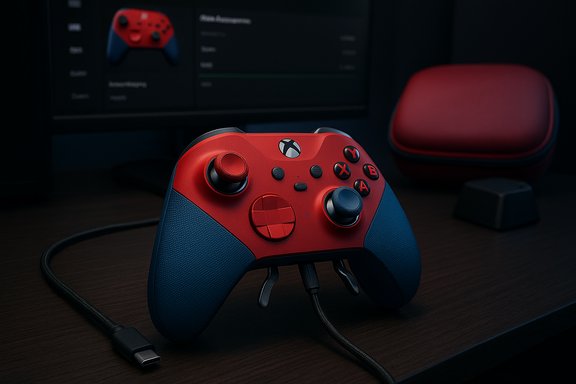
- Customization: Adjustable‑tension thumbsticks, shorter hair‑trigger locks, swappable thumbsticks/D‑pad/paddles (depending on bundle), and the Xbox Accessories app for button mapping and dead‑zone tuning. Save up to three custom profiles plus one default directly on the controller.
- Included items: Items depend on the SKU (Full Set vs Core). Microsoft lists Core packaging as including the controller, some thumbstick adjustments and a USB‑C cable; Full Set and Complete Component Pack variants add charging dock, carrying case, extra paddles, D‑pad and thumbsticks. Note: Microsoft lists the included USB‑C cable as a 9‑foot cable (≈2.7 m) on several product pages and spec tables.
Deep dive: Connectivity, compatibility, and the cable confusion
How it connects — practical reality
The Elite Series 2 supports three main connection modes: Xbox Wireless (native low‑latency radio to Xbox consoles and PCs that have the Xbox Wireless radio), Bluetooth (for mobile devices, tablets, and many laptops), and USB‑C wired.- Xbox Wireless gives the best latency and full feature set on Xbox consoles and on Windows systems equipped with the Xbox Wireless radio or Microsoft’s USB Wireless Adapter. Bluetooth provides broad compatibility but can limit certain features (for example, advanced mapping or some console‑specific commands). Wired USB‑C works everywhere and is the fallback for older Windows versions. Microsoft notes some functionality is not supported on older OS versions and over Bluetooth.
The cable length typo and why it matters
You may encounter conflicting copy in third‑party posts: the eTeknix snippet provided in the deal listing contains a typographical ambiguity where the USB‑C cable is described as “9” USB‑C cable” which appears to be a typo. Microsoft’s official specification consistently lists the included cable as a 9‑foot (9') USB‑C cable, which equals roughly 2.7 metres, not 9 inches. For practical use this matters — a 9‑foot cable provides comfortable wired play distance and is the expected accessory in the Full Set and Complete Component Pack. Treat the eTeknix “9”” wording as an error unless specifically clarified by that seller.Windows 7/8.1 caveats
If you intend to use the Elite with legacy Windows versions, note Microsoft’s compatibility matrix: Windows 10/11 supports Bluetooth, wired USB‑C or Xbox Wireless Adapter connections with broader feature support, while Windows 7 and 8.1 require the wired USB connection and still may not expose full accessory functionality. Driver availability is limited for older OS builds and certain app features (for example, the Xbox Accessories app) are only available on Windows 10/11 and Xbox consoles. That limits some customization workflows for older systems.Included components and SKU differences
One confusing aspect of Xbox Elite Series 2 shopping is the number of SKUs and optional packs.- Elite Wireless Controller Series 2 — Full Set / Original Elite Series 2: Historically included the controller, magnetic D‑pad, multiple interchangeable thumbsticks and paddles, charging dock, carrying case, and a USB‑C cable. This Full/“Complete” configuration is the most complete out‑of‑box for competitive players. Microsoft sells a Complete Component Pack separately as well.
- Elite Series 2 — Core: A more affordable SKU that pares down included components — typically the controller, a USB‑C cable, and a reduced subset of interchangeable parts. The Core SKU is targeted at buyers who want Elite performance without the case/dock extras. Microsoft and Xbox announcements describe this differentiated offering.
- Complete Component Pack (sold separately): For Core owners who later decide they want the full hardware suite, Microsoft’s Complete Component Pack bundles the extra paddles, D‑pad, thumbsticks, a carry case and a charging dock for an MSRP listed on Microsoft’s storefront.
Customization, software, and real‑world configuration
Xbox Accessories app and on‑board profiles
The Xbox Accessories app (available on Xbox consoles and Windows 10/11) is the primary configuration tool. It exposes:- Button remapping and profile creation
- Dead‑zone and stick sensitivity curves
- Trigger dead‑zones and hair‑trigger behavior tuning
- Lighting and profile switching options
Hardware adjustments: tension, paddles, and triggers
- Adjustable‑tension thumbsticks: The Series 2 includes a small tool to change magnet tension on the thumbsticks so players can pick looser or stiffer stick response. This is a mechanical adjustment that complements software curve tuning.
- Hair‑trigger locks: These shorten trigger travel for faster firing in FPS games; the mechanical locks are a staple of the Elite line.
- Paddles and interchangeability: Paddles attach magnetically and map to face buttons or other control inputs, giving more accessible inputs without moving thumbs from the sticks.
Build quality, durability, and long‑term concerns
The Elite Series 2 is built from premium materials, with a rubberized wrap‑around grip and metal components in key areas. That said, several long‑term issues have been reported in reviews and user communities:- Wear on small parts: Reviews note the rubber nubs used on certain hair‑trigger elements and small clips can degrade over long use. Windows Central observed cosmetic and small part wear after extended ownership, pointing out that some inexpensive parts on an otherwise premium controller can disappoint.
- Stick drift risk: Drift is an industry‑wide concern for analog sticks. The Elite Series 2 uses higher‑quality mechanisms and is generally reliable, but magnetic or Hall‑effect sensor adoption is the clearest long‑term solution; owners should expect some risk over many years of heavy competitive play.
- Repairability: Interchangeable components are designed to be user‑replaceable, but internal repairs still require service or warranty work. Microsoft’s one‑year limited warranty covers defects, but accidental damage or wear beyond warranty remains a concern for second‑hand buyers.
Performance and day‑to‑day impressions
Independent reviews and comparisons generally agree on these strengths and trade‑offs:- Strengths
- Excellent ergonomics for long sessions; the rubber grips and massing make it comfortable.
- Extensive customization that’s actually usable: hardware adjustments plus the Accessories app.
- Reliable battery life: advertised up to 40 hours, which aligns with typical mixed‑use experiences.
- Trade‑offs / Weaknesses
- Premium price relative to standard controllers.
- Some durability nitpicks on small parts and the occasional wear item flagged by long‑term reviewers.
Practical buying advice and where deals matter
- Confirm the SKU: Verify if you’re looking at the Core or Full/Complete bundle. The Core saves money up front but can cost more later if you buy the Complete Component Pack separately.
- Watch for promotions on trusted retailers: Microsoft Store promotions, Amazon, Best Buy and specialist retailers often run bundle discounts or price reductions on the Elite Series 2. The eTeknix deals page highlighted in the user’s snippet is typical of aggregator posts that collect these offers; treat such pages as deal pointers and verify the SKU and included items before purchase.
- Consider your platform mix: If you primarily use Windows 7/8.1, the Series 2 will work wired but lacks full app support. If you’re on Windows 10/11 or Xbox consoles, you’ll get the full customization experience.
- Check returns and warranty: Microsoft’s limited warranty covers defects; extended coverage or retailer return policies (often extended during holiday seasons) can reduce the risk of buying a premium controller.
Maintenance, troubleshooting and longevity tips
- Keep the controller in the carrying case when not in use to avoid dust build‑up in small grooves and seams. Dust is a common nuisance in textured premium controllers.
- Use official or high‑quality replacement components if paddles/sticks fail; aftermarket parts vary in feel and reliability.
- Keep firmware up to date via the Xbox Accessories app or console — Microsoft periodically ships firmware updates to improve compatibility and functionality.
- If you experience stick drift, try recalibration via the Accessories app first; if persistent, consult Microsoft support or the vendor for warranty service.
Critical analysis — strengths, risks, and reader takeaways
The Elite Series 2 delivers on the promise of a configurable, high‑performance gamepad for serious players. Its strengths are tangible: adjustable hardware, in‑app customization, long battery life, and comfortable ergonomics. For players who want to fine‑tune sensitivity curves, swap paddles, or use multiple profiles across devices, the Elite Series 2 is arguably unmatched at its price tier. But the product is not without risk for buyers:- Price vs. use case: Casual players rarely need this level of configurability; a standard Xbox Wireless Controller offers most core gameplay features for a fraction of the price.
- Durability caveats: The Elite’s small mechanical parts—hair‑trigger rubber nubs, clips for paddles—have shown wear in long‑term usage reports, meaning some owners will eventually face replacement or repair decisions.
- Compatibility limits: Older Windows systems and some Bluetooth connections won’t expose the full customization toolset; check your primary platform and preferred connection method before committing.
Final verdict
The Xbox Elite Wireless Controller Series 2 remains a top‑tier option for demanding players who prioritize customization, ergonomics, and an out‑of‑box competitive ready‑state. Microsoft’s product pages and reviews from multiple respected outlets confirm the controller’s core claims — up to 40 hours of battery life, adjustable‑tension thumbsticks, hair‑trigger locks, and extensive on‑board profile storage — and also highlight practical trade‑offs in price and long‑term wear. If you’re eyeing a deal (as eTeknix’s deals column suggests), verify the SKU and included components, confirm the cable length is the full 9‑foot USB‑C (2.7 m) the manufacturer lists, and check return/warranty terms. For enthusiasts, the Elite Series 2 delivers a meaningful, tangible upgrade; for everyone else, weigh whether the additional features will actually change how you play.Conclusion: for Windows and Xbox users who want the ultimate in controller flexibility and can tolerate a premium price, the Elite Series 2 is still one of the best investments in peripherals. Buyers should, however, confirm SKU contents and platform compatibility before purchase, and keep an eye on official retailer promotions or bundle deals to maximize value.
Source: eTeknix Xbox Elite Wireless Controller Series 2
