

Microsoft’s handheld gaming push took another tangible step in January 2026: the Xbox Handheld Compatibility Program received a fresh slate of high-profile additions marked as Handheld Optimized and Mostly Compatible, while Xbox Play Anywhere quietly passed the 1,000-game threshold — moves that make buying, finding and playing PC games on Windows handhelds simpler but also raise new questions about performance parity, platform fragmentation, and developer follow‑through.
Microsoft launched the Handheld Compatibility Program to give players explicit guidance about how well PC titles scale to small-screen, controller-first Windows handhelds. The program uses two primary labels: Handheld Optimized for titles that should run well out of the box with controller mappings, readable UI and sensible defaults, and Mostly Compatible for games that work but may require minor setting tweaks. This initiative is paired with a device- and title performance Fit indicator that estimates expected framerates on specific hardware. The program’s intent is to reduce install-regret and make discovery easier on devices such as the ROG Xbox Ally family and other Windows handhelds. Concurrently, Microsoft’s January platform update broadened the Xbox PC app’s reach (adding Arm-based Windows 11 support), shipped a Game Save Sync Indicator that clarifies cloud-save status across devices, and made the handheld badges visible on product pages and in the Xbox app home channels — practical, customer-facing touches meant to reduce friction for people moving between console, PC and pocketable machines.
For consumers and IT buyers: the path forward is pragmatic. Use the badges and Performance Fit values to set expectations, favor OEM-validated updates, and treat early previews with caution. For developers and publishers: supporting the handheld form factor now — even modestly — is likely to deliver discovery and retention advantages, especially on subscription-driven platforms like Game Pass.
The January additions are a meaningful step in a longer journey. If Microsoft, OEMs and developers maintain the cadence of firmware updates, driver tuning and clear compatibility metadata, handheld Windows gaming could move from a hobbyist delight to a mainstream, dependable way to play — but getting there will require continued engineering discipline and measured publisher investment.
Source: Analytics Insight Xbox Handheld Compatibility Gets a Boost With Smoother, Optimized Play
 Background / Overview
Microsoft launched the Handheld Compatibility Program to give players explicit guidance about how well PC titles scale to small-screen, controller-first Windows handhelds. The program uses two primary labels: Handheld Optimized for titles that should run well out of the box with controller mappings, readable UI and sensible defaults, and Mostly Compatible for games that work but may require minor setting tweaks. This initiative is paired with a device- and title performance Fit indicator that estimates expected framerates on specific hardware. The program’s intent is to reduce install-regret and make discovery easier on devices such as the ROG Xbox Ally family and other Windows handhelds. Concurrently, Microsoft’s January platform update broadened the Xbox PC app’s reach (adding Arm-based Windows 11 support), shipped a Game Save Sync Indicator that clarifies cloud-save status across devices, and made the handheld badges visible on product pages and in the Xbox app home channels — practical, customer-facing touches meant to reduce friction for people moving between console, PC and pocketable machines. What changed in January 2026: Titles and badges
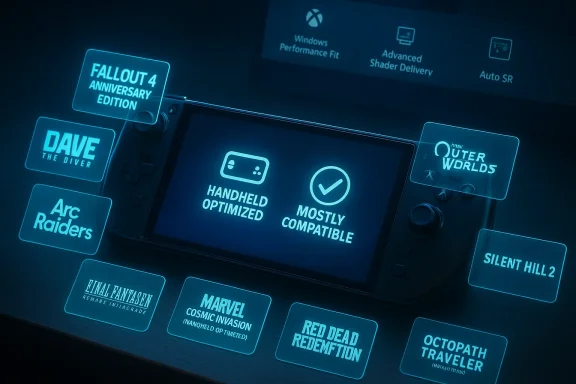
The January update populated the Handheld Compatibility catalog with several notable additions. Multiple mainstream outlets and Microsoft’s own announcement list the same new entries, which fall into the two badge classes:- Handheld Optimized (expected to work well without manual changes):
- Fallout 4: Anniversary Edition
- Dave the Diver
- The Outer Worlds 2
- Silent Hill 2
- Marvel Cosmic Invasion
- Mostly Compatible (playable, may need tweaks):
- Red Dead Redemption
- Final Fantasy VII Remake Intergrade
- Arc Raiders
- Octopath Traveler 0
How the program works — technical clarity
Handheld Optimized vs Mostly Compatible: what the labels mean
- Handheld Optimized: Games in this category have passed tests for controller mapping, on-screen keyboard behavior, iconography and text legibility at typical handheld resolutions. They should launch with usable defaults and require minimal to no manual configuration on supported devices. This is intended to be a “works out of the box” signal for players.
- Mostly Compatible: These titles run on handhelds but may expose UI scale issues, default input quirks, or require resolution/graphics changes to hit target framerates. They’re still playable but may demand a few minutes of configuration for optimal comfort.
Platform-level features that matter for handheld play
Beyond badges, several platform elements directly influence handheld experience:- Xbox Full Screen Experience (FSE): A controller-first alternate shell that presents the Xbox PC app as a full- some Explorer subsystems, and reduces background noise so more resources are available for games. FSE is not a separate OS; it’s a session posture layered on Windows 11 designed to feel more console-like on handhelds. Early engineering notes and community testing show claimed memory savings (often cited as ~1–2 GB reclaimed in tuned conditions), though those gains vary by configuration.
- Advanced Shader Delivery (ASD) and precompiled shader bundles: Tools that allow stores and installers to deliver precompiled shaders at install time — reducing first-run shader hitches that have historically plagued PC and handheld sessions. This improves perceived smoothness on thermally constrained systems.
- Auto Super Resolution (Auto SR): An OS-level NPU-accelerated upscaler intended to run at the Windows rendering path level so NPU-equipped handhelds can upscale to native resolutions with lower GPU load where supported. Its effectiveness depends on hardware NPU maturity and per-title shader pipeline behavior.
- Arm support and Prism emulation: The Xbox PC app’s expansion to Arm-based Windows 11 PCs leverages runtime translation and anti-cheat vendor cooperation to increase the catalog of locally-installable titles on Arm. Emulation overhead and driver maturity remain limiting factors for peak performance on Arm devices.
Cross-checking the claims — verification and independent confirmation
To ensure the January updates and the badge list are accurate, the key claims were verified against multiple sources:- Microsoft’s official Xbox news post for January 21, 2026, which documents the Handheld Compatibility Program additions, the Game Save Sync Indicator, and expanded Arm support. This is the primary source for the January update details.
- Independent gaming outlets and news aggregators re-reported the same new Handheld Optimized and Mostly Compatible entries and the Play Anywhere milestone in the same timeframe, confirming the rollout is not a single-site error. Examples include coverage that lists the same title group and Play Anywhere additions.
- Microsoft’s developer documentation (introducing the Handheld Compatibility Program) describes the criteria and the Windows Performance Fit logic, which matches how badges are surfaced in the Xbox app. This provides the implementation detail behind the labels.
- Internal community and Windows-handheld-focused reporting corroborate technical claims around FSE, memory savings, and the trade-offs of a console-style shell layered over Windows — adding practical caveats around driver maturity and anti‑cheat behavior. Those engineering analyses provide the necessary cautionary framing for headline performance claims.
Strengths — why this matters to handheld players and OEMs
- Faster, clearer discovery: The handheld badges and the dedicated handheld channel in the Xbox app significantly reduce the friction of finding games that will work well on small roller-only inputs. That alone addresses a long-standing pain point for buyers evaluating portability vs compatibility.
- Buy once, play anywhere: Expanding Xbox Play Anywhere simplifies the economics of handheld ownership. Players can buy a game once and carrhievements across console, PC and supported handheld devices — a real convenience for the multi-device lifestyle.
- Platform-level smoothing: FSE, ASD and Auto SR are concrete engineering steps to reduce the two most widely complained about handheld problems: first-run stutter and inconsistent frame pacing during sustained play. Delivered well, they materially improve the user experience on thermally constrained devices.
- Better expectations = fewer returnsle handheld guidance and Windows Performance Fit estimates, Microsoft reduces the mismatch between marketing, screenshots and actual gameplay on smaller, lower-power systems — which should reduce purchase remorse and support friction.
Risks, caveats and the real-world limits
- Performance variability is real: The memory savings and smoothness improvements Microsoft and OEMs reference are conditional on driver maturity, firmware tuning, thermal headroom and the player’s installed apps. Handheld results will vary by model and even by specific game scenes. Treat claims like “reclaims ~1–2 GB” as directional engineering estimates rather than guarantees for all users.
- Anti‑cheat and multiplayer fragmentation: Kernel-mode anti‑cheat systems and DRM layers are a major barrier for full parity, particularly on Arm devices or when emulation is involved. Some competitive or protected multiplayer titles will remain blocked until publishers and an compatible components. This creates an inconsistent multiplayer landscape for handheld users.
- Arm = more choices, not a universal fix: Arm-based Windows devices gain reach via Prism and emulation improvements, but translated execution canative x86/x64 performance. Users should expect trade-offs: better battery life in exchange for lower peak framerates on CPU-bound titles.
- Platform fragmentation and update cadence: The handheld experience depends on OEM firmware, GPU driver updates, Xbox app releases and publisher testing cycles. Fragmentation in update timing can create inconsistent experiences across devices and models, complicating the “one badge fits all” idea.
- Community hacks and warranty exposure: Enthusiast tools and registry tweaks can unlock FSE or other features earlier than OEMs intend. These community methods can degrade stability, break anti‑cheat detection, and risk warranty/support issues. Microsoft and OEMs recommend waiting for validated builds.
Practical advice for players and IT buyers
- Check the badge before buying: Look for Handheld Optimized or Mostly Compatible on the product detail page in the Xbox app before downloading or purchasing on a handheld device.
- Use Windows Performance Fit as a guide: Treat the “Should play great / Should play well” indicators as realistic presets for expected framerates on your hardware. If a title lacks a fit indicator for your device, test performance in short sessions before committing to long play.
- Keep firmware and drivers current: For the best handheld experience, update OEM firmware and GPU drivers via official channels; validated OEM builds tend to stabilize thermals and driver behavior.
- Prefer official paths to feature previewing: Use Insider channels or OEM-validated updatty registry hacks to enable FSE or other experimental features — this reduces the risk of anti‑cheat, driver and support problems.
- Use the Game Save Sync Indicator: After the January rollout, the sync indicator can prevent lost progress when switching devices. Confirm the indicator shows a recent timestamp before swapping systems.
Publisher and developer implications
For developers, the Handheld Compatibility Program is both a quality signal and a checklist:- Prioritize controller mapping, text legibility and default resolution/scaling at typical handheld sizes.
- Test with Real-World Performance Fit targets and provide clear metadata for players in the Product Description Page.
- Consider shipping precompiled shader bundles and small adjustments to default settings to ensure first-run smoothness on low-thermal headroom devices.
The broader market context and what to watch next
- Valve’s Steam Deck ecosystem and Nintendo’s portable-first approach remain important comparators. Microsoft’s approach is different: preserve Windows compatibility, layer a controller-first shell (FSE), and rely on a combination of OS-level improvements (ASD, Auto SR) plus developer cooperation to close the handheld gap. The question is whether this incremental, platform-wide strategy can match the out-of-the-box consistency of dedicated handheld consoles.
- The real metric to watch in 2026 is whether these platform changes translate into stable, repeatable user experiences across a range of popular titles — not just isolated success stories. Independent hardware reviews and community playtests will be indispensable for validating Microsoft’s performance claims.
- Publisher buy-in for Arm-native builds, anti‑cheat parity and shipping precompiled shader bundles will determine how quickly handhelds move from “interesting” to “reliable” for mainstream audiences. Until then, expect a mosaic of wins and misses across the catalog.
Final assessment and conclusion
Microsoft’s January 2026 update moves the needle in tangible, user-friendly ways: badges that remove guesswork, a Play Anywhere milestone that simplifies ownership across devices, and platform improvements that target the core technical frictions of handheld play. These are sensible, well-scoped interventions that address real pain points for pocketable Windows gaming. However, the improvements are not a universal fix. Performance gains are conditional on OEM firmware, driver maturity, and developer cooperation. Arm support and emulation widen the device set but introduce performance tradeoffs and anti‑cheat complexity. Community methods to unlock features can accelerate adoption but expose users to real stability and support risks. These factors mean that while the Handheld Compatibility Program and Xbox Play Anywhere make handheld ownership more practical, they do not yet guarantee the same “turn on and play” parity that dedicated consoles deliver.For consumers and IT buyers: the path forward is pragmatic. Use the badges and Performance Fit values to set expectations, favor OEM-validated updates, and treat early previews with caution. For developers and publishers: supporting the handheld form factor now — even modestly — is likely to deliver discovery and retention advantages, especially on subscription-driven platforms like Game Pass.
The January additions are a meaningful step in a longer journey. If Microsoft, OEMs and developers maintain the cadence of firmware updates, driver tuning and clear compatibility metadata, handheld Windows gaming could move from a hobbyist delight to a mainstream, dependable way to play — but getting there will require continued engineering discipline and measured publisher investment.
Source: Analytics Insight Xbox Handheld Compatibility Gets a Boost With Smoother, Optimized Play
