
Microsoft began rolling out Xbox mode for Windows 11 PCs on April 30, 2026, in select markets, bringing a controller-first, console-inspired full-screen gaming interface to laptops, desktops, tablets, and handhelds through Windows Update and the Xbox app ecosystem for players who want simpler access. The move is not just a new coat of paint for the Xbox app; it is Microsoft’s latest attempt to make Windows feel less like a deskbound operating system when the user is holding a controller. That matters because the PC has already won the games-library argument, while the console still wins the living-room-friction argument. Xbox mode is Microsoft trying to close that gap without giving up the thing that makes Windows valuable: its messiness, openness, and reach.
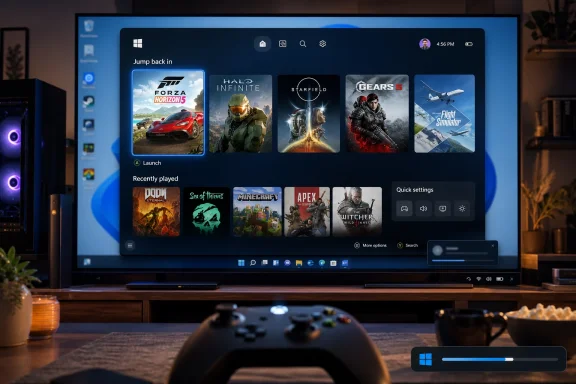
Xbox mode is best understood as a layer, not a replacement. It gives Windows 11 a full-screen gaming surface inspired by Xbox Series X|S, with large tiles, controller navigation, recently played games, and access to an aggregated library that includes Game Pass and installed games from other PC storefronts. The user can jump back to the regular Windows desktop when the PC needs to become a PC again.
That duality is the entire pitch. Microsoft is not shipping “Xbox OS for PCs,” however much some handheld owners might wish it would. It is shipping a more disciplined front door for gaming on Windows, one designed to keep the taskbar, notifications, window chrome, launchers, and background clutter out of sight until they are needed.
For desktop traditionalists, that may sound cosmetic. For anyone who has tried to use a Windows handheld from a sofa, dock a gaming laptop under a TV, or navigate PC launchers with a controller, it is more consequential. Windows is powerful because it does everything; gaming hardware often feels better when it does one thing first.
The trick is whether Microsoft can make this feel native rather than bolted on. Steam Big Picture has lived in this territory for years, and handheld vendors have built their own overlays because Windows never quite behaved like a living-room platform. Xbox mode is Microsoft admitting that the operating system itself has to participate.
By renaming and expanding the full-screen experience as Xbox mode, Microsoft is taking a handheld fix and generalizing it across Windows 11 PCs. That is a revealing sequence. The handheld market did not merely create a new device category; it gave Microsoft a laboratory for rethinking how Windows should behave when gaming is the primary task.
There is a reason the company talks about telemetry and player feedback from handhelds. Handheld users are unusually sensitive to boot flow, memory pressure, controller focus, sleep behavior, and launcher sprawl. If the interface drops input focus, opens a desktop prompt, or buries a game behind another window, the illusion breaks instantly.
Those lessons transfer neatly to the living room. A tower PC connected to a television has always been technically possible, but “technically possible” is not a product experience. Xbox mode is Microsoft’s attempt to turn that setup from a hobbyist configuration into something a normal person might actually use.
A console dashboard can assume a relatively controlled commercial environment. A Windows gaming dashboard cannot. Steam, Epic Games Store, Battle.net, GOG, Ubisoft Connect, EA app, Microsoft Store, and standalone launchers all have claims on the user’s machine. If Xbox mode pretends otherwise, it becomes a Game Pass kiosk rather than a Windows gaming shell.
Microsoft knows this. The company’s best argument is not that Xbox mode replaces Steam or other launchers, but that it can sit above them. If it becomes the place where the user starts, resumes, and switches between games regardless of where they were purchased, Microsoft gains the interface layer even when it does not own the transaction.
That is the strategic prize. Platforms are not merely stores; they are habits. If players press the Xbox button, land in Xbox mode, see their library, and launch whatever they want, Microsoft has placed Xbox at the center of PC gaming without requiring every game to be bought from Microsoft.
Windows has none of those luxuries. A Windows PC might have three monitors, RGB utilities, anti-cheat drivers, overlay software, enterprise policies, removable storage, VPN clients, multiple GPUs, and a decade of accumulated startup entries. Making that feel console-like is not a skinning exercise. It is a negotiation with chaos.
That is why the phrase minimizing background distractions matters. The value of Xbox mode is not only that it looks like Xbox; it is that it tries to prioritize gaming as a system state. If background activity is reduced, if controller focus is reliable, and if the user can avoid desktop detours, the experience becomes meaningfully different from opening the Xbox app maximized.
Still, Microsoft has to be careful with its claims. A full-screen interface does not erase shader compilation stutter, driver weirdness, Windows Update timing, launcher sign-ins, or anti-cheat incompatibilities. The PC’s freedom is inseparable from its rough edges. Xbox mode can sand some of them down, but it cannot repeal the nature of Windows.
But consoles do not survive only because they have exclusive software. They survive because they make guarantees. A console has one expected interface, one hardware target, one update channel, and one support model. Parents, casual players, and people who simply do not want to manage Windows still benefit from that appliance model.
The more interesting shift is that Microsoft no longer seems to need the Xbox console to be the sole center of Xbox. The brand is becoming a service, an interface, a subscription, a controller language, and a cross-device identity. Xbox mode fits that migration perfectly. It makes Windows more Xbox-like while letting the dedicated console remain the low-friction option.
That may sound like hedging, but it is also realism. Microsoft has spent years telling players they can play across console, PC, cloud, handhelds, and TVs. Xbox mode is the Windows half of that promise becoming visible. The console remains useful, but it is no longer the only place where the Xbox experience is supposed to feel complete.
Microsoft’s problem has never been a lack of games. Windows remains the default PC gaming platform by sheer compatibility, driver support, storefront breadth, and developer attention. The problem is that Windows often behaves as though the user is sitting upright at a desk, even when the hardware says otherwise.
Xbox mode is a defensive move as much as an offensive one. It tells OEMs that they do not have to invent a new shell for every handheld or living-room device. It tells players that Windows can be more comfortable outside the keyboard-and-mouse posture. And it tells Valve that Microsoft is finally willing to compete on experience, not just compatibility.
The risk is that Microsoft arrives with the weight of Windows bureaucracy attached. SteamOS has constraints, but it feels intentional. Xbox mode must avoid feeling like a full-screen launcher taped over a general-purpose operating system that keeps interrupting the session from underneath.
The practical concerns are predictable. Administrators will want to know whether Xbox mode can be hidden, whether related app components can be removed or controlled, how it behaves under standard user accounts, and whether Windows Update’s phased rollout complicates fleet consistency. In education environments, the answer is likely to be tighter policy control. In corporate environments, the feature will be ignored unless it appears somewhere users can click.
But there is a subtler enterprise angle. Microsoft is increasingly comfortable shipping experiences that target narrow modes of use on top of the same Windows base. Gaming gets Xbox mode. AI gets Copilot surfaces. Developers get Dev Home-style workflows. The operating system is becoming a collection of task-specific front ends wrapped around a common core.
That may be the only viable future for Windows. One desktop metaphor cannot serve every context anymore. The danger is fragmentation; the opportunity is relevance. Xbox mode is the gaming expression of a broader design philosophy.
A phased rollout makes sense. Microsoft can monitor device classes, regional availability, crashes, app behavior, and support signals before expanding more broadly. But phased rollouts also create confusion, especially when one PC receives a feature and another seemingly identical machine does not.
That confusion is magnified by the fact that Xbox mode is both visible and experiential. Users will not judge it like a hidden kernel improvement. They will ask why their friend has it, why a setting is missing, whether a cumulative update is enough, and whether an Insider build is required. Microsoft’s servicing model often makes those answers harder than they should be.
For the rollout to land well, Microsoft needs the experience to appear cleanly, explain itself clearly, and avoid the scavenger hunt that has plagued many Windows feature flights. A console-like mode should not require forum archaeology to enable. If the promise is simplicity, acquisition has to be simple too.
That is a higher bar than screenshots suggest. Controller navigation has to be consistent. Focus cannot disappear into hidden desktop elements. Storefront handoffs need to be graceful. Sleep and resume need to feel predictable. Game updates need to be understandable. The interface needs to recover well when something fails, because something on a gaming PC always eventually fails.
Microsoft has an advantage here that third-party overlays do not: it owns Windows, Xbox services, Game Bar, the Xbox app, Microsoft Store plumbing, and the update channel. It can coordinate pieces that others have to work around. If Xbox mode matures, that integration could become its strongest argument.
It also has a disadvantage: every Microsoft surface is tempted to become a billboard. The company must resist turning Xbox mode into a carousel of upsells, subscription prompts, rewards nudges, and promotional tiles. The closer it feels to a clean launcher, the more credible it becomes. The closer it feels to a storefront takeover, the faster users will retreat to Steam.
That does not mean Xbox mode will immediately transform the average Windows PC. Many users will never enable it. Others will try it once, decide Steam Big Picture already solves their needs, and move on. The feature’s importance lies less in day-one adoption than in the direction it sets.
Microsoft is building toward a world where Xbox hardware, Windows handhelds, gaming laptops, desktops, cloud sessions, and TV apps all express the same identity. That world requires interfaces that travel. Xbox mode is the Windows implementation of that idea, and it arrives at a moment when the boundary between console and PC is thinner than ever.
It also arrives with the burden of Microsoft’s past PC gaming missteps. Games for Windows Live still haunts old-timers. The Microsoft Store has improved but remains culturally downstream from Steam. The Xbox app has had years of uneven reputation. Xbox mode cannot erase that history, but it can prove that Microsoft has learned the right lesson: PC gamers do not want less freedom; they want less friction.
Source: KitGuru Microsoft begins rolling out Xbox Mode for Windows 11 PCs - KitGuru
 Microsoft Turns the Desktop Into a Console Without Killing the Desktop
Xbox mode is best understood as a layer, not a replacement. It gives Windows 11 a full-screen gaming surface inspired by Xbox Series X|S, with large tiles, controller navigation, recently played games, and access to an aggregated library that includes Game Pass and installed games from other PC storefronts. The user can jump back to the regular Windows desktop when the PC needs to become a PC again.That duality is the entire pitch. Microsoft is not shipping “Xbox OS for PCs,” however much some handheld owners might wish it would. It is shipping a more disciplined front door for gaming on Windows, one designed to keep the taskbar, notifications, window chrome, launchers, and background clutter out of sight until they are needed.
For desktop traditionalists, that may sound cosmetic. For anyone who has tried to use a Windows handheld from a sofa, dock a gaming laptop under a TV, or navigate PC launchers with a controller, it is more consequential. Windows is powerful because it does everything; gaming hardware often feels better when it does one thing first.
The trick is whether Microsoft can make this feel native rather than bolted on. Steam Big Picture has lived in this territory for years, and handheld vendors have built their own overlays because Windows never quite behaved like a living-room platform. Xbox mode is Microsoft admitting that the operating system itself has to participate.
The Handheld Experiment Becomes the Windows Strategy
The feature started life as the Xbox full-screen experience on Windows handhelds, where the problem was impossible to ignore. Devices like the ROG Xbox Ally forced Microsoft to confront what PC gamers had known for years: Windows is a phenomenal compatibility layer and a mediocre appliance interface. On a seven-inch screen, every dialog box and background updater becomes an indictment.By renaming and expanding the full-screen experience as Xbox mode, Microsoft is taking a handheld fix and generalizing it across Windows 11 PCs. That is a revealing sequence. The handheld market did not merely create a new device category; it gave Microsoft a laboratory for rethinking how Windows should behave when gaming is the primary task.
There is a reason the company talks about telemetry and player feedback from handhelds. Handheld users are unusually sensitive to boot flow, memory pressure, controller focus, sleep behavior, and launcher sprawl. If the interface drops input focus, opens a desktop prompt, or buries a game behind another window, the illusion breaks instantly.
Those lessons transfer neatly to the living room. A tower PC connected to a television has always been technically possible, but “technically possible” is not a product experience. Xbox mode is Microsoft’s attempt to turn that setup from a hobbyist configuration into something a normal person might actually use.
The Library Is the Real Battleground
The most important part of Xbox mode may be the aggregated library. Microsoft says the experience can surface Game Pass titles and installed games from leading PC storefronts. That is a quiet but necessary concession to reality: PC gamers do not live inside one store.A console dashboard can assume a relatively controlled commercial environment. A Windows gaming dashboard cannot. Steam, Epic Games Store, Battle.net, GOG, Ubisoft Connect, EA app, Microsoft Store, and standalone launchers all have claims on the user’s machine. If Xbox mode pretends otherwise, it becomes a Game Pass kiosk rather than a Windows gaming shell.
Microsoft knows this. The company’s best argument is not that Xbox mode replaces Steam or other launchers, but that it can sit above them. If it becomes the place where the user starts, resumes, and switches between games regardless of where they were purchased, Microsoft gains the interface layer even when it does not own the transaction.
That is the strategic prize. Platforms are not merely stores; they are habits. If players press the Xbox button, land in Xbox mode, see their library, and launch whatever they want, Microsoft has placed Xbox at the center of PC gaming without requiring every game to be bought from Microsoft.
Console Simplicity Is Harder Than It Looks
The console experience is often described as simple because consoles are less capable than PCs. That misses the point. Consoles feel simple because the platform holder controls the boot path, the update model, the input assumptions, the storefront, the certification process, and the living-room interface.Windows has none of those luxuries. A Windows PC might have three monitors, RGB utilities, anti-cheat drivers, overlay software, enterprise policies, removable storage, VPN clients, multiple GPUs, and a decade of accumulated startup entries. Making that feel console-like is not a skinning exercise. It is a negotiation with chaos.
That is why the phrase minimizing background distractions matters. The value of Xbox mode is not only that it looks like Xbox; it is that it tries to prioritize gaming as a system state. If background activity is reduced, if controller focus is reliable, and if the user can avoid desktop detours, the experience becomes meaningfully different from opening the Xbox app maximized.
Still, Microsoft has to be careful with its claims. A full-screen interface does not erase shader compilation stutter, driver weirdness, Windows Update timing, launcher sign-ins, or anti-cheat incompatibilities. The PC’s freedom is inseparable from its rough edges. Xbox mode can sand some of them down, but it cannot repeal the nature of Windows.
The Standalone Xbox Is Not Dead, but Its Job Is Changing
The obvious provocation is whether Xbox mode makes a dedicated Xbox console unnecessary. For some users, the answer will increasingly be yes. A small-form-factor Windows 11 PC with Xbox mode, a controller, Game Pass, Steam, and access to non-console PC games is a powerful argument under a television.But consoles do not survive only because they have exclusive software. They survive because they make guarantees. A console has one expected interface, one hardware target, one update channel, and one support model. Parents, casual players, and people who simply do not want to manage Windows still benefit from that appliance model.
The more interesting shift is that Microsoft no longer seems to need the Xbox console to be the sole center of Xbox. The brand is becoming a service, an interface, a subscription, a controller language, and a cross-device identity. Xbox mode fits that migration perfectly. It makes Windows more Xbox-like while letting the dedicated console remain the low-friction option.
That may sound like hedging, but it is also realism. Microsoft has spent years telling players they can play across console, PC, cloud, handhelds, and TVs. Xbox mode is the Windows half of that promise becoming visible. The console remains useful, but it is no longer the only place where the Xbox experience is supposed to feel complete.
Valve Forced the Issue Before Microsoft Was Ready
It is impossible to talk about Xbox mode without mentioning Steam Deck, even if Microsoft would prefer to frame the story around Windows handhelds. Valve proved that PC gaming could feel appliance-like when the software stack was built around the controller and the game library first. SteamOS did not win because it ran every Windows game perfectly; it won mindshare because it respected the context of handheld play.Microsoft’s problem has never been a lack of games. Windows remains the default PC gaming platform by sheer compatibility, driver support, storefront breadth, and developer attention. The problem is that Windows often behaves as though the user is sitting upright at a desk, even when the hardware says otherwise.
Xbox mode is a defensive move as much as an offensive one. It tells OEMs that they do not have to invent a new shell for every handheld or living-room device. It tells players that Windows can be more comfortable outside the keyboard-and-mouse posture. And it tells Valve that Microsoft is finally willing to compete on experience, not just compatibility.
The risk is that Microsoft arrives with the weight of Windows bureaucracy attached. SteamOS has constraints, but it feels intentional. Xbox mode must avoid feeling like a full-screen launcher taped over a general-purpose operating system that keeps interrupting the session from underneath.
Enterprise IT Will Mostly Watch, Then Disable What It Must
For WindowsForum’s sysadmin crowd, Xbox mode is less a revolution than another reminder that Windows 11 is a consumer and business platform sharing the same foundation. Most managed fleets will not care about a console-style gaming interface on office desktops, except to the extent that it appears in images, policies, support tickets, or user questions.The practical concerns are predictable. Administrators will want to know whether Xbox mode can be hidden, whether related app components can be removed or controlled, how it behaves under standard user accounts, and whether Windows Update’s phased rollout complicates fleet consistency. In education environments, the answer is likely to be tighter policy control. In corporate environments, the feature will be ignored unless it appears somewhere users can click.
But there is a subtler enterprise angle. Microsoft is increasingly comfortable shipping experiences that target narrow modes of use on top of the same Windows base. Gaming gets Xbox mode. AI gets Copilot surfaces. Developers get Dev Home-style workflows. The operating system is becoming a collection of task-specific front ends wrapped around a common core.
That may be the only viable future for Windows. One desktop metaphor cannot serve every context anymore. The danger is fragmentation; the opportunity is relevance. Xbox mode is the gaming expression of a broader design philosophy.
The Rollout Toggle Is Also a Trust Test
Microsoft is telling users who want Xbox mode quickly to open Windows Update and enable “Get the latest updates as soon as they are available.” That instruction is simple, but it carries baggage. Windows enthusiasts know that early access to features can mean early access to regressions, staged enablement, missing toggles, and update roulette.A phased rollout makes sense. Microsoft can monitor device classes, regional availability, crashes, app behavior, and support signals before expanding more broadly. But phased rollouts also create confusion, especially when one PC receives a feature and another seemingly identical machine does not.
That confusion is magnified by the fact that Xbox mode is both visible and experiential. Users will not judge it like a hidden kernel improvement. They will ask why their friend has it, why a setting is missing, whether a cumulative update is enough, and whether an Insider build is required. Microsoft’s servicing model often makes those answers harder than they should be.
For the rollout to land well, Microsoft needs the experience to appear cleanly, explain itself clearly, and avoid the scavenger hunt that has plagued many Windows feature flights. A console-like mode should not require forum archaeology to enable. If the promise is simplicity, acquisition has to be simple too.
The Best Version of Xbox Mode Is Boring
The success case for Xbox mode is not that users marvel at it. It is that they stop thinking about it. They sit down, pick up a controller, see the game they want, launch it, and forget Windows is underneath until they need it.That is a higher bar than screenshots suggest. Controller navigation has to be consistent. Focus cannot disappear into hidden desktop elements. Storefront handoffs need to be graceful. Sleep and resume need to feel predictable. Game updates need to be understandable. The interface needs to recover well when something fails, because something on a gaming PC always eventually fails.
Microsoft has an advantage here that third-party overlays do not: it owns Windows, Xbox services, Game Bar, the Xbox app, Microsoft Store plumbing, and the update channel. It can coordinate pieces that others have to work around. If Xbox mode matures, that integration could become its strongest argument.
It also has a disadvantage: every Microsoft surface is tempted to become a billboard. The company must resist turning Xbox mode into a carousel of upsells, subscription prompts, rewards nudges, and promotional tiles. The closer it feels to a clean launcher, the more credible it becomes. The closer it feels to a storefront takeover, the faster users will retreat to Steam.
The Windows Living Room Finally Gets a Serious First Draft
This rollout gives Microsoft a credible answer to a question it has dodged for years: what should Windows look like when the monitor is a TV and the keyboard is across the room? The answer, finally, is not “the desktop, but bigger.” It is a mode designed around games, controllers, and quick resumption.That does not mean Xbox mode will immediately transform the average Windows PC. Many users will never enable it. Others will try it once, decide Steam Big Picture already solves their needs, and move on. The feature’s importance lies less in day-one adoption than in the direction it sets.
Microsoft is building toward a world where Xbox hardware, Windows handhelds, gaming laptops, desktops, cloud sessions, and TV apps all express the same identity. That world requires interfaces that travel. Xbox mode is the Windows implementation of that idea, and it arrives at a moment when the boundary between console and PC is thinner than ever.
It also arrives with the burden of Microsoft’s past PC gaming missteps. Games for Windows Live still haunts old-timers. The Microsoft Store has improved but remains culturally downstream from Steam. The Xbox app has had years of uneven reputation. Xbox mode cannot erase that history, but it can prove that Microsoft has learned the right lesson: PC gamers do not want less freedom; they want less friction.
The Few Things Worth Remembering Before You Flip the Switch
Xbox mode is not a new operating system, and it is not a magic performance button. It is a full-screen, controller-focused gaming experience layered into Windows 11, and its value depends on how cleanly Microsoft can make that layer behave across wildly different PCs.- Microsoft began rolling out Xbox mode on April 30, 2026, starting in select markets and expanding gradually over the following weeks.
- The feature brings a console-inspired, controller-optimized interface to Windows 11 laptops, desktops, tablets, and handhelds.
- Xbox mode can surface Game Pass titles and installed games from other major PC storefronts in an aggregated library.
- Users can switch between Xbox mode and the standard Windows 11 desktop rather than committing the machine to a permanent console shell.
- The fastest official path is to keep Windows 11 updated and enable the setting that receives the latest updates as soon as they are available.
- The feature narrows the usability gap between a living-room PC and a console, but dedicated Xbox hardware still keeps the advantage in predictability and appliance-like simplicity.
Source: KitGuru Microsoft begins rolling out Xbox Mode for Windows 11 PCs - KitGuru
