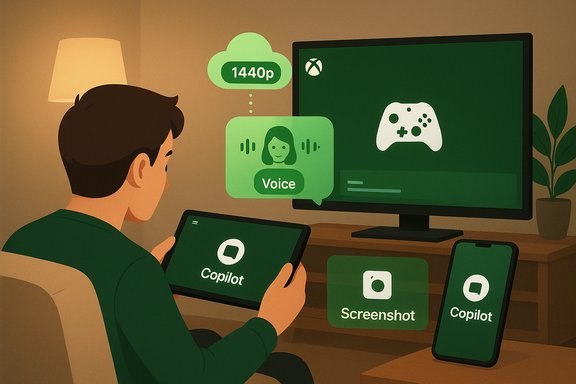
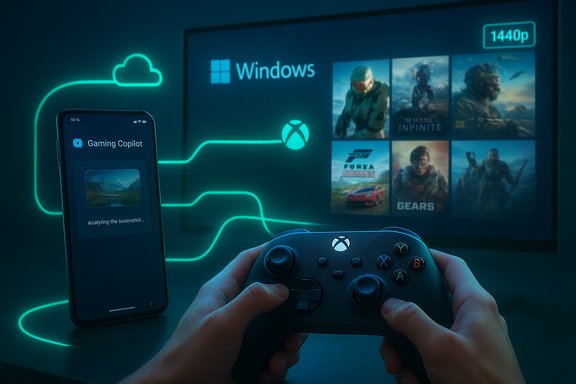
Microsoft’s November Xbox update quietly turned two interlocking initiatives into public features: Gaming Copilot (Beta) landed in the Xbox mobile app as a second‑screen, voice‑enabled assistant, and the Full Screen Experience (FSE)—the controller‑first, console‑style shell Microsoft tested on the ROG Xbox Ally—was expanded to a much wider set of Windows 11 devices, including previews for desktop PCs via Insider channels.
The November wave is broad but pragmatic: it brings an AI‑driven, context‑aware helper into players’ pockets while making Windows behave more like a dedicated gaming console when users want it to. The update also bundles cloud streaming improvements (user‑selected resolution, with select titles up to 1440p) and regional expansions for Xbox Cloud Gaming, widening the total set of entry points into the Xbox ecosystem. The moves reinforce Microsoft’s strategy of turning Xbox into a cross‑device service, not just a box. This article explains what shipped, how it works, why it matters for players and admins, and where to be cautious. All major product claims below are cross‑checked against Microsoft’s November update and independent coverage; any claim that couldn’t be fully verified is clearly flagged.
Those strengths come with real trade‑offs—principally around privacy, fairness in competitive play, and the performance cost of an active multimodal assistant on battery‑sensitive hardware. For players and administrators, the practical path is straightforward: try the features, test them in the context you care about, and treat Copilot’s answers as helpful guidance rather than authoritative truth until the Beta proves its accuracy and Microsoft publishes tighter operational guarantees.
Source: livemint.com Xbox November update brings Gaming Copilot to mobile and Full-Screen Experience | Mint
 Overview
The November wave is broad but pragmatic: it brings an AI‑driven, context‑aware helper into players’ pockets while making Windows behave more like a dedicated gaming console when users want it to. The update also bundles cloud streaming improvements (user‑selected resolution, with select titles up to 1440p) and regional expansions for Xbox Cloud Gaming, widening the total set of entry points into the Xbox ecosystem. The moves reinforce Microsoft’s strategy of turning Xbox into a cross‑device service, not just a box. This article explains what shipped, how it works, why it matters for players and admins, and where to be cautious. All major product claims below are cross‑checked against Microsoft’s November update and independent coverage; any claim that couldn’t be fully verified is clearly flagged.Background: why these two threads matter together
Microsoft’s product strategy for Xbox over recent years has been to make progress, purchases and services travel across consoles, PC, handhelds and mobile. Two technical trends drove this November update into being:- The expansion of the Copilot family from productivity into device‑aware assistance that can combine voice, vision (screenshot analysis), and account context.
- The rise of “consolized” Windows postures for handheld devices—an alternate shell that reduces desktop noise and prioritizes controller navigation.
Gaming Copilot (Beta) on mobile — what it is and how it behaves
Core capabilities
Gaming Copilot is a context‑aware assistant tuned for in‑play help. At launch on mobile it offers the following modes and features:- Voice Mode: push‑to‑talk via a microphone icon or typed queries through the Copilot tab in the Xbox mobile app. Responses can be voice or text.
- Screenshot / Vision grounding: with explicit permission, Copilot can analyze user‑initiated screenshots to provide image‑grounded guidance (identify UI elements, point out objectives, or explain on‑screen state).
- Account‑aware personalization: when signed into an Xbox/Microsoft account, Copilot can reference achievements, play history and owned library items to tailor recommendations.
- Second‑screen interaction: the mobile app acts as a distraction‑free surface for Copilot so players don’t need to overlay the primary game screen on PC or console.
How the experience shows up in practice
- Update the Xbox mobile app (iOS or Android) and open the new Gaming Copilot tab.
- Tap the microphone icon to start a voice query or type in the chat box to ask for tips, achievement help, or recommendations.
- Optionally grant permission to upload a screenshot for visual grounding; Copilot will use that image plus account context (if permitted) to answer more precisely.
What Copilot can and can’t do (verified vs. caution)
Verified at launch:- Provide gameplay tips, walkthrough advice, and achievement history based on account data.
- Accept voice or typed input on mobile without forcing players to open Game Bar on PC.
- Specific billing details such as “Game Pass renewal date” being retrievable by Copilot are plausible (account‑aware assistants commonly surface subscription metadata), but Microsoft’s official November post does not explicitly list billing/renewal visibility; independent coverage that repeats this claim traces to brief consumer reporting and should be treated as partially verified until Microsoft publishes a clear data‑scope note. Users should confirm through their Microsoft account pages if unsure.
Full Screen Experience (FSE) — what changed and how to use it
What FSE is, technically
Full Screen Experience is a session posture—an alternate full‑screen shell layered on top of Windows 11 that:- Launches a chosen “home app” (typically the Xbox PC app) as the primary UI.
- Defers many non‑essential desktop startup tasks and Explorer ornamentation, reclaiming user‑space memory and reducing idle CPU wakeups.
- Adapts Game Bar and Task View flows for controller navigation and larger, thumb‑friendly tiles.
Rollout details and device support
- FSE was first shipped preinstalled on ASUS’ ROG Xbox Ally devices. The November rollout expands availability to additional Windows 11 handhelds, explicitly including MSI’s Claw family in Insider previews and moving toward wider Insider‑channel testing on laptops, desktops and tablets.
- For traditional PCs, FSE is being previewed in Windows Insider builds (Dev and Beta channels), and Microsoft is gating visibility via server flags and OEM entitlements so not every qualifying device gets it at the same time.
How to enable and use FSE (concise steps)
- Ensure Windows 11 is up to date and that the Xbox app and Game Bar are installed from the Microsoft Store.
- If enabling via preview, join the Windows Insider Program and update to the requisite build that contains FSE plumbing.
- Open Settings > Gaming > Full screen experience and select Xbox as your home app. Optionally enable “Enter full screen experience on startup.”
- Enter or exit FSE via Task View (Win + Tab), Game Bar settings, or a shortcut (Win + F11 is reported as a quick toggle in experimental coverage).
Cloud streaming and companion updates
The November update also introduces user‑selected cloud streaming resolution and increases the ceiling for select titles to 1440p for Game Pass Ultimate subscribers, giving players more control over visual fidelity versus bandwidth. Xbox Cloud Gaming was also expanded to additional countries (India among them) and more Fire TV / LG TV devices in specific regions. These cloud changes are service‑level upgrades that pair well with handheld and mobile improvements because they reduce the need to locally install large titles.Strengths — why these features matter
- Reduced context switching: Copilot on mobile makes it natural to get real‑time help without alt‑tabbing or pausing the game, which preserves immersion and saves time for casual and completionist players alike.
- Controller‑first UX on Windows: FSE gives handhelds a predictable, console‑like session that’s easier to navigate with a gamepad and can lower background noise, improving sustained performance on thermally constrained devices. Independent hands‑on tests and Microsoft claims both report tangible improvements in some scenarios.
- Cloud fidelity choice: Letting users pick streaming resolution (including 1440p where supported) addresses a long‑standing ask from cloud gamers who want better visuals without sacrificing accessibility.
- Ecosystem integration: These features are consistent with a broader platform vision: purchases, progress and assistance travel across devices, making Xbox more of a service fabric than a single hardware product.
Risks, trade‑offs and governance concerns
Privacy and data flow
Gaming Copilot’s usefulness depends on access to screenshots and account context. Microsoft publicly describes a hybrid local/cloud model, and product messaging emphasizes explicit permissioning. However, the company’s public announcements do not yet publish exhaustive telemetry retention windows or detailed data‑use timelines for every Copilot surface. Organizations and privacy‑sensitive users should treat the following as open points:- How long conversation logs and screenshot artifacts are retained in Microsoft’s systems.
- Whether telemetry is tied to persistent account identifiers and for what debugging or quality‑improvement purposes those logs are used.
- The exact split between on‑device vs. cloud inference for multimodal queries.
Competitive fairness in multiplayer contexts
AI assistance that can analyze a screenshot and provide real‑time tactical advice raises legitimate fairness questions in multiplayer or esports environments. Microsoft positions Gaming Copilot as a single‑player aid and stages the rollout as Beta to gather publisher and player feedback, but tournament rules and publisher policies may need updating to clarify permitted assistance. Expect studios and competition organizers to define boundaries in the months ahead.Performance and battery cost on handhelds
FSE reduces background processes and can free RAM, but Copilot (when used in vision or voice modes) adds network activity and the potential for extra CPU/GPU wakeups. On battery‑sensitive handhelds, that interaction can surface as heated discussions: FSE claims steady frame rates by cutting background noise, while Copilot’s cloud round‑trips create additional network and processing overhead. Users should test real‑world battery life and thermals on their specific device/firmware combination.Fragmentation risk
Because availability is gated by age, region and Insider membership, the rollout will be uneven. That’s good for controlled testing but increases short‑term fragmentation—players in different regions or with different account entitlements will see different behaviors. Administrators and reviewers should expect staggered feature flags and server‑side gating.Practical advice for players and IT owners
- Players who care about privacy: review Game Bar and Xbox app permissions; avoid enabling screenshot sharing or voice capture until you understand retention policies. Use the Xbox privacy dashboard to verify account settings.
- Handheld owners testing FSE: enable it via Settings > Gaming > Full screen experience, but run battery and FPS tests for a few games before making it your default boot posture. If you depend on background utilities, note they may be deferred while FSE is active.
- Tournament organizers & competitive gamers: monitor publisher guidance and platform policies. Treat AI assistance as a potential variable and seek explicit clarifications from developers about allowed tools during hosted competition.
- Admins in regulated environments: block or restrict Copilot surfaces in managed endpoints if screenshots or conversational logs conflict with data‑loss prevention policies until Microsoft publishes formal telemetry and retention controls.
Verification notes and cross‑checks
- Microsoft’s official November update and product blog set out the high‑level features: Gaming Copilot on mobile, FSE expansion, selectable cloud streaming resolution up to 1440p, and regional cloud expansions. Those itemized claims are the authoritative baseline.
- Independent outlets (The Verge, Tom’s Hardware) and hands‑on reporting corroborate FSE’s mechanics, the Insider‑channel PC preview and practical behaviors such as toggling via Task View / Win + F11. Those outlets also relay OEM mentions like MSI Claw receiving early preview enablement.
- Community and technical analyses collected in public forums and briefing documents emphasize that FSE is a session‑level posture (not a new kernel) and that Copilot uses a hybrid local/cloud model. These analyses highlight known unknowns—particularly telemetry retention and the exact inference split—so readers should treat unverified operational details cautiously.
What to watch next
- Microsoft publishing detailed telemetry and retention notes for Gaming Copilot surfaces (an engineering‑level privacy addendum would be ideal).
- Publisher and tournament policy updates on permitted AI assistance in multiplayer contexts.
- Independent battery and performance tests that measure the combined effect of FSE and on‑device Copilot use on handheld thermal envelopes and frame‑time consistency.
- Whether Microsoft extends Copilot’s second‑screen model into consoles (a natural next step) and how it handles cross‑platform policy and telemetry across Xbox consoles, PC and mobile.
Conclusion
The November Xbox update is a textbook example of Microsoft’s current product playbook: integrate useful AI where it reduces friction, and adapt Windows to the needs of specific device form factors. Gaming Copilot on mobile reduces context switching and promises genuine convenience; Full Screen Experience brings a cleaner, controller‑first posture to Windows handhelds and previews on PCs. Together they deepen Xbox’s identity as a cross‑device gaming service.Those strengths come with real trade‑offs—principally around privacy, fairness in competitive play, and the performance cost of an active multimodal assistant on battery‑sensitive hardware. For players and administrators, the practical path is straightforward: try the features, test them in the context you care about, and treat Copilot’s answers as helpful guidance rather than authoritative truth until the Beta proves its accuracy and Microsoft publishes tighter operational guarantees.
Source: livemint.com Xbox November update brings Gaming Copilot to mobile and Full-Screen Experience | Mint