

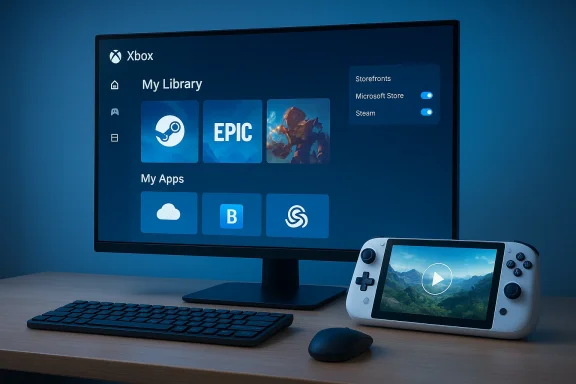
Microsoft has quietly reshaped the Xbox PC app into a true one‑stop launcher for Windows games — one that now automatically aggregates installed titles from major PC storefronts, provides a new “My apps” shelf for third‑party launchers, adds user controls for which storefronts appear, and (according to community reports) even lets you manually add any app or game to your Xbox library so it can be pinned, launched, and given artwork inside the official Xbox UI.
For years, PC gaming has been defined by fragmentation: Steam, Epic Games Store, GOG, Battle.net, Ubisoft Connect, and a host of vendor launchers each hosted parts of players’ collections. That fragmentation created friction for users who wanted a single, controller‑friendly surface — particularly on small handh to browse and launch games. Microsoft’s Xbox app was once primarily a Game Pass storefront on PC, but the company has been incrementally expanding its remit toward a unified gaming shell for Windows devices, especially handhelds.
In September 2025 Microsoft announced a formally supported change: the Xbox PC app now includes an aggregated gaming library that surfaces installed games from supported third‑party storefronts into “My Library,” plus a new My Apps tab and cross‑device play history that will sync cloud‑playable titles and recent sessions across console, PC, and handheld. Jason Beaumont, VP of Experiences at Xbox, framed the move as a response to Insider feedback and a way to make gaming on Windows more seamless.
This is not an overnight pivot but the culmination of months — and in some cases years — of iterative updates, Insider previews, and device launches (notably OEM handhelds that adopt a controller‑focused UI). Microsoft has been rolling pieces of the work through the Xbox Insider program and then widening availability to all users. The result: the Xbox app now behaves much more like a modern game launcher/aggregator — similar in spirit to Playnite and GOG Galaxy — but with Microsoft’s own platform hooks and console‑centric design choices.
Key UX additions:
Practical effects of auto‑discovery:
At the same time, the implementation blends official features (automatic storefront aggregation, My Apps, cross‑device play history) with community‑reported capabilities (manual adds and artwork editing). That mixture means expect some variability in behavior across builds, games, and store types. The real test will be how Microsoft handles edge cases — DRM/anti‑cheat handoffs, duplicate ownership management, telemetry clarity, and publisher partnerships. Until Microsoft provides exhaustive documentation of manual add workflows and privacy details, power users should treat the feature as a powerful convenience with some remaining rough edges.
For most users, the recommendation is straightforward: try the aggregated library, customize the storefront toggles to your taste, and use manual adds where automatic discovery doesn’t reach — but keep a watchful eye on launch behaviors for titles that depend on specific store clients or anti‑cheat tooling. Microsoft has given Windows gamers a genuine option to reduce friction; the onus now is on the company to polish the edges and on the community to test and document real‑world behaviors.
The Xbox PC app’s evolution from a Game Pass dock into a full‑fledged, aggregated gaming shell is one of the more consequential changes to Windows gaming in recent memory — a move that recognizes how players actually buy and play games today. As the rollout widens, expect rapid iteration, community tips and best practices, and a period where both Microsoft’s documentation and third‑party launchers adjust to coexistence. For players who’ve long used Playnite or GOG Galaxy to corral their libraries, the Xbox app is finally offering a legitimate, official alternative — but with important trade‑offs that warrant attention and testing.
Source: Windows Report https://windowsreport.com/xbox-app-gains-steam-like-feature-to-add-any-pc-game/
 Background / Overview
For years, PC gaming has been defined by fragmentation: Steam, Epic Games Store, GOG, Battle.net, Ubisoft Connect, and a host of vendor launchers each hosted parts of players’ collections. That fragmentation created friction for users who wanted a single, controller‑friendly surface — particularly on small handh to browse and launch games. Microsoft’s Xbox app was once primarily a Game Pass storefront on PC, but the company has been incrementally expanding its remit toward a unified gaming shell for Windows devices, especially handhelds.In September 2025 Microsoft announced a formally supported change: the Xbox PC app now includes an aggregated gaming library that surfaces installed games from supported third‑party storefronts into “My Library,” plus a new My Apps tab and cross‑device play history that will sync cloud‑playable titles and recent sessions across console, PC, and handheld. Jason Beaumont, VP of Experiences at Xbox, framed the move as a response to Insider feedback and a way to make gaming on Windows more seamless.
This is not an overnight pivot but the culmination of months — and in some cases years — of iterative updates, Insider previews, and device launches (notably OEM handhelds that adopt a controller‑focused UI). Microsoft has been rolling pieces of the work through the Xbox Insider program and then widening availability to all users. The result: the Xbox app now behaves much more like a modern game launcher/aggregator — similar in spirit to Playnite and GOG Galaxy — but with Microsoft’s own platform hooks and console‑centric design choices.
What changed — feature by feature
Aggregated Gaming Library (official)
The central, headline change is the Aggregated Gaming Library. When the Xbox PC app detects games installed from a supported storefront, those titles automatically appear in “My Library” and in the “Most Recent” sidebar so you can launch them from the Xbox app without hunting through multiple clients. Microsoft’s announcement explicitly names Xbox libraries, Game Pass titles, Battle.net, and “other leading PC storefronts” as supported examples, with additional store coverages planned over time. The company also added settings that let you hide storefronts if you prefer a simplified view.Key UX additions:
- A consolidated “My Library” view that aggregates installed games from supported storefronts.
- A “My Apps” tab that groups third‑party storefronts and utilities for easy access and installation.
- Storefront toggles under Settings > Library & Extensions sich platforms are visible.
Manual adds and metadata editing (community reporting; partially verified)
Several outlets and user reports indicate that the app also supports manually adding an arbitrary app or game to “My Library” when a storefront isn’t automatically recognized. Community posts describe an “Add a game from your PC” flow where you can supply the executable path, the display name, and custom artwork — much like Steam’s “Add a Non‑Steam Game” feature or Playniion. That functionality has surfaced in screenshots and Insider chatter and appears to be rolling out to more users. However, Microsoft’s official blog post does not explicitly enumerate a manual add workflow, so this specific capability is currently best described as community‑verified but not exhaustively documented by Microsoft. Treat manual‑add details as accurate based on testing and reportage, but keep an eye on official docs for the canonical how‑to.Cross‑device play history and cloud‑playable sync
Microsoft also announced that play history and cloud‑playable titles will sync across devices — meaning the “Jump back in” list on console, PC, or handheld surfaces recent sessions so users can continue where they left off. This feature is slated to roll out after the initial aggregated library changes. It’s aimed at smoothing continuity across Xbox consoles, PCs, and Windows handhelds.Under‑the‑hood: Arm support and local installs
The Xbox app’s evolution includes technical work for Windows on Arm. Microsoft has started enabling the Xbox PC app on Arm‑based Windows devices and rolling local install support for compatible games — a substantive shift away from a cloud‑only Arm story. Insider builds for Arm referenced specific Xbox app builds that opened local installs for Arm devices, reflecting deeper platform work (runtime translation, coordination with anti‑cheat tooling, and more). That engineering lift is critical for handheld adoption.How the aggregated library works (and where it doesn’t)
Automatic discovery
For supported storefronts, the Xbox app auto‑discovers installed titles. Once a supported store is installed on a device, games you install through that store should populate in “My Library” automatically. This detection includes Steam, Battle.net, Epic (in many reports), and several others depending on the build and the user’s Insider status. Microsoft says it will expand support for additional storefronts over time.Practical effects of auto‑discovery:
- One place to search and filter across your whole installed library.
- A controller‑friendly launch surface for handhelds and TVs.
- A unified “Most Recent” list that surfaces recent play sessions regardless of which launcher they came from.
Manual add: when auto‑discovery falls short unsupported or a game is installed in a nonstandard location, reports indicate users may manually add the executable to “My Library.” This provides a workaround for older titles, emulators, DRM‑free games, or utilities that aren’t recognized. Manual entries reportedly let you edit the display name and artwork, which is attractive to users who want a polished launcher surface. Again: this capability is widely discussed in community threads and by journalists testing Insider builds, but it’s not yet exhaustively documented in Microsoft’s official post, so treat specifics as community‑sourced until officially documented.
What launching actually does
When you press Play from the Xbox app for a game that came from another storefront, the Xbox app often acts as a launcher surface — in many cases it will trigger the original storefront to run the game (e.g., opening Steam or Epic first) rather than replacing the store’s DRM/launcher flow. Some imported titles show only a play button and a link back to the originating storefront page; others launch directly where the store and DRM allow it. Expect behavior to vary by game, DRM method, and publisher. (gamespot.com)Why this matters — benefits for players and Microsoft
For players: fewer context switches, cleaner handheld UX
- Convenience: Centralized access reduces launcher hopping and makes the “time to play” shorter, particularly on handhelds where screen real estate and input methods penalize constant Alt+Tabbing.
- Controller‑first navigation: The Xbox app’s UI is designed for gamepad navigation, so aggregated libraries make it easier to browse all installed games without a mouse.
- Artwork and polish: Manual adds with artwork editing let users present a tidy catalog on devices like the ROG Xbox Ally or other Windows handhelds. Community tools and posts show users customizing covers to match storefront entries.
For Microsoft: platform stickiness, cr
- Stronger front door: Integrating other stores into the Xbox app encourages users to treat Xbox on PC as the canonical “home screen,” which increases engagement with Xbox features and services.
- Handheld strategy: For Microsoft’s push into Windows handhelds and “Xbox mode” experiences, a single launcher that aggregates games makes the hardware proposition far stronger.
Risks, trade‑offs, and unanswered questions
Microsoft’s aggregated library is a big UX win, but there are legitimate concerns and potential pitfalls.DRM and anti‑cheat handoffs
Because the Xbox app often launches games via the original storefront, the handshake between launchers can be fragile. Some games require the original client to be running for DRM or anti‑cheat. Coordinating those handoffs — especially on Arm devices where compatibility layers and anti‑cheat requirements complicate matters — requires careful engineering. Microsoft has been working with anti‑cheat teams for local installs on Arm, but the landscape remains complex. Expect edge cases where games fail to locks play until the original client is present.Duplication and clutter
If you own the same game on multiple storefronts, the aggregated view can show duplicate entries back‑to‑back. That’s a usabilit appears to accept for transparency’s sake, but it can create a cluttered library for users who shop across stores. Windows Central and other outlets flagged this early on in the Insider rollouts.Privacy and telemetry questions
A launcher that aggregates multiple stores necessarily has to know which ones you have installed and which games you’ve launched. Users and privacy‑conscious communities will rightly ask what telemetry Microsoft collects, how long it retains play history, and whether aggregated launch data is shared across accounts or devices. Microsoft’s blog post mentions settings to hide storefronts, but detailed telemetry policies are not part of that announcement and deserve scrutiny.Platform politics: will Valve and others like it?
There’s a political dimension: Valve, Epic, and other platform owners may be indifferent so long as Xbox doesn’t block or crce — but they may be wary if Microsoft uses the aggregated surface to promote Xbox services preferentially. So far the Xbox app appears to be a neutral aggregator rather than a replacement storefront, but platform tensions could surface in future policy or technical changes. Industry observers have flagged this possibility as the Xbox app claims more “front‑door” attention on PC.Security and injection risk
Allowing manual addition of arbitrary executables raises a small but real security consideration: user errors or social engineering could add potentially unsafe programs to a launcher and treat them like games. While the risk is primarily user‑level, Microsoft should consider safe‑guards (warning prompts, machine‑wide admin checks) for executables added to a system‑wide library. Comy testers have suggested Microsoft will need guardrails.How to use the new Xbox PC app features (practical steps)
These steps summarize what Microsoft documents and what community testers report. If you’re following along on your PC, use the Xbox app and the Settings > Library & Extensions pathway.- Open the Xbox app on Windows.
- Gore → Settings → Library & Extensions. Choose which storefronts you want visible in My Library via toggles. This will control automatic discovery
- Check the “My Library” and “Most Recent” lists to see aggregated titles. Games installed from supported stores should appear automatically.
- To use “My Apps,” open the tab and browse for storefronts and utilities you want quick access to.
- Open “My Library” and look for an “Add a game from your PC” or similar option. Point the Xbox app at the game’s executable and provide a display name and artwork if desired. This flow is reported in Insider builds and community posts; Microsoft’s official documentation should be checked if you do not see this option.
How this stacks up against Playnite and GOG Galaxy
Aggregated launchers are not new. Playnite and GOG Galaxy have long offered cross‑store aggregation, manual adds, and metadata editing. Microsoft’s Xbox app distinguishes itself in several ways:- Xbox app is built into the Microsoft/Xbox ecosystem and is designed for controller navigation first. That matters on handhelds and TVs.
- Playnite and GOG Galaxy offer heavier customization, community plugins, and open‑soic features that some power users prefer. Playnite is especially loved by tinkerers for importing libraries and scripting.
- The Xbox app leans on Microsoft’s platform integration (Game Pass, cloud play, Play History), offering cross‑device continuity that third‑party launchers cannot match without additional service integrations.
Developer and publisher considerations
While Microsoft’s update is user‑facing, it has implications for publishers and middleware providers:- Anti‑cheat and DRM vendors will need to ensure consistent behavior when games are launched via a third‑party aggregator. Microsoft’s work to coordinate with anti‑cheat systems on Arm underlines how complex this is.
- Publishers who want users to always run a specific client (for anti‑cheat, overlays, or telemetry) may be cautious about aggregator behavior that appears to abstract the original store. In practice the Xbox app typically invokes the source launcher when needed, but edge‑case failures are possible.
- Indie developers and DRM‑free advocates may welcome easier discoverability on Windows handhelds and the Xbox app’s polished UI; others may worry about additional integration testing and support burdens.
Recommendations for users and Microsoft
For users:- If you value convenience: enable the aggregated library but review Settings > Library & Extensions to toggle off storefronts you don’t want to appear. This reduces clutter and potential cross‑store confusion.
- If you’re privacy‑conscious: investigate what telemetry the Xbox app collects and consider limiting cross‑device sync until you’re comfortable with the data flows. Microsoft’s announcement doesn’t fully map telemetry boundaries.
- Backup your preferred artwork and metadata if you manually add games — community tools can help keep consistency across devices.
- Publish a clear, versioned guide to the manual add workflow and telemetry. Users will trust the aggregated library more if Microsoft documents what is and isn’t shared.
- Add safety checks for manual adds (warnings for unknown executables), and show clearly when a game will open an external launcher to satisfy DRM/anti‑cheat requirements.
- Continue working with anti‑cheat and DRM vendors to reduce friction on Arm and hybrid devices; this is a long‑term engineering requirement.
Verdict — a pragmatic consolidation with important caveats
Microsoft’s aggregated library in the Xbox PC app is a clear, pragmatic improvement for many Windows gamers. It simplifies discovery, reduces launcher switching, and creates a coherent, controller‑friendly surface that aligns Windows PC gaming with console expectations. For players who want a tidy, polished catalog — especially on handhelds — the update materially improves the out‑of‑box experience.At the same time, the implementation blends official features (automatic storefront aggregation, My Apps, cross‑device play history) with community‑reported capabilities (manual adds and artwork editing). That mixture means expect some variability in behavior across builds, games, and store types. The real test will be how Microsoft handles edge cases — DRM/anti‑cheat handoffs, duplicate ownership management, telemetry clarity, and publisher partnerships. Until Microsoft provides exhaustive documentation of manual add workflows and privacy details, power users should treat the feature as a powerful convenience with some remaining rough edges.
For most users, the recommendation is straightforward: try the aggregated library, customize the storefront toggles to your taste, and use manual adds where automatic discovery doesn’t reach — but keep a watchful eye on launch behaviors for titles that depend on specific store clients or anti‑cheat tooling. Microsoft has given Windows gamers a genuine option to reduce friction; the onus now is on the company to polish the edges and on the community to test and document real‑world behaviors.
The Xbox PC app’s evolution from a Game Pass dock into a full‑fledged, aggregated gaming shell is one of the more consequential changes to Windows gaming in recent memory — a move that recognizes how players actually buy and play games today. As the rollout widens, expect rapid iteration, community tips and best practices, and a period where both Microsoft’s documentation and third‑party launchers adjust to coexistence. For players who’ve long used Playnite or GOG Galaxy to corral their libraries, the Xbox app is finally offering a legitimate, official alternative — but with important trade‑offs that warrant attention and testing.
Source: Windows Report https://windowsreport.com/xbox-app-gains-steam-like-feature-to-add-any-pc-game/
