

Microsoft’s Xbox PC Remote Tools have landed in public preview at exactly the moment Windows game development is becoming more distributed, more automated, and more strategically important to the company’s broader platform plans. The new toolkit attacks one of the least glamorous but most painful parts of game production: provisioning remote devices, moving builds around, and debugging them repeatedly without wasting hours on full redeploys. More than a convenience update, this is Microsoft signaling that Windows game development should be treated as a first-class, storefront-agnostic workflow rather than a walled-garden feature for Xbox-branded titles.
What makes the release notable is not just the tooling itself, but the timing. Microsoft previewed the suite at GDC 2026 and moved it into public preview on March 30, 2026, with release notes dated March 23 documenting the initial feature set. That means developers went from announcement to hands-on access in a matter of days, and they did so with a package that includes automated provisioning, incremental deployment, remote debugging, and CI/CD support across Windows 10 and Windows 11 devices. In practical terms, Microsoft is trying to remove friction from the build-test-iterate loop that every studio depends on.
For years, remote testing on Windows game projects has been a messy combination of scripts, manual installs, ad hoc network setup, and recurring copy-everything deployments. Microsoft’s own documentation acknowledges the pain by emphasizing that the new tools are meant to streamline remote provisioning, deployment, launch, debugging, and iteration on Windows-based devices. The release notes also identify the suite’s core pieces: Xbox PC Toolbox,
That matters because game development is not like ordinary enterprise software deployment. A studio may need to push dozens of builds a day to a handful of test devices, each with different hardware, driver stacks, and performance characteristics. When every iteration requires a full transfer, the process turns into a bandwidth and time sink. Microsoft’s new approach is aimed at shaving that overhead down to the bare minimum by sending only changed files and automating the boring parts of device management.
The March 2026 release also fits a broader Windows developer story that Microsoft pushed at GDC 2026. In the same announcement wave, the company highlighted broader platform changes for Windows PC game developers, including improvements to DirectX tooling and a coming expansion of Xbox mode on Windows 11. Taken together, the message is clear: Microsoft wants Windows to be the most efficient place to build, test, and ship PC games.
There is also a longer strategic thread running through the launch. Microsoft has been positioning Windows gaming around a “Build for PC” approach, and the company’s broader Xbox strategy increasingly leans toward unified build pipelines rather than rigid platform silos. That is where Project Helix enters the picture, because a tooling layer that works across storefronts today could become the on-ramp to a more unified Xbox/PC future tomorrow.
The likely takeaway for developers is not “one more Microsoft app,” but “one less source of friction.” That distinction is important, because the biggest wins in production tooling are often invisible until they are missing.
It is also notable that the suite is free and not tied to the Microsoft Game Development Kit. That opens the door to broader adoption by teams shipping on Steam, the Epic Games Store, or anywhere else on Windows.
Microsoft says the toolbox uses WinGet and DSCv3 for provisioning, and release notes describe secure pairing through a time-limited PIN and certificate exchange. That means the setup process is meant to be declarative and repeatable, not a one-off manual exercise on each machine. For studios that maintain a fleet of test systems, that is a major operational improvement.
The command-line layer is equally important.
The real value is not that remote testing becomes possible. It is that remote testing becomes boringly consistent.
Microsoft has described full-build transfers as slow and error-prone, and any studio that has wrestled with repeated device installs will understand why. When a build contains large executable packages, shaders, content packs, and dependency changes, a full copy can become a bottleneck. Incremental deployment removes much of that waste and makes iteration feel closer to code editing than to software packaging.
That efficiency also matters for shared studio environments. If multiple developers are testing against the same rack of devices, network congestion can become a hidden tax on productivity. Lowering the payload size means less bandwidth contention and fewer delays during peak testing hours.
In that context, Microsoft’s tooling starts to resemble modern software package managers and containerized deployment models. The logic is simple: move only what changed, and let the environment stay stable.
That may sound mundane, but reproducibility is gold in game development, where intermittent bugs can eat up entire days.
This is a subtle but significant departure from the way platform tooling often works. Many vendors tie the best developer experience to their own distribution channel, which can limit uptake and create political friction with studios. Microsoft appears to be betting that if Windows is the underlying platform, the tooling should be useful even when the final product is not an Xbox-branded release.
That is both commercially smart and strategically defensive. If Microsoft wants Windows to remain the default PC gaming environment, it needs to make the operating system itself feel like the best place to build. A free, general-purpose remote workflow does more to achieve that than an exclusivity pitch ever could.
That is especially useful for publishers and co-development houses that manage multiple release channels. A shared toolset can become a shared language.
The company seems to understand that the best way to keep developers inside the ecosystem is not to lock them in. It is to make staying feel easiest.
The command-line tools are arguably even more important for advanced teams. By separating control into
The Remote Iteration API is the most forward-looking part of the package. It is still in preview, but Microsoft says it is already functional and intended to let engine developers build remote workflows directly into their tooling. For Unreal, Unity, and proprietary engines, that opens the door to much tighter integration than a generic deploy utility could provide.
That makes debugging more likely to happen early, when it is cheapest to fix issues.
That could matter most for studios with custom tooling stacks. They often value integrated workflows more than polished standalone apps because they need everything to fit into their existing production machinery.
That means the toolkit is optimized for studio labs, test benches, and same-site development environments. It is not a cloud-first remote access system, and it is not trying to replace general-purpose remote desktop tools. Instead, it addresses the narrower but more valuable use case of controlled in-office or on-prem device management.
The local-network requirement is probably the biggest practical limitation. Remote teams can work around it with VPNs or office hardware access, but Microsoft does not position the suite as a distributed-team solution in the current preview. That leaves the tools strongest in the exact settings where repeat testing matters most: studios, QA rooms, and device labs.
That security posture is reasonable for a preview, but it also signals that Microsoft is prioritizing controlled environments over casual home use.
That is a practical decision, and it lowers the adoption threshold.
If that vision holds, the value of the Remote Tools suite goes beyond present-day convenience. It becomes part of the preparation layer for a future in which a studio’s Windows build pipeline can more easily feed Xbox console targets. Microsoft has indicated developer kits for that effort are due in 2027, which gives studios a multi-year runway.
This is where the launch becomes more than a tooling story. It becomes a roadmap story. Microsoft is effectively saying: adopt these workflows now, and you will be in a better position when the next generation of unified Xbox development arrives.
The earlier a studio standardizes, the less painful the eventual transition tends to be.
That would be a rare case where the smaller team gets proportionally more value than the larger one.
The other concern is dependency. If Microsoft eventually folds more of the Windows game development story into a unified stack, studios may find themselves more tightly coupled to its assumptions than they expected.
The more interesting question is whether the company will relax the local-network limitations, deepen engine integrations, and broaden the device-management model for modern distributed studios. If it does, the tools could move from “useful lab utility” to “core studio infrastructure.” That would be the real breakthrough, because it would mean Microsoft is solving not just for the next build, but for the next generation of Windows game production.
Source: WinBuzzer Microsoft Releases Xbox PC Remote Tools for Windows Game Devs
What makes the release notable is not just the tooling itself, but the timing. Microsoft previewed the suite at GDC 2026 and moved it into public preview on March 30, 2026, with release notes dated March 23 documenting the initial feature set. That means developers went from announcement to hands-on access in a matter of days, and they did so with a package that includes automated provisioning, incremental deployment, remote debugging, and CI/CD support across Windows 10 and Windows 11 devices. In practical terms, Microsoft is trying to remove friction from the build-test-iterate loop that every studio depends on.
 Background
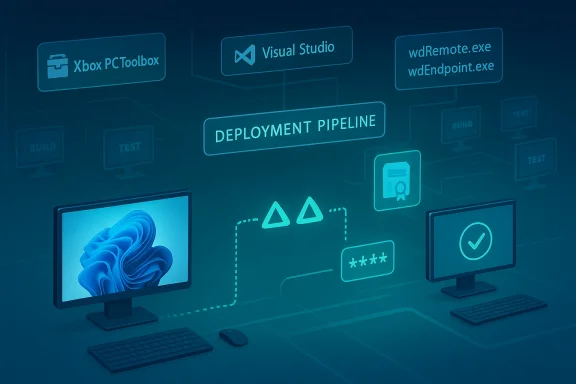
For years, remote testing on Windows game projects has been a messy combination of scripts, manual installs, ad hoc network setup, and recurring copy-everything deployments. Microsoft’s own documentation acknowledges the pain by emphasizing that the new tools are meant to streamline remote provisioning, deployment, launch, debugging, and iteration on Windows-based devices. The release notes also identify the suite’s core pieces: Xbox PC Toolbox, wdRemote.exe, wdEndpoint.exe, the Remote Iteration API, and the Xbox PC Remote Debugger for Visual Studio.That matters because game development is not like ordinary enterprise software deployment. A studio may need to push dozens of builds a day to a handful of test devices, each with different hardware, driver stacks, and performance characteristics. When every iteration requires a full transfer, the process turns into a bandwidth and time sink. Microsoft’s new approach is aimed at shaving that overhead down to the bare minimum by sending only changed files and automating the boring parts of device management.
The March 2026 release also fits a broader Windows developer story that Microsoft pushed at GDC 2026. In the same announcement wave, the company highlighted broader platform changes for Windows PC game developers, including improvements to DirectX tooling and a coming expansion of Xbox mode on Windows 11. Taken together, the message is clear: Microsoft wants Windows to be the most efficient place to build, test, and ship PC games.
There is also a longer strategic thread running through the launch. Microsoft has been positioning Windows gaming around a “Build for PC” approach, and the company’s broader Xbox strategy increasingly leans toward unified build pipelines rather than rigid platform silos. That is where Project Helix enters the picture, because a tooling layer that works across storefronts today could become the on-ramp to a more unified Xbox/PC future tomorrow.
Why this preview matters now
The preview arrives at a point where handheld PCs, hybrid workflows, and multi-target testing are no longer niche concerns. Studios are building for desktops, laptops, handhelds, and living-room-style Windows devices with increasing frequency. Microsoft’s tools are meant to support that reality with automated setup and remote execution over a local network.The likely takeaway for developers is not “one more Microsoft app,” but “one less source of friction.” That distinction is important, because the biggest wins in production tooling are often invisible until they are missing.
- Full-build deployment is costly in time and bandwidth.
- Manual device setup does not scale across teams.
- Remote debugging often fragments by device and workflow.
- CI/CD for game builds is still uneven in many studios.
- Incremental deployment can materially shorten iteration loops.
The release cadence is itself a signal
Microsoft did not let the announcement sit as vaporware. The company turned the GDC preview into a public preview quickly, which suggests the initial toolkit had enough maturity to be useful to real teams. That is a meaningful sign for developers who are wary of early-stage platform promises.It is also notable that the suite is free and not tied to the Microsoft Game Development Kit. That opens the door to broader adoption by teams shipping on Steam, the Epic Games Store, or anywhere else on Windows.
What Microsoft actually released
The Xbox PC Remote Tools suite is not one monolithic app. It is a collection of workflows and entry points intended to cover the whole lifecycle of remote testing on Windows targets. The center of gravity is the Xbox PC Toolbox app, which acts as a pairing and management hub for both development PCs and remote devices.Microsoft says the toolbox uses WinGet and DSCv3 for provisioning, and release notes describe secure pairing through a time-limited PIN and certificate exchange. That means the setup process is meant to be declarative and repeatable, not a one-off manual exercise on each machine. For studios that maintain a fleet of test systems, that is a major operational improvement.
The command-line layer is equally important.
wdRemote.exe on the development machine and wdEndpoint.exe on the target device handle deployment, launch, and termination workflows. That makes the suite useful not only for interactive work in a lab, but also for automation pipelines where builds need to be exercised without human intervention.The four key components
Microsoft’s own documentation divides the suite into four major pieces, and each serves a different audience within the studio.- Xbox PC Toolbox for device setup and management.
- Xbox PC Remote Debugger for Visual Studio debugging.
- Command-line tools for scripted deployment and execution.
- Remote Iteration API for engine-level integration.
What stands out technically
The most consequential aspect is the combination of secure pairing, automated provisioning, and remote execution. Microsoft is not merely offering remote shell access or a better file copy tool. It is trying to standardize how development devices are configured and how builds move between them.- Secure pairing reduces the risk of loose, ad hoc device access.
- Declarative provisioning makes machine setup repeatable.
- Command-line automation enables build pipelines.
- Visual Studio integration shortens the debug loop.
- Engine APIs lower the cost of custom integration.
Why this is different from older workflows
Older remote game testing stacks often depend on local scripts, manual installs, or utility apps that were never designed to scale. Microsoft’s approach is different because it is designed as an ecosystem, not a single-purpose helper. That distinction matters when you are onboarding new team members or standardizing across multiple projects.The real value is not that remote testing becomes possible. It is that remote testing becomes boringly consistent.
Incremental deployment changes the economics
The headline feature is incremental deployment. Instead of transferring an entire build every time, the tools send only the changed files to the remote device. That sounds modest, but in game development it can be transformational, especially when assets are large and iteration cycles are frequent.Microsoft has described full-build transfers as slow and error-prone, and any studio that has wrestled with repeated device installs will understand why. When a build contains large executable packages, shaders, content packs, and dependency changes, a full copy can become a bottleneck. Incremental deployment removes much of that waste and makes iteration feel closer to code editing than to software packaging.
That efficiency also matters for shared studio environments. If multiple developers are testing against the same rack of devices, network congestion can become a hidden tax on productivity. Lowering the payload size means less bandwidth contention and fewer delays during peak testing hours.
Why deltas matter more in games than in apps
Games are unusually sensitive to file size because they combine code, content, and runtime assets in one product. A small gameplay tweak can still trigger a substantial deployment if the pipeline is not smart enough to identify what changed. That is where incremental transfer becomes more than a nice-to-have.In that context, Microsoft’s tooling starts to resemble modern software package managers and containerized deployment models. The logic is simple: move only what changed, and let the environment stay stable.
Implications for team productivity
For small teams, the immediate gain is fewer manual steps. For larger teams, the gain is more strategic: fewer failed test runs caused by deployment mishaps and less time spent maintaining brittle scripts. The tools may not make game development easy, but they can remove a significant amount of routine drag.- Faster local iteration.
- Less network overhead.
- Fewer install-related errors.
- More predictable test cycles.
- Better fit for continuous integration.
A hidden benefit: more reliable debugging
Incremental deployment also helps debugging by reducing the number of variables introduced between build and test. When a team is constantly re-copying entire builds, it becomes harder to know whether a bug lives in code, content, or the deployment process itself. Smaller, more focused updates improve reproducibility.That may sound mundane, but reproducibility is gold in game development, where intermittent bugs can eat up entire days.
Storefront-agnostic by design
One of the most important details in the launch is that the suite is storefront-agnostic. Microsoft says the tools do not depend on the Microsoft Game Development Kit or the Xbox PC App, which means developers can adopt them regardless of where they intend to ship. That includes Steam, Epic Games Store, or any other Windows storefront.This is a subtle but significant departure from the way platform tooling often works. Many vendors tie the best developer experience to their own distribution channel, which can limit uptake and create political friction with studios. Microsoft appears to be betting that if Windows is the underlying platform, the tooling should be useful even when the final product is not an Xbox-branded release.
That is both commercially smart and strategically defensive. If Microsoft wants Windows to remain the default PC gaming environment, it needs to make the operating system itself feel like the best place to build. A free, general-purpose remote workflow does more to achieve that than an exclusivity pitch ever could.
Why agnosticism matters to studios
Game studios increasingly ship the same title across multiple storefronts, often with platform-specific packaging and certification differences. A remote testing toolkit that works independent of storefront constraints reduces duplication and makes the underlying workflow more portable across teams.That is especially useful for publishers and co-development houses that manage multiple release channels. A shared toolset can become a shared language.
Microsoft’s broader Windows strategy
There is a deeper pattern here. Microsoft has increasingly framed Windows as an open, flexible gaming platform that supports many engines, hardware types, and distribution models. The GDC 2026 messaging around Windows developer tooling reinforces that idea.The company seems to understand that the best way to keep developers inside the ecosystem is not to lock them in. It is to make staying feel easiest.
Competitive implications
This move also puts pressure on other platform holders to justify their own tooling boundaries. If Microsoft can offer free, high-quality remote deployment across all Windows storefronts, then competitors who still rely on more fragmented workflows may face awkward comparisons. The result could be a modest but real competitive advantage for Microsoft in PC game development mindshare.- Lower adoption friction.
- Broader top-of-funnel developer interest.
- Stronger Windows platform loyalty.
- Better support for multi-store shipping.
- More leverage for future Xbox-PC convergence.
Visual Studio, CI/CD, and engine integration
The Xbox PC Remote Debugger extension for Visual Studio is another important piece because it puts remote debugging where developers already work. Microsoft says the extension supports both Visual Studio 2022 and Visual Studio 2026, which is a sensible move given how many studios standardize around the IDE. Remote debugging is only valuable if developers can attach quickly and consistently.The command-line tools are arguably even more important for advanced teams. By separating control into
wdRemote.exe and wdEndpoint.exe, Microsoft makes the workflow scriptable, which is essential for CI/CD and reproducible test automation. That lets teams embed remote testing into build systems instead of treating it as a manual side channel.The Remote Iteration API is the most forward-looking part of the package. It is still in preview, but Microsoft says it is already functional and intended to let engine developers build remote workflows directly into their tooling. For Unreal, Unity, and proprietary engines, that opens the door to much tighter integration than a generic deploy utility could provide.
Why IDE integration is more than convenience
In practice, many developers resist remote workflows because they are slow to configure and easy to break. If debugger attachment requires a separate process, extra credentials, or a custom device profile every time, developers fall back to local testing. A Visual Studio extension reduces that cognitive burden.That makes debugging more likely to happen early, when it is cheapest to fix issues.
CI/CD support is where the ROI compounds
Game teams that already maintain automated build systems can benefit disproportionately from the command-line layer. Once deployment, launch, and termination are scriptable, the tooling can support smoke tests, regression checks, and hardware matrix validation. That is especially valuable for studios testing across different GPUs, CPU tiers, and handheld form factors.- Automated smoke testing.
- Multi-device validation.
- Reproducible launch conditions.
- Faster regression detection.
- Easier pipeline standardization.
Engine-level APIs could be the real long-term win
The Remote Iteration API may ultimately be the most strategic element because it gives engine vendors and internal tools teams a path to deeper integration. If Microsoft can make remote deployment a native engine feature rather than an external ritual, adoption friction drops dramatically.That could matter most for studios with custom tooling stacks. They often value integrated workflows more than polished standalone apps because they need everything to fit into their existing production machinery.
Windows 10, Windows 11, and the local-network constraint
The requirements are straightforward but revealing. Both the development PC and target device must run Windows 10 or Windows 11 Home or Pro, and they need to be on the same local network for initial setup and ongoing use. Administrator access is required, and Microsoft notes that physical access to both devices is needed for the first pairing.That means the toolkit is optimized for studio labs, test benches, and same-site development environments. It is not a cloud-first remote access system, and it is not trying to replace general-purpose remote desktop tools. Instead, it addresses the narrower but more valuable use case of controlled in-office or on-prem device management.
The local-network requirement is probably the biggest practical limitation. Remote teams can work around it with VPNs or office hardware access, but Microsoft does not position the suite as a distributed-team solution in the current preview. That leaves the tools strongest in the exact settings where repeat testing matters most: studios, QA rooms, and device labs.
What the requirements say about the intended audience
This is not a consumer utility. It is a production utility aimed at professional game teams that own or control the target hardware. The requirement for administrator rights and initial physical pairing reinforces that interpretation.That security posture is reasonable for a preview, but it also signals that Microsoft is prioritizing controlled environments over casual home use.
The Windows 10/11 scope is broader than it looks
By supporting both Windows 10 and Windows 11, Microsoft keeps the barrier low for studios with mixed hardware. Not every team can refresh all its machines at once, and support for both releases avoids forcing a risky infrastructure upgrade just to adopt the toolset.That is a practical decision, and it lowers the adoption threshold.
Limitations to keep in mind
- Same-network access remains necessary.
- First-time setup requires physical access.
- Administrator privileges are mandatory.
- The current design favors studio environments.
- Distributed teams may need extra network plumbing.
Project Helix and Microsoft’s long game
The most intriguing strategic angle is Project Helix, Microsoft’s forthcoming Xbox console effort that is expected to lean on a unified-build model. According to the GDC messaging, developers are being encouraged to start with their PC build as the basis for the console version, which is a strong hint that Microsoft wants the distinction between PC and console workflows to narrow over time.If that vision holds, the value of the Remote Tools suite goes beyond present-day convenience. It becomes part of the preparation layer for a future in which a studio’s Windows build pipeline can more easily feed Xbox console targets. Microsoft has indicated developer kits for that effort are due in 2027, which gives studios a multi-year runway.
This is where the launch becomes more than a tooling story. It becomes a roadmap story. Microsoft is effectively saying: adopt these workflows now, and you will be in a better position when the next generation of unified Xbox development arrives.
Why the timing matters for studios
Studios plan around lead times, engine upgrades, hardware refreshes, and certification cycles. A tool that arrives two years before a new development target can shape architecture decisions long before the hardware ships. That is especially true for smaller teams that cannot afford a late-stage pipeline overhaul.The earlier a studio standardizes, the less painful the eventual transition tends to be.
Indie studios may benefit the most
Indies often have the least DevOps capacity and the fewest platform engineers. A free, cross-store remote toolkit can save them from building custom device management infrastructure themselves. If Project Helix turns into a unified build target, those same teams could see a smoother migration path from PC-first development into console-ready workflows.That would be a rare case where the smaller team gets proportionally more value than the larger one.
The competitive stakes
If Microsoft succeeds, it could reduce one of the historical frictions between PC and console development. That is not only good for Microsoft; it could also lower complexity across the broader market by making Xbox-style pipelines more familiar to PC teams. But it also means rival ecosystems may need to answer with better tooling, not just better hardware.- PC-first workflow alignment.
- Lower future porting overhead.
- Better preparation for unified builds.
- Stronger incentive to standardize on Windows.
- Potentially faster console adaptation.
Strengths and Opportunities
The strongest thing about Xbox PC Remote Tools is that they target an unglamorous but universally expensive part of game development and do it in a way that feels immediately useful. Microsoft is not asking developers to believe in a future platform vision before they get value; it is giving them practical wins now. That combination of near-term utility and long-term strategy is what makes the launch worth watching.- Free adoption lowers the barrier for studios of all sizes.
- Storefront-agnostic support broadens the audience beyond Xbox publishing.
- Incremental deployment can save major iteration time.
- Secure provisioning improves consistency across device labs.
- Visual Studio integration fits existing developer habits.
- CI/CD compatibility helps automate repeatable test cycles.
- Project Helix readiness may provide future strategic value.
Risks and Concerns
For all its promise, the preview still carries clear constraints. The suite is designed around local-network access and controlled device environments, which means it is not a universal remote testing answer. The biggest question is whether Microsoft can evolve the tools beyond studio-bound workflows without sacrificing the security and simplicity that make them appealing in the first place.- Local network dependence limits remote and hybrid teams.
- Preview status means APIs and workflows may still change.
- Administrator requirements may complicate locked-down environments.
- Windows-only scope excludes cross-platform build farms.
- Physical pairing adds friction for large distributed labs.
- Feature maturity is still unproven at scale.
- Project Helix timelines could shift before developer kits arrive.
The preview caveat is real
Public preview is useful, but it is still preview. Teams adopting early will need to tolerate evolving documentation, occasional bugs, and possible workflow changes as Microsoft hardens the suite. For large studios, that means the tools may be ideal for pilot programs before they become production standards.The other concern is dependency. If Microsoft eventually folds more of the Windows game development story into a unified stack, studios may find themselves more tightly coupled to its assumptions than they expected.
Security and infrastructure trade-offs
The use of OpenSSH and HTTPS is reassuring, but any system that grants remote execution on development hardware deserves careful governance. Studios will need to think about credential management, machine trust, and network segmentation. That is not a flaw in the tools; it is simply the reality of tooling that can deploy and launch code on command.Looking Ahead
The next phase will tell us whether Microsoft intends Xbox PC Remote Tools to be a narrowly useful preview or the foundation of a much larger Windows gaming workflow. The short-term signals are promising: the toolkit is free, it is already public, and it aligns neatly with Microsoft’s broader GDC push around DirectX, Xbox mode, and developer experience. If Microsoft keeps iterating at this pace, the suite could become a default part of how Windows games are tested.The more interesting question is whether the company will relax the local-network limitations, deepen engine integrations, and broaden the device-management model for modern distributed studios. If it does, the tools could move from “useful lab utility” to “core studio infrastructure.” That would be the real breakthrough, because it would mean Microsoft is solving not just for the next build, but for the next generation of Windows game production.
- Expanded remote connectivity beyond the same LAN.
- More mature engine plugins for Unreal, Unity, and proprietary stacks.
- Broader support across managed enterprise environments.
- Additional debugging and telemetry hooks in future previews.
- Clearer guidance on how the tools map to Project Helix timelines.
Source: WinBuzzer Microsoft Releases Xbox PC Remote Tools for Windows Game Devs
