

Xojo 2026r1 arrives as one of the company’s more consequential cross-platform updates in recent memory, especially for developers who live in the debugger, ship signed macOS apps, or maintain code across Windows, web, and Android targets. The release centers on watchpoints, a smarter macOS signing workflow, and a broader set of controls that make the toolchain feel more complete on each platform. It is also notable for what it says about Xojo’s product direction: less emphasis on headline-grabbing reinvention, more focus on removing friction where professional teams actually spend time.
Xojo 2026r1 was released on March 31, 2026, and the company frames it as a feature-focused step forward rather than a sweeping redesign. The official release notes list 124 bugs fixed and 56 features added, which is a healthy ratio for a release that also touches IDE workflow, runtime behavior, and platform-specific polish. That balance matters because cross-platform development tools are only as strong as their weakest target, and Xojo has spent the last several releases filling in those weak spots. (documentation.xojo.com)
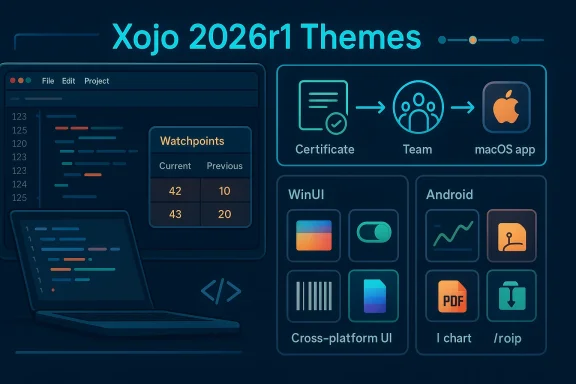
The most visible headline is debugger support for watchpoints, which complements the existing breakpoint-and-inspect workflow. Xojo’s documentation already describes the debugger as the place where developers step through code, inspect variables, and pause execution when needed, but watchpoints raise the bar by making state changes themselves first-class debugging events. That is a meaningful advance for chasing subtle logic errors, especially in code that mutates data indirectly through properties, collections, or UI callbacks.
The second major theme is macOS app signing. Xojo has long documented the need to provide a Developer ID, set up signing, and handle App Store publishing or notarization workflows, but 2026r1 makes that process more approachable with a new Team-based Developer ID field and improved handling of certificates and provisioning profiles. In practice, that should reduce the number of signing failures caused by certificate confusion, inconsistent team selection, or build settings that drift between debug and release.
The other big story is breadth. Xojo 2026r1 expands WinUI support, adds new web controls, and gives Android developers a richer toolkit with charting, color picking, PDF viewing, and file compression support. That kind of breadth is not glamorous, but it is often what makes a release valuable in day-to-day production work. The company is signaling that Xojo is no longer content to merely support these targets; it wants each one to feel usable, native, and worth the development effort. (documentation.xojo.com)
That context matters because Xojo’s user base is unusual. It includes hobbyists, educators, independent developers, and professional teams that need to ship desktop, mobile, and web software without committing to a full stack of separate frameworks. For those users, platform polish is not a luxury; it is the whole value proposition. If macOS signing is clumsy, Windows controls feel bolted on, or Android lacks basic utilities, the “single language” advantage quickly loses appeal.
The release also lands after a period in which Xojo has been visibly refining its IDE experience. Jade, the built-in AI assistant introduced in 2025r3, was a major shift in how users interact with the tool. By 2026r1, Xojo is not just adding more AI polish; it is reducing token usage and improving response behavior, suggesting the company sees AI assistance as a practical productivity layer rather than a marketing badge. That is a subtle but important distinction.
The company’s own documentation shows how much of the macOS workflow still revolves around signing details, certificates, teams, and notarization. That complexity is manageable for experienced developers, but it is a trap for newcomers and a recurring time sink for everyone else. Simplifying it is not flashy, but it is exactly the kind of improvement that can save hours during release week.
And because Xojo is used across desktop, web, and mobile targets, small platform improvements compound quickly. A new control in web apps, a better WinUI mapping in Windows apps, or a more capable Android PDF viewer can remove the need for custom workarounds that otherwise fragment a codebase. That is how a release like this becomes strategically important. (documentation.xojo.com)
This matters because many logic bugs are not “line 42” problems. They are state-propagation problems, where an object is altered several calls away from where the symptom appears. A watchpoint can catch that change at the moment it happens, which is a big deal in event-driven code, reactive UI flows, or data structures mutated by helper methods. In that sense, Xojo is moving its debugger closer to the kind of workflow seasoned developers expect from more mature toolchains.
A few practical scenarios stand out:
The new previous-value display is also a smart design choice. It turns the watch list into a lightweight audit trail rather than a static snapshot, which helps developers understand not just that something changed, but how it changed. That’s the kind of refinement that sounds small until you are deep in a regression hunt and every extra clue matters. (documentation.xojo.com)
It also pushes Xojo closer to the debugging expectations set by larger IDE ecosystems. Developers who have used watch expressions, data breakpoints, or watch-style workflows elsewhere will recognize the value immediately. The release does not attempt to mimic every feature of heavyweight platforms, but it does close an important gap.
There is still a caveat: watchpoints can be noisy if used indiscriminately. In a large codebase, too many data triggers can overwhelm the debugger and distract rather than clarify. That is why the added comparison options and current-versus-previous display matter; they give developers a better way to narrow the signal. Used well, watchpoints can transform debugging. Used carelessly, they can become another source of clutter. (documentation.xojo.com)
Xojo 2026r1 simplifies this with a new Team-based Developer ID field and improved detection of available teams and signing options. The release notes also mention better handling of entitlements and provisioning profiles, including more reliable application to builds beyond direct distribution and improved behavior when running or debugging sandboxed macOS apps from the IDE. That is a useful quality-of-life improvement because debug builds are often where signing friction first appears. (documentation.xojo.com)
The new process also aligns better with the mental model developers already use in iOS-style signing workflows, which Xojo explicitly references in the announcement. A more consistent certificate flow across Apple targets should lower cognitive overhead for teams that ship both desktop and mobile apps. When tooling matches expectation, the entire release process feels less brittle. (documentation.xojo.com)
Xojo also adds the com.apple.security.get-task-allow entitlement by default to macOS apps run or debugged from the IDE, which helps tools like Instruments attach to inspect leaks and other runtime issues. That is a very developer-friendly move, because it improves the utility of the debug build rather than treating it as a disposable artifact. For performance and memory investigations, that is real value. (documentation.xojo.com)
There is also a trust angle here. Signing and notarization are not just bureaucracy; they are part of the end-user security story on macOS. A better signing workflow should increase the odds that teams do the right thing consistently instead of postponing or improvising. That may sound minor, but security hygiene usually fails in the spaces where tooling is clumsy.
The main limitation is that simplification does not eliminate platform policy. Developers still need valid certificates, correct account setup, and a clear understanding of distribution intent. The IDE can guide the process, but it cannot replace the Apple side of the workflow. That remains true regardless of how polished the Xojo interface becomes.
The practical effect is simple: developers get more of the standard UI building blocks they need without having to fall back to custom composites or older control patterns. DesktopTabPanel matters because tabbed layouts are common in configuration, administration, and productivity software. DesktopGroupBox matters because it remains a staple for organizing forms and settings panes. (documentation.xojo.com)
There are also implications for maintenance. When more standard controls are available through the platform’s modern UI stack, developers spend less time compensating for styling gaps or event mismatches. That reduces the number of one-off code paths that creep into mature applications. Less custom glue is usually a good sign. (documentation.xojo.com)
Xojo’s release notes also mention that WinUI controls now support contextual-menu construction and that the DesktopXAMLContainer gained storyboard-related controls. Those are not banner features, but they reinforce the idea that the Windows side of the framework is becoming more capable and less experimental. The result is a more credible Windows story overall. (documentation.xojo.com)
This also strengthens the case for desktop apps that need a consistent cross-platform codebase but cannot sacrifice a believable Windows presence. In sectors like business tools, internal dashboards, and field utilities, Windows polish is not optional. It is often the difference between “usable” and “not seriously considered.” (documentation.xojo.com)
The risk, of course, is that partial control support can create expectations faster than the framework can meet them. Developers may assume one mapped control implies a complete modern Windows stack, which is rarely how these transitions work. Xojo needs to keep shipping at this pace to ensure the promise does not outrun the implementation. (documentation.xojo.com)
These additions may sound modest compared with a platform rewrite, but for web developers they cover everyday UI needs that often determine whether a framework feels product-ready. A color picker is useful for content tools, design systems, branding utilities, and internal admin panels. A switch control improves forms and settings screens. Barcode support opens the door to inventory, logistics, and scanning-style workflows. (documentation.xojo.com)
Xojo also defaults new projects to more aggressive event batching and lazy-load behavior for web sessions. That suggests a continued focus on performance and network efficiency, not just UI surface area. In practice, those defaults can reduce chatter between browser and server, which is exactly the kind of invisible optimization web developers appreciate once apps start scaling. (documentation.xojo.com)
There is a nice continuity here with earlier Xojo web improvements. The 2025r1 web release emphasized drag-and-drop support and broader ListBox capabilities, while 2026r1 fills in more day-to-day controls and infrastructure polish. That pattern suggests the company is growing the web target in layers rather than trying to leap all at once.
For smaller teams, the gains are even more straightforward. More controls mean faster prototyping, fewer workaround hours, and less code to keep synchronized between the designer and runtime. That is the kind of unglamorous efficiency that often decides whether a project ships. (documentation.xojo.com)
The main question is how deeply these controls integrate with the rest of the framework. A control is useful only if its events, styling, and deployment behavior feel coherent in production. The release notes suggest strong foundations, but the real test will be how developers use them across complex apps. (documentation.xojo.com)
The importance of these additions is easy to underestimate. Android app development often lives or dies on whether a framework includes standard mobile components without forcing developers to implement them from scratch. A color picker is a common UX feature. PDF viewing is critical for document workflows. Charting is essential for analytics and reporting. Compression support is just plain useful. (documentation.xojo.com)
The addition of Zip and Unzip support via FolderItem is another practical win. Mobile apps routinely need to package attachments, export logs, or import archives, and compression support makes those workflows much easier to implement cleanly. It is the sort of feature that does not make a marketing splash but quietly expands what the platform can do. (documentation.xojo.com)
The broader implication is that Xojo Android is moving beyond “it compiles” territory and toward “it can support ordinary app requirements with less custom code.” That is a major distinction. A framework becomes attractive on mobile only when it can cover the boring-but-essential features businesses actually need.
This is where the retrospective value of Xojo’s Android work becomes visible. The framework has been improving incrementally over the last few releases, and 2026r1 continues that trajectory. Rather than chasing giant platform leaps, Xojo appears to be filling in the missing pieces that matter for real app delivery. That is a healthier strategy than it may first appear.
Still, Android remains a demanding platform. Device fragmentation, vendor customizations, and evolving OS behaviors mean that support breadth must be matched by testing discipline. Xojo can add controls, but teams will still need to validate performance and visual consistency across actual devices.
Those changes are significant because AI features in developer tools can quickly become noisy, expensive, or annoying if they do not respect workflow. Showing the response immediately is a better interaction model. Compaction matters because it reduces the risk that a long thread becomes sluggish or wasteful. Updating the default model suggests Xojo is trying to keep the assistant current without forcing users to micromanage it. (documentation.xojo.com)
There is also a cost-management angle that deserves attention. Lower token usage and API costs matter if AI assistance is to be available regularly instead of sparingly. In developer tooling, cost controls can be the difference between a feature that is used daily and one that is politely ignored. That economic reality matters. (documentation.xojo.com)
The release also includes a fix for a crash when asking Jade questions while offline, which is the sort of mundane resilience issue that separates useful tools from fragile ones. It is easy to add an assistant; it is harder to make it behave gracefully when the network or response flow goes sideways. (documentation.xojo.com)
That could help retain existing users who might otherwise split work across multiple tools. It could also make onboarding easier for new developers who want one environment that covers the whole project lifecycle. The challenge is keeping that convenience from turning into complexity.
For now, Jade feels like the right kind of incremental AI story: useful, restrained, and tied to concrete workflow gains. It does not promise to write your application for you, and that restraint may be its greatest strength. (documentation.xojo.com)
The release also improves macOS app workflows around entitlements, App Store confirmation, and debugging attachment, while refining Windows behavior and fixing several web and Android issues. That wide spread suggests the company is doing the unglamorous housekeeping that keeps a multi-target IDE viable. Without that kind of work, features accumulate faster than the product matures. (documentation.xojo.com)
That kind of polish often matters more to professionals than to casual observers. Professionals live with the seams between features, and those seams are where time gets lost. If Xojo can keep shrinking those seams, it strengthens the argument that a single cross-platform tool can genuinely support serious work.
It also helps explain the release cadence. A platform like Xojo does not win by one giant breakthrough alone. It wins by consistently making the product less annoying to use. That may sound modest, but it is exactly how enduring developer tools earn trust.
The most important thing to watch next is whether these improvements translate into faster shipping for real teams. If watchpoints shorten debugging cycles, if macOS signing reduces release friction, and if the new web and Android controls prevent detours into custom code, then 2026r1 will prove to be more than a maintenance release with a few marquee features. It will have changed the economics of using Xojo day to day.
Source: The Manila Times Xojo 2026r1 Delivers Enhanced Debugging, Simplified macOS Signing Experience, More Controls for Windows, Web, and Android
 Overview
Xojo 2026r1 was released on March 31, 2026, and the company frames it as a feature-focused step forward rather than a sweeping redesign. The official release notes list 124 bugs fixed and 56 features added, which is a healthy ratio for a release that also touches IDE workflow, runtime behavior, and platform-specific polish. That balance matters because cross-platform development tools are only as strong as their weakest target, and Xojo has spent the last several releases filling in those weak spots. (documentation.xojo.com)The most visible headline is debugger support for watchpoints, which complements the existing breakpoint-and-inspect workflow. Xojo’s documentation already describes the debugger as the place where developers step through code, inspect variables, and pause execution when needed, but watchpoints raise the bar by making state changes themselves first-class debugging events. That is a meaningful advance for chasing subtle logic errors, especially in code that mutates data indirectly through properties, collections, or UI callbacks.
The second major theme is macOS app signing. Xojo has long documented the need to provide a Developer ID, set up signing, and handle App Store publishing or notarization workflows, but 2026r1 makes that process more approachable with a new Team-based Developer ID field and improved handling of certificates and provisioning profiles. In practice, that should reduce the number of signing failures caused by certificate confusion, inconsistent team selection, or build settings that drift between debug and release.
The other big story is breadth. Xojo 2026r1 expands WinUI support, adds new web controls, and gives Android developers a richer toolkit with charting, color picking, PDF viewing, and file compression support. That kind of breadth is not glamorous, but it is often what makes a release valuable in day-to-day production work. The company is signaling that Xojo is no longer content to merely support these targets; it wants each one to feel usable, native, and worth the development effort. (documentation.xojo.com)
Background
Xojo has always sold itself as a way to build native applications for multiple platforms from a single language and IDE, and that pitch becomes more compelling when the runtime is modern enough to feel platform-aware rather than generically cross-platform. In recent releases, the company has pushed harder into current platform generations, including macOS Tahoe 26, iOS 26, WinUI, and Android growth. The 2025r3 and 2025r3.1 releases laid a foundation by adding Jade, Libraries, expanded WinUI-backed controls, and Android PDF support, giving 2026r1 a stronger baseline to build on.That context matters because Xojo’s user base is unusual. It includes hobbyists, educators, independent developers, and professional teams that need to ship desktop, mobile, and web software without committing to a full stack of separate frameworks. For those users, platform polish is not a luxury; it is the whole value proposition. If macOS signing is clumsy, Windows controls feel bolted on, or Android lacks basic utilities, the “single language” advantage quickly loses appeal.
The release also lands after a period in which Xojo has been visibly refining its IDE experience. Jade, the built-in AI assistant introduced in 2025r3, was a major shift in how users interact with the tool. By 2026r1, Xojo is not just adding more AI polish; it is reducing token usage and improving response behavior, suggesting the company sees AI assistance as a practical productivity layer rather than a marketing badge. That is a subtle but important distinction.
Why this release matters now
The cross-platform market has become less forgiving. Developers expect native behavior on each platform, but they also expect the toolchain to keep pace with Apple, Microsoft, and Google changes without constant manual intervention. Xojo 2026r1 reads like a release built to address that pressure directly, with practical gains in build reliability, debugging precision, and target-specific controls. (documentation.xojo.com)The company’s own documentation shows how much of the macOS workflow still revolves around signing details, certificates, teams, and notarization. That complexity is manageable for experienced developers, but it is a trap for newcomers and a recurring time sink for everyone else. Simplifying it is not flashy, but it is exactly the kind of improvement that can save hours during release week.
And because Xojo is used across desktop, web, and mobile targets, small platform improvements compound quickly. A new control in web apps, a better WinUI mapping in Windows apps, or a more capable Android PDF viewer can remove the need for custom workarounds that otherwise fragment a codebase. That is how a release like this becomes strategically important. (documentation.xojo.com)
Debugging Gets Smarter
The most technically interesting change in Xojo 2026r1 is watchpoints. Traditional breakpoints stop execution at a known line of code; watchpoints stop when a value changes or matches a condition, which is much more powerful when the bug is not tied to a single obvious instruction. The release notes also add comparison options such as greater than or equal to and less than or equal to, and the watchpoint list now shows both the current and previous value for easier comparison. (documentation.xojo.com)This matters because many logic bugs are not “line 42” problems. They are state-propagation problems, where an object is altered several calls away from where the symptom appears. A watchpoint can catch that change at the moment it happens, which is a big deal in event-driven code, reactive UI flows, or data structures mutated by helper methods. In that sense, Xojo is moving its debugger closer to the kind of workflow seasoned developers expect from more mature toolchains.
Watchpoints in practice
Xojo’s existing debugger already supports pausing, stepping, inspecting variables, and using conditional break logic. The new watchpoints complement those tools by shifting attention from execution flow to data flow. That is especially useful in cross-platform apps where the same bug may surface differently on macOS, Windows, web, or Android.A few practical scenarios stand out:
- Catching when a property is unexpectedly overwritten.
- Detecting a value drift in a long-running background task.
- Tracing when a collection element changes during a UI update.
- Isolating hidden mutations in model-view code.
- Confirming whether a bug happens before or after a specific callback.
The new previous-value display is also a smart design choice. It turns the watch list into a lightweight audit trail rather than a static snapshot, which helps developers understand not just that something changed, but how it changed. That’s the kind of refinement that sounds small until you are deep in a regression hunt and every extra clue matters. (documentation.xojo.com)
Why this is a big deal for teams
For solo developers, watchpoints mean faster diagnosis. For teams, they also mean better communication around defects, because a bug report can be anchored to an observed change in application state rather than a vague “it broke somewhere” description. That can make code review and triage more productive.It also pushes Xojo closer to the debugging expectations set by larger IDE ecosystems. Developers who have used watch expressions, data breakpoints, or watch-style workflows elsewhere will recognize the value immediately. The release does not attempt to mimic every feature of heavyweight platforms, but it does close an important gap.
There is still a caveat: watchpoints can be noisy if used indiscriminately. In a large codebase, too many data triggers can overwhelm the debugger and distract rather than clarify. That is why the added comparison options and current-versus-previous display matter; they give developers a better way to narrow the signal. Used well, watchpoints can transform debugging. Used carelessly, they can become another source of clutter. (documentation.xojo.com)
macOS Signing Becomes Less Hostile
The second headline feature is Xojo’s improved macOS app code signing experience. Apple’s signing and notarization requirements have long forced developers to navigate certificate types, team IDs, entitlements, provisioning profiles, and build settings before their app ever reaches users. Xojo’s documentation already lays out that workflow in detail, including the need to paste a certificate ID into the Developer ID field and, for distribution scenarios, handle Team ID and publishing settings.Xojo 2026r1 simplifies this with a new Team-based Developer ID field and improved detection of available teams and signing options. The release notes also mention better handling of entitlements and provisioning profiles, including more reliable application to builds beyond direct distribution and improved behavior when running or debugging sandboxed macOS apps from the IDE. That is a useful quality-of-life improvement because debug builds are often where signing friction first appears. (documentation.xojo.com)
What changed and why it matters
Apple’s requirements are not going away. If anything, they have become more entangled as platform security tightened over the years. Xojo is not eliminating the underlying complexity, but it is making the IDE less likely to confuse newcomers or force experienced developers to manually correct avoidable settings. That is very different from merely adding more help text.The new process also aligns better with the mental model developers already use in iOS-style signing workflows, which Xojo explicitly references in the announcement. A more consistent certificate flow across Apple targets should lower cognitive overhead for teams that ship both desktop and mobile apps. When tooling matches expectation, the entire release process feels less brittle. (documentation.xojo.com)
Xojo also adds the com.apple.security.get-task-allow entitlement by default to macOS apps run or debugged from the IDE, which helps tools like Instruments attach to inspect leaks and other runtime issues. That is a very developer-friendly move, because it improves the utility of the debug build rather than treating it as a disposable artifact. For performance and memory investigations, that is real value. (documentation.xojo.com)
Enterprise and independent developer impact
For independent developers, signing improvements save time and reduce frustration. They make the route from “build succeeded” to “testable and distributable” shorter, which matters when you are wearing every hat in the release process. For enterprise teams, the payoff is more systemic: fewer build pipeline interruptions, fewer certificate mistakes, and less institutional knowledge required to keep macOS deployment working. (documentation.xojo.com)There is also a trust angle here. Signing and notarization are not just bureaucracy; they are part of the end-user security story on macOS. A better signing workflow should increase the odds that teams do the right thing consistently instead of postponing or improvising. That may sound minor, but security hygiene usually fails in the spaces where tooling is clumsy.
The main limitation is that simplification does not eliminate platform policy. Developers still need valid certificates, correct account setup, and a clear understanding of distribution intent. The IDE can guide the process, but it cannot replace the Apple side of the workflow. That remains true regardless of how polished the Xojo interface becomes.
Windows Gets More Native
On Windows, Xojo 2026r1 extends WinUI support to include DesktopTabPanel and DesktopGroupBox. That is important because WinUI is Xojo’s path toward a more native Windows 10/11 experience, and every additional mapped control reduces the sense that apps are wearing a compatibility layer. The release notes also mention WinUI-related fixes for theming and control behavior, indicating that the effort is not just about feature coverage but visual consistency too. (documentation.xojo.com)The practical effect is simple: developers get more of the standard UI building blocks they need without having to fall back to custom composites or older control patterns. DesktopTabPanel matters because tabbed layouts are common in configuration, administration, and productivity software. DesktopGroupBox matters because it remains a staple for organizing forms and settings panes. (documentation.xojo.com)
Native feel is more than skin deep
A lot of cross-platform frameworks promise native appearance but deliver uneven behavior. Xojo’s approach here is to gradually map more of its desktop abstractions to current Windows UI tech while preserving the project model developers already know. That is slower than a total rewrite, but it is much more realistic for long-term adoption. (documentation.xojo.com)There are also implications for maintenance. When more standard controls are available through the platform’s modern UI stack, developers spend less time compensating for styling gaps or event mismatches. That reduces the number of one-off code paths that creep into mature applications. Less custom glue is usually a good sign. (documentation.xojo.com)
Xojo’s release notes also mention that WinUI controls now support contextual-menu construction and that the DesktopXAMLContainer gained storyboard-related controls. Those are not banner features, but they reinforce the idea that the Windows side of the framework is becoming more capable and less experimental. The result is a more credible Windows story overall. (documentation.xojo.com)
Why Windows developers should care
Windows remains the most operationally diverse desktop environment in mainstream software, and UI inconsistency is often where cross-platform tools lose credibility. If a framework can do ordinary controls well, developers are more willing to trust it for larger applications. Xojo 2026r1 moves in that direction. (documentation.xojo.com)This also strengthens the case for desktop apps that need a consistent cross-platform codebase but cannot sacrifice a believable Windows presence. In sectors like business tools, internal dashboards, and field utilities, Windows polish is not optional. It is often the difference between “usable” and “not seriously considered.” (documentation.xojo.com)
The risk, of course, is that partial control support can create expectations faster than the framework can meet them. Developers may assume one mapped control implies a complete modern Windows stack, which is rarely how these transitions work. Xojo needs to keep shipping at this pace to ensure the promise does not outrun the implementation. (documentation.xojo.com)
Web Apps Gain Practical UI Depth
Xojo 2026r1 brings a trio of new web controls: WebColorPicker, WebSwitch, and WebBarcode. The release notes confirm that WebColorPicker is a new non-visual control similar to DesktopColorPicker, WebSwitch is now available for web apps, and barcode reading support has also been added for web projects. The web stack also moves to Bootstrap v5.3.8, continuing Xojo’s effort to keep the web framework current. (documentation.xojo.com)These additions may sound modest compared with a platform rewrite, but for web developers they cover everyday UI needs that often determine whether a framework feels product-ready. A color picker is useful for content tools, design systems, branding utilities, and internal admin panels. A switch control improves forms and settings screens. Barcode support opens the door to inventory, logistics, and scanning-style workflows. (documentation.xojo.com)
Bootstrap and TypeScript updates
The framework also ships with Bootstrap 5.3.8 and TypeScript 5.9.3, which should help Xojo Web stay aligned with contemporary front-end expectations. Keeping those dependencies current matters because web applications are the most exposed to ecosystem churn. Even a “low-code” or IDE-managed web stack must still track the broader browser and JavaScript landscape. (documentation.xojo.com)Xojo also defaults new projects to more aggressive event batching and lazy-load behavior for web sessions. That suggests a continued focus on performance and network efficiency, not just UI surface area. In practice, those defaults can reduce chatter between browser and server, which is exactly the kind of invisible optimization web developers appreciate once apps start scaling. (documentation.xojo.com)
There is a nice continuity here with earlier Xojo web improvements. The 2025r1 web release emphasized drag-and-drop support and broader ListBox capabilities, while 2026r1 fills in more day-to-day controls and infrastructure polish. That pattern suggests the company is growing the web target in layers rather than trying to leap all at once.
How this affects real-world projects
For enterprise internal tools, these controls reduce the need for custom JavaScript bridges or external widget libraries. That matters because the moment you start stitching in external UI dependencies, you increase maintenance burden and reduce portability. Xojo’s web story is stronger when common app features are available natively. (documentation.xojo.com)For smaller teams, the gains are even more straightforward. More controls mean faster prototyping, fewer workaround hours, and less code to keep synchronized between the designer and runtime. That is the kind of unglamorous efficiency that often decides whether a project ships. (documentation.xojo.com)
The main question is how deeply these controls integrate with the rest of the framework. A control is useful only if its events, styling, and deployment behavior feel coherent in production. The release notes suggest strong foundations, but the real test will be how developers use them across complex apps. (documentation.xojo.com)
Android Finally Feels More Complete
Android is one of the most interesting parts of Xojo’s recent evolution, and 2026r1 adds several meaningful pieces: MobileChart, MobileColorPicker, MobilePDFViewer, and FolderItem.Zip/Unzip. The release notes also include other Android compiler and runtime fixes, which suggests the target is continuing to stabilize rather than merely accumulating features. (documentation.xojo.com)The importance of these additions is easy to underestimate. Android app development often lives or dies on whether a framework includes standard mobile components without forcing developers to implement them from scratch. A color picker is a common UX feature. PDF viewing is critical for document workflows. Charting is essential for analytics and reporting. Compression support is just plain useful. (documentation.xojo.com)
PDF, charts, and file handling
MobilePDFViewer is especially noteworthy because it directly addresses a recurring requirement in business and productivity apps. If users need to preview invoices, tickets, manuals, or reports on-device, PDF handling cannot be an afterthought. Likewise, MobileChart helps Xojo apps present data visually without exporting to external libraries or custom canvas work. (documentation.xojo.com)The addition of Zip and Unzip support via FolderItem is another practical win. Mobile apps routinely need to package attachments, export logs, or import archives, and compression support makes those workflows much easier to implement cleanly. It is the sort of feature that does not make a marketing splash but quietly expands what the platform can do. (documentation.xojo.com)
The broader implication is that Xojo Android is moving beyond “it compiles” territory and toward “it can support ordinary app requirements with less custom code.” That is a major distinction. A framework becomes attractive on mobile only when it can cover the boring-but-essential features businesses actually need.
Stability and developer confidence
The release notes show several Android bug fixes involving color methods, iterator casting, array resizing, and control subclassing. That matters because mobile targets often fail developers not on the obvious features, but on the corner cases that make builds flaky or runtime behavior inconsistent. Each of those fixes makes the Android target a little more trustworthy. (documentation.xojo.com)This is where the retrospective value of Xojo’s Android work becomes visible. The framework has been improving incrementally over the last few releases, and 2026r1 continues that trajectory. Rather than chasing giant platform leaps, Xojo appears to be filling in the missing pieces that matter for real app delivery. That is a healthier strategy than it may first appear.
Still, Android remains a demanding platform. Device fragmentation, vendor customizations, and evolving OS behaviors mean that support breadth must be matched by testing discipline. Xojo can add controls, but teams will still need to validate performance and visual consistency across actual devices.
Jade Gets a More Mature Workflow
Xojo’s built-in AI assistant, Jade, introduced in 2025r3, continues to evolve in 2026r1. The release notes say response output is now shown at the start rather than after scrolling to the end, long conversations are compacted to reduce token usage and API costs, and the default model is updated to Claude 4.6 from 4.0. That is a sign Xojo is treating AI assistance as an operational feature, not a novelty. (documentation.xojo.com)Those changes are significant because AI features in developer tools can quickly become noisy, expensive, or annoying if they do not respect workflow. Showing the response immediately is a better interaction model. Compaction matters because it reduces the risk that a long thread becomes sluggish or wasteful. Updating the default model suggests Xojo is trying to keep the assistant current without forcing users to micromanage it. (documentation.xojo.com)
AI assistance as a utility layer
Jade’s improvements are not as headline-friendly as watchpoints or WinUI support, but they indicate a broader philosophy. Xojo seems to want Jade to help users in the background while the core IDE continues to be a traditional, code-first environment. That hybrid approach may be more sustainable than replacing the editor experience with an AI-centric workflow.There is also a cost-management angle that deserves attention. Lower token usage and API costs matter if AI assistance is to be available regularly instead of sparingly. In developer tooling, cost controls can be the difference between a feature that is used daily and one that is politely ignored. That economic reality matters. (documentation.xojo.com)
The release also includes a fix for a crash when asking Jade questions while offline, which is the sort of mundane resilience issue that separates useful tools from fragile ones. It is easy to add an assistant; it is harder to make it behave gracefully when the network or response flow goes sideways. (documentation.xojo.com)
What this says about Xojo’s roadmap
Xojo has been steadily broadening the IDE’s role from code editor to full development environment. Libraries, AI assistance, platform-aware build tools, and richer debugging all point in that direction. The company is not trying to be a general-purpose IDE giant, but it is clearly aiming to make Xojo itself feel more complete.That could help retain existing users who might otherwise split work across multiple tools. It could also make onboarding easier for new developers who want one environment that covers the whole project lifecycle. The challenge is keeping that convenience from turning into complexity.
For now, Jade feels like the right kind of incremental AI story: useful, restrained, and tied to concrete workflow gains. It does not promise to write your application for you, and that restraint may be its greatest strength. (documentation.xojo.com)
Other IDE and Framework Refinements
Beyond the marquee features, Xojo 2026r1 includes several smaller but still meaningful IDE and framework adjustments. The release notes mention improved handling of custom control previews, layout-editor drawing support, and clearer exposure rules for library APIs. These are the kinds of changes that make the environment more predictable for advanced users and framework authors. (documentation.xojo.com)The release also improves macOS app workflows around entitlements, App Store confirmation, and debugging attachment, while refining Windows behavior and fixing several web and Android issues. That wide spread suggests the company is doing the unglamorous housekeeping that keeps a multi-target IDE viable. Without that kind of work, features accumulate faster than the product matures. (documentation.xojo.com)
Platform polish as product strategy
There is a pattern here: Xojo is investing in friction reduction. Watchpoints reduce debugging friction. Improved signing reduces deployment friction. New controls reduce UI friction. Jade compaction reduces interaction friction. In aggregate, those changes create a smoother experience than any single feature can on its own. (documentation.xojo.com)That kind of polish often matters more to professionals than to casual observers. Professionals live with the seams between features, and those seams are where time gets lost. If Xojo can keep shrinking those seams, it strengthens the argument that a single cross-platform tool can genuinely support serious work.
It also helps explain the release cadence. A platform like Xojo does not win by one giant breakthrough alone. It wins by consistently making the product less annoying to use. That may sound modest, but it is exactly how enduring developer tools earn trust.
A few details worth noting
- The database schema viewer now shows correct decimal precision.
- The IDE improves readability of debugger highlighting in dark mode.
- Libraries are now properly saved into XML projects.
- Web session defaults now favor batched event delivery and lazy-loaded dependencies.
- Windows WinUI controls receive theming fixes for light and dark mode switching. (documentation.xojo.com)
Strengths and Opportunities
Xojo 2026r1’s strength is that it improves the places where developers spend the most time: debugging, signing, UI building, and platform-specific polishing. It is also a release that quietly expands the practical scope of each target, which should help teams do more with less custom code.- Watchpoints make debugging more precise and more informative.
- macOS signing is less intimidating and better aligned with real certificate workflows.
- WinUI support for DesktopTabPanel and DesktopGroupBox improves Windows credibility.
- Web controls like WebColorPicker, WebSwitch, and WebBarcode fill common UI gaps.
- Android additions make mobile apps more capable without extra libraries.
- Jade improvements reduce friction in AI-assisted development.
- Platform fixes reinforce trust in release stability.
- Default web session tuning may improve performance out of the box.
- Debugger usability gets better with clearer value comparisons.
- Broader control coverage reduces the need for third-party dependencies. (documentation.xojo.com)
Risks and Concerns
Despite the strong feature set, Xojo 2026r1 still inherits the risks that come with any cross-platform abstraction layer. The release solves many problems, but it also highlights how much complexity still sits beneath the surface.- Watchpoints can become noisy if developers overuse them.
- macOS signing remains Apple-dependent and still requires valid certificates and account setup.
- WinUI support is expanding, not finished, so expectations must stay realistic.
- Android coverage still needs real-device validation across fragmented hardware.
- AI features can create cost and trust concerns if users do not understand token use.
- New controls may require ecosystem updates before third-party libraries fully catch up.
- Cross-platform parity remains uneven by design, so one target may advance faster than another.
- Feature growth can outpace documentation if adoption accelerates faster than examples and tutorials.
- Smaller bug fixes do not eliminate system-level edge cases in mature projects.
- Platform policy changes from Apple, Microsoft, or Google could quickly alter workflow assumptions.
Looking Ahead
Xojo 2026r1 suggests the company is building toward a more capable, more polished, and more professionally credible platform rather than chasing novelty. The release strengthens the core promise of Xojo: build once, deploy broadly, and spend less time fighting the toolchain. That promise only works if each target keeps getting better in the details, and this release is a clear step in that direction. (documentation.xojo.com)The most important thing to watch next is whether these improvements translate into faster shipping for real teams. If watchpoints shorten debugging cycles, if macOS signing reduces release friction, and if the new web and Android controls prevent detours into custom code, then 2026r1 will prove to be more than a maintenance release with a few marquee features. It will have changed the economics of using Xojo day to day.
- More WinUI control coverage beyond TabPanel and GroupBox.
- Additional Android UI controls and media/document capabilities.
- Continued macOS signing and notarization simplification.
- Further Jade refinements around reliability and workflow integration.
- More web control parity with desktop UI expectations. (documentation.xojo.com)
Source: The Manila Times Xojo 2026r1 Delivers Enhanced Debugging, Simplified macOS Signing Experience, More Controls for Windows, Web, and Android
Last edited:
