📎 AI Summary:
The thread discusses a helpful Windows 8 app discovered by Drew, which serves as a handy cheat sheet for keyboard shortcuts and other guidance, enhancing user productivity and understanding of Windows 8. Jimbo22 confirms they've been using the app and finds it effective, though he mentions the color scheme isn't visually appealing. Drew emphasizes the app's usefulness compared to printable lists and encourages others to explore similar educational apps available in the Windows Store to improve their Windows 8 experience. Overall, the conversation is positive, highlighting the app's practicality and the value of Microsoft's instructional resources.
Thread Author
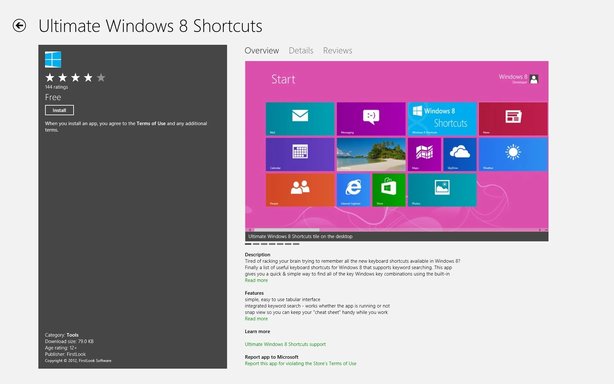
I just inadvertently found this today. W/ Snap you can run it right beside your desktop. Discover, learn & be glad to know all the Win8 Keyboard Commands (shortcuts) & w/ this right beside you, as you are doing things, it's your cheat sheet to getting them memorized.

Link Removed

And, indeed, if you look in Store there are several APPs offering insight and instruction, guidance to enlighten you as the use, navigation, understanding, productivity and enjoyment of Windows 8. Do yourself a favour and > Store > Charms > Search and type in Windows 8. Seriously, check it out... MS has put helpful stuff, APPs, there for you about operating Windows 8.

Cheers,

Drew

Link Removed


Attachments

  • Screenshot (25).webp
    Screenshot (25).webp
    86.1 KB · Views: 505
    Microsoft Defender: No threats detected Scan details
  • Win8Logo.webp
    Win8Logo.webp
    1.1 KB · Views: 522
    Microsoft Defender: No threats detected Scan details
Last edited by a moderator:

Jimbo22

Essential Member
Member details
Joined
Aug 27, 2008
Messages
5,036
I've all ready found that app and have been using it for some time now....very nice little app. All though the colors are not very pleasing to the eye for me but it does get the job done.
 

Drew

Banned
Member details
Joined
Mar 25, 2006
Messages
3,560
Thread Author #3
Jim, I know some people were printing the list that is in this forum that I compiled months ago & keeping it in front of them... this likely works even better than that cus it can be right on the screen beside you. (beside the desktop, that is). You had found it (& me, too) but, there may be people who did not know this worthwhile material was or is there for them. ... and now they do, too 🙂

But, I also, wanted to bring to people's notice, as well, the other educational APPs that MS has there that can quickly help heighten one's comfort level for those who are new to Windows 8.

Cheers,
Drew
Link Removed
 

Attachments

  • Win8Logo.webp
    Win8Logo.webp
    1.1 KB · Views: 480
    Microsoft Defender: No threats detected Scan details
Last edited by a moderator: