📎 AI Summary:
The thread discusses a user experiencing BSOD errors related to ntoskrnl.exe, with initial suggestions pointing towards potential hardware issues such as CPU overheating, voltage problems, or overclocking. The responder advises testing hardware stability, updating drivers, checking system firmware, and ensuring proper ventilation, while also suggesting disabling overclocking to see if the problem persists. Overall, the troubleshooting emphasizes ruling out hardware faults, driver incompatibilities, and system overheating as causes for the recurring BSODs.

oridn

New Member
Member details
Joined
Feb 2, 2014
Messages
15
Thread Author #1
Recently I get error messages linked with the files ntoskrnl.exe +4 adb3c, I attached the files to your system,

I would appreciate any help,
Ori
 

Attachments

  • ori.zip
    ori.zip
    246.1 KB · Views: 378
    Microsoft Defender: No threats detected Scan details
Solution
Code:
*******************************************************************************
*                                                                             *
*                        Bugcheck Analysis                                    *
*                                                                             *
*******************************************************************************

Use !analyze -v to get detailed debugging information.

BugCheck 7F, {8, 80050033, 406f8, fffff80002ecd437}

Probably caused by : ntkrnlmp.exe ( nt!KiDoubleFaultAbort+b2 )

Followup: MachineOwner

Hi,
that's better I got to see your full driver stack this time although the above error, 7F, is caused by either hardware or incompatible...

oridn

New Member
Member details
Joined
Feb 2, 2014
Messages
15
Thread Author #21
yes
several times and several version,
and also format my computer for six times and the problem return
 

kemical

Essential Member
Member details
Joined
Aug 28, 2007
Messages
36,163
Hmm... well let's try and rule out some other possibilities. I mean your CPU is getting warm, very warm when running Prime95 but I doubt it gets that hot while your using photoshop. Try doing that. Use photoshop as normal but have the hardware monitor running also and keep an eye on the cpu temp.

Please download and run memtest86. Run for around 3-4 passes:
http://www.memtest.org/

Did you check on the SSD firmware? I posted the link in reply number 8.

.
 

oridn

New Member
Member details
Joined
Feb 2, 2014
Messages
15
Thread Author #23
yes the ssd firmware is up to date.
the the RAM is sure fine i use memtstest before and the lasb replace my memory and make test again,

can it be the Intel® Turbo Boost in the bios ?

Intel® Turbo Boost
 

kemical

Essential Member
Member details
Joined
Aug 28, 2007
Messages
36,163

oridn

New Member
Member details
Joined
Feb 2, 2014
Messages
15
Thread Author #25
Thanks for the help Kemical
maybe this is part of the pronlem, maybe not,

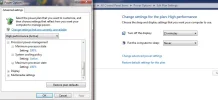
but i can use my power mangment only in high perfomances,
if ichange in one percent the system is freeeze Immediately :
 

Attachments

  • highpref.webp
    highpref.webp
    39.2 KB · Views: 361
    Microsoft Defender: No threats detected Scan details

kemical

Essential Member
Member details
Joined
Aug 28, 2007
Messages
36,163
It might be that you have some settings which need correcting in the bios. Check the bios to see if you have a setting for 'optimized default' and set the bios to that. Otherwise try setting everything to auto.