Assume I have a rather new external (Toshiba) 3TB USB harddisk.
During the last days I experienced a data loss because one of the data blocks on the hard disk seems to get damaged.
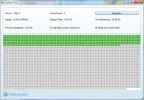
I run a surface test with one of these hardidsk management tools like Minitool Partition Wizard.
It shows exactly ONE bad block on the hard disk (see attached snapshot).
So if I backup the current stuff to another hard disk, then re-format the hard disk and finally re-transfer the data files on the hard disk in focus: Can I continue to use this hard disk without problems?
I have heard that new hard disks are smart enough to exclude such error blocks from their internal table of free available blocks.
So if I later copy some files onto it then the files will NEVER be copied to the bad block.
It will be completely invisible in the future.
Is this correct?
Thank you
Peter
During the last days I experienced a data loss because one of the data blocks on the hard disk seems to get damaged.
I run a surface test with one of these hardidsk management tools like Minitool Partition Wizard.
It shows exactly ONE bad block on the hard disk (see attached snapshot).
So if I backup the current stuff to another hard disk, then re-format the hard disk and finally re-transfer the data files on the hard disk in focus: Can I continue to use this hard disk without problems?
I have heard that new hard disks are smart enough to exclude such error blocks from their internal table of free available blocks.
So if I later copy some files onto it then the files will NEVER be copied to the bad block.
It will be completely invisible in the future.
Is this correct?
Thank you
Peter