
📎 AI Summary:
The thread discusses a user’s difficulty in removing Asus built-in optimization tools after changing the operating system on their Asus VivoBook 15. Despite formatting the disk and performing a clean OS installation, the tools persist, leading the user to seek solutions. Contributors suggest that only a complete disk format and clean install typically remove such pre-installed software, but the user reports this did not resolve the issue.

Numberman

New Member
Joined
Mar 10, 2023
Messages
18
Thread Author #1
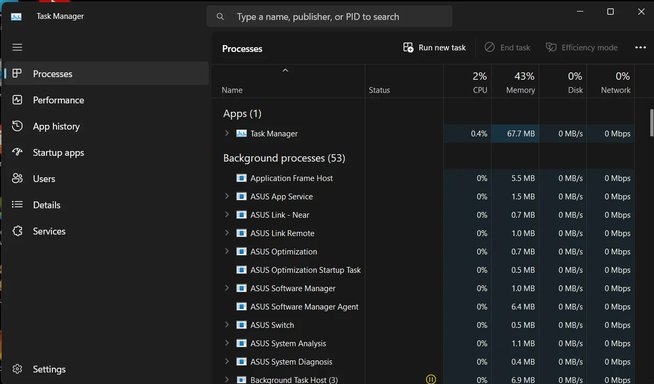
Hey hi guys, Hope you are doing well, i have asus vivobook 15 x515ea model.. i recently changed my operating system to get rid of the asus inbuilt optimization tools, but still i dont know how they got into my system after changing the os.. is there any way to remove these asus tools permanently, i attached an image of which tools is those, Thanks in advance.
 

Attachments

  • Screenshot (2).webp
    Screenshot (2).webp
    59.4 KB · Views: 8

Neemobeer

Windows Forum Team
Staff member
Joined
Jul 4, 2015
Messages
8,995
If you upgraded apps would have remained. Only with a format of the disk and clean install would you have gotten rid of them.
 

Solution

Numberman

New Member
Joined
Mar 10, 2023
Messages
18
Thread Author #6
If you upgraded apps would have remained. Only with a format of the disk and clean install would you have gotten rid of them.
I formatted the disk as well while installing the os, not just upgraded it or whatever, still it remains idk how