📎 AI Summary:
The user reports problems with their audio devices, noticing multiple "digital display audio" entries that were not present before and inaccurate status for "AMD High Definition Audio." Responders clarify that these display audio entries are related to monitor output through HDMI, which is typical when using display connections for audio. The thread concludes with a link to the motherboard's support page, providing further assistance. Overall, the discussion focuses on diagnosing display audio issues, with helpful guidance indicating the source is likely HDMI-related rather than a hardware fault.

Shadowandy123

New Member
Joined
Apr 11, 2019
Messages
2
Thread Author #1
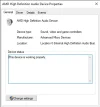
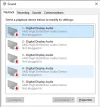
Hello I have this problem with my computer is my audio is not working and i go to my audio devices and it says my digital display audio is not working and its 5 of them which never showed before it was only one of them but anyway And it says my AMD High definition audio is working and clearly its not and after days of me crying i go into my BIOS and nothing is still not working

Here's my motherboard if needed: ASUSTeK COMPUTER INC. PRIME B360M-A 180527624303672 Rev X.0x
 

Attachments

  • Sound 4_11_2019 5_05_14 PM.webp
    Sound 4_11_2019 5_05_14 PM.webp
    23.9 KB · Views: 222
  • AMD High Definition Audio Device Properties 4_11_2019 4_57_49 PM.webp
    AMD High Definition Audio Device Properties 4_11_2019 4_57_49 PM.webp
    13.6 KB · Views: 226

Neemobeer

Windows Forum Team
Staff member
Joined
Jul 4, 2015
Messages
8,995
Those are all display audio meaning your display supports an audio output. Speaker outputs will generally show as "Speakers" with the audio device below it like this

37727
 

Neemobeer

Windows Forum Team
Staff member
Joined
Jul 4, 2015
Messages
8,995
Are you using an HDMI cable or do you have an audio cable plugged in?
 

Solution