📎 AI Summary:
The thread discusses a user experiencing an error when attempting to access or load programs, specifically receiving a "Could not access network location" message related to the C:\ Program Files folder on Windows 7. Despite attempts to fix the issue by editing the registry, disabling antivirus, and trying various solutions from a tutorial, the problem persists. The overall sentiment indicates frustration, as the user has exhausted common troubleshooting steps without resolution.

ahmet4844

New Member
Joined
Jan 19, 2019
Messages
6
Thread Author #1
when I want to load something gives the following error :

Could not access network location C: Program Files\.

I tried everything but no results. I changed regedit files,reboot pc...

my PC -> Windows 7 32 Bit Home Premium
 

Solution
1) Did you try to do whatever you did as administrator?

2) Sometimes that error is caused by the antivirus. Try to do whatever you did after temporarily disabling/uninstaling the antivirus.

livix07

Honorable Member
Joined
Feb 19, 2018
Messages
585
Is it a shared file/folder on the local network?
If yes, then try to access it by typing the IP address of the computer on which the file/folder is in the File Explorer like this:
38015
 

ahmet4844

New Member
Joined
Jan 19, 2019
Messages
6
Thread Author #3
Is it a shared file/folder on the local network?
If yes, then try to access it by typing the IP address of the computer on which the file/folder is in the File Explorer like this:
View attachment 38015
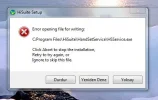
No its not. My problem is this :
 

Attachments

  • Ekran Alıntısı.webp
    Ekran Alıntısı.webp
    17.7 KB · Views: 283
Last edited by a moderator:

livix07

Honorable Member
Joined
Feb 19, 2018
Messages
585
1) Did you try to do whatever you did as administrator?

2) Sometimes that error is caused by the antivirus. Try to do whatever you did after temporarily disabling/uninstaling the antivirus.
 

Solution

ahmet4844

New Member
Joined
Jan 19, 2019
Messages
6
Thread Author #6
I m administrator,ı closed antıvırus but anything not happened. ı ha ve a same problem again