📎 AI Summary:
The thread discusses a recurring issue in Windows 11 after upgrading to version 22H2, where the user notices multiple error events (ID=1108 with specific error codes) appearing in the event viewer after each reboot. The original poster seeks a solution, citing that a clean reinstall resolves the problem but is undesirable due to data loss. Respondents suggest that many of these errors might be informational and not critical, with one advising system checks like DISM and chkdsk, but the original user remains hopeful for a less invasive fix.

Bassie

Extraordinary Member
Member details
Joined
Oct 14, 2015
Messages
58
Thread Author #1
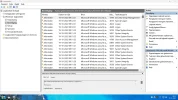
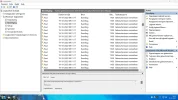
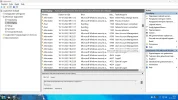
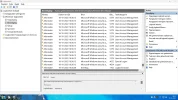
Since the upgrade from 21H2 to 22H2 , in Windows11, Im getting 20 times , ID=1108 in the eventviewer .
After each reboot they appear again , 10 times ; id=1108 , errorcode 15005 , eventid=0
and ;10 times ; id=1108 , errorcode 15003 , eventid=4688
After each other ; 15005 , 15003 , 15005, 15003 , etc.

Never seen this before , arrived with the upgrade to 22H2.
I like a clean eventviewer , Im searching for a solution , still found nothing.

Anyone has this problem also , a solution would be very welcome.................
 

Attachments

  • 1.webp
    1.webp
    226.6 KB · Views: 40
  • 3.webp
    3.webp
    220.3 KB · Views: 39
  • 4.webp
    4.webp
    194.7 KB · Views: 41
  • 5.webp
    5.webp
    217.2 KB · Views: 39
Solution
I do not. If it's causing an issue you can check your systems integrity.

  • Open 'command prompt', 'powershell' or 'windows terminal' with 'Run As Administrator'
  • Check the disk health with the following command: Chkdsk /F this will require a reboot
  • Run DISM /Online /Cleanup-Image /RestoreHealth
    • If no issues are detected your done
    • If Items are restored, reboot and repeat until no errors are listed (This process can take several repair/reboot cycles)

Neemobeer

Windows Forum Team
Staff member
Member details
Joined
Jul 4, 2015
Messages
8,995
I'll give you this piece of advice. "If it ain't broke, don't fix it". I say this because your quite literally guaranteed to always have "errors" in the event log. I added quotes because a lot of errors are really informational errors only or in other words non-halting. They are intentional soft failures
 

Bassie

Extraordinary Member
Member details
Joined
Oct 14, 2015
Messages
58
Thread Author #3
I'll give you this piece of advice. "If it ain't broke, don't fix it". I say this because your quite literally guaranteed to always have "errors" in the event log. I added quotes because a lot of errors are really informational errors only or in other words non-halting. They are intentional soft failures
Ok , so , you dont have these errors in your viewer................??
 

Neemobeer

Windows Forum Team
Staff member
Member details
Joined
Jul 4, 2015
Messages
8,995
I do not. If it's causing an issue you can check your systems integrity.

  • Open 'command prompt', 'powershell' or 'windows terminal' with 'Run As Administrator'
  • Check the disk health with the following command: Chkdsk /F this will require a reboot
  • Run DISM /Online /Cleanup-Image /RestoreHealth
    • If no issues are detected your done
    • If Items are restored, reboot and repeat until no errors are listed (This process can take several repair/reboot cycles)
 

Solution

Bassie

Extraordinary Member
Member details
Joined
Oct 14, 2015
Messages
58
Thread Author #5
Yep, so I did already , all fine , except this id=1108 in the eventviewer , 20 times after every reboot still...............
Seems to get fixed by a clean install ............goes too far for me , losing all my software , etc !
There must be another solution...........