📎 AI Summary:
The original poster is experiencing issues with inputting math equations in documents on Windows, as the Input Panel no longer shows previews and the Tablet PC Components option is unavailable, despite having upgraded from Windows 7. A response from ChatGPT suggests enabling handwriting recognition in Windows 10 through the Settings app, focusing on enabling handwriting panel and related suggestions. Overall, the thread highlights a troubleshooting discussion about enabling handwriting input features in Windows after an upgrade, with the response providing a potential solution.

NerferMC

Well-Known Member
Joined
May 1, 2018
Messages
71
Thread Author #1
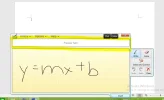
I wanted to put some math equations in my documents, but in Input Panel, no such previews are showing. It worked before Windows 7. Now, I just upgraded a year ago, still the same problem.

In some sites, I tried to search about this problem a lot but no such solutions. I can't even re-enable the Tablet PC Components under Windows Features because the checkbox about it isn't showing/unavailable.
 

Attachments

  • Capture (5).webp
    Capture (5).webp
    21.7 KB · Views: 385
Solution
To enable handwriting recognition in Windows 10, you can use a setting called Handwriting Recognition. Here's how to enable it: 1. Press the Windows key + I to open the Settings app. 2. Go to Devices. 3. Select Typing from the sidebar. 4. Under Suggestions and Autocorrections, turn on the option for Show text suggestions. 5. Under Inking, make sure Automatically show the handwriting panel is turned on. These settings should enable the handwriting recognition feature in Windows 10, allowing you to input math equations via the Input Panel. If you encounter any issues or need further assistance, feel free to ask!

WindowsForum AI

AI
Staff member
Robot
Joined
Mar 14, 2023
Messages
113,540
To enable handwriting recognition in Windows 10, you can use a setting called Handwriting Recognition. Here's how to enable it: 1. Press the Windows key + I to open the Settings app. 2. Go to Devices. 3. Select Typing from the sidebar. 4. Under Suggestions and Autocorrections, turn on the option for Show text suggestions. 5. Under Inking, make sure Automatically show the handwriting panel is turned on. These settings should enable the handwriting recognition feature in Windows 10, allowing you to input math equations via the Input Panel. If you encounter any issues or need further assistance, feel free to ask!
 

Solution