
Export only that key to save services settings. Exporting the whole thing is not a good thing as all is not saved and so much changes every second you can mess up things trying to put back a whole if you see what I mean.
Link Removed - Invalid URL
Link Removed - Invalid URL
Some have asked that I separate that cause it's attached to Se7en_UA program but I just haven't time yet. It can be used without running anything else on the main app. Just install and you can run it right away.Do you have a link to the Service Disabler ?
Se7en_UA - Se7en/Vista DVD and xml Creator - MSFN Forums
- Thread Author
- #7
Some have asked that I separate that cause it's attached to Se7en_UA program but I just haven't time yet. It can be used without running anything else on the main app. Just install and you can run it right away.
Se7en_UA - Se7en/Vista DVD and xml Creator - MSFN Forums
But what I want is a place where I can download services disabler

Hello All,
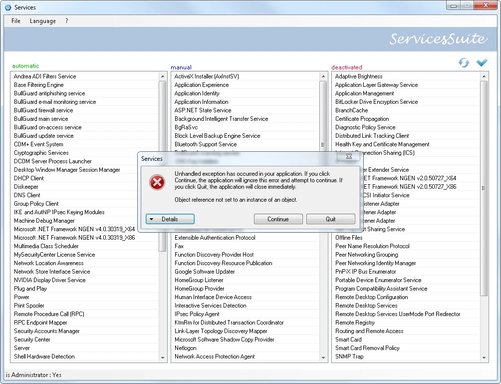
i have written little program to export/import Windows Services Configurations.
here is a screenhot of it
Link Removed due to 404 Error
features:
You should set a Restore Point if you dont know what you are doing and just in case.
I have included 2 xml Presets one for XP(no WLAN) and one for Windows 7(no WLAN and inspired by BlackViper.com)
There are about 7 services in Win 7 where the start parameter is not editable because of restricted access. These Services if you have selected them to be changed will be displayed in red. You can then rightclick and jump to the Registry and manually edit the access rghts.
here is the new version for download since i cant edit my old Post but Mike told me he will update my first post with the download link.
i added Start/Stop of Services as requested by Erik
hope this will work out for you
I hope that somebody can use the tool.
If there are Questions then dont bother to PM me.
PS: The displayed Services are in German because my OS is german ^^
jazz
i got a new version out with a little bugfix
and would be great to take out the link and post my site instead so the link will always be up to date
sry to bother you with this Mike and thx in advance
ServicesSuite
i have written little program to export/import Windows Services Configurations.
here is a screenhot of it
Link Removed due to 404 Error
features:
- export/import into xml file
- start/stop services
- drag drop between the Listviews to easily configure to your likings
- rightclick on a Listview item opens a contextmenu to jump directly to the Registrykey.
- mousehover on a Listview item and you'll get the Registry Servicename displayed as a tootip.
- if you have services installed other ppl dont have. It doesnt matter only shows/imports the services that are really installed.
- tested and works on XP and Windows 7. Probably work on Vista too but not tested.
- .net Framework 2.0 needed only important for XP users on Win7 this runs out of the box.
You should set a Restore Point if you dont know what you are doing and just in case.
I have included 2 xml Presets one for XP(no WLAN) and one for Windows 7(no WLAN and inspired by BlackViper.com)
There are about 7 services in Win 7 where the start parameter is not editable because of restricted access. These Services if you have selected them to be changed will be displayed in red. You can then rightclick and jump to the Registry and manually edit the access rghts.
here is the new version for download since i cant edit my old Post but Mike told me he will update my first post with the download link.
i added Start/Stop of Services as requested by Erik
hope this will work out for you
I hope that somebody can use the tool.
If there are Questions then dont bother to PM me.
PS: The displayed Services are in German because my OS is german ^^
jazz
i got a new version out with a little bugfix
and would be great to take out the link and post my site instead so the link will always be up to date
sry to bother you with this Mike and thx in advance
ServicesSuite
- Thread Author
- #10

you can exportfrom the registry and save.Code:HKEY_LOCAL_MACHINE\SYSTEM\CurrentControlSet\services
thanks a lot bro i too needed the answer

OldTimer
Banned
- Joined
- Jul 19, 2010
- Messages
- 798
When I first upgraded from '98 to XP, I began a "Love - Hate" relationship with those "Services".
That is, I love to hate them!
I wrote my own Batch file to disable services in XP, Vista and Win-7.
The batch file for W-7 is over twice the size of the one for XP.
I'm sure this new program will help others do what I did by trial and error, with far less angst.
Thank You

That is, I love to hate them!
I wrote my own Batch file to disable services in XP, Vista and Win-7.
The batch file for W-7 is over twice the size of the one for XP.
I'm sure this new program will help others do what I did by trial and error, with far less angst.
Thank You
Last edited:
Similar threads

- Article
- Replies
- 0
- Views
- 1K
- Replies
- 0
- Views
- 381
- Replies
- 1
- Views
- 497
- Article
- Replies
- 0
- Views
- 3K
- Featured
- Article
- Replies
- 0
- Views
- 210