asdfmod

New Member
Joined
Jun 16, 2010
Messages
8
I am Window 7 Home Premium user and want to install a Japanese software.
The installation window looks ????????? and does not show Japanese.
I tried to download Microsoft Language Interface Packs (LIPs) but Japanese is not available. What should I do?
 

Last edited by a moderator:
Solution
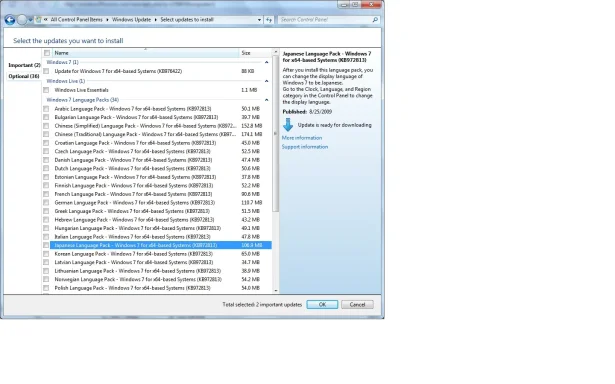
Language Packs are available as optional updates for download from Windows Update when you have Ultimate or Enterprise installed.

View attachment 6643


Links for Japanese Language Packs:

32bit:
windows6.1-kb972813-x86-ja-jp_08758c23cc64a53949072d53dd7bf6bbc8b45420.exe

64bit:
windows6.1-kb972813-x64-ja-jp_9d73b1c1270deacbe7a2329559476a94daddb848.exe

What I have posted is the same language pack that would be installed by windows update if you had Windows 7 Ultimate or Windows 7 Enterprise. There is no other official Microsoft language pack. Since you do not have Ultimate or Enterprise you will have to use the link provided.

This is the same as Windows 7 Multilingual User Interface Pack (MUI) and Microsoft...

Mike

Windows Forum Admin
Staff member
Premium Supporter
Joined
Jul 22, 2005
Messages
9,250
The option works the same as it does in Windows Vista. Please see this guide:

Link Removed due to 404 Error
 

asdfmod

New Member
Joined
Jun 16, 2010
Messages
8
Use Japanese in Windows 7 (still having a problem)

The option works the same as it does in Windows Vista. Please see this guide:

Link Removed due to 404 Error


Thank you for the guidance. I went to the website above and installed Japanese.
This allows me to type Japanese font. And I can read Japanese in web site and microsoft word etc. However, when I tried to install a Japanese software, the installation window still looks like ??????? (????? part is probably Japanese font.)

I remember I did the procedure above and something extra when I used Windows XP and it works. What extra should I do?
 

webscaper

Senior Member
Joined
May 21, 2010
Messages
189
Language Packs are available as optional updates for download from Windows Update when you have Ultimate or Enterprise installed.

Capture.webp


Links for Japanese Language Packs:

32bit:
windows6.1-kb972813-x86-ja-jp_08758c23cc64a53949072d53dd7bf6bbc8b45420.exe

64bit:
windows6.1-kb972813-x64-ja-jp_9d73b1c1270deacbe7a2329559476a94daddb848.exe
 

Last edited:

asdfmod

New Member
Joined
Jun 16, 2010
Messages
8
Thank you for the answer. Is the link above for MUI? As I said in my original question #1, I am using Windows 7 Home Premium. So Windows 7 Multilingual User Interface Pack (MUI) is not available. Microsoft Language Interface Packs (LIPs) is not available, either.

I forgot the detail how to but I had no problem installing Japanese with Windows XP. Is that option not available anymore for Windows 7 user? I appreciate further assistance.
 

webscaper

Senior Member
Joined
May 21, 2010
Messages
189
Language Packs are available as optional updates for download from Windows Update when you have Ultimate or Enterprise installed.

View attachment 6643


Links for Japanese Language Packs:

32bit:
windows6.1-kb972813-x86-ja-jp_08758c23cc64a53949072d53dd7bf6bbc8b45420.exe

64bit:
windows6.1-kb972813-x64-ja-jp_9d73b1c1270deacbe7a2329559476a94daddb848.exe

What I have posted is the same language pack that would be installed by windows update if you had Windows 7 Ultimate or Windows 7 Enterprise. There is no other official Microsoft language pack. Since you do not have Ultimate or Enterprise you will have to use the link provided.

This is the same as Windows 7 Multilingual User Interface Pack (MUI) and Microsoft Language Interface Packs (LIPs).

The knowledge base article (KB972813) and windows version (6.1) are part of the link which I have provided. For more information read the article: Windows 7 language packs are available for computers that are running Windows 7 Ultimate or Windows 7 Enterprise.
 

Last edited by a moderator:
Solution

asdfmod

New Member
Joined
Jun 16, 2010
Messages
8
I failed to download a few times for some reason but finally made it and worked out. Thank you soooooooooo much.