
📎 AI Summary:
The thread discusses an unexpected "unidentified network" appearing as a loopback connection in Windows 7's Network and Sharing Center, with the user seeking to understand its origin and how to disable or remove it. A responder explains that such a loopback adapter is created internally or by applications and suggests running specific PowerShell commands to gather system information for diagnosis. Overall, the conversation focuses on identifying and troubleshooting the mysterious network entry, with helpful technical guidance provided.

pstein

Extraordinary Member
Member details
Joined
Mar 20, 2010
Messages
454
Thread Author #1
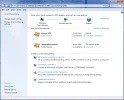
Since a few days I have a new network in

Control Panel--Network and internet--network and Sharing Center:

Its labelled "unidentified network" and acts as loopback.

See attached snapshot.

I cannot figure out how this network entry was created.
As far as I remember my Win7 worked well for a long long time without this.

Under "Access type" it is noted "No network access"

How can I temporarily disable this network (to see possible errors)?

How can I remove this entry forever?

Peter
 

Attachments

  • unidentified network.webp
    unidentified network.webp
    56.6 KB · Views: 188
Solution
A loopback adapter is just a connection that never leaves the machine through the network stack. Some application may have installed it.

Open a powershell prompt and run the following

Get-NetAdapter | Out-File -FilePath "$($env:USERPROFILE)\Desktop\net.txt" -Append -Encoding ascii
Get-NetTcpConnection | Out-File -FilePath "$($env:USERPROFILE)\Desktop\net.txt" -Append -Encoding ascii
Get-Package | Out-File -FilePath "$($env:USERPROFILE)\Desktop\net.txt" -Append -Encoding ascii


If the last command doesn't work you can run this one instead
Get-WmiObject Win32_Product | Out-File -FilePath "$($env:USERPROFILE)\Desktop\net.txt" -Append -Encoding ascii

Upload the net.txt file from your desktop

Neemobeer

Windows Forum Team
Staff member
Member details
Joined
Jul 4, 2015
Messages
8,995
A loopback adapter is just a connection that never leaves the machine through the network stack. Some application may have installed it.

Open a powershell prompt and run the following

Get-NetAdapter | Out-File -FilePath "$($env:USERPROFILE)\Desktop\net.txt" -Append -Encoding ascii
Get-NetTcpConnection | Out-File -FilePath "$($env:USERPROFILE)\Desktop\net.txt" -Append -Encoding ascii
Get-Package | Out-File -FilePath "$($env:USERPROFILE)\Desktop\net.txt" -Append -Encoding ascii


If the last command doesn't work you can run this one instead
Get-WmiObject Win32_Product | Out-File -FilePath "$($env:USERPROFILE)\Desktop\net.txt" -Append -Encoding ascii

Upload the net.txt file from your desktop
 

Solution