
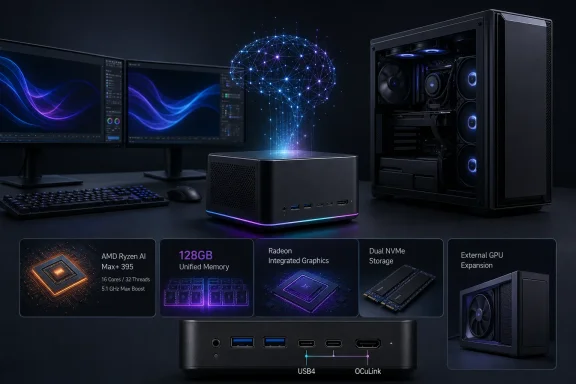
 Overview: A Mini PC Built Around Memory, Not Just CPU Cores
The headline specification is not simply the Ryzen AI Max+ 395. It is the prospect of pairing AMD’s flagship “Strix Halo” processor with up to 128 GB of fast unified memory in a compact desktop system. That combination matters because the processor’s CPU, Radeon integrated graphics, and AI hardware all draw from the same physical memory pool, giving the system a different set of strengths and trade-offs from a conventional desktop with separate DDR5 system RAM and discrete GPU VRAM. AMD describes the Ryzen AI Max platform as supporting up to 128 GB of unified memory, with up to 96 GB potentially available to graphics workloads.
At 158 × 158 × 85 mm, the F9A occupies roughly 2.1 liters, according to separate reporting from IT Home. That is a remarkably small enclosure for a platform that AMD rates across a broad 45 W to 120 W configurable TDP range. The F9A is therefore best understood not as a low-power NUC-style office PC, but as a mini workstation whose sustained behavior will depend heavily on Acemagic’s cooling design, firmware tuning, and power limits.
This distinction is important. A 16-core processor in a compact chassis can be extremely capable, but “capable” and “quiet at full load” are not interchangeable promises. The F9A’s physical design and reported 140 W peak performance release sound ambitious, yet buyers should wait for independent thermals, acoustic measurements, and sustained-performance tests before assuming that short-burst benchmark numbers will translate directly into all-day rendering, compiling, or local AI inference performance. IT Home’s coverage identifies the 140 W figure, while AMD lists the chip’s configurable power range rather than a fixed system-wide operating target.
Ryzen AI Max+ 395: The Silicon Behind the F9A
Sixteen Zen 5 Cores and Radeon 8060S Graphics
The F9A uses AMD’s Ryzen AI Max+ 395, the top-end processor in the original Ryzen AI Max family. AMD specifies 16 Zen 5 CPU cores, 32 threads, a base clock of 3 GHz, and a maximum boost clock of up to 5.1 GHz. It also includes 16 MB of L2 cache and 64 MB of L3 cache, placing it far beyond the usual mobile-class processor found in compact Windows mini PCs. AMD’s official processor specification page confirms those core, thread, clock, cache, and power specifications.
The integrated graphics portion is equally central to the product’s identity. The Ryzen AI Max+ 395 includes Radeon 8060S graphics, rather than a minimal display engine intended solely for desktop use. AMD’s original Ryzen AI Max announcement said the series can reach 40 RDNA 3.5 graphics compute units, positioning the platform for GPU-accelerated creative work, light-to-serious gaming, and AI workloads that run more effectively on the GPU than on a dedicated NPU. AMD’s Ryzen AI Max launch materials frame the combination of Zen 5 CPU cores, RDNA 3.5 graphics, and XDNA 2 AI hardware as a workstation-oriented client platform.
That is also why the F9A’s 128 GB configuration matters more than it would in a typical compact PC. In a standard desktop, a powerful graphics workload depends largely on the dedicated GPU’s VRAM capacity. Here, the Radeon 8060S can access a much larger shared pool, potentially allowing a sizeable portion of system memory to be allocated to graphics or AI tasks. AMD has specifically said that Ryzen AI Max+ 395 systems can offer up to 96 GB as graphics memory through its Variable Graphics Memory approach. AMD’s Ryzen AI Max+ 395 platform discussion outlines that memory allocation model.
Understanding the 126 TOPS Claim
Acemagic advertises 126 TOPS of total AI performance for the F9A. This figure should not be confused with a single accelerator’s capability. The processor’s XDNA 2 NPU is rated for up to 50 TOPS, while the overall 126 TOPS figure combines AI-relevant throughput across the NPU, integrated graphics, and CPU components. Notebookcheck’s F9A report distinguishes the 50 TOPS NPU rating from Acemagic’s 126 TOPS platform total, and AMD likewise identifies the NPU’s 50 TOPS ceiling.
TOPS, or trillions of operations per second, is useful for classifying a system’s theoretical AI acceleration but does not predict every real-world AI experience. Model architecture, quantization, memory bandwidth, software frameworks, drivers, and whether the workload is directed to the NPU, GPU, or CPU can all substantially affect results. The more practical takeaway is that the F9A has three different compute engines available for modern Windows AI applications rather than relying on a CPU alone.
For Windows users, that layered approach is potentially more useful than a single large TOPS number. Lightweight tasks such as effects, transcription, or supported on-device features may lean on the NPU; image generation, local large language model inference, and creative acceleration can benefit from the Radeon graphics; conventional applications and mixed workloads still have access to 16 high-performance CPU cores. The ultimate experience will hinge on software support, but the underlying hardware is unusually well-equipped for experimentation.
Why 128 GB of Unified Memory Changes the Conversation
Local AI Is the F9A’s Most Distinctive Use Case
A mini PC with 128 GB of memory is not a novelty in itself. The key is that the F9A’s LPDDR5X-8000 memory is unified across CPU and GPU resources, allowing much larger data sets or AI models to stay resident than would be possible on an integrated-graphics system limited to 32 GB or 64 GB. AMD has positioned Ryzen AI Max systems specifically for large local models, saying the architecture can support very large AI workloads through its unified-memory design. AMD’s Ryzen AI Max platform announcement makes the connection between the 128 GB memory option and support for large AI models.
That makes the Acemagic F9A a potentially attractive machine for developers who want to run models locally rather than continuously sending prompts, source code, documents, or experimental datasets to a cloud service. It could also appeal to users building private retrieval systems, testing smaller agent workflows, working with local image-generation pipelines, or evaluating AMD’s evolving AI software environment under Windows and Linux.
The practical advantage is not that every model will run quickly. Memory capacity determines whether a model can load and operate locally; it does not erase the performance limitations of a compact integrated-graphics architecture. Still, memory capacity is often the first hard boundary in local AI work, and this is where the F9A’s maximum configuration could be more consequential than its raw CPU specification.
The Upgradeability Trade-Off
There is a major caveat to the 128 GB story: the reported memory is onboard LPDDR5X-8000, rather than socketed desktop DDR5. IT Home’s specification rundown describes the memory as onboard and connected through a 256-bit interface. That is not necessarily a flaw—soldered LPDDR5X can provide the bandwidth and compact board layout this platform needs—but it means purchasers must choose their capacity carefully at the point of sale.
For a conventional office machine, 32 GB or 64 GB may be more than sufficient. For a local-AI system, the difference between 64 GB and 128 GB can be fundamental. Buyers considering the F9A specifically for models, large creative projects, virtual machines, or RAM-heavy development work should treat the memory choice as a long-term platform decision, not a configuration detail to revisit later.
Acemagic has not yet clarified all retail configurations, pricing tiers, storage bundles, or whether every variant will use the same cooling and power profile. That information will determine whether the 128 GB model is a realistic workstation option or merely an expensive halo configuration. Until then, the strongest case for the F9A remains clear in principle but incomplete in purchasing terms.
Storage and Connectivity: A Surprisingly Complete Desktop I/O Set
The F9A is not relying solely on the Ryzen AI Max platform’s integrated muscle. Acemagic reportedly includes two M.2 slots for PCIe 4.0 x4 NVMe SSDs, creating room for a fast operating-system drive and a separate high-capacity project, game-library, scratch-disk, or model-storage drive. Notebookcheck and IT Home both report the dual PCIe Gen4 x4 M.2 arrangement.
That is a welcome decision. AI models, virtual machines, high-resolution media, development environments, and modern games can consume storage at an alarming rate. A second internal M.2 slot is materially more useful than forcing users into a USB enclosure or a network-attached-storage workflow for every capacity upgrade.
The external connectivity specification is also unusually strong for a 2.1-liter Windows mini PC:
- Two USB4 Type-C ports, each reported at up to 40 Gbps
- Three USB Type-A ports rated at 10 Gbps
- HDMI 2.1 display output
- Dual 2.5 GbE Ethernet ports
- Wi-Fi 7 and Bluetooth 5.4
- SD 4.0 / UHS-II card reader
- 3.5 mm audio jack
- OCuLink 4i external PCIe connection
These specifications are reported by Notebookcheck and independently detailed by IT Home.
For creative users, the UHS-II SD reader could be an understated benefit, particularly for photographers and videographers moving files from compatible media. For networking enthusiasts, two 2.5 GbE ports open possibilities for high-speed NAS access, network redundancy, firewall or router experimentation, and direct machine-to-machine transfers. Wi-Fi 7 is similarly forward-looking, although users will only realize its full potential with compatible routers and access points.
OCuLink Makes the F9A More Flexible Than an All-in-One Mini PC
An External GPU Path With Real Limits
The F9A’s OCuLink port is the feature that prevents the system from becoming a fixed-function integrated-graphics box. It provides an external PCIe path for compatible GPU docks, allowing owners to attach a discrete desktop graphics card when their workloads outgrow the Radeon 8060S. Notebookcheck’s coverage identifies the port as a PCIe 4.0 x4 OCuLink implementation.
OCuLink’s fundamental advantage is that it exposes PCIe connectivity directly over a cable, rather than treating the GPU strictly as a Thunderbolt peripheral. A Teledyne LeCroy Gen4 OCuLink adapter datasheet confirms that PCIe Gen4 OCuLink can operate at link widths ranging from x1 to x16 and at transfer rates up to 16 GT/s per lane; the F9A’s announced x4 implementation uses only a portion of that wider ecosystem.
The important limitation is in the “x4.” A PCIe 4.0 x4 link has substantially less bandwidth than the PCIe 4.0 x16 slot used by a full desktop graphics card. That does not make OCuLink useless—far from it—but it means GPU performance can vary by game, resolution, workload, and the volume of data moving between CPU memory and the external GPU. GPU-bound rendering or compute tasks may fare better than workloads that repeatedly shuttle large assets across the interconnect.
This makes OCuLink an upgrade path, not a replacement for a high-end desktop motherboard. The F9A can be compact and self-contained for daily work, then connect to an eGPU dock at a desk for gaming, GPU rendering, CUDA- or ROCm-focused experimentation, or advanced AI tasks. However, an eGPU setup adds cost, cables, a power supply, a dock or enclosure, and physical desk clutter—the very things mini-PC buyers often hope to reduce.
Why OCuLink Is Still a Valuable Inclusion
Even with those constraints, OCuLink is a strategically smart feature for the F9A. It gives owners a way to extend the platform’s life if the integrated Radeon 8060S is eventually insufficient. It can also let users decide where they want their complexity: a quiet two-liter system in a living room, studio, or office, with a larger GPU dock connected only when maximum graphics performance is necessary.
The design also offers an interesting contrast to USB4 eGPU arrangements. AMD lists two native USB4 40 Gbps ports and 16 usable PCIe 4.0 lanes for the Ryzen AI Max+ 395 platform, providing the underlying I/O resources for a flexible mini-PC design. AMD’s official specifications confirm those native USB4 and PCIe capabilities.
The unanswered questions are practical ones: which eGPU docks will Acemagic validate, how reliably the system handles hot-plugging or sleep-and-resume behavior, and whether firmware updates will be issued promptly when GPU compatibility problems emerge. Those details are often more important than the existence of the port itself.
Windows-Centric Features: Copilot, Audio, and Everyday Usability
Acemagic has added a physical Copilot button, a microphone array, configurable RGB lighting, and dual 2 W speakers. Notebookcheck reports these features as part of the F9A’s desktop-focused design.
The Copilot button is more than decorative branding, although its usefulness will depend on each user’s Windows configuration. Microsoft says the Copilot key can open Microsoft Copilot or Microsoft 365 Copilot, and Windows provides controls to customize what the key does when Copilot is unavailable or disabled. Microsoft’s Windows keyboard shortcuts documentation explains the configurable behavior.
Still, the physical button should not be oversold. A mini PC generally lives beside or behind a monitor, while the keyboard is where users naturally interact with Windows shortcuts. The better interpretation is that Acemagic is signaling the F9A’s AI-PC identity rather than delivering a transformative desktop control mechanism.
The microphone array and speakers are more practical. They could make the F9A suitable for basic voice interaction, casual conferencing, and media playback without immediately requiring extra peripherals. Buyers working in professional meeting environments, recording setups, or higher-fidelity media systems will still want dedicated equipment, but integrated audio reduces friction for everyday deployment.
The Risks That Matter Before Buying
Price, Availability, and Real-World Validation
The largest immediate risk is that the F9A is still an announced product without confirmed pricing or a public sales date. Notebookcheck’s July 25 report explicitly notes that Acemagic had not provided either detail at the time of publication.
That missing information matters because Ryzen AI Max+ 395 systems are inherently premium products. Once a configuration includes 128 GB of LPDDR5X memory, dual SSDs, Wi-Fi 7, two 2.5 GbE ports, and OCuLink, the final price could put the F9A in direct competition with compact desktops that use separate GPUs, larger workstations, or alternative Ryzen AI Max designs.
The second risk is performance consistency. The F9A’s hardware list is impressive, but compact workstations live or die by cooling. Processor power limits, fan curves, VRM design, SSD temperatures, memory behavior, and firmware maturity can all influence sustained output. Independent reviews should establish whether the F9A can maintain its performance without excessive fan noise or thermal throttling during extended workloads.
Security Trust Must Be Earned
Acemagic also carries a relevant history that prospective buyers should weigh responsibly. In 2024, reports identified malware issues affecting some Acemagic mini-PC shipments, and the company said it had resolved the problem in current stock while offering remediation steps. Tom’s Hardware reported on malware found in some batches and on the company’s response; Acemagic’s published statement said it would strengthen audits, source-code reviews, virus protections, security updates, and clean installation availability.
That history is not evidence that the newly announced F9A is affected by any malware issue. It is, however, a reason for buyers—especially developers, small businesses, and users handling sensitive data—to apply sensible procurement discipline. A clean Windows installation from Microsoft, current firmware and driver updates from verified sources, full Windows Security scans, and a review of preinstalled software should be standard practice for any new PC, regardless of vendor.
For a machine marketed toward AI and workstation scenarios, software supply-chain confidence is as important as processor performance. Acemagic’s opportunity with the F9A is not only to deliver strong hardware, but also to demonstrate dependable firmware support, transparent documentation, and a clean out-of-box Windows experience over the product’s lifespan.
A Promising Compact Workstation With One Major Unknown
The Acemagic F9A looks like one of the more interesting Ryzen AI Max+ 395 mini PCs because it does not reduce the platform to a headline CPU. The combination of up to 128 GB of unified LPDDR5X memory, dual PCIe 4.0 SSD slots, dual 2.5 GbE, Wi-Fi 7, USB4, UHS-II storage access, and OCuLink eGPU expansion gives it the outline of a genuinely versatile Windows workstation. Notebookcheck’s specification report and IT Home’s additional details suggest Acemagic has tried to build a complete desktop rather than a processor showcase.
Its strongest appeal will be to buyers who value memory capacity and local compute flexibility more than internal upgradeability. A 128 GB unified-memory configuration could be especially compelling for local AI experimentation and memory-intensive creation, while OCuLink offers a credible route to discrete graphics when the integrated Radeon 8060S is no longer enough.
Yet the final judgment must wait for the numbers Acemagic has not supplied: price, release timing, full configuration options, cooling performance, acoustic behavior, eGPU compatibility, firmware support, and independent benchmark data. If Acemagic gets those fundamentals right, the F9A could become a serious compact Windows AI workstation rather than simply another mini PC with a powerful AMD chip inside.
