
For Windows users who travel, work in split-window layouts, or spend their day in Outlook, Edge, Teams, Excel and remote-management consoles, the Edge’s formula is persuasive. The review measured 13 hours and five minutes in a scripted web test and 14 hours and 30 minutes in an offline video loop, while retaining a full keyboard, number pad, HDMI, USB-A, USB-C and Wi-Fi 7. Those figures are promising, though they remain single-outlet measurements rather than independently replicated results.
There is also a naming and specification problem worth clearing up before anyone searches for the machine. Intel lists the Core Ultra 7 355 as a Core Ultra Series 3 “Panther Lake” processor launched in the first quarter of 2026. Acer Singapore sells the Swift Edge 16 AI SFE16-I51 family as a 2026 system. The “2025” in the submitted review title is therefore almost certainly a mistaken carryover, not the laptop’s model year.
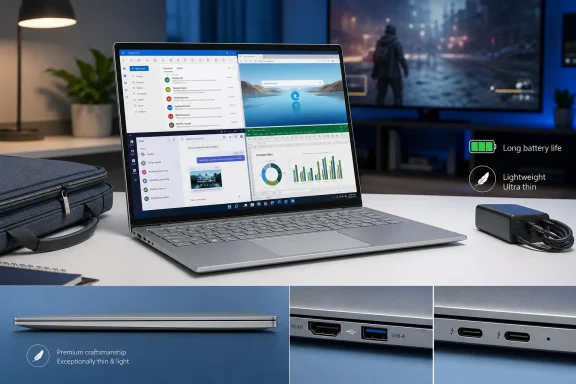 A 16-inch OLED laptop that travels like a smaller machine
The case for the Swift Edge 16 is physical. At 1.19kg, it undercuts the 1.36kg Swift Go 16 used as the review’s comparison point by 170g, and its 14.6mm rear height is narrower than many conventional 14-inch business laptops. The distinction sounds academic on a specification sheet, but it matters most in the exact setting Acer is pursuing: carrying the notebook between meetings without surrendering the workspace that makes a 16-inch, 16:10 display useful.
The panel is a 120Hz OLED at 2880×1800, a resolution Acer identifies as WQXGA+. That correction matters because the review repeatedly calls it 2880×1880, including in its gaming test description. The actual 2880×1800 panel has a conventional 16:10 aspect ratio, and it is one of the reasons this system makes sense for document-heavy work: two full-size windows can sit side by side without the cramped feel that usually sends ultrabook owners looking for an external monitor.
Acer specifies 100% DCI-P3 coverage, 500 nits of brightness on Singapore retail listings, and a glossy OLED surface. The reviewer’s objection to the gloss is fair. OLED’s contrast and black levels work well for media, photo work and late-night reading, but a glossy finish remains a practical liability in offices with overhead lighting and in bright cafés. Buyers replacing an older matte Swift Edge should not assume the display treatment carried forward.
Acer has also avoided the usual thin-and-light port tax. The Edge 16 family includes two USB-C ports with Thunderbolt 4 support, two USB-A ports, HDMI 2.1 and a 3.5mm headset jack. That is unusually useful for Windows professionals who still connect to HDMI conference-room displays, USB-A security keys, wired peripherals, external SSDs, and USB-C docks without wanting a travel hub in every bag.
Panther Lake’s branding hides the deciding hardware difference
The review’s central conclusion is sound: do not buy the Swift Edge 16 AI expecting it to double as a competent modern-games laptop. Intel’s Core Ultra 7 355 has four performance cores and four low-power efficient cores, but its integrated GPU is branded only as “Intel Graphics” and contains four Xe cores. It is materially different from the Arc B390-equipped Core Ultra X7 358H in Acer’s Swift Go 16.
That “X” is doing more work than the notebook names suggest. The Swift Go 16 review published by AsiaOne and attributed to the same Potions.sg testing operation reports that its X7 358H configuration reached about 40fps in Diablo IV at medium settings and the native 2880×1800 resolution without XeSS. The Swift Edge review reports 29fps with Intel XeSS enabled at the same general target, and only 16fps in the fuller performance section with XeSS disabled.
Those numbers should be treated as directional rather than laboratory-grade comparatives. The Edge review gives two different native-resolution Diablo IV results — 18fps in its opening gaming discussion and 16fps later — without identifying a driver revision, system power mode, RAM configuration, render scale, or an exact repeatable test route beyond an Infernal Hordes encounter. There is no independent outlet reporting the same game result for this exact Swift Edge configuration yet.
The practical conclusion nevertheless survives the inconsistency. At a 2.8K native resolution, four Xe cores are not enough for demanding current games at medium settings. XeSS can recover some performance by rendering internally below native resolution and reconstructing the image, but 23fps in Cyberpunk 2077 with XeSS enabled and roughly 29fps in Diablo IV remain compromises, not a reliable gaming experience.
The review’s claim that the human eye cannot see gains beyond 30fps should also be discarded. Frame rate above 30fps is plainly perceptible in motion, responsiveness and input latency, particularly in action games. More importantly, a 30fps average can conceal drops below 30fps during busy encounters — precisely where smoothness matters most.
For occasional lighter games, streaming through Xbox Cloud Gaming or GeForce NOW, and older PC titles, the Edge will be serviceable. For local Diablo IV, Cyberpunk 2077, modern 3D creation workloads or GPU-accelerated media work where time matters, the Swift Go 16’s X7 configuration is the more rational Acer option even if it costs more battery runtime and 170g of carrying weight.
Battery life is the Edge’s actual performance feature
The gap between the Core Ultra 7 355 and Core Ultra X7 358H is not merely gaming speed. Intel rates the 355 at 25W base power with up to 55W turbo power, and its smaller GPU plus lower-core CPU design leaves less hardware drawing power during ordinary Windows tasks. The Edge review’s 13-hour-five-minute browsing result was roughly 56% longer than the cited eight-hour-22-minute Swift Go 16 result; its 14-hour-30-minute video figure was about 33% longer than the Go’s ten-hour-52-minute score.
Acer’s own figures support the general shape of that result, though vendor battery claims should never be read as a promise. Its regional specifications cite up to 13.5 hours of web browsing and up to 20 hours of video playback for certain Swift Edge 16 configurations. Differences in OLED brightness, refresh rate, wireless signal, browser tabs, Windows power mode, background apps and the local video codec will move a real-world result substantially.
Still, the tested web figure is credible enough to change how the machine should be evaluated. This is not a low-power laptop that happens to have a large display; it is a large-screen laptop designed around an all-day working day. The ability to open a 16-inch OLED, run a full browser session, take video calls, work in Microsoft 365 and leave the charger in a bag may matter far more to its intended audience than a benchmark win.
The review also reports better battery retention during a 30-minute gaming run: 73% remaining after Diablo IV versus approximately 59% on the Swift Go 16, and 92% versus 84% in Slay the Spire 2. Again, those figures lack independent replication, but the direction is unsurprising. The Edge makes a straightforward exchange: it spends less energy on frames it cannot produce at a competitive rate.
Acer’s own store listings leave buyers with unresolved details
The hardware is clearer than Acer’s regional product documentation. Singapore’s Acer store lists a Core Ultra 7 355, 32GB RAM, 1TB SSD Swift Edge 16 AI as model SFE16-I51-74YG, retailing at SGD 3,399 before a listed discount. It separately lists model SFE16-I51-7125 with the same processor and 1TB SSD but 16GB RAM.
That makes the review’s 32GB specification plausible, but it is not a universal Swift Edge 16 configuration. Memory is soldered LPDDR5X rather than user-upgradeable SO-DIMM memory, so the distinction needs to be resolved before purchase. A buyer ordering the 16GB version cannot plan to add memory later after discovering that large Teams meetings, browser-heavy workflows, local virtual machines or AI tools consume more RAM than expected.
Acer’s fingerprint-reader documentation is also contradictory. Its retail summary for the 16GB SFE16-I51-7125 says “Fingerprint Reader on Power Key,” yet the more detailed Acer technical-specification page for that identical model says “Finger Print Reader: No.” The submitted review says the test unit lacks a fingerprint reader and relies on the FHD IR camera for Windows Hello face sign-in, which aligns with the detailed page.
This is the kind of ambiguity buyers should not have to resolve through product photography and review samples. Windows Hello facial recognition is quick and generally preferable for a laptop used at a desk, but a power-button fingerprint sensor remains useful in dim rooms, on flights, or when the camera cannot see the user properly. Acer should correct the store listing rather than allow a security and convenience feature to vary by interpretation.
The right Swift depends on what “performance” means
The Swift Edge 16 AI makes a compelling case for a specific Windows user: someone who values a large OLED workspace, a proper port selection, low carry weight and credible all-day battery life over local graphics power. The Core Ultra 7 355’s 49-TOPS NPU also qualifies the system for Copilot+ PC features, although prospective buyers should evaluate the Windows AI features they will actually use rather than treating that badge as a reason to accept the wrong memory or graphics configuration.
The important correction to Acer’s Swift family positioning is that thinness and a 16-inch display no longer identify the right model. The Swift Edge 16 AI is the endurance-first machine, while the Swift Go 16 with Core Ultra X7 358H is the heavier, shorter-running model for buyers who want credible integrated-graphics headroom.
Before ordering, match the SKU rather than the family name: confirm 16GB versus 32GB soldered memory, verify whether the specific regional unit has a fingerprint reader, and do not mistake the 2.8K OLED’s native resolution for a reasonable target in demanding games. The Swift Edge 16’s most valuable achievement is not that it can play Diablo IV at the edge of acceptability; it is that a 16-inch Windows work machine can weigh 1.19kg without making its owner carry a charger as part of the laptop.
