
The distinction has practical consequences for Windows users who are increasingly receiving suspect images, voice notes and clips in Teams chats, email, WhatsApp Desktop, browser tabs and social feeds. A real video can be cropped, captioned falsely, replayed out of context or attached to a fabricated story. Conversely, a detection service can flag a real image that has been heavily compressed, edited or passed through social-media processing. The right result is rarely “the tool said it is fake”; it is “the tool gave us a reason to verify the source and the claim before acting.”
Digital Edge, republished by KLSE Screener from The Edge Malaysia Weekly, groups the tools under the broad task of spotting misinformation. The reporting is correct that users now need to examine both the media and the proposition wrapped around it. But the list mixes forensic detectors, official government rebuttals and fact-check databases without explaining their different evidentiary value.
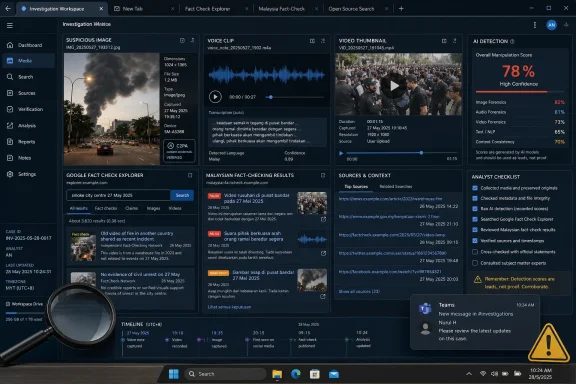 Three detectors answer a narrower question
Resemble AI and Hive are deepfake-detection platforms. Their public documentation says they can analyze combinations of image, video and audio, returning a likelihood or confidence result and, in some cases, a suspected generative engine or areas of a recording that drove the assessment. Resemble also markets an enterprise meeting product that can place an automated bot into Zoom, Microsoft Teams, Google Meet and Webex calls to flag suspected cloned voices, face swaps and synthetic video during the session.
That capability is relevant to organizations facing payment fraud and executive impersonation. It is not, however, a consumer-side magic shield. A tool watching a Teams meeting may detect visual or vocal artifacts, but it cannot determine whether the person on screen is authorized to approve a bank transfer, whether a request matches a known business process, or whether a “CEO” has been coerced into making it. IT teams should treat an in-call alert as a trigger for a separate verification step, such as calling a verified number or using a prearranged approval channel.
Hive’s browser extension is potentially more convenient for day-to-day triage because it can scan content from a webpage through a right-click action, direct upload or pasted input. The Chrome Web Store listing says it covers images, video, audio and text, and may identify likely image and video generation engines. That is useful for comparing suspicious social posts quickly, but the convenience comes with a trade-off: media supplied to a cloud detection service is no longer confined to the user’s PC.
For a public meme, that may be immaterial. For a customer document, a confidential screenshot, a medical image, a recorded HR meeting or a video involving minors, it is a governance problem. Before uploading material to Resemble, Hive or any comparable detector, organizations should determine what the service retains, where it processes files, whether uploads may be used for model improvement and whether their data-processing agreement permits the disclosure. A browser extension that makes analysis effortless can also make accidental external sharing effortless.
Digital Edge describes DeepAI’s AI Image Detector as a browser-based still-image checker returning an AI likelihood percentage, confidence level and classification, with support for formats including JPEG, PNG, WebP and HEIC. Unlike Resemble and Hive, the submitted reporting confines DeepAI’s role to images; it does not present it as a voice or video solution. More significantly, no independently documented explanation of its model limitations, evaluation set or error rates appears in the guide. Readers should regard any single percentage from it as a lead for further checks, rather than a forensic conclusion.
A confidence score is not a chain of custody
The vendors’ language naturally centers on confidence scores and detection coverage. Those numbers are meaningful within a product’s own model and testing conditions, but confidence is not the same thing as certainty. The National Institute of Standards and Technology continues to run adversarially challenging deepfake-evaluation work precisely because generated media and the ways it is edited keep changing; detectors must be tested against material that does not resemble their training sets.
There are two predictable failure modes. The first is a false negative: an altered clip is judged likely authentic, perhaps because it has been resized, re-encoded, cropped or generated by an unfamiliar model. The second is a false positive: authentic content is labeled suspicious because low light, aggressive denoising, beauty filters, compositing, unusual compression or ordinary post-processing creates visual patterns that resemble synthetic artifacts.
Model attribution deserves the same caution. If a platform says an image resembles output from a named generator, that may help an investigator formulate a hypothesis. It does not prove who made the image, which tool they used or whether the media was fabricated. A person can run a genuine photo through an AI editor; a hostile actor can also strip metadata, take a screenshot or repeatedly re-encode content to complicate analysis.
This is why the original file matters more than the forwarded copy. Downloading a video from a social platform, recording it through a screen capture tool or receiving it as an image pasted into a chat can remove context that may have been available in the original upload. Keep the URL, posting time, account name, captions and any earlier versions alongside the file. On Windows, avoid editing the only copy before it has been checked; save the attachment or media file first, then work from a duplicate.
A detector result should therefore be paired with source checks:
- Confirm whether the account publishing the material is the verified or long-standing account it claims to be.
- Search for the earliest identifiable upload rather than judging only the version now circulating.
- Look for independent reporting, primary records, a full speech, an official transcript or the original event footage.
- Treat urgency, payment instructions, credential requests and demands for secrecy as fraud indicators even when the voice or image appears authentic.
Malaysian fact checks address claims, not pixels
The list’s second half is more valuable for verifying a specific assertion. Sebenarnya.my is operated by Malaysia’s Communications and Multimedia Commission and publishes clarifications obtained from relevant authorities. Its Artificial Intelligence Fact-check Assistant, known as AIFA, was launched to query material against its verified information base and is available in Malay, English, Mandarin and Tamil, including through WhatsApp.
That makes Sebenarnya.my particularly suitable for claims about Malaysian ministries, public assistance, banks, government services and official notices. It is a poor fit for trying to establish whether an overseas conflict video was filmed where a caption says it was, or whether a photograph from a real event has been misdated. Its scope is institutional clarification, not universal internet verification.
MyCheck Malaysia, operated by national news agency Bernama, performs a related but distinct editorial role. It publishes fact checks and has an accessible archive of claims evaluated in the Malaysian context. According to Bernama’s description of the service, MyCheck operates as a fact-checking platform rather than merely republishing agency statements. That can add useful reporting and context, although users should still open the full check, identify the precise claim assessed and compare its date with the current version spreading online.
Neither service should be mistaken for a general answer engine. AIFA’s operators have themselves cautioned that users sometimes treat the chatbot as if it were a broad generative-AI assistant. The relevant discipline is to enter the exact claim — including names, amount, date, program and alleged action — and then read the supporting record. Asking “Is this viral post true?” is much less reliable than asking whether a named agency announced a specific payment on a specific date.
Google Fact Check Explorer is an index, not a verdict engine
Google Fact Check Explorer fills another gap. It searches fact checks published by participating verification organizations, drawing on the web’s ClaimReview markup. Its value is speed: a claim that crossed borders, changed wording or resurfaced after several years may already have been investigated by a credible outlet elsewhere.
But the Explorer does not independently authenticate every result it displays, and its presence does not prove the fact checker’s conclusion is universally accepted. Users still need to open the underlying report, look at the evidence, note its publication date and make sure the check addresses the same image, version, date and wording now in circulation.
This becomes especially important with recycled disaster videos and political clips. A 2023 fact check may establish that a video was old at the time it first went viral, while a 2026 post may misrepresent it differently. The old report is evidence about the video’s history, not automatic proof that every new statement attached to it is false.
Provenance is the missing seventh tool
The strongest omission from Digital Edge’s list is a provenance check such as C2PA Content Credentials. Detection tools make an inference from the pixels, frames or audio. Content Credentials, when present and valid, can provide cryptographically protected information about an asset’s origin and editing history, including the tools involved and the signer associated with the record.
That does not certify that an image’s caption is accurate, and a missing credential does not mean the image is fake. The C2PA standard explicitly warns against treating provenance records as a cure-all for misinformation. Still, valid provenance answers a different and often stronger question than an AI detector: whether a known source’s signed record remains bound to the specific file being examined.
For administrators, the workable policy is not to add six bookmark tiles and call the problem solved. Build a response path: preserve the original, inspect the source, check the underlying claim through credible reporting or official records, use a detector to identify manipulation signals, and require an out-of-band confirmation for money, credentials, sensitive data or urgent operational changes.
The tools in Digital Edge’s list are worth keeping, but they should be arranged by purpose rather than presented as interchangeable truth machines. A synthetic-media detector can expose artifacts. Sebenarnya.my and MyCheck can test Malaysian claims. Google Fact Check Explorer can locate prior reporting. None of them removes the need to verify who published the material, what happened, and whether the action being demanded is safe.