
Bedroom Producers Blog first reported the August 10 release, describing a plugin aimed at fast broad-stroke adjustment rather than detailed corrective work. Air-G Audio’s existing Air-G Prism and Airwindows’ own PearEQ documentation establish the more useful context: Air-G EQ Pedal is a new presentation of an existing EQ engine, not a new equalizer design. Its value is a deliberately constrained workflow and a visual control surface around DSP that Airwindows normally distributes with minimal interfaces.
For Windows musicians who use amp simulators, record direct instruments, or want a lightweight EQ before effects, that is a sensible niche. It also means prospective users should not mistake six gain knobs for six fully configurable equalizer bands.
 PearEQ’s fixed-band design sets the limits
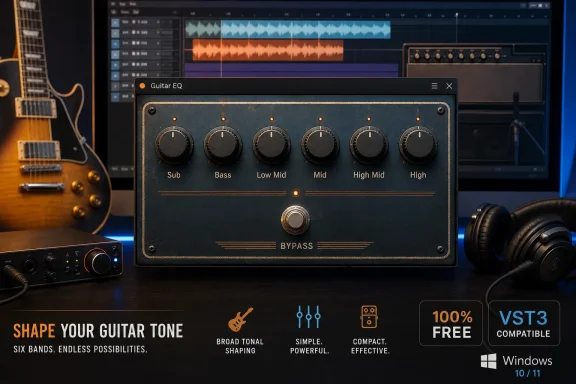
Air-G EQ Pedal exposes six named ranges: Sub, Bass, Low Mid, Mid, High Mid, and High. Each control is centered for unity gain, boosts when turned clockwise, and cuts counter-clockwise. There are no selectable center frequencies, bandwidth controls, filter types, spectrum analyzer, or individual band bypass switches.
That layout makes the plugin closer to a traditional graphic EQ pedal than to a modern channel-strip EQ. A guitarist can reduce low-end buildup before an amp sim, pull back a congested midrange, or add top-end presence without opening a parametric equalizer and deciding where to place each band. The same limitation applies on bass, drum, keyboard, vocal, and mix-bus tracks: the plugin can establish a broad tonal direction quickly, but it cannot isolate a narrow ring, resonance, whistle, or room mode.
Airwindows’ PearEQ documentation explains why leaving every gain control at center matters. The underlying design splits the signal into bands through a subtractive crossover approach and reconstructs the source when the bands are left flat. In other words, the processor is designed to avoid changing the sound merely by being inserted on a track.
That is a meaningful distinction from an EQ whose individual filters accumulate phase or frequency-response changes even at nominal settings. It does not make Air-G EQ Pedal universally “transparent” in every real-world chain—level matching, clipping elsewhere in the signal path, and aggressive boosts still matter—but it does mean the plugin’s intended neutral state is technically more than an empty promise on a pedal graphic.
The pedal format is the actual product change
The release resembles Air-G Prism more than it resembles a separate product line. KVR Audio lists Air-G Prism as a six-band graphic EQ built on Airwindows PearEQ, with the same broad Sub-through-High organization and fixed-band approach. Prism adds a response graph, direct node dragging, gain readouts, and per-band enable controls.
Air-G EQ Pedal strips that detail away. The result should be faster for a use case where a player wants to make a handful of tonal moves while tracking or auditioning an amp sound, but it sacrifices the visual feedback and band-level control that make Prism more suitable for mix decisions.
That relationship changes how Windows users should choose between the two:
- Air-G EQ Pedal is the better fit when the goal is immediate tonal shaping with a small, pedal-like control set in a VST3 host.
- Air-G Prism is the better fit when the same PearEQ sound is wanted with a displayed response curve, numerical gain feedback, and the ability to disable individual bands.
- Neither is a replacement for a surgical parametric EQ when the job requires locating and cutting a precise frequency.
The release’s most credible appeal, then, is not that it offers six EQ bands for free; Windows already has plenty of those. It offers an intentionally bounded control scheme on top of a processor whose behavior is different from conventional biquad-based equalizers. Airwindows says PearEQ’s filters can produce steep, strongly separated bands without the resonant character often associated with aggressively steep conventional filters. Whether a particular mix benefits from that character is subjective, but the underlying architecture is documented rather than merely implied by a retro pedal skin.
Windows support is narrow, even if the price is not
Air-G EQ Pedal is offered as a 64-bit VST3 for Windows 10 or newer, with a Linux build requiring GLIBC 2.35 or later. The release has no macOS version at present. For the Windows audience, VST3 is broadly supported by current versions of major DAWs, including REAPER, Cubase, Studio One, Ableton Live, FL Studio, Bitwig Studio, Cakewalk Sonar, and many others.
But format support is not the same thing as universal support. Pro Tools users looking for AAX will need another option, and users of older VST2-only hosts are excluded. The announcement also does not identify validated DAWs, supported processor architectures beyond 64-bit Windows, an installer method, a plugin installation path, a version number, latency specification, or a changelog. Those omissions are routine for a free independent release, but they are still operational details that matter to people maintaining stable project systems.
The “true-bypass-style” footswitch likewise should be read as an interface convenience, not as a hardware claim. Bedroom Producers Blog says it is connected to the host application’s bypass function. In practice, that gives the plugin a familiar pedal workflow inside the DAW and provides a quick A/B check, but the host controls the actual plug-in bypass behavior.
Air-G Audio’s broader catalog also deserves a small qualification. KVR Audio describes the developer’s Prism release as available for Windows, Linux, and macOS, while the EQ Pedal announcement specifically limits this new plug-in to Windows and Linux. That means macOS availability elsewhere in the Air-G catalog should not be treated as evidence that an EQ Pedal build exists; it does not.
Free software, but an upstream dependency
Air-G Audio distributes its plugins on a pay-what-you-want basis and points users toward optional donations. The developer also directs people to Chris Johnson’s Airwindows Patreon, which is appropriate given that the processing code is derived from the open-source Airwindows project.
The licensing and development relationship matters beyond credit. Airwindows has already made PearEQ available in its own consolidated collection across several formats, including VST3 and LV2, and documents the algorithm publicly. Air-G’s contribution is the GUI, packaging, and a focused workflow around that code. Users who prefer the original Airwindows interface, want a different supported format, or simply want to compare behavior can do so without treating the Air-G release as the only path to PearEQ.
Conversely, a polished interface can remove a genuine adoption barrier. Airwindows plugins have long been valued for efficient DSP but are often associated with sparse controls and unusual parameter naming. Air-G EQ Pedal makes the signal-processing model legible: six broad knobs, one bypass control, and no invitation to over-tune a simple corrective move.
No other outlet had independently reported the Air-G EQ Pedal launch by August 11, beyond Bedroom Producers Blog’s release coverage. The technical claims about PearEQ itself are consistent with Airwindows’ own documentation and with the previously released Air-G Prism, but users should treat the pedal’s host compatibility and installation behavior as unverified until Air-G Audio publishes fuller release notes.
For Windows VST3 users, the immediate consequence is straightforward: Air-G EQ Pedal is a no-cost, low-friction way to try PearEQ’s broad fixed-band voicing before an amp sim or on a source track. It will not replace the parametric EQ already in a DAW, and it was never designed to.