

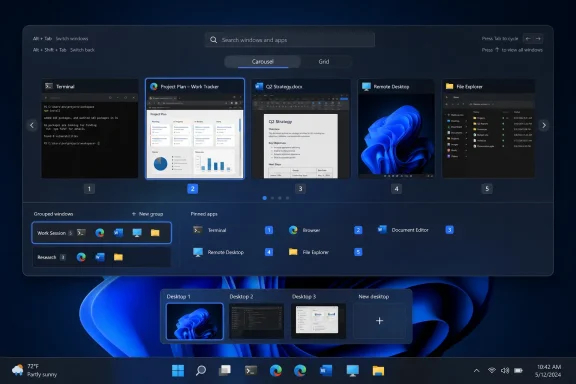
Neowin first reported the launch on August 12, and the same-day announcement in Stardock’s community confirms that AltTabby is intended to replace the Windows task switcher rather than sit alongside it as a separate launcher. Stardock is charging $7.99 during the beta, against a stated regular price of $9.99, with a license covering up to five devices; it is also being folded into the company’s Object Desktop subscription bundle.
The product is real and the stated feature set is unusually specific for a first beta. But the announcement is also almost entirely vendor-supplied: Neowin discloses a relationship with Stardock, and no independent outlet had published hands-on testing or compatibility reporting at publication time. That leaves the most important operational question unanswered: how reliably AltTabby behaves across the mix of desktop apps, elevation prompts, virtual desktops, full-screen software, and Windows 11 preview builds that power users actually run.
AltTabby changes the decision Alt+Tab makes
Windows 11’s built-in Alt+Tab remains deliberately simple. Microsoft describes it as a way to move through open windows, while the Multitasking settings already let users choose whether the switcher includes windows from only the current virtual desktop or from all desktops, and how browser tabs appear in the view.
AltTabby’s pitch is to make the choice less dependent on recency. Stardock says the beta offers more than five switcher layouts, including carousel, grid, and classic Windows-style views, alongside adjustable icon sizes, row and column counts, badges, search, and grouping behavior. Those controls will matter most on systems where a user routinely has a large number of windows open and where the default horizontal strip becomes difficult to scan quickly.
The more consequential feature is custom hotkey pinning. Instead of holding Alt and pressing Tab repeatedly until a target appears, Stardock says a user can assign a shortcut that goes straight to a selected application. If the implementation reliably focuses the intended live window, that can remove several steps from switching between a terminal, ticketing system, browser, remote desktop client, and documentation.
There is an important limitation in the wording, however. Stardock’s materials alternately describe pinning “windows” and pinning “apps.” Those are not interchangeable behaviors. A shortcut that always opens or focuses a particular application is useful, but a shortcut that identifies the correct one among several Word documents, File Explorer windows, or Remote Desktop sessions would be more valuable. Stardock has not yet published enough technical detail to establish which rules AltTabby uses when several windows belong to the same executable.
The beta will need to coexist with Windows, not merely redraw it
Replacing Alt+Tab is a deeper intervention than adding a Start menu skin or a taskbar widget. The shortcut is used across ordinary desktop applications, many full-screen programs, and remote sessions; it must also avoid interfering with Windows security surfaces and applications that claim keyboard input directly.
Stardock says AltTabby is designed for Windows 11, but the announcement does not identify supported Windows 11 releases, minimum builds, Windows on Arm status, known conflicts, or whether Windows Insider channels are supported. That absence matters because Windows interface modification tools have repeatedly needed updates after shell and taskbar changes.
Microsoft itself previously applied a Windows 11 upgrade compatibility hold to devices with certain third-party Start-menu replacement software, including Stardock Start10, before compatible versions were available. That was a 2021 upgrade issue, not evidence of an AltTabby defect, and Stardock’s current Start11 products have long targeted Windows 11. It does show why IT administrators should treat a tool that intercepts a core shell behavior as software that needs testing after feature updates—not as a cosmetic preference that can be deployed without a rollback plan.
Stardock’s own beta guidance also makes the tradeoff plain: beta builds are less stable than release-channel software, particularly when used alongside Windows preview builds. For enthusiasts, that is a familiar warning. For managed PCs, it is a reason to wait for a documented release build and compatibility matrix.
Search and grouping are the features that could justify the price
The layout options are likely to get most of the screenshots, but they are the least persuasive reason to replace a system-wide keyboard action. Windows users already have several routes to open or locate work: Alt+Tab for open windows, Windows+Tab for Task View, the taskbar, Start search, and app-specific shortcuts. A new carousel alone adds preference, not much capability.
Search can be different. When a user has a cluttered desktop, typing part of a window title could be quicker than hunting through thumbnails or taskbar groups. Grouping may likewise help users who want a single entry per application rather than individual entries for every document and browser window. Both features, though, depend on choices Stardock has not documented: whether search matches window titles, process names, documents, browser tabs, or all of them; whether results preserve virtual-desktop boundaries; and how minimized or elevated windows are handled.
The company’s direct-hotkey feature also creates a potential collision problem. Windows, applications, accessibility tools, remote-desktop clients, GPU overlays, and keyboard-management utilities all use global shortcuts. Stardock has not said how AltTabby detects a conflict, whether it reserves combinations safely, or what happens when another program registers the same combination first. A clean settings page is not enough if the tool can silently lose its shortcut or override one that an organization relies on.
These are ordinary beta questions rather than allegations of faults. They are also the details that determine whether AltTabby becomes a genuine workflow tool or a polished switcher theme.
Object Desktop inclusion changes the buying decision
AltTabby is being sold separately, but Stardock is also including it in Object Desktop, its annual bundle of Windows customization and productivity tools. That package already includes products such as Start11, Fences, Groupy, Multiplicity, WindowBlinds, DeskScapes, CursorFX, and other utilities.
For an existing Object Desktop subscriber, early access makes AltTabby effectively a bundle addition rather than a fresh purchase. For everyone else, the bundle is not automatically a better deal: it is a subscription with up to five active installs and early-access benefits, whereas AltTabby’s individual license is presented as a lower-cost product license for up to five devices. Buyers should confirm renewal terms and whether beta access is handled differently before treating the two options as equivalent.
Administrators should be even more selective. AltTabby is aimed at individual desktop workflow customization, and Stardock has not announced centralized management, enterprise policy controls, MSI deployment information, telemetry documentation, or support commitments for managed fleets. The lack of those details does not make it unsuitable for business use, but it means there is currently no basis to recommend broad deployment.
What early adopters should test first
The sensible beta test is narrow: install AltTabby on one noncritical Windows 11 machine and verify the switching behavior that matters to the user’s actual workload. A graphical design, developer, help-desk, or trading setup may expose different failure modes than a browser-and-Office desktop.
At minimum, early users should check these points before relying on it:
- Verify that AltTabby switches predictably among multiple windows from the same application, including minimized windows and windows on separate virtual desktops.
- Test assigned hotkeys against existing shortcuts used by PowerToys, AutoHotkey, remote-desktop software, accessibility tools, and graphics overlays.
- Confirm that full-screen applications, elevated administrative windows, UAC prompts, and remote sessions retain expected keyboard behavior.
- Keep a way to disable or uninstall the beta quickly before installing a Windows cumulative update or moving to a new Insider build.
AltTabby’s beta arrives with a credible idea: the decades-old Alt+Tab workflow still forces users to scroll through history when many actually want a direct route to a known destination. Stardock has made that proposition available for $7.99, but has not yet supplied the compatibility details that would make it an easy recommendation beyond enthusiast machines. Until independent testing arrives, the safe conclusion is that it is a promising replacement shell behavior worth trying selectively—not a system utility to standardize across Windows 11 PCs.
Update: PCWorld publishes first hands-on impressions of AltTabby (August 12, 2026)
PCWorld has now published an early hands-on look at AltTabby, ending the initial lack of independent usability reporting. Its reviewer, Mark Hachman, says Stardock supplied a free license and describes the utility as particularly useful for reducing clutter when many application and browser windows are open.
The report provides a little more clarity on the product’s shortcut behavior: AltTabby can pin either a window or an application, and it offers configurable Alt-key combinations for moving among windows belonging to the same app. That distinction matters for users with multiple File Explorer, browser, Office, or remote-desktop windows.
PCWorld’s first impression is measured rather than a blanket endorsement. The reviewer found the basic replacement close to Windows’ native Alt+Tab behavior, but suggested its deeper configuration options—including search and alternative visual switcher modes—could justify it for users willing to customize their workflow.
Update: Windows Central identifies monitor filtering and frequency-based window ranking (August 13, 2026)
Windows Central has published a separate hands-on assessment of AltTabby, reporting that the utility can either show windows from every display or limit its switcher to the current monitor. That could make the replacement more practical for multi-monitor users who want to avoid cycling through windows parked on secondary screens.
According to Windows Central, AltTabby can also learn which windows are used most frequently and prioritize them, rather than relying solely on the standard most-recently-used order. Users can instead retain conventional recency sorting. The report also notes integration with Stardock’s Groupy, allowing users to customize how grouped windows behave.
The reviewer preferred AltTabby’s carousel mode but found its icon-focused layouts overly dense, reinforcing that the value of the beta will depend heavily on a user’s display size, window count, and preferred navigation style.