
.exe files.
ZDNET’s Jack Wallen demonstrated the new workflow with Notepad++, reporting that downloading and double-clicking its installer triggered a guided compatibility setup rather than the usual hunt for Wine prefixes, DLL overrides, and launch commands. The real change arrived in the 2.0.1 package set: AnduinOS added an .exe file association and its own AnduinOS Exe Launcher, while version 2.0.0 was the larger rebuild announced in late June. The project’s current download page identifies 2.0.1 as the available release.
For Windows users considering Linux after Windows 10 support, that distinction is useful. AnduinOS is making a Windows program easier to attempt, not making Windows software native, universally compatible, or safely isolated from the rest of the machine.
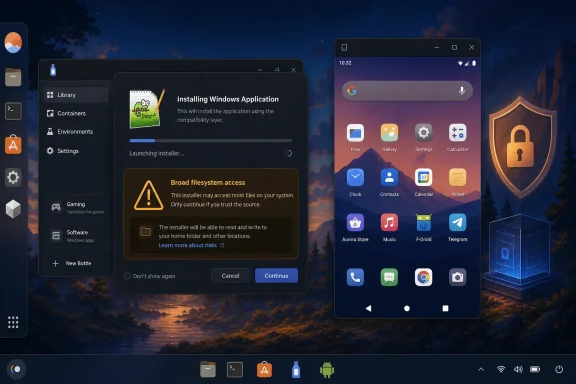 The Windows installer workflow is Bottles under a custom front end
The mechanism is more substantial than a desktop shortcut, but it is also less proprietary than the “compatibility sandbox” name suggests. AnduinOS 2.0.1’s launcher detects a Windows executable, checks whether Bottles and a default Bottle environment already exist, and offers to configure them if they do not.
Bottles is a Linux application that manages Wine and related Windows-compatibility components, including runners such as Wine or Proton and graphics layers such as DXVK and VKD3D. AnduinOS’s wrapper handles the first-run plumbing: it adds Flathub as a system Flatpak remote if necessary, installs Bottles, initializes components, creates a default application-oriented Bottle, and installs font packages intended to reduce text-rendering problems. Only then does it pass the selected .exe to Bottles.
That is a meaningful quality-of-life improvement over telling a new Linux user to install Wine, create a prefix, find the right architecture setting, and troubleshoot a missing runtime. Wallen’s successful Notepad++ test is credible evidence that ordinary, relatively simple Win32 desktop applications can benefit from the workflow. The AnduinOS launcher also contains recommendations that can intercept some Windows installers and point users toward native alternatives instead of blindly running every .exe.
But there is one default Bottle for the whole workflow. That makes the initial setup faster, while also making it a poor fit for software that needs separate dependencies, unusual Windows versions, separate registry states, custom DLLs, drivers, anti-cheat support, USB passthrough, or highly controlled test environments. Bottles can handle more advanced configurations, but AnduinOS’s one-click path is deliberately aimed at the least complicated cases.
“Sandbox” does not mean a safe place for unknown EXEs
The most consequential detail is in AnduinOS’s published launcher code. After configuring Bottles, the launcher starts the Windows executable through Flatpak with the --filesystem=host permission. Flatpak’s own documentation defines that permission as access to the host’s top-level filesystem paths, subject to a set of reserved exclusions.
In practical terms, the Windows program is running through Wine inside Bottles, and Bottles is a Flatpak application, but the launcher explicitly grants the Bottle broad visibility into the host filesystem so that the selected installer and its files work without users wrestling with portal permissions. That choice improves usability. It also means the default setup should not be treated like Windows Sandbox, Windows Defender Application Guard, a disposable virtual machine, or a tightly confined Flatpak application.
A malicious executable may still be constrained from some system locations and kernel-level actions by Linux permissions, Flatpak restrictions, and the fact that it is not native Windows code. Those are real protections. They are not a reason to execute an untrusted installer: a program able to access a user’s home directories and mounted data can still read, encrypt, alter, or exfiltrate files that the logged-in user can reach.
Neither the AnduinOS release notes nor the ZDNET walkthrough spells out that host-filesystem grant. For ordinary software downloaded from a vendor users trust, it is a defensible convenience trade-off. For old abandonware, “free download” sites, unsigned business utilities, and suspicious attachments, use a VM, a separate account with restricted data, or a throwaway system instead.
The Windows side also has familiar Wine limits. Microsoft Office desktop applications, Windows kernel drivers, low-level hardware utilities, apps with strict DRM or anti-cheat requirements, and software dependent on obscure .NET, Visual C++, browser, or COM behavior can still fail. A successful Notepad++ installation should be read as a proof of a smoother onboarding process, not a compatibility guarantee.
Wayland makes Waydroid practical, but Android is still optional
The Android portion has a cleaner technical rationale. AnduinOS 2.0 moved to a Wayland-only desktop session, and Waydroid’s official Ubuntu and Debian guidance specifically requires Wayland to be enabled. Waydroid runs a full Android environment in Linux containers rather than emulating an Android phone instruction by instruction, which is why it can integrate Android windows into a Linux desktop more naturally than many emulators.
The catch is straightforward: Waydroid is not included in the AnduinOS image. ZDNET’s two-command installation adds the upstream Waydroid repository and installs the package through APT. That is easy for someone willing to paste commands into a terminal, but it is still an external repository trust decision and an additional Android system image download. It is not an out-of-box Android subsystem.
Waydroid’s own documentation describes the included Android environment as a customized LineageOS-based system image, currently based on Android 11. The project supports full-screen and multi-window behavior, so Android apps can appear as conventional desktop windows rather than forcing a permanent phone-shaped interface. The Wayland-only desktop avoids the display-server mismatch that has made Waydroid more temperamental on older Linux setups.
Users should temper expectations around Android app availability. A vanilla Waydroid deployment does not automatically provide the Google Play Store. Google-dependent apps may require a Google Apps image, and Waydroid documents a separate device-certification process for Google Play Protect. Banking apps, DRM video services, games that require Play Integrity, and apps that expect cellular hardware or a certified handset may refuse to run even when the Android container itself launches correctly.
That makes Waydroid more compelling for Android-only utilities, development work, sideloaded applications, and software that does not demand Google’s device-attestation stack. It is less suitable as a promise that every app from a modern Android phone will work on a Linux PC.
AnduinOS 2 is an Ubuntu derivative with more aggressive defaults
The application story is only one part of the 2.x release. AnduinOS says the operating system was rebuilt around a declarative package-building process, replacing its older collection of system-modification scripts with standard Debian packages and conventional apt update and apt upgrade maintenance. The distro is based on Ubuntu 26.04 LTS, with GNOME 50, Linux kernel 7.0, Wayland, and both x86-64 and ARM64 images listed on its current download page.
For Windows migrants, the more immediate experience is a GNOME desktop heavily arranged around a familiar taskbar-and-Start-menu pattern. The project provides its own Appearance settings app for left-aligned or centered taskbar icons and taskbar placement. It also removes Canonical’s Snap infrastructure by design, uses Firefox ESR as the default browser, and ships a comparatively sparse default software selection.
That sparseness has two effects. The ISO stays around 2.5GB, and users are expected to obtain most software through APT, Flatpak, or AnduinOS’s app store rather than inherit a long list of preinstalled programs. It also means the Windows and Android pitch should not obscure the basic reality: this remains a customized Ubuntu/GNOME desktop, with the ordinary advantages and support boundaries of an Ubuntu derivative.
AnduinOS 2.0.1 is therefore a promising migration distro for people who have one or two Windows-only productivity applications and an occasional Android requirement. Its best feature is not a new compatibility technology; it is packaging established Linux tools behind a less intimidating setup flow. The important operational rule is just as simple: use the .exe launcher for software you already trust, and keep a virtual machine available for the Windows application you cannot afford to have fail—or cannot afford to let near your files.
