
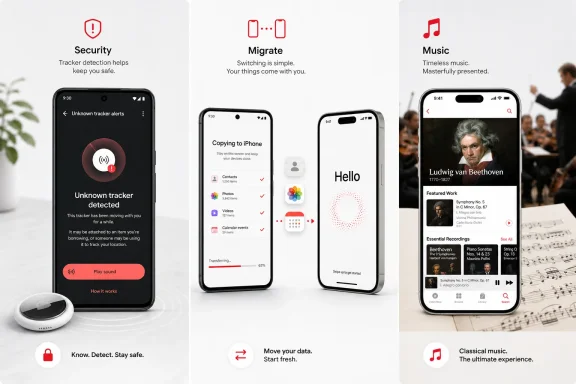
Tracker Detect is the most security-relevant of the group. Apple released it in December 2021 so Android users could manually scan for AirTags and other Find My-compatible item trackers that may be separated from their owners. If the app finds a tracker nearby for at least 10 minutes, it can play a sound to help locate it.
That utility is no longer Android users’ only line of defense. Google now includes unknown-tracker alerts in Android 6 and later, with automatic notifications when a compatible tracker appears to be moving with someone over time. Android’s Settings app also includes a manual scan under Safety & Emergency. Tracker Detect remains available, but the system-level detection service is the more practical safeguard because it can alert users without waiting for them to open Apple’s app.
 Apple’s Exit Door Is Better Maintained Than Its Entry Points
Move to iOS is the clearest example of Apple supporting Android only where it helps bring people into its ecosystem. The app is used during initial iPhone or iPad setup, pairing the devices with a six- or 10-digit code and transferring data wirelessly or, in some cases, through a USB-C cable.
Apple’s current documentation says the tool can move contacts, message history, SMS, camera photos and videos, photo albums, files, browser bookmarks, mail accounts, calendars, WhatsApp data, call history, Voice Memos, and selected free apps. It can also transfer accessibility and display settings, a notable improvement over the bare-bones migration utilities of earlier smartphone eras.
There is a practical caveat for IT teams supporting device changes: the process is designed for the setup phase. If the iPhone has already been configured, Apple says it generally must be erased before using Move to iOS, otherwise content has to be migrated manually. Music, books, and PDFs also remain separate jobs.
For a Windows user moving from Android to an iPhone, the tool does not solve everything—Microsoft accounts, OneDrive files, Outlook, and cross-platform applications still need their own sign-ins—but it removes much of the initial data-transfer friction.
Classical Is a Real Android Product, Not a Token Listing
Apple Music Classical is the most complete Android-facing app in the trio. It requires an Apple Music subscription and the standard Apple Music app, but it is not merely a reskinned genre tab. Apple designed it around the metadata classical listeners actually use: composer, work, conductor, recording, release information, editorial notes, and curated programming.
Apple’s support documentation confirms that the Android app works on Android 9 or later, connects to the main Apple Music app, and is included at no additional charge with an Apple Music subscription. The service also supports browsing by composer and work title rather than treating a symphony as just another collection of tracks.
That separation matters. Conventional streaming interfaces are built around artists, albums, and songs; classical catalogues frequently need more precise distinctions between compositions, movements, conductors, orchestras, and recordings. For subscribers who use Android hardware, Apple Music Classical is arguably Apple’s most thoughtful example of platform flexibility.
Apple still keeps its largest services and device integrations close to its own platforms. But as How-To Geek notes, these Android apps are more useful than their low profile suggests: one addresses personal safety, one eases a platform switch, and one gives an Apple subscription a credible life outside the iPhone.
